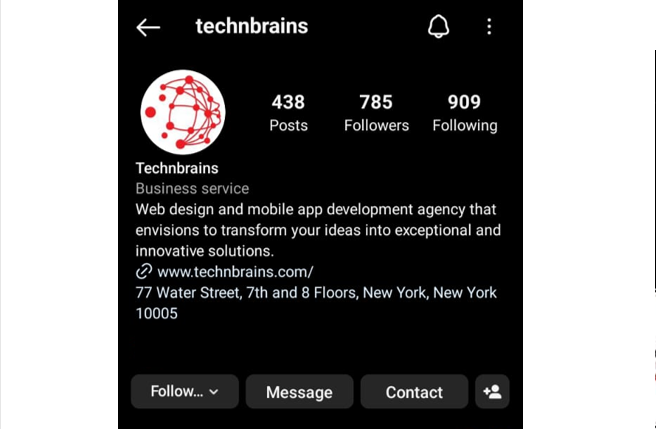
We don't just develop apps; we engineer experiences, innovate
solutions, and redefine possibilities. With a legacy of over a
decade, our commitment to excellence, cutting-edge technologies,
and a talented team of professionals is what sets us apart.
Overview: Mobile App Research helps determine customer preferences and generate viable options for your firm. Knowing what customers expect from your products and how it improves efficiency benefits you long-term.
Are you an entrepreneur or a large business that is considering a mobile app for business? Mobile App Development is your gateway to success (and TechnBrains is the key). This explosive growth of the mobile app market has made it a lucrative space for businesses. Before you rush into the mobile app development process, you need to do in-depth mobile app research so you can make an informed decision.
Mobile app market research is undoubtedly the most crucial step for any mobile app development project. It serves as the foundation for validating your ideas and jotting down the strategies you would follow. Whether you are building a social media app like Instagram or a vacation rental app like Airbnb, mobile app research is essential.
In this blog, you will learn about
Mobile app research
Importance of Mobile app research
Best market research strategies for mobile app development
What is Mobile App Market Research?
Mobile app market research is the process of gathering, analyzing, and interpreting data related to the mobile app ecosystem. It involves studying user behavior, market trends, and competition to make informed decisions about app development and marketing strategies. In essence, the compass guides businesses in the vast dimensions of mobile app research.
Types of Mobile App Research
Mobile app research can be categorized into two main types: Primary Research and Secondary Research. Here’s an explanation of each:
Primary Research
Secondary Research
Direct data collection
Uses existing data
Specific objectives
Provides background insights
Highly tailored
Limited customization
Requires more time/resources
Quicker, cost-effective
Unique, firsthand insights
Based on existing data
Full control
Limited control
Surveys, interviews, etc.
Literature reviews, etc.
Primary Research
Primary research involves the collection of original data and information directly from individuals or sources. It is conducted specifically for the purpose of the research study and provides firsthand insights. In the context of mobile app research, primary research methods can include:
Creating surveys or questionnaires to gather feedback and opinions from mobile app users or potential users. This can help in understanding user preferences, needs, and satisfaction.
Conducting one-on-one or group interviews with mobile app users to gain in-depth insights into their experiences, challenges, and suggestions for improvement.
Observing and collecting data on how users interact with the app. This can help identify usability issues and areas for improvement.
Bringing together a small group of individuals to discuss and provide feedback on the app. This can uncover collective opinions and ideas.
Observing users in their natural environment as they use the app. This can provide real-world insights into user behavior.
Testing early versions or mobile app prototyping with potential users to gather feedback and make necessary adjustments.
Comparing different versions of the app with real users to determine which one performs better in terms of user engagement, retention, or other key metrics.
Secondary Research
Secondary research involves the use of existing data and information that has been collected by others for different purposes. It does not include the direct collection of new data. In the context of mobile app research, secondary research methods can include:
Reviewing existing literature, articles, academic papers, and industry reports related to mobile apps. This can provide insights into trends, best practices, and user behavior.
Studying other similar mobile apps in the market to understand their features, user reviews, and user ratings. This can help identify gaps and opportunities for your app.
Utilizing market research reports and studies that provide data on the mobile app industry, including market size, growth trends, and user demographics.
Analyzing user reviews and ratings on app stores (e.g., Apple App Store, Google Play Store) to gain insights into user satisfaction and areas for improvement.
Monitoring social media platforms for discussions, comments, and feedback related to your app or similar apps. This can help identify user sentiment and issues.
Analyzing data collected from your own app (if available) to understand user behavior, usage patterns, and areas of improvement.
Both primary and secondary research are valuable for informing mobile app development and optimization. Primary research provides direct insights from users, while secondary research offers a broader industry and market perspective. Combining these research approaches can lead to a more comprehensive understanding of your target audience and the competitive landscape.
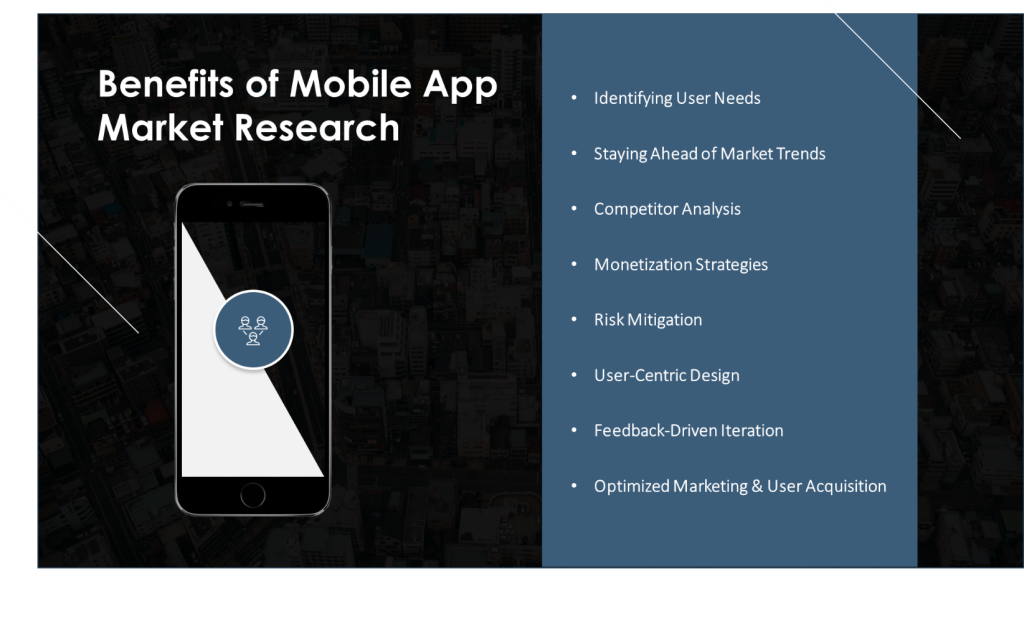
The Importance of Mobile App Market Research
In today’s highly competitive digital landscape, simply creating an app and releasing it to the market is not enough. Here is why mobile app research is essential:
Identifying User Needs
Mobile app research empowers businesses to grasp user needs and preferences. Through surveys, interviews, and user feedback analysis, you can get an understanding. It uncovers the pain points, desires, and expectations that drive user satisfaction. This deep understanding is essential for tailoring apps that resonate with users.
Knowing what users truly want allows mobile app developers to create features and functionalities that not only meet but also exceed expectations. It is akin to having a roadmap that guides you through the process of app development, ensuring you are on the right track to providing genuine value to your target audience.
Staying Ahead of Market Trends
Mobile app research enables businesses to adapt and innovate accordingly. For instance, the rise of AR VR app development in mobile apps is a trend that businesses need to consider to stay competitive.
The landscape of mobile technology is in a state of perpetual flux. New trends, features, and technologies emerge at a rapid pace. Market research serves as the radar that detects these shifts. By staying updated with the latest trends in mobile app development and user behavior, businesses can adapt and innovate accordingly. Without mobile app research, such trends might pass unnoticed, leaving businesses trailing behind their competitors.
Competitor Analysis
Knowing who your competitors are and what they offer can give you a competitive edge. App Market Research helps in identifying gaps in the market that your app can fill. It sheds light on the strengths and weaknesses of rival apps, their user acquisition, and Mobile App Research Strategies.
By analyzing competitor data, businesses can build on unexplored niches or opportunities to outshine rivals in specific areas. It is like having a treasure map that reveals where the hidden gems lie and how to navigate the competitive landscape.
Monetization Strategies
Mobile App Research helps to identify the most effective monetization strategies for your app. Whether it’s through in-app purchases, subscriptions, or ads, understanding what your audience is willing to pay for or tolerate in terms of advertising is key to generating revenue.
Moreover, market research for apps can help optimize pricing strategies, determining the ideal balance between generating revenue and providing value to users. This financial research ensures your app is not only popular but also profitable.
Risk Mitigation
Launching an app without conducting thorough market research is akin to setting sail without a navigational chart. Mobile App Research will assess the risks associated with app development and market entry. It highlights potential pitfalls, market saturation, or unforeseen challenges.
By identifying risks early, we can implement strategies to mitigate them. This could involve refining the app’s features, adjusting marketing tactics, or even reconsidering the timing of the app’s launch. In essence, research provides a safety net that prevents costly mistakes.
User-Centric Design
User experience (UX) and user interface (UI) are critical elements in app development. Our creative UI/UX designer gathers insight that aids in the design process, and you can do it. This includes understanding user preferences for layout, color schemes, navigation, and overall usability.
By aligning design decisions with user expectations, your mobile app research can result in creating apps that are not only functional but also aesthetically pleasing and user-friendly. This fosters positive user experiences, leading to higher user satisfaction and retention rates.
Feedback-Driven Iteration
The journey of app development does not end with the app’s initial release. Continuous improvement is the key to long-term success. Mobile App Market research provides a mechanism for gathering feedback from users, enabling businesses to iterate and enhance their apps.
By listening to user feedback, businesses can identify areas for improvement, fix bugs, and introduce new features that align with user demands. This iterative process not only keeps users engaged but also helps maintain a competitive edge in the market.
Optimized Marketing and User Acquisition
Understanding your target audience through research allows for more precise marketing efforts. Businesses can create tailored marketing campaigns that resonate with their audience’s interests, behaviors, and pain points. This results in more effective user acquisition strategies and higher conversion rates.
Additionally, mobile app research helps in choosing the most suitable marketing channels. It answers questions like, “Where does my target audience spend their time online?” and “What messaging appeals to them the most?” This knowledge streamlines marketing budgets and efforts.
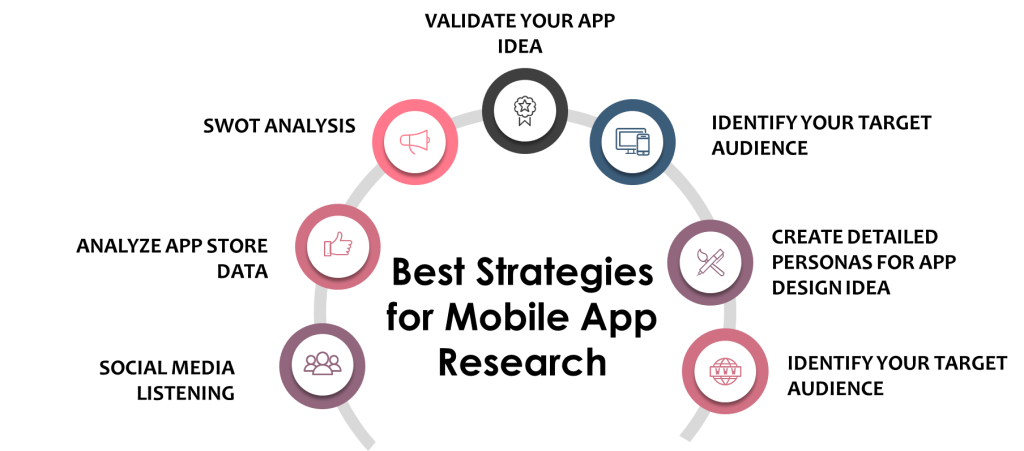
Best Strategies for Mobile App Research
Depending on the creative direction we are heading to, everyone’s mobile app market research will be different. The strategies we are going to explore below are just to make sure that your mobile app research is steering in the right direction:
Validate Your App Idea
Before you start building your app, you need to validate your idea. Begin by searching for relevant keywords like “mobile app research” and “app market research” to see if people are talking about a problem your app intends to solve. If there is a buzz, it’s a good sign. Even if there is not, don’t fall back fuel it to reshape your app to make it even better.
Reach out to people who might use your app. Ask friends, family, or colleagues if they would find your app useful. You can also conduct surveys to get invaluable feedback. To go overboard, You can also create a simple webpage describing your app’s idea and its benefits. Share it on social media and see if people sign up or express interest. This can be a strong indicator of demand.
Identify Your Target Audience
Understanding your future users is a fundamental step. In your mobile app research, you need to get a clear picture of your audience. Create User Personas will help you get through it. It will also be the best app development company to add value to your app idea. Imagine your ideal app user.
What do they do?
What are their interests?
What problems does your app solve for them?
Location of the user
The age bracket that you are targeting
It is important to consider these factors when interacting with others, as they can provide insight into how they may react in different situations. By being aware of these factors, we can communicate more effectively and build stronger relationships based on mutual understanding and respect.
Create detailed personas to guide your app’s design and marketing.
Ask your potential audience about their needs and preferences. Use simple online surveys or conduct informal interviews to gather insights. Divide your potential users into smaller groups with similar characteristics or needs. This will help you tailor your app to different user segments.
Conducting Competitor Analysis for Mobile Apps
Understanding your competition is key to standing out. Search for apps similar to your idea using keywords like “mobile applications market research” and “apps market research.” In your mobile app research, analyze their features.
Download and use these apps. Take notes on what works well and what does not. Think about how your app can offer something better or different. Read user reviews of competitor apps in the app stores. Pay attention to what users praise and complain about. This can guide your app’s development.
SWOT Analysis
It is a simple but powerful tool for you to get ahead in the game. SWOT analysis stands for
Strengths
Weaknesses
Opportunities
Threats
Assess your app’s strengths and weaknesses. What can your app do better than others, and where might it fall short? You can also conduct a SWOT Analysis of the Android App. Look at the market and the competition. What opportunities can your app seize? What threats should it be prepared for? Mobile App Research Market research is unquestionably one of the many excellent uses for conducting a SWOT analysis in many business settings. A SWOT analysis ultimately aids in your preparation for mobile app development firm and mobile marketing strategies. It also helps you stay one step ahead of the competition by increasing your awareness of the market and yourself.
Analyze App Store Data
App stores are goldmines of information. Here’s how to extract valuable insights: Read through the user ratings and reviews of apps similar to yours. What do users like and dislike? What problems do they mention that your app could solve? You can also optimize your Google Play Store App Ratings accordingly. Check app rankings in your app store category. What are the top-performing apps doing right? Can your app emulate their success while offering something unique?
Social Media Listening
There are numerous social media listening tools available, such as Hootsuite, Brandwatch, and Mention. These tools help automate the process of monitoring and analyzing social media conversations.
Before you start, clarify your goals. Are you monitoring brand mentions, tracking industry trends, or conducting competitor analysis? Having clear objectives will guide your efforts. Choose keywords, hashtags, and topics that are pertinent to your goals. Use a mix of broad and specific terms to capture a wide range of conversations.
Social media listening isn’t limited to just one platform. You should track discussions on popular platforms like Twitter, Facebook, Instagram, and LinkedIn, as well as niche forums and communities where relevant conversations may occur. Don’t just collect data; analyze it. Look for trends, sentiments, and emerging issues. Use these insights to inform your marketing strategies, content creation, or product improvements.
These Strategies ensure that your mobile app idea is not just a shot in the dark but has a real chance of hitting the bullseye in the market.
Mobile app research doesn’t have to be overly complex. By following these simplified steps and using keywords like “mobile app research,” “app market research,” and “market research for apps,” you can ensure that your app idea is on the right track. Remember, research is your compass, guiding you towards creating an app that not only meets user needs but also thrives in the competitive app market.
Start Your Mobile App Research Today
In conclusion, mobile app market research is not a mere formality; it is the cornerstone of successful app development and market entry. It equips businesses with the insights needed to navigate the complex mobile app landscape. From understanding user needs to outsmarting competitors and optimizing monetization strategies, research is the compass that ensures businesses do not get lost in the crowded sea of mobile applications. It is a strategic imperative that can spell the difference between app success and obscurity in an intensely competitive marketplace. Contact TechnBrains to get started on the App Development right now.
FAQs
How to perform market research for mobile apps?
Market research for mobile apps is crucial for understanding your target audience and competition.
Determine what you want to achieve with your app and the questions you need to answer through research. Know who your potential users are, their demographics, preferences, and pain points. Study your competitors’ apps. Identify their strengths, weaknesses, and unique features. You can also hire TechnBrains the best app development company in USA to make your dream app into reality.
Why is market research important for mobile app development?
Market research is essential for several reasons:
It helps in creating apps that cater to users’ needs and preferences, improving user satisfaction.
Research enables you to identify gaps in the market and develop features that set your app apart from competitors.
It reduces the risk of investing resources in an app with little demand or potential for success.
Helps in choosing the right monetization model based on user behaviors and market trends.
Informs your marketing plan, helping you reach the right audience effectively.
A well-researched app is more likely to sustain long-term success and adapt to changing market conditions.
How to know if your mobile app will be successful?
While there are no guarantees, these indicators can suggest potential success. If your research indicates a demand for your app and a lack of strong competitors, it’s a good sign. TechnBrains can provide Consistent growth in user numbers, downloads, or revenue over time is a positive sign. We can build an app that can adapt to changing user needs and industry trends has a better chance of long-term success.
Overview: Cryptocurrencies can buy goods and services, play games, and trade for profit. If you are considering investing in crypto in 2023, you’ve come to the right place. Learn more about Cryptocurrency and its functionality here.
At some point, many of us have considered investing in crypto. Crypto investing is a vast field; there is much more to it than meets the eye. Cryptocurrency has revolutionized the financial landscape since its inception, and in 2023, it continues to shape how we perceive and interact with money. This digital form of currency has brought about numerous advancements and debates, impacting the financial industry and various sectors of the global economy.
We have already witnessed the era of ChatGPT and the all-new FedNow instant payment service. So here we are TechnBrains has this fresh guide to what Cryptocurrency is. Read on to learn all about Cryptocurrency for beginners.
What is Cryptocurrency?
Cryptocurrency, also referred to as “crypto,” is a digital form of currency that can be used for payments and investments. The term “crypto” is derived from the use of encryption techniques that ensure secure transactions without the need for a centralized authority like a bank or government.
Bitcoin, one of the most well-known examples of cryptocurrency, was designed to offer a decentralized payment option that operates independently of traditional financial institutions. This means that individuals can use Cryptocurrency to make transactions without the need for intermediaries such as banks or payment processors. Overall, Cryptocurrency represents a new and innovative way to conduct financial transactions in a more secure, transparent, and efficient manner. Bitcoin was primarily developed as a decentralized payment system free from central bank control or distribution.
Types of Cryptocurrencies
Bitcoin is only a type of Cryptocurrency. Before investing in Cryptocurrency, you need to know the types of Cryptocurrencies. They are below:
Bitcoin (BTC):
Bitcoin is the first and most well-known Cryptocurrency, often referred to as digital gold. It laid the foundation for the entire cryptocurrency ecosystem and is primarily used as a store of value and a medium of exchange.
Ethereum (ETH):
Ethereum introduced the concept of smart contracts and decentralized applications (DApps). It’s not only a cryptocurrency but also a platform for developers to build and deploy various applications on its blockchain.
Non-Fungible Tokens (NFTs):
They represent unique digital assets or artwork, unlike fiat and cryptocurrencies, which are interchangeable.
Ripple (XRP):
Ripple aims to revolutionize cross-border payments and remittances. It focuses on facilitating fast and cost-effective international transactions, making it popular among financial institutions.
Litecoin (LTC):
Created as a “silver to Bitcoin’s gold,” Litecoin is a peer-to-peer cryptocurrency that offers faster transaction confirmation times and a different hashing algorithm.
Cardano (ADA):
Cardano is known for its focus on research-driven development and peer-reviewed academic research. It aims to create a more secure and scalable blockchain platform.
Polkadot (DOT):
Polkadot is a multi-chain blockchain platform that enables different blockchains to interoperate and share information, fostering a more interconnected blockchain ecosystem.
Binance Coin (BNB):
Initially, the creators designed Binance Coin as a utility token for the Binance exchange, but it has since grown to offer various use cases, such as trading fee discounts and participation in token sales on the Binance Launchpad.
Stellar (XLM):
Stellar aims to facilitate cross-border payments and financial inclusion by connecting banks, payment systems, and individuals. It focuses on providing fast and low-cost transactions.
Chainlink (LINK):
Chainlink is a decentralized oracle network that aims to connect real-world data with smart contracts on the blockchain. It’s crucial for enabling smart contracts to interact with external data sources.
Dogecoin (DOGE):
Initially created as a joke, Dogecoin has gained a following due to its vibrant community and philanthropic efforts. It’s often used for tipping and charitable donations.
Solana (SOL):
Solana is known for its high-speed blockchain platform, capable of processing thousands of transactions per second. It aims to support decentralized applications and crypto projects.
Filecoin (FIL):
Filecoin is focused on decentralized storage solutions, allowing users to rent out their unused storage space in exchange for cryptocurrency rewards.
Uniswap (UNI):
Uniswap is a decentralized exchange (DEX) built on Ethereum. It allows users to trade various ERC-20 tokens directly from their wallets without the need for a centralized intermediary.
Tether (USDT):
Tether is a stablecoin pegged to the value of traditional fiat currencies, such as the US Dollar. It provides stability in the volatile cryptocurrency market.
These are just a few examples of the many cryptocurrencies available today. Each Cryptocurrency serves a unique purpose, whether it’s offering fast transactions, enabling smart contracts, enhancing cross-border payments, or providing a store of value. As the cryptocurrency ecosystem continues to evolve, new types of cryptocurrencies with innovative features and use cases are likely to emerge.
The Evolution of Cryptocurrency
Cryptocurrency’s story began in the late 2000s with Bitcoin’s creation by Satoshi Nakamoto. Bitcoin’s innovative whitepaper introduced the concept of decentralized digital currency and blockchain technology. Early days were marked by curiosity, with a small community experimenting with mining and trading.
Bitcoin’s success inspired the creation of alternative cryptocurrencies like Litecoin, which aimed to address limitations. Ethereum’s introduction in 2015 brought “smart contracts” and decentralized applications, expanding possibilities. The ecosystem’s growth raised regulatory and security concerns, along with debates about its future. Cryptocurrency’s journey continues, impacting finance and technology through innovation, regulatory shifts, and evolving public perception.
Why do people invest in cryptocurrencies?
People invest in cryptocurrencies hoping for a rise in value, which leads to profit. For instance, increased demand for Bitcoin can raise its value. If Bitcoin gains popularity as a payment method, its value in USD could go up, providing an opportunity to make money by selling it.
Ethereum is a blockchain network where developers create financial apps without relying on third-party financial institutions. Ether is the Cryptocurrency used for building and running applications on Ethereum. The more apps built on Ethereum, the higher the demand for Ether. Some people don’t consider cryptocurrencies as investments. Bitcoin enthusiasts believe it’s an improved monetary system and prefer its use as everyday payment.
How does Cryptocurrency work?
Cryptocurrencies use blockchain technology to prevent double-spending and maintain a tamper-resistant record of transactions. Depending on their use, cryptocurrencies can be referred to as coins or tokens. Some function as units of exchange, while others store value or allow participation in software programs such as games and financial products.
How do NFTs and Cryptocurrency work together?
Non-fungible tokens (NFTs) and Cryptocurrency are both part of the proposed Web3 and the metaverse. Unlike Cryptocurrency, users cannot exchange NFTs for one another, but they can engage with both. To purchase NFTs, users need a crypto wallet, which is also where they store NFT keys as proof of ownership.
Users keep their crypto wallets secure, similar to an offline wallet. Although many NFTs can only be purchased with Cryptocurrency, there are often options to buy with local currency or credit cards. Users may advertise crypto and NFT investments or sales on social media, potentially reaching children and teenagers. If you want to get started on NFT development, let’s start here.
How are cryptocurrencies created?
One of the most common ways to create cryptocurrencies is through mining, a process used by Bitcoin. This can be an energy-intensive process where computers solve complex puzzles to verify transaction authenticity on the network. In return, owners of these computers can receive newly created cryptocurrencies.
Other cryptocurrencies use different methods to create and distribute tokens, many of which have a lighter environmental impact. For most people, buying Cryptocurrency from an exchange or another user is the easiest way to obtain it.
Pros and Cons of Crypto
It is a double-edged sword. It offers exciting opportunities for financial empowerment, innovation, and inclusion, but it also comes with significant risks and uncertainties. As the crypto landscape continues to evolve, individuals must weigh these pros and cons carefully before diving into the world of digital finance.
Pros of Cryptocurrency
Cons of Cryptocurrency
Decentralization
Volatility
Security
Lack of Regulation
Accessibility
Security Concerns
Transparency
Limited Acceptance
Lower Transaction Fees
Irreversible Transactions
Investment Potential
Environmental Concerns
Financial Inclusion
Legal Ambiguity
Innovation
Lack of Consumer Protection
Pros of Cryptocurrency
Decentralization
One of the most significant advantages of Cryptocurrency is its decentralized nature. It’s not controlled by any central authority, like banks or governments. This empowers individuals with financial autonomy.
Security
Cryptocurrencies are built on robust cryptographic technology, making them highly secure. Transactions are irreversible, reducing the risk of fraud.
Accessibility
Cryptocurrency is accessible to anyone with an internet connection, bridging the gap for those without access to traditional banking services.
Transparency
Blockchain technology ensures transparent and publicly verifiable transactions, reducing the chances of corruption.
Lower Transaction Fees
Cryptocurrency transactions typically have lower fees compared to traditional banking systems, especially for international transfers.
Investment Potential
Many have reaped substantial profits through cryptocurrency investments as the value of certain coins has skyrocketed.
Financial Inclusion
Cryptocurrency has the potential to include the unbanked population, providing them with access to financial services.
Innovation
The blockchain technology behind cryptocurrencies has spurred innovation across various industries, from finance to healthcare.
Cons of Cryptocurrency
Volatility
The cryptocurrency market is notoriously volatile, with prices capable of wild fluctuations in a short period, posing a risk to investors.
Lack of Regulation
The absence of regulation makes cryptocurrencies susceptible to scams and fraudulent schemes.
Security Concerns
While the blockchain itself is secure, individual users can fall victim to hacking, phishing, and theft.
Limited Acceptance
Despite its growth, Cryptocurrency is not universally accepted as a form of payment, limiting its practical use.
Irreversible Transactions
The irreversible nature of cryptocurrency transactions can be problematic if you make a mistake or fall victim to fraud.
Environmental Concerns
Cryptocurrency mining consumes vast amounts of energy, raising concerns about its environmental impact.
Legal Ambiguity
Cryptocurrency’s legal status varies from country to country, leading to uncertainty and potential legal issues.
Lack of Consumer Protection
Unlike traditional banks, cryptocurrency transactions offer little to no recourse for consumers in the event of disputes.
Are NFTs cryptocurrencies?
Non-fungible tokens, commonly known as NFTs, are a type of digital asset that allows individuals to own a unique digital file. With NFT development, people are building a fortune for themselves. These assets can be exchanged in online marketplaces, similar to the way cryptocurrencies are traded. NFTs are distinct from other digital assets in that each one is singularly unique and cannot be replicated or interchanged with other tokens. As a result, NFTs are highly sought after by collectors and enthusiasts alike.
Are cryptocurrencies financial securities, like stocks?
Currently, the classification of Cryptocurrency as a security is ambiguous. In finance, security is any tradable item that represents value, such as stocks or bonds. Legal experts and industry leaders who argue that traditional securities regulations do not apply to cryptocurrencies are challenging the suggestion that regulators should regulate cryptocurrencies like securities. The Securities and Exchange Commission is paying close attention to the cryptocurrency industry, expressing concerns about activities like crypto staking. The SEC’s decision on whether or not to classify cryptocurrencies as securities could have significant implications for the future of this asset class.
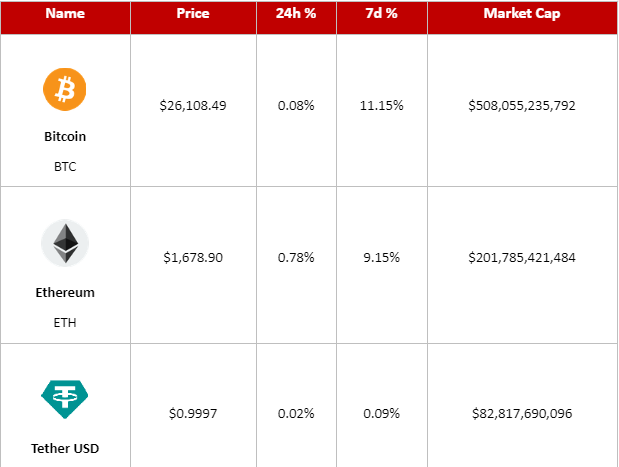
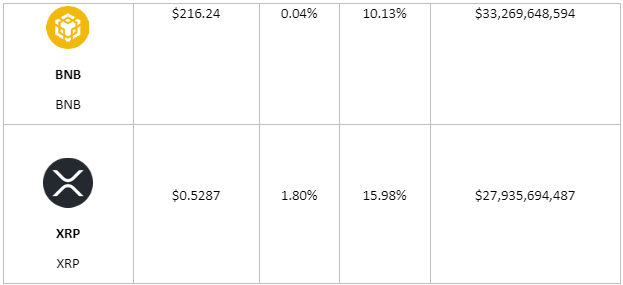
Today’s Cryptocurrency Prices
Here are today’s prices for some of the most popular cryptocurrencies (21 Aug 2023)
Crypto Future Predictions for the Next 5 Years
The crypto market’s volatility makes it difficult to predict, but there are notable trends. Bitcoin’s performance significantly impacts the broader crypto market. Increased institutional adoption and limited supply post-halving could propel Bitcoin beyond $100,000 in the next 5 years. Ethereum’s transition to Ethereum 2.0 could unlock additional value. The platform’s potential for DeFi applications and smart contracts has experts predicting a bullish future, with prices expected to surpass previous records. DeFi platforms like Uniswap, Chainlink, and Aave have experienced rapid growth. As the DeFi sector expands, these coins could enjoy further appreciation.
Why is crypto down today?
Cryptocurrency prices dipped on Thursday morning as derivatives traders began liquidating hundreds of millions of dollars in options and futures contracts. This is a common occurrence after prolonged declines in asset prices, which happened to Bitcoin and other digital currencies throughout August. The gradual price reductions eroded spot prices, resulting in a decline of over 7% for BTC in August. As a large volume of August Bitcoin options contracts expire out of the money this week, it triggers the liquidation of Bitcoin futures, intensifying the downward pressure on prices.
Wrapping it Up
Cryptocurrency is a high-risk investment and should only make up a small part of your portfolio. It’s important to prioritize securing your retirement savings, paying off debt, and investing in less-volatile funds made up of stocks and bonds.
Diversifying one’s cryptocurrency portfolio can prove to be a smart investment strategy. Given that different crypto assets tend to fluctuate in distinct ways, spreading one’s investments across a range of cryptocurrencies can serve as a hedge against potential losses.
Researching before investing is crucial, especially in cryptocurrencies since they are tied to a specific technology, unlike stocks, which are linked to companies with well-defined financial reporting requirements. Cryptocurrencies are less regulated in the US, making it difficult to determine viable projects. Consult a cryptocurrency-savvy financial advisor for input.
For beginners investing in crypto, it may be helpful to assess the level of adoption of a cryptocurrency. Reliable crypto projects usually provide public metrics that show the number of transactions carried out on their platforms. If the usage of a cryptocurrency is increasing, it may indicate that it is gaining a foothold in the market. As the world continues to adapt to this digital evolution, staying informed about its developments is important.
FAQs
1. Is Cryptocurrency a safe investment?
It can be a lucrative investment, but it comes with risks due to its volatility. It’s essential to research and understand the market before investing.
2. Can I use Cryptocurrency for everyday purchases?
While some businesses accept it, it’s not yet widely used for everyday transactions, and this limits its practicality as a currency.
3. How can I secure my holdings?
To secure your cryptocurrencies, use reputable wallets, enable two-factor authentication, and be cautious of phishing attempts.
4. Are cryptocurrencies legal everywhere?
The legality of cryptocurrencies varies by country. It’s crucial to check your local regulations before buying or using them.
5. What’s the environmental impact of Cryptocurrency?
Cryptocurrency mining consumes a significant amount of energy, which has raised concerns about its environmental footprint. Some cryptocurrencies are exploring more energy-efficient solutions.
6. Popular Cryptocurrencies in 2023
While Bitcoin remains the most well-known currency, various other cryptocurrencies have emerged, each with distinct features and purposes. In 2023, some of the prominent ones include Ethereum, Ripple, Litecoin, and Cardano.
Cross-platform app development has become one of the most popular ways mobile app developers build mobile applications. This approach allows developers to effortlessly deploy a single code on different mobile platforms. Saving time and efforts this has become a go-to for developers all around the globe.
Stats about Cross Platform App development in 2023
According to Persistence Market Research, the Cross-Platform App Development Framework Market will exceed $546.7 billion by 2033 due to the increasing use of mobile devices.
The cross-platform app development framework industry is expected to grow at a CAGR of 16.8% until 2033.
The React Native segment is expected to witness a CAGR of 16.7% from 2023 to 2033, driven by JavaScript-based frameworks.
Flatter segment of mobile app frameworks is expected to grow at a CAGR of 16.6% until 2033.
The US cross-platform app development framework industry is projected to reach $104.7 billion by 2033.
Top Six Cross Platform App Development Frameworks
The top Cross Platform App development frameworks for 2023 are:
Flutter
React Native
Kotlin Multiplatform Mobile
Ionic
Xamarin
NativeScript
Let us look into them in detail:
Flutter
Flutter is the most popular cross platform mobile app development framework that enables the app developers to create seamless applications across multiple platforms, including mobile, web, and desktop. According to the Stack Overflow Developer Survey 2021, Flutter is the second most-loved framework. This innovative technology is based on the programming language Dart and was introduced by Google in 2017. With Flutter, developers can build high-performance, visually appealing, and responsive applications that deliver an exceptional user experience.
Programming language
Dart
Key features of Flutter
Flutter’s hot reload feature allows you to instantly see changes in your code without recompiling.
Flutter supports Google’s Material Design and offers multiple widgets for app building.
It has its own rendering engine for drawing widgets, independent of web browser technology.
Flutter’s hot reload feature speeds up the development process by allowing developers to instantly see changes without restarting the app.
Provides a consistent UI experience across different platforms (iOS and Android) due to its widget-based approach.
Dart, the language Flutter uses, compiles to native ARM code, leading to better performance.
Offers a wide range of customizable UI widgets and animations.
Cons of Flutter
Apps built with Flutter tend to be larger in size compared to native apps due to the inclusion of the Flutter runtime.
Some advanced native features might require platform-specific code integration.
Developers who are new to Dart might need some time to adjust to the language.
Use Flutter when
Best used when you want to create visually rich and highly customizable UIs.
Great for building cross-platform apps with a single codebase that can run on both iOS and Android.
Suited for projects where UI consistency and a native-like feel are important.
React Native
React Native is an open-source UI software framework developed in 2015 by Meta Platforms, formerly Facebook. It is based on Facebook’s JavaScript library, React, and enables developers to create natively rendered cross-platform mobile applications. Building mobile apps with React Native is made easier with a strong community of knowledgeable developers.
Programming language
JavaScript
Key features
React components update instantly with Fast Refresh.
React Native’s focus on UI allows for custom and responsive interfaces.
Integration with Flipper debugger is enabled in versions 0.62 and up.
React Native has a large community and is widely adopted, which means plenty of resources, libraries, and tools are available.
Code reusability between platforms (iOS and Android) is high, which can save development time.
Allows the integration of native components for platform-specific functionality.
Performance is relatively good due to the use of native components.
Cons of React Native
Achieving consistent UI design across platforms might require extra effort.
While generally good, certain complex animations or interactions might be less performant.
Developing custom native modules can be complex and might require a deeper understanding of native languages.
Use React Native When
Ideal for projects where a significant portion of the codebase can be shared between iOS and Android platforms.
Suited for projects with a focus on rapid development and leveraging web development skills (JavaScript).
Suitable when there’s a need for integrating with existing React components or libraries.
Kotlin Multiplatform Mobile
Kotlin Multiplatform Mobile is a fast-growing cross-platform mobile development framework with a mature community and native-like user experience for multiplatform apps. Developers can leverage the Kotlin Multiplatform Mobile (KMM) SDK, developed by JetBrains, to create Android and iOS applications using a single codebase. This approach minimizes the need for platform-specific code, except when handling native UI components or platform-specific APIs. With KMM, developers can significantly reduce their workload and streamline their app development process.
Programming language
Kotlin.
Key features
You can easily start using Kotlin Multiplatform Mobile in existing projects.
Kotlin Multiplatform Mobile provides you with full access over the user interface. You can utilize the latest UI frameworks, such as SwiftUI and Jetpack Compose.
Developers have easy access to the Android and iOS SDKs without any restrictions.
Allows sharing business logic and code across platforms while maintaining separate UI components.
If your team is already familiar with Kotlin, KMM can offer a seamless development experience.
Kotlin compiles to native code, leading to good performance.
Can directly use existing Android libraries and tools.
Kotlin Multiplatform Mobile Cons
KMM is relatively new, so it might lack some features and stability compared to more established frameworks.
UI components still need to be built separately for each platform.
While Kotlin is generally user-friendly, there might still be a learning curve if your team is not familiar with it.
Best use of Kotlin Multiplatform Mobile
Best used when your team is already familiar with Kotlin and you want to share business logic and some code across multiple platforms.
Well-suited for projects where performance is critical and you want to achieve a higher level of code sharing compared to traditional approaches.
Ionic
Ionic is a UI toolkit that is open-source that was introduced in 2013. With connectors for the Angular, React, and Vue frameworks, it aids developers in creating hybrid mobile and desktop applications using native and web technologies including HTML, CSS, and JavaScript. On the Ionic Forum, where community members share knowledge and assist one another in solving development-related problems, there is constant activity.
Programming language
JavaScript.
Mobile apps built with Ionic
Sanvello and MarketWatch and wearables.
Key features:
Ionic offers a variety of UI components for building applications and is built on a SaaS UI framework created specifically for mobile OS.
The camera, torch, GPS, and voice recorder are just a few examples of the built-in functions that may be accessed using the Ionic framework by using the Cordova and Capacitor plugins.
Ionic offers a proprietary integrated development environment (IDE) called Ionic Studio that was created for rapid app development and prototyping.
Ionic Pros
If your team is familiar with web technologies (HTML, CSS, JavaScript), Ionic offers an easier transition.
Develop once and deploy on multiple platforms.
It provides a library of UI components for consistent designs.
Access to Cordova plugins can provide access to native device features.
Ionic Cons
While performance is decent, it might not match the level of native or other frameworks.
Achieving a fully native look and feel might be challenging.
Implementing complex native features might require custom plugin development.
Use Ionic If
Suitable for projects where web developers with HTML, CSS, and JavaScript skills are the primary developers.
Good for building simple apps or prototypes quickly that can run on various platforms using web technologies.
Best used for projects that don’t require extremely high performance or native-like UI.
Xamarin
Microsoft owns the cross-platform app development framework Xamarin. The programming language is C#.Net framework for Windows, iOS, and Android app development. Xamarin is widely used by contributors worldwide and is notably well-liked by C, C++, and C# developers that develop mobile applications.
Programming language
С#
Mobile apps that utilize Xamarin
Oro, MRW, CA Mobile, APX
Key features
Xamarin applications utilize the.NET BCL, a comprehensive collection of classes with XML, database, IO, and networking support.
Xamarin.Forms allows developers to use platform-specific UI elements and improve data binding performance with compiled bindings, reducing runtime errors.
Advantages of Xamarin
If your team is proficient in C#, Xamarin is a natural choice.
Allows sharing code across platforms for non-UI logic.
Xamarin apps compile to native code, offering good performance.
Can access native APIs and components through Xamarin bindings.
Disadvantages of Xamarin
Achieving consistent UI across platforms might require more effort.
Learning Xamarin and its nuances can take time, especially if developers are new to C#.
Xamarin apps can be larger in size due to the inclusion of the Mono runtime.
Use Xamarin for
Ideal for projects with a C#/.NET development background and where code sharing between platforms is important.
Well-suited for enterprises that heavily rely on Microsoft technologies and want to target both iOS and Android platforms.
NativeScript
Released in 2014, the NativeScript mobile application development framework empowers developers to create Android and iOS apps effortlessly using JavaScript or languages that compile to JavaScript, such as TypeScript, alongside frameworks like Angular and Vue.js. Developers commonly prefer NativeScript because it utilizes familiar web technologies like JavaScript and Angular. However, small companies and startups primarily use it.
Programming language
JavaScript, TypeScript.
Key features
NativeScript simplifies accessing native Android and iOS APIs.
Renders platform-native UIs
Eliminates the need for third-party solutions with its various plugins and pre-built app templates.
If your team is skilled in these languages, the learning curve can be lower.
Generates native UI components, resulting in a more native look and feel.
NativeScript apps perform well, as they use native UI components.
Offers direct access to native APIs.
Cons of NativeScript
The community is smaller than other frameworks, leading to fewer resources.
While JavaScript/TypeScript might be familiar, the NativeScript framework itself might take time to learn.
Not as extensive a collection of plugins compared to other frameworks like Cordova.
Use NativeScript When
Best used when you want to build native-like apps using JavaScript or TypeScript.
Suited for projects where you need a high level of native performance and access to device APIs.
Good for scenarios where you want to create custom UI components or animations.
How to Choose the Best Cross Platform Framework?
Choosing the best cross-platform framework for mobile app development requires careful consideration of various factors to ensure that your app meets your goals, is efficient, and provides a good user experience. Here’s a step-by-step guide to help you make an informed decision:
Understand Your Requirements:
Define your app’s requirements, including its features, performance expectations, target platforms (iOS, Android, etc.), and any specific hardware or software functionalities you need to access.
Evaluate Cross-Platform Frameworks:
Research and evaluate popular cross-platform frameworks based on their capabilities, community support, performance, and ease of use. Some well-known options include:
Evaluate the programming languages and tools required for each framework. Choose a framework that aligns with your development team’s skills and preferences. For instance, if your team is more comfortable with JavaScript, React Native might be a good choice.
Performance:
Consider the performance of the framework. Some frameworks use native components, which can lead to better performance, while others use a web view or render components in a different way, which might affect performance. Evaluate the framework’s ability to deliver a smooth user experience.
UI and UX:
Look into the framework’s capabilities for creating appealing and user-friendly UI. Check if the framework provides native-like UI components for each platform and if it allows customization to match platform-specific design guidelines.
Third-Party Libraries and Plugins:
Check if the framework supports essential third-party libraries and plugins that your app might need. This can significantly impact your development speed and functionality.
Testing and Debugging:
Evaluate the testing and debugging capabilities of the framework. Cross-platform frameworks often provide tools to help you test your app on multiple platforms and devices.
Long-Term Support and Updates:
Choose an actively maintained and regularly updated framework. This ensures that your app will remain compatible with new operating system versions and continues to receive security updates.
Prototyping:
Consider building a small prototype using the framework to assess its feasibility and whether it meets your expectations.
Remember that there is no one-size-fits-all solution. The best cross-platform framework for mobile app development depends on your specific project requirements, team expertise, and the trade-offs you are willing to make between development speed, performance, and platform integration.
Overview: You need to see a doctor but are unable to find the time, or perhaps your location makes it impossible. Sounds recognizable? Telemedicine may be the solution, or at the very least a short-term fix, depending on the problem. Explore doctor on demand app with TechnBrains.We always have an application available that will serve us with helping hands around-the-clock, no matter where we are in the world, for any aspect of life, including work, transportation, or sports. The same applies to health. You may appreciate how critical it is to seek prompt medical attention if you have ever had significant discomfort following the consumption of an unfamiliar dish on a cruise ship or woken up with a fever before presenting at a foreign conference. Fortunately, you can actually get a personal doctor on your smartphone.We will examine the mobile health (mHealth) market in this post and provide a full, step-by-step tutorial on creating a doctor on demand app and generating money from it.
How does a doctor on demand app work?
Doctor on demand apps connect patients with healthcare specialists for remote consultations. The app has three roles: doctor, patient, and administrator, each requiring distinct functions. The number of doctors and patients is almost equal, making it crucial to develop the app with care for both groups.
So what do users do in doctor on demand apps?
For Doctors
In a doctor on demand app for doctors, they can register, list their qualifications and achievements, offer specialized services, and communicate with patients through video calls, chats, offline appointments, or hybrid treatment plans. They can also fill in patients’ medical records.
For Patients
For a patients doctor on demand app it allows them to register and provide details about their health. They can search for doctors based on name, specialization, location, reviews, and response time. Patients can select payment methods and review their medical history after appointments.
For Administration
An app is incomplete without an admin panel, and you need to have it in doctor on demand to provide video calls, chats, maps, immediate timetable updates, accurate search, and scheduling features. Notify patients via push notifications, SMS, and email. Ensure secure online payment and confidentiality.
Benefits of Doctor on demand app
Developing a doctor on demand app can bring about a multitude of benefits for both users and healthcare providers. Here are some of the key advantages:
Convenience and Accessibility
Doctor on demand apps offer the convenience of accessing medical consultations from anywhere, reducing the need to travel to a physical clinic. This is especially valuable for individuals with limited mobility, those residing in remote areas, and those with busy schedules.
24/7 Availability
These apps provide 24/7 medical support, ensuring users can seek medical advice and assistance at any time, even during off-hours, weekends, and holidays. This availability is crucial for addressing urgent health concerns.
Reduced Waiting Times
By connecting users with medical professionals virtually, doctor on demand apps eliminate the need for users to wait in crowded waiting rooms. This reduces frustration and enhances the overall patient experience.
Rapid Emergency Response
In critical situations, the app enables users to quickly connect with doctors, facilitating timely interventions and potentially life-saving advice. This is particularly beneficial when immediate medical attention is required.
Cost Savings
For non-urgent health issues, doctor on demand apps can be more cost-effective than traditional in-person visits. They help users avoid unnecessary emergency room expenses and reduce costs related to transportation and missed work hours.
Continuity of Care
Some apps offer the option of follow-up consultations with the same doctor. This promotes continuity of care, particularly beneficial for managing chronic conditions where consistent medical oversight is essential.
Health Monitoring and Data Tracking
Some doctor on demand apps enable users to monitor their health metrics and share this data with doctors. This allows for more personalized recommendations and treatments based on the user’s health trends.
Geographical Flexibility for Doctors
Healthcare professionals can provide services through the app from any location. This flexibility can lead to better work-life balance for doctors and enable them to reach a broader patient base.
Remote Monitoring and Telemedicine
Some apps support remote monitoring of patients with chronic conditions, enabling doctors to track their progress, make necessary adjustments to treatment plans, and intervene when required. This contributes to improved long-term care management.A doctor on demand app provides a comprehensive solution to various healthcare challenges. It improves accessibility, reduces waiting times, enhances patient-provider interactions, and promotes overall healthcare efficiency. However, it is crucial to develop these apps while adhering to regulatory standards, ensuring patient data security, and maintaining the highest level of medical professionalism in the virtual healthcare space. TechnBrains can do it for you, let us build a doctor on demand app for you!
Features of Doctor on Demand app
Incorporating these features ensures that the doctor on demand app offers a comprehensive platform for doctors, patients, and administrators to interact seamlessly, provide high-quality medical services, and ensure data security and privacy.
Features for Doctors
Registration and Profile Setup
Doctors can create accounts by providing their credentials, licenses, and certifications on Doctor On demand App. They can build detailed profiles with their qualifications, specialties, achievements, and professional experience.
Specialized Services
Doctors can list their areas of expertise and offer specialized medical services tailored to their skills.
Communication Channels
Video Calls: Doctors can conduct virtual consultations through secure video calls, enabling face-to-face interactions with patients.
Chat: Real-time chat functionality allows doctors to communicate with patients through text messages.
Offline Appointments: Doctors can offer in-person appointments for patients who prefer traditional consultations.
Hybrid Treatment Plans: Create personalized treatment plans on Doctor On demand App that combine virtual and in-person interactions for comprehensive care.
Medical Record Management
Doctors can maintain electronic medical records for each patient, including medical history, diagnoses, prescriptions, and treatment plans.
Features for Patients
Registration and Health Profile
Patients can register with the Doctor On demand App and provide their personal and health details. They can create profiles with relevant medical history, allergies, medications, and pre-existing conditions.
Doctor Search and Selection
Search Filters: Patients can search for doctors based on name, specialization, location, and reviews.
Response Time: Doctors’ average response time can be displayed to help patients choose a timely consultation.
Appointment Booking
Patients can schedule appointments on Doctor On demand App with preferred doctors based on their availability.
Payment Methods
Patients can select from various payment methods, such as credit/debit cards, digital wallets, or in-app payment systems on Doctor On demand App.
Post-Appointment Review
After appointments, patients can provide feedback and reviews on Doctor On demand App, helping other users make informed decisions.
Access to Medical History
Patients can review their medical history, prescriptions, and treatment plans within the app.
Features for Administration Panel
Doctor Management:
Approve doctor registrations and verify their credentials. Manage doctor profiles, specialties, and services offered. Monitor doctor-patient interactions for quality assurance.
Patient Management:
Oversee patient registrations and ensure data accuracy. Manage medical records and ensure data privacy and security.
Real-Time Updates:
Administrators can manage doctors’ schedules and appointments in real-time. Ensure accurate and up-to-date doctor information for patients.
Communication and Notifications:
Notify patients about appointment confirmations, reminders, and updates. Send important updates and reminders via text messages and emails from Doctor On demand App.
Admin panel ensures the confidentiality and security of patient data and medical records.
Tech stack for Doctor on demand App Development
The technology required to develop a doctor on demand app varies based on the platform used – mobile (Android or iOS), web, desktop, or all three. Therefore, the tech stack for telemedicine app development will also vary.We can use Electron.js for desktop, React.js and Node.js for web, and React Native for mobile doctor on demand apps. With JavaScript, HTML, and CSS, cross-platform desktop applications can be created, while open-source JavaScript libraries, React.js and Node.js, aid in the development of web doctor appointment apps. Meanwhile, React Native is a framework that helps in developing Android and iOS apps using a single code base.We at TechnBrains believe that React Native is the optimal framework for developing cross-platform mobile apps. By using this framework, you only need one team to release your app on both iOS and Android platforms, rather than having separate teams for each.
How much does it cost to develop a doctor on demand app?
Here is the cost and timing breakdown estimate for developing a doctor on demand app. Please note that these numbers are approximate and are based on our calculation for an app with basic functionality, without an admin panel or video.
Stage
Estimated time hours
Approximate costs
Project analysis
50
$850
UI/UX design
200
$7,900
App development
1700
$60,000
QA
40
$9,000
Project management
Based on project
$15,000
Creating a basic functionality doctor on demand app will cost around $83,900 and take 1720 hours, or 2-3 months. The cost may vary based on staff and desired features.
Best Telemedicine Apps
You can obtain remote medical care from a doctor through telemedicine apps, all without having to visit their office. Here are our top selections for the finest telemedicine apps based on user reviews, general quality, and dependability.A quick review of the top telemedicine applications
Overall best: MDLIVE
Best for delivering prescriptions: Lemonaid
Budget-friendly: LiveHealth
PlushCare is the best for all-around medical care
Doctor on Demand is the most user-friendly
Amwell is the best for on-demand care
Therapeutic website: Talkspace
MDLIVE
MDLive is an excellent platform that offers quick, effortless, and comfortable access to certified adult and pediatric doctors. Additionally, the platform also provides behavioral health therapy services and psychiatry. You can have peace of mind knowing that MDLIVE doctors are licensed by the state and board-certified. To get started, you need to create a secure account, which only takes about 15 minutes, and then you can schedule an appointment at a time that works best for you.
Insurance in MDLIVE
MDLIVE accepts insurance. Urgent care is under $82, dermatology is under $95, and psychiatry is $284 or less depending on policy.
Pros of MDLIVE
There are options for psychiatric as well as general adult and pediatric treatments from the app’s doctors.
Sometimes, you can visit a doctor right away.
Cons of MDLIVE
It takes some time to create an account.
Although you can schedule an appointment at any time, there may be a wait until you can see a doctor or mental health specialist.
It could be more difficult to book a therapist’s availability for an evening or weekend appointment.
Pros of MDLIVE
Cons of MDLIVE
– Offers various treatments including psychiatric care.
– Account creation takes time.
– Immediate doctor visits possible.
– Wait time for appointments may occur.
– Booking evening or weekend therapist might be challenging.
Lemonaid
A quick and easy approach to get a diagnosis and start treatment is provided by the Lemonaid app. You shell out $25 for a doctor’s consultation and get free, prompt delivery from the Lemonaid Pharmacy.Simply choose a service and provide basic health information. After payment, a doctor will assess your case within 24 hours. In some jurisdictions, you might additionally need a quick video consultation. Your medication can be delivered to your door or sent to a nearby pharmacy.Doctors at Lemonaid can recommend medication for a variety of conditions, including high blood pressure, anxiety, depression, and urinary tract infections.
Lemonaid has insurance?
Lemonaid pharmacy service doesn’t take insurance. You can request them to send your meds to a local pharmacy if you want to use your insurance.
Lemonaid Pros
The app’s doctors may provide prescriptions for a range of popular medicine, including as birth control and drugs for blood pressure control.
If you need to visit a doctor or other expert in person to get a prescription, you’ll receive a medical review within 24 hours and your consultation cost will be reimbursed.
Lemonaid Cons
Since you aren’t seeing a professional in person, there is a chance that something might be missed.
You must still visit a physical location to complete testing under some circumstances.
doesn’t take the place of routine long-term healthcare.
Pros
Cons
Offers prescriptions for popular medicines including birth control and blood pressure drugs.
Possibility of missing issues without in-person consultation.
Provides medical review within 24 hours for in-person prescription visits; consultation cost reimbursed.
In-person testing needed in some cases.
Not a replacement for regular long-term healthcare.
LiveHealth
When you need a qualified doctor, LiveHealth will send one to you. Simply register, log in, and select the best physician for your need. There is no need for you to schedule anything. LiveHealth claims that you can connect with a doctor via private and secure video in 10 minutes or less and that they are available 24/7.The app’s doctors can treat conditions like the flu and bronchitis as well as allergies, skin infections, and much more. The program also offers access to registered nutritionists, licensed therapists, and lactation specialists.
LiveHealth accepts Insurance?
LiveHealth accepts health insurance. Without insurance, visits cost $59 or $175 for an initial psychiatry appointment and $75 for follow-ups.
LiveHealth Advantages
Simply sign in when you need care, and you’ll be connected to a doctor within 10 minutes.
Doctors can examine you for a number of ailments, including allergies, skin infections, and more.
LiveHealth Disadvantages
Common medical documents cannot be completed on LiveHealth Online, including requests for service dogs, FMLA, insurance, and disability benefits.
The wait time to see a psychiatrist could go up to two weeks.
Advantages
Disadvantages
Connects to a doctor within 10 minutes.
Can’t complete common medical documents (e.g., service dog requests, insurance).
Inclusive exams for various conditions, including allergies.
Up to 2-week wait to see a psychiatrist.
PlushCare
You can acquire medications and treatment through PlushCare for a number of chronic, non-emergency ailments. Select a time for your appointment, fill out your insurance information, and connect with a doctor or therapist quickly and easily.Many common non-controlled medicines, such as those for antibiotics, birth control, blood pressure medications, and some medications for mental health, can be filled via PlushCare. They are unable to recommend or reorder prohibited medications like morphine, Adderall, or Xanax, though.
PlushCare accepts Insurance?
The majority of Blue Cross Blue Shield, Anthem Blue Cross Blue Shield of California, and United Health Care PPO plans are just a few of the insurance providers PlushCare works with. Appointments cost $119 plus $14.99 per month or $99 for an annual subscription if you do not have insurance. Future trips will cost $59 if you do not wish to join.
Pros of PlushCare
Services are available through the app for a number of non-emergency medical concerns.
You can obtain prescriptions for common medications including birth control and blood pressure meds, as well as refills for those prescriptions.
Cons PlushCare
Non-members can only make phone calls to schedule appointments.
Delivers prescriptions only to the neighborhood pharmacy, except several medications for mental health
There are just 17 states that offer urgent care.
PlushCare Pros
PlushCare Cons
App offers services for various non-emergency medical issues.
Non-members can only schedule appointments via phone calls.
Provides prescriptions for common medications, including birth control and blood pressure meds.
Prescriptions delivered to neighborhood pharmacies.
Limited urgent care availability in only 17 states.
Doctor on Demand
Whether you have insurance or not, make in-person appointments with a doctor, a psychiatric professional, or a psychologist. The licensed doctors, psychiatric practitioners, and psychologists working on the app may provide video-based online treatment for hundreds of conditions. Your doctor will examine you, talk to you about your health history, and prescribe a course of action.
Doctor on Demand works with Insurance?
Doctor on Demand offers consultations for medical and mental health, with varying costs depending on your insurance plan. For those without insurance, fees range from $75 for medical consultations to $299 for initial psychiatry consultations. Follow-up psychiatry appointments cost $129.
Doctor on Demand app Pros
You can schedule appointments whether or not you have insurance.
The providers are able to address a variety of problems
Doctor on Demand app Cons
Without insurance, you might find that a 30-minute teletherapy session costs more than an hour of in-person therapy.
A few days may pass before you can schedule an appointment.
Amwell
Amwell provides on-demand access to high-quality medical care for symptoms like the flu, headaches, strep throat, and cold sores. They also offer counselling, psychiatric services, nutrition advice, and help for breastfeeding.Once you have signed up, doctors are accessible whenever you need them. You can typically see a doctor immediately away, or you can arrange a convenient appointment that fits into your schedule.
Does Amwell work with Insurance?
Amwell collaborates with a variety of insurers. Amwell services range from $79 or less for urgent treatment to up to $279 for an online psychiatric visit before insurance.
Pros of Amwell
You can receive treatment for prevalent conditions like headaches, strep throat, and cold sores.
The service offers mental services, nutrition counselling, and specialized assistance for breastfeeding.
Since doctors are available 24/7, you might be able to get an appointment right away.
Cons of Amwell
There is no text-based therapy offered.
Providers at Amwell will not write controlled drug prescriptions.
Talkspace
Talkspace is a practical, inexpensive, and efficient approach to work on enhancing your mental well-being. You can communicate with your therapist indefinitely by text, audio, image, or video messaging thanks to this subscription service. You’ll get a response at least once per day, five days a week, but if you send messages late at night, you might have to wait. As a result, even though you can contact at any time, you might not always get responses. With their Premium and Ultimate subscriptions, you can also choose to add a total of one or four live video sessions each month. There are no contracts and prices for the plans range from $260 to $396 per month. For $199 for the initial evaluation and $125 for follow-ups, you can add psychiatry services.
Talkspace Insurance
According to Talkspace, 40 million people are covered for their services through insurance, but you should check with your insurance provider to confirm whether you’re covered.
Pros of Talkspace
You can send your therapist an unlimited number of text, voice, and video communications.
Suggests quick method to receive mental health treatment.
Cons of Talkspace
Although you can contact your provider at any time.
the app only ensures that you’ll receive at least one response each day even if you can do so 24/7.
TechnBrains can build Your Doctor On Demand App Solution
At TechnBrains, we understand the growing need for convenient and accessible healthcare solutions. Our expertise lies in designing innovative and user-centric applications that revolutionize the way healthcare is delivered. Introducing our cutting-edge Doctor On Demand App, designed to connect patients with qualified medical professionals seamlessly.
For Doctors
Showcase your qualifications, achievements, and areas of expertise through a comprehensive profile. Communicate with patients through secure video calls, real-time chats, and offer offline appointments or hybrid treatment plans. Our intuitive app lets you manage patient medical records, ensuring continuity of care.
For Patients
We develop user-friendly Doctor On Demand App. Create a personal health profile, search for doctors based on specialization, location, reviews, and even response times. Schedule appointments hassle-free, choose from multiple payment methods, and access your medical history at your convenience. Your feedback helps others make informed decisions.
Our Admin Panel
An app is incomplete without efficient administration. Our robust admin panel empowers you to manage doctors’ registrations, verify credentials, and ensure the quality of services provided. Real-time updates for doctor availability, accurate search functionality, and seamless communication ensure a streamlined experience. We prioritize data security and confidentiality, guaranteeing a safe environment for medical interactions.
Expertise: Our skilled developers specialize in healthcare app development, ensuring a feature-rich and user-centric experience.
Innovation: We leverage the latest technologies to create cutting-edge solutions that meet the evolving needs of the healthcare industry.
Quality: Our solutions undergo rigorous testing to ensure they meet the highest standards of performance, security, and usability.
Collaboration: We work closely with our clients to understand their unique requirements and tailor our solutions accordingly.
Privacy: We prioritize the security of patient data, implementing robust measures to safeguard confidentiality.
Elevate your healthcare experience with TechnBrains. Let us build the Doctor On Demand App that empowers doctors, patients, and administrators alike. Contact us today to discuss your vision, and let’s bring innovative healthcare to your fingertips.
Wrapping it up
In this article, we discussed the health market and developing a doctor on demand app, including its features, benefits, and costs. We also provide our own successful cases of doctor on demand app development. Contact us by filling the form below to discuss your app idea and its building cost. We will get back to you within 24 hours.
FAQs
What is On-Demand App Development?
On-demand app development involves creating applications that offer immediate access to various services or products whenever users need them. We build apps that connect users with service providers, facilitating quick transactions, convenience, and personalized experiences.
Frontend and Backend Development: User-friendly interfaces for patients and doctors and a robust backend to manage data and interactions.
Video Call and Chat Integration: Seamless communication features for virtual consultations.
Database Management: Storage and retrieval of patient data, medical records, and appointment schedules.
Payment Gateway: Secure payment integration for appointments and services.
User Authentication: Secure login and authentication for doctors and patients.
Admin Panel: An efficient control panel for managing doctors, patients, appointments, and overall app functionality.
Security Measures: Stringent data security and privacy protocols to protect sensitive medical information.
How Much Does It Cost to Develop an On-Demand Service App?
The cost of developing an on-demand service app, such as a doctor-on-demand app, can vary widely based on factors like features, complexity, development time, and location of the development team. Creating a basic functionality doctor on demand app will cost around $83,900 and take 1720 hours, or 2-3 months. The cost may vary based on staff and desired features.
How Long Does It Take to Create a Doctor-On-Demand App?
The development timeline for a doctor-on-demand app depends on its complexity, features, and the development team’s efficiency. A basic version might take 3 to 6 months, while more advanced features and thorough testing could extend the timeline.
What Are the Benefits of On-Demand App Development?
Convenience: Users can access services whenever and wherever they need them.
Time Efficiency: On-demand apps eliminate the need for users to wait in queues or travel to physical locations.
Personalization: Apps can tailor experiences based on user preferences and history.
Cost-Effectiveness: Users can choose services that fit their budgets, and businesses can optimize resource allocation.
Increased Customer Reach: On-demand apps can expand businesses’ customer base and reach.
Flexibility for Providers: Service providers can offer their services more flexibly and efficiently.
Real-Time Tracking: Users can track real-time service delivery, enhancing transparency.
Business Growth: On-demand apps can increase revenue and business expansion opportunities.
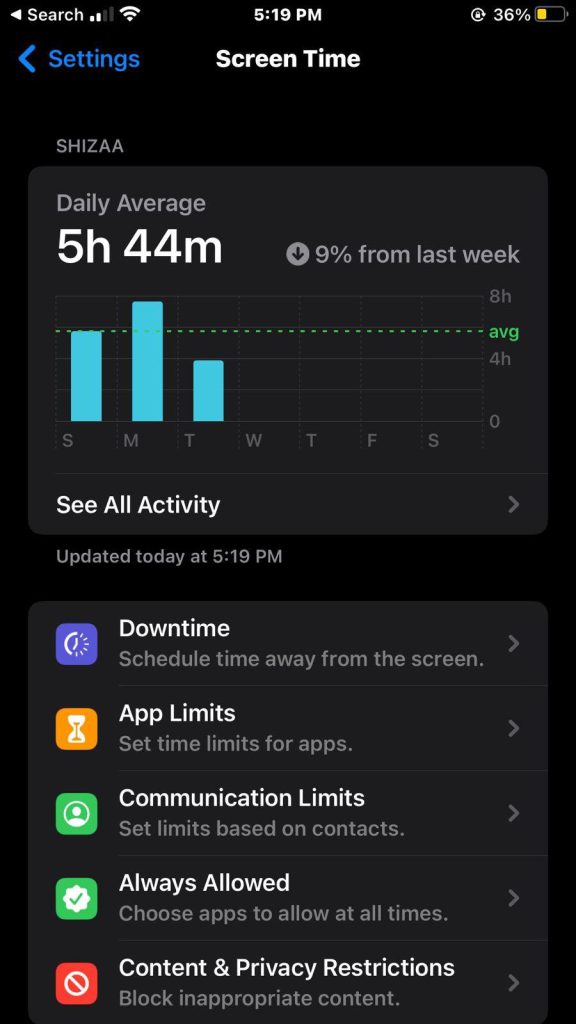
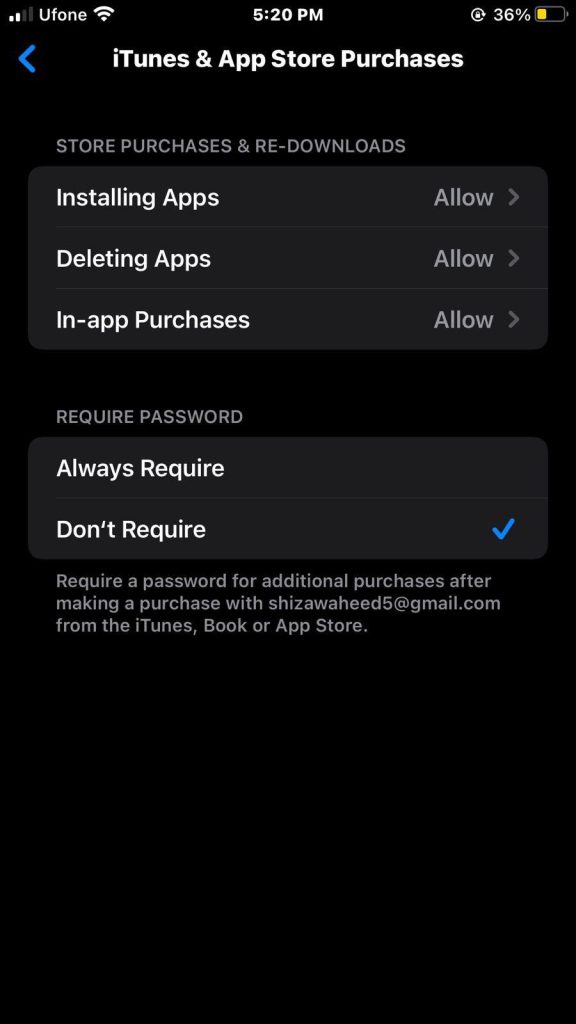
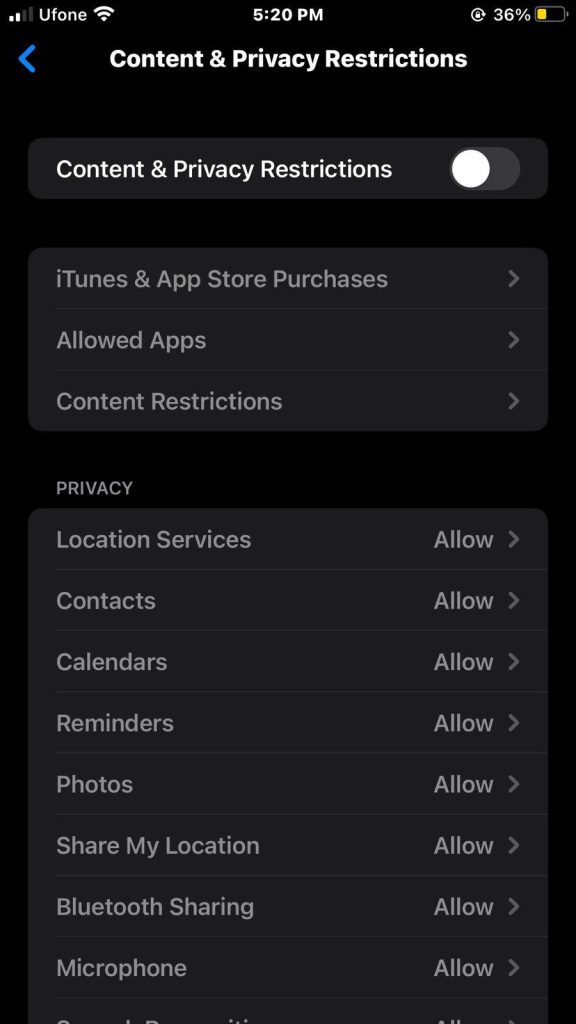
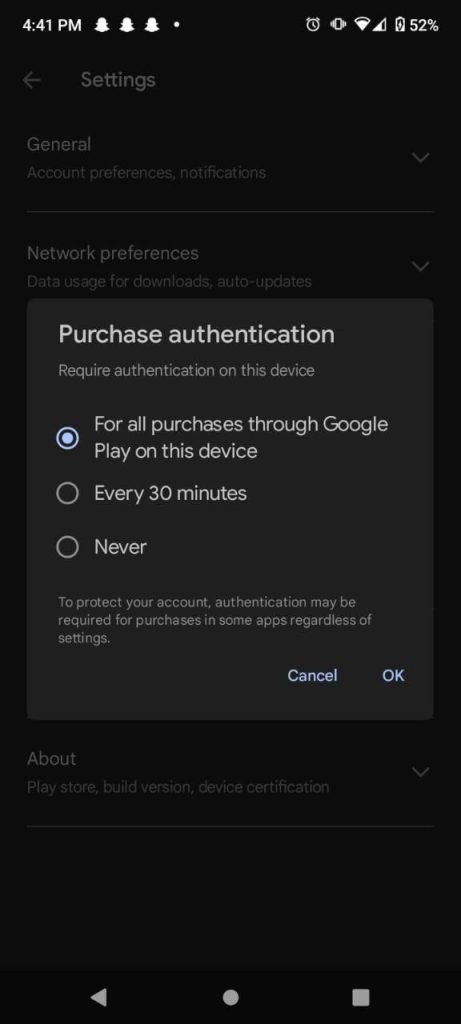
Overview: You can easily turn on or turn off in app purchases on your Apple or Android devices. These can be divided into four categories: Auto-renewable and non-renewing subscriptions, consumable and non-consumable. Disabling them can help prevent accidental purchases or overspending on apps, especially if children are using your device. Both the Google Play Store and Apple App Store have built-in payment systems that connect directly to your bank account. To avoid accidental purchases, we will show you how to turn them off and add authentication before making any purchases.
In-app purchases are commonly used by apps and games to sell additional content or services, like paid versions, feature unlocks, special items, or ad removal. This way, developers can earn extra money by encouraging users to buy content and upgrade to paid versions.
An in-app purchase is any additional purchase made within an app. You can turn off in-app purchases on Apple and Android devices to resist the temptation to spend money while using Apple and android apps and to prevent kids from making unauthorized purchases.
We are well equipped with all the necessary information about in-app purchases that you might require. Without further ado, let us get into how to turn them off in iPhone and android.
In-app purchases
It is common for apps to offer paid versions that come with many benefits. Yet, it is essential to keep track of your in-app purchases to avoid overspending and draining your bank account. Luckily, we have got you covered with some helpful tips on how to turn them off on both Google and Apple app stores.
To add more, we will provide you with some useful advice on how to prevent your children from making unauthorized purchases on your device. With our guidance, you can enjoy your favorite apps without any financial worries.
Stats
The whole mobile app market is expected to continue expanding. In 2023, sales from the market are projected to reach an astounding $935 billion.
In Q1 2021, sales on Google Play reached $36.7 billion, while sales on the Apple App Store reached $31.8 billion.
By 2025, consumer spending on the App Store will be close to $200 billion.
Google Play generates 98% of its revenue from free apps.
One of the most popular methods of monetization is in-app purchases. It is reportedly used by 50% of non-game apps and 79% of game apps.
2% of mobile app earnings come from in-app purchases, compared to 14% from ad-based revenue and 37.8% from paid app downloads.
Globally, users spend $380 billion on in-app purchases.
How to turn off In-App Purchases on iPhone
To turn off in app purchases iPhone follow the steps below:
1. Click on the Settings icon on your iPhone
2. Tap Screen Time, and then click on Content & Privacy Restrictions.
3. Tap the slider to Enable Content & Privacy Restrictions.
4. Once enabled, it will turn green.
5. Then, tap on iTunes & App Store Purchases.
6. Select do not allow for In app Purchases.
How to Disable In-App Purchases on Android
To turn off in-app purchases android follow the steps below:
1. Tap on the Google Play Store app icon on your android smartphone.
2. Once you are in the app, tap the profile icon on the top left corner.
3. From the pop-up menu, select Settings.
4. Tap Authentication, followed by Require authentication for purchases, on the Settings page.
5. Then select For all purchases from Google Play on this device from the list of options.
6. Enter your Google password when prompted.
After making this change, whenever someone tries to make a purchase from Google Play on your Android device, they will be required to enter their username and password. This enhances the security of your device and prevents unauthorized and accidental purchases.
The four types:
App publishers often use multiple types of in-app purchases to generate revenue.
1. Auto-renewable subscriptions
According to this IAP model, users must pay recurring fees in order to access certain services, features, or content within an app. Until they decide to discontinue their subscription, users are automatically charged each pay cycle.
Example: An automated monthly subscription to Netflix.
2. Non-renewing subscriptions
A non-renewing subscription, on the other hand, is not renewed automatically. For a brief time only, this in-app purchase model offers services or content. Once the current subscription expires, users will need to buy a new subscription if they wish to keep access.
Example: A one-time 6-month subscription of PlayStation Plus & Xbox Live.
3. Consumable
Consumable purchases eventually run out when the user consumes them. To continue receiving the same benefits after using up all of a consumable purchase, the player must make another consumable IAP purchase.
Example: In game currency and ad removal.
4. Non-consumable
When a user makes a non-consumable purchase, it is permanently available without expiration. These purchases usually consist of premium features.
Example: Extra App Features.
How to Request a Refund for In-App Purchases from Apple
In the past, it was uncertain if you would be successful in appealing in-app purchases. Apple has no means of knowing that a 6-year-old as opposed to a 36-year-old who is now trying to avoid paying the bill made the purchases unintentionally.
There is no assurance that you will get every purchase reimbursed; for instance, if Apple notices that you frequently make purchases and subsequently request refunds, they could be less inclined to do so; still, it never hurts to try.
Tips for Managing In-App Purchases
Managing in-app purchases effectively requires a combination of awareness, control, and responsible usage. Here are some valuable tips to help you stay on top of your in-app spending:
1. Enable Parental Controls
If you are a parent or guardian, make use of the parental control features available on both iPhone and Android devices. Set up restrictions to prevent unauthorized or excessive in-app purchases, especially by children.
2. Familiarize Yourself with Settings
Take the time to explore the settings of each app you use. Some apps offer options to disable or limit in-app purchases directly within their settings, giving you more tailored control.
3. Use App Store Alerts
Configure your device to send alerts for in-app purchases. This way, you will receive notifications each time a purchase is made, allowing you to stay informed and react promptly if any unauthorized transactions occur.
4. Educate and Communicate
If you are sharing your device with family members, especially children, educate them about the importance of responsible in-app purchasing. Encourage open conversations about what is and is not allowed.
5. Use Gift Cards or Store Credit
Consider using app store gift cards or store credit for making in-app purchases. This way, you can limit your spending to the amount available on the card and avoid overspending.
6. Use Family Sharing (iOS) or Google Family Library (Android)
These features allow you to share your purchases with family members without having to make separate purchases for each individual. It can help manage costs and control spending within the family.
By implementing these tips, you’ll be better equipped to manage your IAPs responsibly, avoid overspending, and maintain control over your digital spending habits.
Benefits and Challenges of In-App purchases
IAPs refer to the ability to buy digital content or services within a mobile app or online platform. These purchases have become a prominent monetization strategy for app developers, especially in the world of mobile gaming and various subscription-based services. There are several benefits and challenges associated with in-app purchases:
Benefits
Revenue Generation: In-app purchases can significantly boost revenue for developers. Users are often willing to spend money on virtual goods, extra features, or premium content, which can lead to a steady stream of income.
Free-to-Play Model: In app purchases allow developers to offer apps free, attracting a larger user base. This “freemium” model encourages more users to try the app, potentially leading to higher conversion rates for in-app purchases among engaged users.
Personalization and Engagement: IAPs enable users to customize their experience by purchasing virtual goods or premium content, enhancing engagement and increasing their connection to the app.
Monetization of Non-Paying Users: In-app purchases allow developers to monetize users who might not be willing to pay for the app upfront. This widens the potential customer base and revenue opportunities.
Continuous Content Updates: Developers can continue adding new content, features, and items that users can purchase, leading to a sustained interest in the app over time.
Cross-Promotion: Developers can promote other IAPs within the app itself, leading to increased visibility and potential cross sales.
Challenges
User Perception and Trust: Some users may view IAPs as exploitative or deceptive, especially if they feel pressured to spend money to progress or enjoy the app fully. This can erode trust and damage the app’s reputation.
Monetization Balance: Finding the right balance between offering valuable content free and encouraging in-app purchases can be challenging. Overly aggressive monetization strategies can turn users away.
Complexity and Development Costs: Implementing in-app purchase systems can be technically complex and time-consuming. Developers need to consider security, payment gateways, and user account management.
Market Saturation: In some industries, such as mobile gaming, there is a high level of competition, leading to market saturation. It can be difficult to stand out and attract users who are willing to make IAPs.
Balancing Gameplay and Monetization: In games, balancing gameplay to avoid making it pay-to-win (favoring players who spend money) while still encouraging IAPs can be a delicate task.
Wrapping it up
In conclusion, in-app purchases offer significant benefits for revenue generation and user engagement, but they also come with challenges related to user perception. Make sure to follow the steps above to disable them on iPhone and Android. Successful implementation requires careful consideration and a focus on creating value for users.
FAQs
What does in app purchases mean?
They refer to transactions made within a mobile application, typically a smartphone or tablet app. These purchases can include a wide range of digital goods or services, such as virtual items, additional content, premium features, subscriptions, and more. Users can buy these items directly from within the app using various payment methods.
Does IAPs cost money?
Yes, they usually involve spending money. The items or services you buy within the app have associated costs. These costs can vary depending on what you’re purchasing and the app you’re using.
How to turn on in-app purchases?
They are generally enabled by default on most devices. However, if you’ve disabled them and want to turn them on:
On iOS: Go to “Settings” > “Screen Time” > “Content & Privacy Restrictions” > “iTunes & App Store Purchases.” Then, select “In-app Purchases” and choose “Allow.”
On Android: The process can vary slightly depending on the device manufacturer and version of Android, but typically, you would go to “Settings” > “Apps” > [Select App] > “Permissions” and enable “In-app purchases.”
How to turn off in app purchases?
If you want to disable in-app purchases to prevent accidental purchases:
On iOS: Go to “Settings” > “Screen Time” > “Content & Privacy Restrictions” > “iTunes & App Store Purchases.” Then, select “In-app Purchases” and choose “Don’t Allow.”
On Android: As with enabling in-app purchases, the process can vary, but it generally involves going to “Settings” > “Apps” > [Select App] > “Permissions” and disabling “In-app purchases.”
How to use Apple Cash for IAPs?
In supported apps where Apple Pay is available as a payment option, an Apple Pay Cash credit balance can be used to make payments, however it cannot be used to make purchases from the iTunes Store, App Store, or iBooks Store.
How to use Apple Gift Card for IAPs?
Steps to use an Apple Gift Card:
On iOS: Open the App Store, go to your profile (top right corner), and tap “Redeem Gift Card or Code.” Enter the gift card code, and the balance will be added to your Apple ID. You can then use this balance for in-app purchases.
On Mac: Open the App Store, click on your profile, and then click “Redeem Gift Card or Code.” Enter the code to add the balance to your Apple ID.
Overview: Facial recognition Apps are becoming more and more popular for a variety of uses, including boosting security, organizing photo albums, and unlocking smartphones. Apps for facial recognition have improved in terms of accuracy and efficiency because of advances in artificial intelligence made by the best mobile app development company. These apps provide a wide range of functionality, including unlocking your phone, images, and even assisting in the search for those who have vanished.
In 2023, the world of technology has brought us to new heights in facial recognition applications. With various options available for both free and paid users, the best face recognition apps are pushing the boundaries of what we thought was possible. From enhanced security to personalized experiences, these apps are revolutionizing the way we interact with our devices and the world around us.
Explore the intriguing world of facial recognition apps to learn about their development, uses, advantages, and ethical issues surrounding their use.
Face Recognition Apps: A Game-Changer in the Digital Age
Face recognition apps have become an integral part of our daily lives, offering convenience, security, and exciting new features. Whether you are looking to unlock your smartphone with a glance, secure your data, or explore augmented reality, a facial recognition app suits your needs.
The rise of face recognition apps has paved the way for a range of applications beyond just device unlocking. From improving accessibility for individuals with disabilities to enhancing digital marketing strategies, the possibilities are vast. As this technology continues to evolve, we can expect even more innovative use cases in the near future.
Inclusivity and Accessibility
Face recognition apps have the potential to make technology more inclusive by providing alternative authentication methods for individuals with disabilities. For example, facial recognition can be a game-changer for individuals with limited mobility or those who struggle with traditional PINs or passwords. This technology allows them to access devices and applications with ease, promoting independence and inclusivity.
Advancements in Digital Marketing
Marketers are also leveraging Face Recognition Apps to gain valuable insights into consumer behavior. By analyzing facial expressions and reactions, businesses can better understand how users interact with their products or advertisements. This data-driven approach enables targeted marketing campaigns and product improvements based on real-time feedback.
Education and Learning
In the realm of education, face recognition apps can enhance the learning experience. Imagine a classroom where the teacher receives instant feedback on student engagement levels based on facial expressions. This information can help educators tailor their teaching methods and identify topics that may require further clarification.
Best 7 Face Recognition Apps of 2023
Let’s delve into some of the best face recognition apps of 2023, catering to both free users and those looking for premium experiences:
1. Time Dynamo
Time Dynamo is the leading facial recognition app for biometric attendance tracking, streamlining HR workflows and reducing labor costs. The innovation employs highly advanced biometric tracking technology to accurately monitor attendance and calculate monthly compensation. This system ensures precise and efficient record keeping, providing both employers and employees with the peace of mind that comes with accurate and reliable data.
By utilizing biometrics, Time Dynamo ensures maximum security and safety, safeguarding against any potential breaches or fraudulent activity. With its sophisticated features and unparalleled accuracy, Time Dynamo is a game-changer in the field of attendance and compensation tracking.
It also provides accurate and reliable data through biometrics, ensuring maximum security and safety against potential breaches or fraud. Its sophisticated features and unparalleled accuracy make it a game-changer in attendance and compensation tracking.
The time to manually track an employee’s work schedule, leaves, timesheet, and attendance. It is widely used by medium to large businesses, educational institutions, and governmental bodies, as well as any industry or workplace that values team collaboration and productivity. It is available on both Android and iOS without any issues.
2. Railer
One of the most well known facial recognition apps is Railer, which uses 99.7% accurate face recognition, sensors, and QR codes for checkpoint security tour patrol, roster and shift management, attendance, and real-time people tracking.
Creating a database and keeping track of staff attendance is simple for businesses. It is frequently used to lower hazards like proxy attendance in businesses, academic organizations, and other settings. Additionally, the app offers analytics, push notifications for time attendance reports to HR and teachers, as well as management of sick, casual, emergency, optional, annual, and holiday leave.
If you are looking for an up-front Face Recognition App which provides a time and attendance management solution, this technology is the solution. Using team chat applications like Troop Messenger, which has Zapier connectivity, you may link it to the facial recognition program you are already using. As a result, you are spared from wasting time switching between various platforms.
3. DeepFace
The simplest face analysis and face attribute recognition library for Python is called DeepFace. Modern AI face recognition models are all included in the free DeepFace library, which also automates all background facial identification tasks. This method simply requires a little amount of code, which can be generated by an AI script generator. The library is imported after receiving the exact picture path as input.
A Facebook research team created the DeepFace program for facial identification using deep learning. Human faces can be recognized in digital images. The program was created using a nine-layer neural network with about 120 million link weights and four million photos uploaded by Facebook members. On the Labeled Faces in the Wild (LFW) data set, the Facebook Research team claims that the technique achieves 97.35% 0.25% accuracy, as opposed to humans’ 97.53%. This suggests that DeepFace sometimes performs better than individuals do.
Real-time testing is possible for facial identification and face attribute analysis modules. Your webcam will be used by the stream function to run those modules.
4. FaceFirst
FaceFirst is a great face-matching technology for businesses including hospitals, casinos, stores, stadiums, and airports. Our innovative video analytics tool was developed to uphold the strictest security, privacy, and accountability standards while being scalable, rapid, accurate, and morally sound. To prevent violence, theft, and fraud, FaceFirst’s software combines human monitoring with artificial intelligence. With the use of our facial recognition program, you can create a safer environment for your valued clients, guests, staff members, and business partners.
After adding them to your custom database, FaceFirst’s identity access management algorithm can identify every recent instance of a known offender entering any of your locations. To perform facial recognition and facial identification against a watch list of known persons of interest, it consumes camera feeds. The security center receives camera and time information for each face detection event. As a result, you can use it to organize evidence for prosecutors and law enforcement. Thanks to its powerful search capabilities, your research might take just minutes as opposed to weeks.
5. FacePhi
Focusing on biometric authentication and digital onboarding solutions, Facephi is a leader in user identification technology in Spain. It offers specialized, needs-based digital identification verification procedures. The platform provides a variety of biometric solutions that are easy to use, efficient for users, and provide the greatest level of security for the customer and the company.
Clients can create any user-adaptable digital onboarding and authentication process with this multibiometric solution. With over 250 clients, a 95% retention rate, and over 300 million users worldwide, it is one of the best facial recognition apps.
FacePhi offers safe, rapid, and easy-to-use technology. They represent themselves as experts in digital identity verification and specialists in digital onboarding and biometric authentication solutions. In order to guarantee secure and fraud-free digital procedures, they committed their team to AI and ML while utilizing blockchain technology to offer a decentralized digital identity.
6. Luxand
Luxand is a well-known facial recognition program whose development began using biometric and artificial intelligence identification technologies. To automatically recognise human traits and face characteristics, the business created a vast array of tools and libraries. The company currently offers a variety of facial feature recognition tools. The company’s technologies and solutions are used by numerous industries, including banking, government, higher education, and the health care sector.
Using the cross-platform Luxand FaceSDK toolkit, programmers may create client- and server-based applications with face detection and recognition in still photos and real-time video streams.
Scientists, researchers, and developers develop the most recent technologies that automatically produce amazingly lifelike 3D models of people by recognizing faces and facial characteristics in Luxand’s research lab.
7. BioID
For face login, the BioID facial recognition app functions as a multifactor user authenticator. This program is a mobile client for BioID Connect, an OpenID Connect, and OAuth 2.0 identification service (BWS), which is based on our BioID Web Service.
BioID liveness detection enables GDPR and ISO-30107-3 compliance. It is a made-in-Germany biometric authentication solution and offers the greatest liveness detection and facial recognition software in the industry. It boosts identity verification internationally with dependable, device-independent anti-spoofing. Its APIs offer simple installation and user interaction.
A service called BioID PhotoVerify instantly verifies who owns an ID. To support compliant remote identity verification, it is designed. The API provides a reliable face match that accurately ascertains whether the person shown on the ID is the one looking into the camera. Additionally, ISO-compliant liveness detection confirms the presence of the person. It guards against media-based presentation-based spoofing attacks. The PhotoVerify API makes it simple to integrate biometric selfie verification into any website or mobile application by using the user’s webcam or smartphone camera.
Trends for Face Recognition Apps
As the demand for face recognition apps continues to grow, we can anticipate several trends in the coming years:
Enhanced Security Features
With cybersecurity threats on the rise, face recognition apps will continue to prioritize security. Expect to see advancements in encryption, multi-factor authentication, and integration with other security measures.
Cross-Platform Integration
Face recognition apps will become more interconnected with various devices and platforms. This seamless integration will allow users to enjoy a consistent experience across smartphones, tablets, laptops, and other devices.
AI-Powered Personalization
Artificial intelligence will play a significant role in enhancing the personalization capabilities of face recognition apps. These apps will learn from user behavior, preferences, and interactions to provide customized experiences.
Ethical Considerations
As with any technology involving personal data, ethical considerations will become more important. Developers and users alike will focus on issues such as consent, data privacy, and the responsible use of Face Recognition Apps.
Industry-Specific Applications
Face recognition apps will expand into various industries, including healthcare, finance, retail, and entertainment. Each sector will find unique ways to leverage this technology to improve services and customer experiences.
Choosing the Right Face Recognition App
Selecting the best Face Recognition Apps for your needs depends on several factors, including security requirements, features, platform compatibility, and personal preferences. Here are some key considerations to keep in mind when choosing a face recognition app:
Security
If security is your top priority, look for apps that offer robust encryption, multi-factor authentication, and secure data storage. Pay attention to any certifications or endorsements from cybersecurity organizations.
User-Friendly Interface
A user-friendly interface is essential for a positive experience. The app should be easy to set up and navigate, even for individuals who are less tech-savvy.
Compatibility
Ensure that the app is compatible with your device’s operating system. Whether you’re using an iPhone or an Android device, there are options available for both platforms.
Features
Consider the features that matter most to you. Do you need advanced customization, augmented reality capabilities, or integration with other apps and services?
Privacy
Research the app’s privacy policy to understand how your facial data will be used and protected. Opt for apps that prioritize user privacy and offer transparent data practices.
Reviews and Ratings
Before making a decision, read reviews and ratings from other users. This can provide insights into real-world experiences with the app and help you make an informed choice.
How TechnBrains can help you build a Face Recognition App
At TechnBrains, we are an award-winning on-demand app development company specializing in transforming innovative ideas into reality, and we are excited to guide you through creating a state-of-the-art face recognition app that caters to your unique needs.
With a team of experienced developers and AI specialists, we are well-equipped to craft a customized face recognition app tailored to your specific requirements. Whether you are aiming to enhance security measures, streamline user authentication, or simply add a touch of futuristic technology to your application, our expertise covers it all.
Expertise: Our team consists of skilled professionals with a proven track record in AI, app development, and UI/UX design.
Tailored Solutions: We understand that every project is unique. Our solutions are tailored to align with your goals and objectives.
Innovation: Staying at the forefront of technological advancements, we incorporate the latest trends and techniques into our projects.
Client Collaboration: We believe in transparent communication and collaboration, keeping you involved throughout the development process.
Quality Assurance: Our commitment to quality ensures that the end product not only meets but exceeds industry standards.
Elevate your business or application with the next-level capabilities of a face recognition app developed by TechnBrains. We also have developed some live streaming apps. Contact us today to turn your vision into a reality that transforms how you engage with technology.
Conclusion
The world of face recognition apps is evolving rapidly, offering a diverse range of options for users seeking convenience, security, and innovation. From securing your smartphone to enhancing marketing strategies, the applications of facial recognition technology are vast and exciting.
As technology continues to advance, we can look forward to even more sophisticated features and ethical considerations shaping the future of face recognition apps. Whether you’re interested in free options or are willing to invest in premium experiences, there’s a face recognition app out there that aligns with your needs and preferences.
Are you excited to catch all the action of the FIFA Women’s World Cup 2023 live? Whether you are a die-hard soccer fan or just looking to experience the thrill of the tournament, live streaming apps have got you covered.
In this guide, we will explore the best platforms to watch the FIFA Women’s World Cup 2023 live online. From websites to mobile apps, you will find all the options you need to stay up-to-date with every match, goal, and victory.
The Rise of Live Streaming for Sports
Gone are the days when watching sports required being glued to the TV screen or having a cable subscription. With the rise of live streaming technology, sports enthusiasts can now enjoy their favorite games and tournaments online, anytime and anywhere.
This revolution in how we consume sports content has made it incredibly convenient for fans to stay engaged with the action, and the FIFA Women’s World Cup 2023 is no exception.
Features of Live streaming apps
Feature
Description
Live Broadcasting
Content creators can easily start live broadcasts, connecting with their audience in real time.
Real-Time Interaction
Viewers can engage with streamers through live chat, comments, and reactions, fostering community.
Virtual Gifts and Donations
Users can send virtual gifts or monetary donations to support favorite creators during streams.
Social Sharing
Integration with social media lets users share live streams with their followers.
Scheduled Streams
Creators can schedule broadcasts in advance, notifying followers and building anticipation.
Discoverability
Users can explore trending and recommended live streams based on their interests.
User Profiles
Both creators and viewers can manage activity, preferences, and followers with profiles.
Notifications
Push notifications alert users when followed creators start new live streams.
Multimedia Support
Live streaming apps often support broadcasting video, audio, and sometimes screen sharing.
Moderation Tools
Content creators can manage and moderate live chat and comments for a safe environment.
Replay and Highlights
Archived versions of live streams can be accessed after broadcasts end.
Monetization Options
Creators can monetize content through ads, subscriptions, virtual gifts, or donations.
Live Polls and Q&A
Interactive features like polls and Q&A engage creators with the audience in new ways.
Customizable Themes
Some apps allow creators to personalize stream appearance with themes and overlays.
Cross-Platform Accessibility
Many apps are available on multiple platforms – mobile devices, tablets, and web browsers.
Analytics and Insights
Creators can access data on viewership, engagement, and metrics to refine content strategy.
Privacy Settings
Creators can control stream visibility – public, private, or accessible to specific groups.
Multi-Camera Support
Advanced apps allow creators to switch between multiple cameras or sources during streams.
Collaborative Streams
Multiple users can join live streams together, enabling collaborations and discussions.
Summary
Live streaming apps come with a range of compelling features that cater to both content creators and viewers. Above are some key features commonly found in live streaming apps. These features collectively create a dynamic and interactive experience for both creators and viewers, making live streaming apps a popular and engaging platform for sharing content and connecting with audiences in real time.
Best Apps to Stream FIFA Women’s World Cup Live Online
In today’s mobile-centric world, live streaming apps bring the action directly to your fingertips. Whether you are on the go or prefer watching on a smaller screen, these apps have you covered:
1. Telemundo
For Spanish-speaking viewers in the United States, Telemundo is the go-to app for live streaming the Women’s World Cup. It offers matches with Spanish commentary, providing an immersive experience for fans who prefer to enjoy the tournament in their native language.
2. Fox Sports
The Fox Sports app is a versatile platform that allows you to watch the Women’s World Cup on your smartphone or tablet. With a user-friendly interface and reliable streaming quality, you can enjoy the games whether you are at home or on the go.
3. YouTube Live Streaming
This live streaming platform, also known as a Live Streaming App, allows creators to educate, discuss, and form social communities in real-time. YouTube is one of the top live streaming platforms and live streaming apps available, according to ColorWhistle as reported by UCToday.
YouTube Live offers three ways for creators to live stream: using a webcam, mobile device, or encoder settings. Webcam and mobile streaming are suitable for beginners, while encoder settings are for advanced levels of live streaming. With channels on every subject imaginable, YouTube Live is a privilege for video content creators.
This platform is embedded with powerful analytics, which can give creators reports on their channel’s performance and viewers’ behavior. Live streaming is accessible on social media websites and can also be played on multiple platforms and social networks simultaneously.
Users on YouTube Live can save their past streams, which are viewable by both the streamers and their audience. Channels on YouTube Live can notify their subscribers about upcoming live streams. The platform includes a chat feature to enhance audience engagement and has tools to moderate live chat, creating a secure and healthy environment.
Creators can add location tags to their live streams and make money through ads, Super Chat, Super Stickers, and channel memberships. To monetize live streams, the channel must be a part of the YouTube Partner Program.
4. Facebook Live Streaming
On Facebook, broadcasters can easily stream live videos that cover various topics such as conversations, promotional events, Q&A sessions, and more. This can be done from anywhere in the world using the Facebook application. Facebook provides high-quality protection and streaming services with its “Live Producer” feature, which makes it easy to go live on the platform.
Creators can schedule their live streams using Facebook Live’s scheduling feature, which allows them to promote their upcoming events to their viewers. There are two ways to schedule a live stream: by creating a Live Broadcast Post, which will automatically be published on the creator’s page, or by using the available settings to moderate comments while streaming live.
Adding a donate button or in-stream ads to a live stream can help raise money for a cause and monetize the video. However, it is important to meet Facebook’s eligibility criteria to enable these fundraising and monetization features.
Facebook has a powerful social network that increases visibility and provides real-time analytics to help improve audience engagement. The platform is free for account holders and integrates with third-party tools like Crowdcast and Zaiper, which offer additional benefits.
5. Instagram Live Streaming
According to We Rave You, Instagram users can now stream live videos through the platform’s Stories feature. This allows for real-time broadcasting to followers, who are notified each time a streamer goes live. Viewers can submit comments and questions during the stream, providing direct feedback to the creator. Offensive messages or comments can be hidden during the live stream, and friends can be invited to join.
The streamer can also restrict who can message during the Instagram live stream. To manage overwhelming amounts of questions, streamers can use the “Question Sticker” option to answer questions. Instagram Live also allows for monetization through in-stream ads, and the platform is free to use.
Cost of Live Streaming Apps
The average rate is $50 per hour, but additional tasks such as design, QA, project management, and others can be included upon request. Based on these factors, the estimated cost of developing a live video streaming app ranges from $26,000 to $48,000.
TechnBrains can build best live streaming apps for you
Understanding Your Needs: We collaborate with you to grasp your goals and audience.
Design Expertise: Our expert designers create an intuitive UI/UX design for your live streaming apps.
Tech Stack: The right tools and frameworks are chosen for smooth performance.
Seamless Streaming: Our mobile app developers implement WebRTC for high quality, real-time video and audio.
User Interaction: Interactive features like chat and reactions enhance engagement.
Monetization: We integrate monetization models like ads or subscriptions.
Scalability: The app is built to handle growth, ensuring performance.
Thorough Testing: Rigorous testing guarantees a bug-free experience.
Launch and Support: Our marketing professionals deploy the app and offer ongoing assistance.
With this approach, TechnBrains delivers outstanding live streaming apps tailored to your requirements.
Wrapping it Up
The FIFA Women’s World Cup 2023 promises to be a spectacular event that will capture the attention of soccer fans around the world. Thanks to the power of live streaming technology, you can be part of the excitement no matter where you are.
Opt for live streaming apps like Telemundo and Fox Sports, these platforms ensure that you will not miss a single goal, save, or victory. So, gear up for an unforgettable tournament and get ready to cheer for your favorite teams as they compete on the grand stage of the Women’s World Cup!
With the advancements of technology, money making has never been accessible. In 2023, we can witness countless opportunities to earn extra cash right from the palm of your hands. The expert team of TechnBrains has conducted a detailed review of the best money making apps in 2023. These apps are sure to be a great way to supplement income and earn some fast cash in no time.
Let us look at these 10 best money making apps of 2023 offer innovative ways to boost your earnings. Without further ado, let’s get into it.
What are the best money making apps?
The top 10 best money making apps in 2023 are:
Swagbucks
Rakuten
Acorns
Ibotta
Fiver
Upwork
Survey junkie
Uber
OfferUp
DoorDash
Now let us discuss each of them in detail below:
1. Swagbucks
Swagbucks is a website and cash rewards app rewards its members with cash for completing online tasks like filling out surveys, playing games, and more. You can join free, and earn Swagbucks points by completing simple tasks and redeeming them for gift cards or cash via your PayPal account. By using the Swagbucks search engine for your daily web browsing, you can earn points almost effortlessly.
Earning Potential: $$
How to earn money with Swagbucks?
With Swagbucks, you can earn points known as “SB” in many ways. Some of these include shopping online, completing surveys, watching videos, playing games, and finishing other tasks. You will receive a different amount of points for each task, and there are over 1,500 retailers to choose from. Surveys usually earn you around 40 to 200 SB points. Once you have earned enough points, you can redeem them for gift cards or cash back via PayPal. The minimum balance required for redemption depends on your payout option, but some gift cards start at just 110 SB.
Payment of Swagbucks
You have the option of redeeming your SB for an e-gift card, PayPal, or Bitcoin through the new Cryptovoucher Gift Card options.
Pros
Swagbucks is 100% Free to Join for Android and iOS users
Easy cash out via PayPal or Amazon Gift Cards
Payments arrive within 10 business days
When you join, you can receive a $10 bonus with a qualifying purchase of $25.
Cons
Low payouts
SB is worth a cent, so you will have to invest a lot of time
Qualifying for each task is not as easy as it seems.
2. Rakuten
Rakuten is the best money making app for cashback rewards. With Rakuten you can actually make money while shopping. This website offers a free service that rewards you with a portion of the purchase price. Rakuten collaborates with over 2,500 retailers like Amazon, Target, Sephora, and Nordstrom. You can easily find your favorite stores or browse through their categories, which include toys and beauty products, and take advantage of special deals.
Earning Potential: $$
How to earn money with Rakuten?
Earn cash back on purchases from popular retailers, restaurants, and food delivery services with Rakuten (previously called Ebates). You can also get cash back for travel, gift cards, and more. It is simple to start: create an account, select the store you want to shop at using the app, and complete your transaction through the portal. You can even earn cash back in-store by linking your credit or debit card to your Rakuten account, as long as you activate the deal through the app first. Once the retailer confirms your purchase, Rakuten will credit the cash back to your account, which can take a few hours to several days.
Payment Method of Rakuten
PayPal or Big Fat Check.
Pros
Earn a $10 welcome bonus for your first qualified purchase.
You can also earn sign-up and referral bonuses.
Donate a portion of your earnings to nonprofit partners.
Cons
Cashback rates can be as low as 1%.
Some users have reported experiencing issues with the app freezing.
Payouts are made every three months.
3. Acorns
Acorns offers an easy mobile app that rounds up your purchases to the nearest dollar and invests the extra cash into ETFs. It is a simple and effective way to build an investment portfolio, as small amounts of money can accumulate over time. This strategy is particularly popular among millennials, as it allows for hands-off investing. You can also add more funds to the app for investment purposes. Best of all, you can try it risk-free and receive a $5 sign-up bonus.
Earning Potential: $$$
How to earn money with Acorns?
To earn rewards, browse through the offers in the Earn section of the app and make purchases. In addition, using a card linked to Acorns can automatically earn you some “Simply Spend” rewards. You may also earn rewards by installing the Earn Chrome and iOS Safari Browser Extensions and shopping online.
Payment of Acorns
PayPal Wallet
Pros
It is 100% free for college students
Streamlines your savings and investing
Low expense ratios when you invest in EFTs
Cons
Flat fees can be burdensome for accounts with low balances.
It may seem counterintuitive, but sometimes you have to spend money to save money.
Unfortunately, there may also be limited investment options available in these situations.
4. Ibotta
The Ibotta app offers a convenient way to earn cash back on your regular purchases, whether online or in-store. With over 300 participating retailers, you can earn cashback on groceries, mall purchases, and even Amazon shopping. Best of all, the Ibotta app is completely free to use. It has many satisfied users, due to consistent rewards with cash back on their everyday purchases.
Earning Potential: $$
How to earn money with Ibotta?
Earn cash back on in-store and online purchases from over 2,000 supported retailers with Ibotta. Initially designed for groceries, it now covers clothing, entertainment, dining out, pet supplies, and other categories. You may come across offers that are specific to a product or retailer, and some will be applied automatically. However, for others, you may need to complete additional tasks, such as watching a video or taking a poll.
Payment of Ibotta
You can get payments directly to your bank account, Gift Card or PayPal.
Pros
Quick cash backs on in-store purchases within 24 hours.
Welcome bonus to new users
Referral bonus
Cons
Your location is tracked when you are in-store
Lack of customer support
5. Fiverr
Fiverr is a platform that connects freelancers to job opportunities in over 200 different fields, including SEO, writing, graphic design, and virtual assisting. To get started, simply create a free account and build a detailed profile highlighting your skills, services, and rates.
Earning Potential: $$$$
How to earn money with Fiverr?
Buyers can easily discover your profile on the site and hire you for projects. Once the job is completed, you will receive payment. You can choose to receive payment via direct deposit, PayPal, or a Fiverr pre-paid card.
As you continue to make successful sales, you can advance to higher levels within the platform. As a top-rated seller, you will receive increased visibility for your postings and priority customer support.
Offering your services as a freelancer on Fiverr can be a highly profitable venture. Compared to other options such as taking online surveys or making deliveries, Fiverr has the potential to launch your career and significantly increase your earnings.
Payment of Fiverr
You can withdraw your earnings from Fiverr through PayPal, direct bank transfer, or by transferring it to a Fiverr Revenue Card (which is a prepaid card).
Pros
Fiverr has a lot of potential for high earnings.
It does not require you to bid on projects.
You can offer a wide variety of services and set your own rates
Cons
After completing an order, there is a standard waiting period of 14 days before you can withdraw the money.
Sellers are charged a commission of 20%.
It can be difficult to land your first gigs.
6. Upwork
Upwork is a top-notch money making app, whether you are looking for a side hustle or building a full-time freelance business. Its streamlined communication and user-friendly interface make it easy to use, and the potential for earning more over time is a definite bonus.
Earning Potential: $$$$
How to earn money with Upwork?
If you are not comfortable pitching directly to companies, UpWork is a great marketplace to find and hire freelancers. Since its launch in 2015, it has become the largest and most popular site of its kind. One of the benefits of using UpWork is that you will not have to worry about scams or chasing payments. UpWork handles these concerns for you, although they do charge a fee for their services.
Payment Method of UpWork
You can receive payment through various methods on Upwork, including direct deposit to your U.S. Bank account, wire transfer, Instant Pay, PayPal, and Payoneer.
Pros
Larger projects with lower fees over time
Simple profile set-up to find work in over 1,600 skills.
Attract new clients based on your reviews, total earnings, and score.
Great customer support throughout the process.
Cons
The service fee charged to clients varies between 5% and 20%, depending on their total earnings.
After the billing period ends, the payment is delivered 10 days later.
Clients have the option to browse and choose from lower rates, which are easily accessible.
7. Survey junkie
Survey junkie is the best money making app for surveys. Complete surveys in less than 30 minutes on Survey Junkie by answering demographic questions and receive instant payment through gift cards or PayPal.
Earning Potential: $$
How to earn money withSurvey junkie?
What’s interesting about Survey Junkie is that it’s owned by DISQ, a reputable data analytics platform that provides market research data to major brands. This means that the surveys you take are part of a larger effort to gather information for companies.
There are two ways to participate in Survey Junkie’s research: SJ Opinion and SJ Pulse. With SJ Opinion, you take surveys and earn points that can be redeemed for rewards. With SJ Pulse, you give Survey Junkie access to your browser history, content engagement, ads, and shopping activity for extra rewards.
When you earn enough points, you can redeem them for e-gift cards to popular retailers or cash out with PayPal payments. It’s a great way to earn a little extra cash or rewards in your spare time.
Payment of Survey junkie
With Survey Junkie, you have multiple options for receiving your payment. You can choose to cash out through PayPal or bank transfer, or opt for an e-gift card to popular stores such as Amazon, Target, Walmart, Sephora, Starbucks, and more.
Pros
You can sign up for free and get bonus points for doing so.
This platform is user-friendly
Provides extra points for sharing your online activity.
Cons
Lower payouts and limited survey options.
Confirming your identity before taking surveys can be frustrating at times.
Invitations to surveys that are no longer available.
8. Uber
Uber is the best money making app for car owners. If you have a car and free time, you can easily sign up at Uber and start earning right away. You can earn money on your own schedule by driving and delivering whenever you choose. Plus, you have the option to cash out your earnings up to five times per day.
Earning Potential: $$$
How to earn money with Uber?
The app can be used for various purposes, ranging from occasional side jobs to full-time business, with the flexibility of setting your own schedule.
As a driver, the Uber app allows you to either accept ride requests or to make UberEats deliveries, with the option to receive instant payments up to 5 times per day.
Your earnings are dependent on several factors, including the number of rides taken, the distance and duration of each ride, tips received, and whether or not you accept ride requests during peak hours. It is recommended to reside in a major city with consistent traffic flow for optimal results.
Payment Method of Uber
Cash it out from your bank account.
Pros
Create your own schedule.
It also enables you to provide food delivery or transportation services to passengers.
You can view reviews from both drivers and passengers.
Cons
You will need a 4-door car that is no more than 15 years old.
Certain model year requirements may prevent you from participating.
As a driver, you will be required to pay a service fee, which varies based on factors such as cost and time.
9. OfferUp
OfferUp offers a modern take on the Craigslist concept by providing an online marketplace for anyone to sell new or used items. It is the best money making app for selling old and new products.
Earning Potential: $$$
How to earn money with OfferUp?
OfferUp, which combined with competitor Letgo in 2020, functions as a local marketplace you can use to sell your stuff. If you want to reach a broader audience, OfferUp also allows shipping anywhere within the United States except for Alaska, Arkansas and Hawaii. Create an account and snap a picture of your smartphone, car, sofa or whatever it is you’re selling. Once you add a title, description and price, you can post your listing and chat with buyers directly through the app. Then, you’ll ship to or arrange a meeting with the buyer.
Payment of OfferUp
If you’re selling something in your local area, OfferUp suggests that you accept cash from the buyer instead of checks, cashier’s checks or payments through other apps. For items that need to be shipped, you can arrange for deposits to be made directly into your debit card or bank account.
Pros
You can directly message potential buyers within the app.
Uploading an image and selling it is easy.
You can set either a firm price or an asking price with room for negotiation.
You can receive cash payment for local transactions or ship products nationwide.
Cons
Being responsible for delivery if shipping is not selected.
Search results appearing to favor Promote Plus members and promoted items
A fee of 12.9% (or a minimum fee of $1.99) for shipping an item.
10. DoorDash
Doordash is a platform that utilizes your car and free time for food delivery. It is a well-known rival of apps like Uber, and currently holds the top spot in the food delivery app market.
Earning Potential: $$$
How to earn money with DoorDash?
Order food from nearby restaurants and stores with DoorDash. They set a minimum payment for each order, ranging from $2-$10 dependent on factors like distance and time. Before accepting an order, you will see the base pay, which can increase during peak times or if you create Challenge bonuses in the app. You will also receive 100% of your tips. If Caviar operates in your area, you can accept orders for it via the DoorDash app since they recently acquired the company.
Payment of DoorDash
You can earn money by DoorDash by using various options. Credit or Debit Card, Apple Pay, PayPal, Venmo, and DoorDash Credits.
Pros
Flexible scheduling options and the possibility of scheduled shifts.
During busy times, you can get Peak Pay
Generous tipping to show appreciation for your service.
Cons
Instant payments incur a charge of $1.99.
Shift availability may be limited, particularly in rural locations.
How TechnBrains Can Develop a Profitable Money-Making App for You
TechnBrains the leading app development company can help turn your app idea into a lucrative reality. With their expertise and experience, we offer a comprehensive approach to developing money making apps that stand out in the competitive market and maximize revenue potential.
At the core of every successful app is a clear vision. We take the time to understand your unique app concept and its intended purpose.
We excel in market research and analysis, a crucial step in creating money making apps. Our team of experts conduct a thorough examination of the app market, identifying trends, user preferences, and competitor offerings
TechnBrains provides a successful app that only looks great but also offers a seamless user experience.
TechnBrains identifies the most suitable monetization model for your app. The goal is to strike a balance between generating revenue and providing value to users.
Rigorous testing and quality assurance processes are in place to detect and rectify any issues before launch.
We have a well-executed app launch that is vital for gaining traction in the market.
TechnBrains is the ideal partner to develop profitable money making apps. With our expertise and dedication, we maximize your app’s potential for revenue generation and overall success in the competitive app market.
FAQs
What Is a Money-Making App?
A money making app is a mobile application designed to help users generate income through various activities, such as completing tasks, participating in surveys, offering services, or engaging in other revenue-generating actions. These apps provide a platform for individuals to earn extra money, often by leveraging their skills, time, or participation.
Which App Is Best for Earning Money?
The choice of the best money-making app depends on your preferences, skills, and goals. Several popular options are available, including survey apps like Survey Junkie, freelancing platforms like Upwork, cashback apps like Rakuten, and delivery apps like UberEats. It’s essential to explore different apps and choose the one that aligns with your strengths and interests.
Are There Any Apps That Actually Pay Money?
Yes, there are numerous apps that genuinely pay money to users for their participation, efforts, or services. These apps operate on various monetization models, such as rewarding users with cash, gift cards, or other incentives.
How Can I Make Easy Money with Apps?
While making money through apps is achievable, it’s essential to approach it realistically. Some apps offer relatively straightforward ways to earn, such as taking surveys, completing simple tasks, or providing small services. However, the concept of “easy” money should be balanced with the effort you invest and the potential returns.
Overview: Instagram is one of the most popular social media apps that has gained recognition throughout the years. Influencers, business and Meme Pages have made Instagram their go to app. With all the greatness it has, we bring to you today a complete guide on apps like Instagram, including the tech stack, cost and features so you build the next Instagram with TechnBrains.
It’s hard to imagine our daily routine without social media nowadays, isn’t it? Among them, Instagram stands out as one of the most popular and influential platforms, allowing users to share their moments, connect with others, and express themselves creatively.
In the third quarter of 2021, Instagram reached over 2 billion users and is predicted to have 2.5 billion monthly active users by the close of 2023.
Have you ever wondered how to create a social media app like Instagram? This article will guide you through the process, uncover the secrets of Instagram’s success, delve into the app development process, explore the costs involved, and highlight essential KPIs for a photo-sharing app.
Instagram
Instagram is a widely used social media platform that allows users to share photos and videos, as well as interact with others through likes, comments, and direct messages. It was launched in 2010 and quickly gained popularity for its focus on visual content and user-friendly interface.
People use Instagram to highlight their daily lives, connect with friends, family, and followers, follow their favorite celebrities, brands, and influencers, and discover new trends and interests. The platform has various features like Stories, IGTV, and Reels, making it a versatile platform for both personal and business use.
Stats about Instagram in 2023
Based on data from SEMrush, Instagram is ranked among the top 10 most-visited websites in the world, with a total of 4.25 billion visits per month.
Around 30.94% of the world’s 4.48 billion internet users regularly utilize Instagram.
Instagram is used by approximately 25.31% of the global population.
Here is a table of monthly users of Instagram:
Year
Users
2013
110 million
2014
200 million
2015
370 million
2016
500 million
2017
700 million
2018
1 billion
2019
1.1 billion
2020
1.3 billion
2021
2 billion
2022
2.3 billion
2023 (estimated)
2.5 Billion
Secrets behind Instagram’s Success
Instagram’s remarkable success can be attributed to various factors that have resonated with users worldwide. The platform’s user-friendly interface, focus on visual content, and constant innovation have all contributed to its widespread popularity. Moreover, Instagram’s seamless integration with other social media platforms and its strategic use of influencers have propelled it to new heights. By maintaining a balance between catering to user preferences and embracing technological advancements, Instagram has managed to create a compelling and addictive user experience.
Features of App like Instagram
In the next section of our guide on creating an app similar to Instagram, we’ll discuss the importance of incorporating various features.
Instagram owes much of its success to the diverse range of features it offers its users. Over the years, the platform has expanded its repertoire from a simple photo-sharing app to something truly remarkable.
Who would have thought a photo-sharing app could help users generate thousands of dollars? Each new feature added to Instagram serves a specific purpose, from increasing engagement with Stories to enhancing interaction through direct messaging. There’s also IGTV, in-app purchases, GPS, search functionality, integration with other platforms, and much more.
To ensure that your app surpasses existing offerings, you too must incorporate these features. After learning how to create an app, it’s crucial to identify which features to include to make it stand out. Below, we’ve listed some of the must-have features to consider when building an app like Instagram.
1. Photo and Video Upload
Uploading photos and videos is a fundamental aspect of creating an app like Instagram. It is essential to provide users with features such as preview, editing, filters, tagging, and the ability to capture images. This is also an opportunity to enhance your application and surpass Instagram’s functionalities.
For instance, Instagram users cannot directly crop their photos when posting them. Although they can apply various filters and adjustments, cropping is not an available option. Uploading photos and videos, along with applying filters, requires coding on both the front-end and back-end. In total, it can take around 300 hours of coding to establish the video upload structure.
Developing a 15-20 second video and recording it can consume at least 200 hours of front-end coding. Additionally, applying filters and special effects can take 8 hours of coding each. Furthermore, enabling features such as camera flip, beauty mode toggle, flash toggle, and speed settings can also take eight hours each.
2. Registration Process
The registration process for an app like Instagram is important, as it can impact the user’s first impression. Making the user wait for too long or requiring too much information can increase the chances of them opting out.
To avoid frustration, consider extracting information from Facebook or sending push notifications for users to complete their profile later. Google also delays asking for phone numbers and profile pictures until later stages. Adding a login option through social media or Google can be helpful.
To set up the registration process for an app like Instagram, front-end coding for username, password, phone number, and email will take 14 hours. Back-end coding for the same process will take about 32 hours. Setting profile pictures and user interests will take 8 hours each on both ends. Allowing users to watch videos without registration takes 6 hours, while adding registration through Gmail or Facebook takes another 6 hours for each platform. In total, it takes 140 hours to set up the registration process.
3. Searching
Instagram users have the ability to search for hashtags, people, and pages. Incorporating this search feature into your application is crucial for enhancing the user experience.
Although it may seem insignificant, the search function is the key feature on Instagram. By allowing users to search for their favorite pages, people, and hashtags, you can improve the overall appeal of the application.
4. Notifications
The registration process is complete. However, how can you ensure that the user returns to your application? Push notifications are the solution. Instagram uses this feature to notify users of newly added stories and when someone adds a photo. These functions encourage users to revisit the app multiple times.
Instagram’s notification system is user-friendly and effective, but back-end coding is necessary to determine who likes your post, video, or photo. This takes approximately 20 hours of coding, while front-end coding takes around 16 hours.
Other features, such as “Who has followed you,” “notifications,” “who has shared your video,” “comments,” and “profile views,” require front-end coding that takes 88 hours on an app like Instagram. Back-end development for these features takes around 110 hours. Mobile app developers need approximately 198 hours of expertise and time to complete the notification feature.
5. Integration with other Platforms
Did you know that Instagram allows users to share photos on Facebook? As Facebook owns Instagram, why not add this feature to your own app? By including this feature, you can use Facebook to promote your app and attract new users. Sharing photos is easy and convenient, and it can help increase exposure for your app. Additionally, integrating with Facebook can be a useful marketing tactic, especially if you have a business Instagram account. Don’t miss out on the benefits of this integration
6. Interacting with Stories
This feature is especially crucial for advertising, especially when it comes to using Instagram for business purposes. With this feature, users can create polls, surveys, ask questions, and more to enhance engagement. Messaging through stories is also an excellent way to boost interaction, which is essential for any business on Instagram. Check out the picture below to see how this feature can increase engagement with stories on Instagram.
7. Location Integration
A lot of users prefer to share their whereabouts with their followers. To make your application more dynamic, it’s essential to incorporate a GPS function. Your application should be able to automatically obtain the user’s location. However, in areas where GPS targeting is weak, it’s important to include a mechanism that lets users set their location manually.
Including GPS tagging is also crucial for user engagement. Tagging places or people in stories has been shown to be a great feature for users. As demonstrated in the attached picture, Instagram has effectively integrated location into their platform.
8. The Activities Section or Instagram Feed
For Instagram users who are interested in keeping up with their followers’ activities, the activity section is the place to go. In the past, it was also possible to see which posts a user had liked or which pages they were following. However, Instagram has removed this feature, despite its popularity among users. Nonetheless, there are still ways to benefit from this functionality. The attached picture depicts the Instagram feed.
9. Sending Messages
Communication with followers and other users is a crucial aspect of Instagram. Throughout its history, direct messaging has been well received by users.
In addition, this is an opportunity to introduce new features to direct messaging. This requires research and a dedicated team to identify any weaknesses in Instagram and enhance them.
By doing so, you can surpass Instagram and develop a superior version of the app. The image displays an instance of sending messages.
10. Instagram Stories
Instagram stories function similarly to Facebook and WhatsApp stories, but with Instagram, users receive notifications after new stories are added. Additionally, Instagram has introduced the “Close Friends” feature, which allows users to share their stories exclusively with selected close friends. Furthermore, there are various story downloaders available to download Instagram stories. These unique features are exclusive to Instagram and are not present on WhatsApp or Facebook.
App like Instagram Tech-Stack
If you are wondering how to create a mobile app like Instagram, there are several technologies involved in both front-end and back-end development, as well as designing and maintaining the server-side of the application.
For back-end development, we recommend using Laravel, and for front-end development, React Native is a great option. When it comes to maintaining your database, PostgreSQL is a reliable choice. For cloud services, Amazon Services is a good option.
For payment gateways, PayPal, Braintree, and Stripe are all great choices. Additionally, tools like Elastic-Search, Google Maps, Google Analytics, and Twilio can be helpful in handling various services and functions.
The Instagram tech stack is a good example of the many technologies and tools involved in creating a mobile app. It’s important to work with a team that has the necessary expertise and knowledge in these areas, from full-stack developers to design experts. You can choose to hire an in-house team or outsource your project.
How to make an app like Instagram
If you are inspired by Instagram’s success and want to create a social media app like Instagram, here is a guide to create an app like Instagram in just 8 steps
Idea Generation and Market Research
Define Features and Functionalities
Choose the Right Technology Stack
Design the User Interface
Front-End and Back-End Development
Testing and Quality Assurance
Launch and Marketing
Continuous Improvement
Let’s take a look at these steps in detail:
1. Idea Generation and Market Research
Before diving into development, identify your app like Instagram’s unique selling points and conduct thorough market research to understand user preferences and competition.
2. Define Features and Functionalities
Outline the core features your app like Instagram will offer, such as user profiles, photo sharing, comments, likes, and direct messaging. Consider incorporating additional features to distinguish your app from the competition.
3. Choose the Right Technology Stack
Select the appropriate technology stack for your app like Instagram’s development, including programming languages, frameworks, and tools that align with your vision.
4. Design the User Interface
Create an intuitive and visually appealing UI/UX design of apps like Instagram that ensures seamless navigation and a delightful user experience.
5. Front-End and Back-End Development
Develop the front-end and back-end of your app like Instagram, focusing on functionality, performance, and security. Implement features like user authentication, data storage, and real-time interactions.
6. Testing and Quality Assurance
Thoroughly test your app like Instagram across various devices and scenarios to identify and fix any bugs or glitches. Prioritize user feedback to refine the app further.
7. Launch and Marketing
Prepare a compelling launch strategy to generate buzz and attract users. Utilize social media, influencer partnerships, and app store optimization techniques. Post-launch, you need to optimize your app store rating and reviews.
8. Continuous Improvement
Gather user feedback post-launch and implement updates and new features regularly to keep your app engaging and relevant.
Cost of app like Instagram 2023
The main question that’s on everyone’s mind: what’s the cost of creating an app like Instagram? To determine this, we’ll need to calculate the total number of hours required for the project. Let’s take a closer look at the key components that go into building an app like this, and estimate the required hours for each.
Task
Number of Hours
Back-end Development
659
Front-end Development
1008
Wireframes
100
Designing
90
Quality Assurance
335
Project Management
252
Total Number of Hours
2454
Based on real-time estimation, we have prepared estimates for developing an app like Instagram. The amount of work required for this task is now clear, so let us discuss the cost involved.
When creating an app like Instagram, factors such as its design, aesthetic, and the location of its developers can all influence the cost. Additionally, the hourly rates of developers can also be a significant factor. Developing an app like Instagram may cost around $500,000.
8 Apps Like Instagram That Offer the Same Excitement
Now that we have discovered all we need to know about an app like Instagram, let’s get down to Instagram alternatives. While Instagram has become one of the most popular social networks, other apps offer a different experience while incorporating some of its best features.
These apps have their own unique feel and are just as visually appealing and community-driven as Instagram. Check out the following list for some refreshing options to try out.
TikTok
TikTok is a strong competitor of Instagram. An app like TikTok can easily compete with Instagram because of the unique and diverse features that it has to offer. TikTok and Instagram stand out as two prominent platforms, each offering a unique experience for users to connect, share, and engage. TikTok is better for raw content whereas Instagram is better for polished content.
Retrica
Retrica is a social network and photo/video platform, app like Instagram. Unlike Instagram, Retrica supports GIF image formats and allows you to create your own GIFs from a collection of photos or a video.
With Retrica, you can enjoy all the features you love from Instagram, plus additional ones. The app offers a variety of fun filters and editing effects, as well as stickers and stamps, to help you express yourself creatively. Moreover, you can connect with like-minded people in the community who share your interests and ideas.
Vigo Video (formerly Flipagram)
If you are looking to create fun videos and photo slideshows with your favorite or trending songs in the background, Vigo Video (formerly Flipagram) is the app for you. Unlike Instagram, Vigo Video allows you to import music and sound effects into your videos.
Vigo Video is a social network where you can follow other talented users, get inspired by their videos or slideshows, have your posts featured, and participate in fun challenges to get your creative juices flowing. This app like Instagram includes a library of music clips, so you don’t need to have the perfect song in your device’s music library to import it.
Snapchat
It’s worth noting Snapchat as it competes with Instagram in terms of popularity and features, particularly as both strive to be the preferred platform for users to share their personal stories. You can easily make an app like snapchat to capture pictures or short videos to add to your Snapchat story, which will be automatically removed after 24 hours.
Snapchat has also introduced Snapchat web, which is a game changer in the photo sharing app industry. If you prefer the concept of temporary posts, Snapchat might be the perfect app for you since all your photos and videos, whether sent as messages or part of your story, will eventually vanish.
We Heart It
If you enjoy sharing and viewing inspirational content, We Heart It is a popular image-sharing platform that you might enjoy. Unlike Imgur, the content on this app is more introspective and consists mainly of motivational photos and quotes. The platform is similar in layout to Pinterest, allowing users to browse and add photos to their collection.
You can also create your own profile, known as a “Canvas,” by uploading your own photos and liking other users’ photos to add them to your “Hearts” section. It’s a great way to connect with positive and inspiring users in the community.
Pinterest
Did you know that Pinterest is not just for wedding planning and recipe collecting? If you love the visually appealing aspect of Instagram, then you will definitely love Pinterest’s super slick and eye-catching platform. Unlike Instagram, Pinterest allows its users to “repin” or save pins from other users. These pins can also link out to other web pages, providing you with more information related to the pinned image.
Tumblr
You may be familiar with Tumblr, a popular blogging platform that mainly revolves around sharing images and GIFs. Along with posting photos and videos, you have the option to create text posts, audio posts, chats, photosets, and more. By following other Tumblr users, you can even “reblog” their posts to your own Tumblr blog.
Tumblr is one of the most versatile social networks available, and its mobile apps make it simple and enjoyable to post and interact with the community. You can post almost any type of content you desire and customize your layout to resemble a genuine blog when viewed on the web from a browser.
Flickr
Have you ever wondered if people still use Flickr? The answer is a resounding yes! You might be surprised to learn that Flickr’s mobile apps have undergone some impressive updates, including cool photo filters and editing effects, as well as a sleek feed.
Some people even say that Flickr is better than Instagram! After Instagram’s privacy policy controversy in 2012, many switched to Flickr and never looked back. If you’re someone who loves taking photos with your phone but aren’t completely satisfied with Instagram, it might be worth checking out Flickr’s mobile apps.
Imgur
Imgur is a widely used and popular free platform for hosting images on the internet. Millions of people use it every day to find amusing pictures, animated GIFs, and videos that have been shared and interacted with extensively, leading to their rise in popularity.
The mobile app boasts a sleek design that showcases the best content, app like Instagram. You can also create a profile and share your own content, similar to other social networks.
TechnBrains can help you make the next Instagram
TechnBrains offers premier custom app development services to help you build an app like Instagram seamlessly. Our skilled team covers every aspect:
Strategy: We’ll refine your concept and create a tailored plan.
Technology: We use cutting-edge tools for robust performance.
Design: A visually stunning interface with user experience in mind.
Features: We integrate engaging functionalities like photo sharing.
Testing: Rigorous testing for a flawless user experience.
Launch: A well-strategized launch for maximum impact.
Support: Ongoing updates and user support post-launch.
Monetization: Guidance on effective revenue models.
Security: Stringent measures to protect user data.
User-Centric: Continuous improvements based on user feedback.
With TechnBrains, your custom app dreams become reality, setting you up for success in the competitive app market.
FAQs
1. How does Instagram make money?
Instagram generates revenue through various channels, primarily:
Advertising: Businesses and brands pay to promote their products or services to a targeted audience through sponsored posts, Stories, and Explore sections.
Shopping: Instagram allows businesses to set up a virtual storefront, enabling users to directly purchase products from posts.
IGTV Ads: Creators can monetize their IGTV videos through ads.
Instagram Shopping Ads: Brands can promote their products within the Shopping section of the app.
Influencer Partnerships: Influencers collaborate with brands for sponsored content.
2. How much does it cost to create an app like Instagram?
The cost of developing an app like Instagram can vary widely based on factors such as features, complexity, development team rates, and location. Developing an app like Instagram may cost around $500,000.
3. What is Instagram’s technology stack?
Create a mobile app like Instagram using various technologies for front-end and back-end development, as well as server-side design and maintenance. Laravel and React Native for back-end development, while PostgreSQL and Amazon Services are reliable options for database maintenance. Payment gateways like PayPal, Braintree, and Stripe. Utilize tools like Elastic-Search, Google Maps, Google Analytics, and Twilio for various services. Hire a team with expertise in these areas, either in-house or outsource.
4. How can I build an app like Instagram?
To build an app like Instagram, follow these 9 steps:
Idea Generation: Define your unique value proposition.
Market Research: Understand your target audience and competitors.
Features: Outline the features you want to include.
Design: Create an intuitive UI/UX design.
Development: Build the app’s frontend and backend.
Testing: Thoroughly test the app for bugs and user experience.
Launch: Prepare a strategic launch plan.
Marketing: Promote your app through various channels.
Feedback: Gather user feedback and continuously improve.
5. What are the top competitors of Instagram?
Some of the notable competitors of Instagram include:
Facebook: Instagram’s parent company offers a similar platform.
Snapchat: Known for its disappearing photo and video sharing.
TikTok: Focuses on short-form video content.
Twitter: Allows users to share text, photos, and videos.
Pinterest: Primarily used for discovering and sharing ideas through images.
Each platform has its unique features and user base, contributing to the competitive landscape in the social media industry.