We don't just develop apps; we engineer experiences, innovate
solutions, and redefine possibilities. With a legacy of over a
decade, our commitment to excellence, cutting-edge technologies,
and a talented team of professionals is what sets us apart.
Overview: Website builders simplify website creation without coding. Ideal for diverse needs, they’re user-friendly, budget-friendly, often include templates, and offer all-in-one packages with hosting, domains, and an editor. Also discover top 10 website builders and how Custom web development can boost your business.
Thanks to website builders, creating your own website is now effortless, even if you’re not a coder. Tailored for various purposes like e-commerce and blogging, the best website builders are user-friendly, budget-friendly, and offer scalability. They often provide templates or themes for a head start in design, simplifying content addition and quick publication. Many of our recommended website builders offer all-in-one packages, encompassing web hosting, domain registration, and a built-in editor, all for a single monthly fee.
In this extensive blog, discover list of website builders and all you need to know about website development.
1. Wix Website Builder
Best for Building Free Sites
If you’re looking for a drag-and-drop website builder, Wix is a favored option. It’s ideal for creating a basic website with a few features without having to make many choices. To begin with Wix, tell them the type of site you want and what features you need, such as a blog, chat, forms, or an online store. With over 900 professional-looking templates to choose from, you can quickly adjust them to fit your needs. Alternatively, you can use Wix’s ADI feature to create your site, but the results may be unsatisfactory.
If you opt for a template, it may take a little over 10 seconds to load as it populates information, but once it’s loaded, the editor is very robust for a free website builder. You can modify fonts, add headings, include lists, and drag and drop sections without having to code or switch between tabs. Wix also offers numerous integrations, including email, and has an AI Text Creator to suggest text for your website.
Wix is also one of the best online website builders which has comprehensive SEO features to help you rank on Google and even enables you to create a marketing calendar and manage ads within the platform. Once you’ve made your adjustments, you can make your site live with a free domain ending in “.wixsite.com” and a Wix logo, or you can connect it to your own domain.
2. Gator
Best for E-Commerce
Gator is a website building platform offered by HostGator, a well-known web hosting company. It’s designed to help individuals and businesses create websites quickly and easily, even if they have no prior experience with web design or coding.
Here are some key features and highlights of the Gator website builder:
User-Friendly Interface: Gator provides an intuitive and user-friendly drag-and-drop interface, making it accessible for beginners.
Templates: It offers a range of professionally designed templates to choose from, covering various industries and styles.
Mobile Responsiveness: Websites built with Gator are automatically optimized for mobile devices, ensuring a seamless user experience on smartphones and tablets.
eCommerce: Gator includes eCommerce functionality, allowing users to set up online stores and sell products or services.
Blogging: You can easily create and manage a blog within your Gator website, making it suitable for content-driven sites.
Domain and Hosting: Gator offers domain registration and hosting services as part of its packages, simplifying the process of getting your website online.
Customer Support: HostGator provides customer support to assist users with any questions or issues they encounter while building and maintaining their websites.
Overall, Gator is a user-friendly website builder that aims to streamline the website creation process, making it accessible to a wide range of users, from individuals looking to create personal websites to small businesses in need of an online presence.
3. Google Sites
Best for Basic Website
Google Sites is one of the easy website builders that can be a suitable choice for those who are new to website building or want to test the waters. However, it’s important to note that it comes with limited customization options and lacks SEO tools, so it may not be the best option if you’re looking to rank high on search engines. You can get started by choosing from one of the dozen templates or creating your own design using a blank canvas. While Google Sites provides six themes to choose from, creating a custom theme requires additional effort.
Google Sites is designed to be user-friendly and seamlessly integrates with your Google Drive, where it automatically saves everything. Although it doesn’t have any built-in SEO settings, you can set a custom path for each page. While Google Sites is a free platform, its customization options are somewhat constrained compared to other website builders like Weebly or Wix. Therefore, it may be more suitable for beginners, hobbyists, or those who are just looking to dabble with website building.
4. Weebly Website Builder
Best for Easy Page Editing
Looking to create a website without all the hassle? Consider Weebly, a user-friendly website builder owned by Square. Though it may not be as advanced as other platforms, Weebly is ideal for creating personal websites such as blogs or portfolios.
Upon signing up, you will be prompted to choose between Weebly (for personal sites) or Square Online (for business sites). Opting for Weebly gives you access to a straightforward builder with all the fundamental features you need. Simply select a template and start editing. With just a few clicks, you can change text, images, and pages.
While Weebly does not provide as many templates as other platforms, the ones available are well-designed. Adding buttons, contact forms, and slideshows is seamless. For additional features, explore the Apps tab where you’ll find Google Ads and forms. These apps typically cost a few dollars but are not subscriptions.
Weebly’s SSL-enabled sites are conducive to SEO, and you can even customize your site’s favicon and SEO settings. However, if you want to use a custom domain, you’ll need to sign up for a paid plan starting at $10/month. All in all, Weebly is a fantastic choice for anyone who needs a simple website builder. Though it may not be as advanced as other platforms, it’s perfect for beginners who don’t have much website experience.
5. Bluehost Website Builder
Best for Easy WordPress Site Creation
The Bluehost Website Builder is a user-friendly and versatile tool that allows individuals and businesses to effortlessly create and customize their online presence. As one of the leading names in web hosting, Bluehost brings its expertise to website building, making it accessible to users of all skill levels.
With its intuitive drag-and-drop interface, the Bluehost Website Builder simplifies the often complex process of web design. Users can easily arrange elements, add content, and tailor their website’s layout to their specific needs. What sets Bluehost apart is its diverse collection of professionally designed templates, catering to a wide range of niches. Whether you’re launching a blog, showcasing a portfolio, or setting up an eCommerce store, there’s a template to match your vision.
6. GoDaddy Websites + Marketing Website Builder
Best for Marketing and SEO Tools
GoDaddy’s Websites + Marketing Website Builder stands out as a comprehensive solution tailored for those seeking to amplify their online presence through marketing and SEO prowess. This platform seamlessly integrates website building with a suite of marketing tools, making it an ideal choice for entrepreneurs, small businesses, and individuals looking to maximize their digital impact.
User-Friendly Design: The builder boasts an intuitive interface, allowing users to effortlessly craft captivating websites. From choosing templates to customizing layouts, the process is user-centric.
Marketing Magic: What sets GoDaddy apart is its robust set of marketing tools. It offers email marketing, social media integration, and analytics to help you reach and engage your target audience effectively.
SEO Optimization: GoDaddy prioritizes search engine optimization, ensuring your website is easily discoverable by search engines like Google. From meta tags to keyword optimization, it covers the essentials of SEO.
7. Hostinger Website Builder
Best for AI-Powered Tools
Hostinger’s Website Builder is a user-friendly platform that simplifies the process of creating stunning websites. It empowers individuals and businesses, regardless of their technical expertise, to embark on their online journey effortlessly. It is also one of the best AI website builders.
With an intuitive drag-and-drop interface, you can build and customize your website without the need for coding skills. Hostinger offers a diverse array of professionally designed templates, ensuring that your site matches your unique vision. Plus, in today’s mobile-centric world, the builder ensures your site is fully responsive on all devices.
For those finding ecommerce website builders, Hostinger’s builder provides robust features for setting up online stores, managing inventory, and processing payments securely. Moreover, the platform is optimized for search engines, enhancing your site’s visibility and attracting organic traffic.
8. GetResponse
Best for Email-focused businesses
GetResponse is our top choice for the best free website builder for businesses that prioritize email. Unlike other free site builders, GetResponse offers an impressive and customizable builder that is seamless to use. Whether you opt for a template or the AI-powered builder, creating a site with it is seamless. The features are comprehensive, yet not overwhelming, which we found commendable.
On the marketing side, GetResponse’s tool is somewhat limited. Although mobile optimization is seamless, SEO features are minimal. You can customize the meta title and description, and add custom code such as HTML, CSS, or JavaScript in the page header element. However, if you’re looking for a free site builder and already use it for email marketing or plan to focus on email marketing, it’s a strong contender.
9. Dorik Website Builder
Best for Free Personal Websites
With Dorik, you can create a website or landing page for free and add premium options such as a blog or paid membership if desired. Compared to my experience with WordPress page builders, I found Dorik to be quite intuitive and refreshing. However, it might pose a challenge to beginners, but there is excellent online documentation available to help navigate through the platform.
You can choose to start from scratch, import JSON, or preview one of the 39 website templates available. Dorik guides you through the settings when you first begin editing, and you can use the visual drag-and-drop editor with 250+ UI blocks and 20+ elements like text, buttons, and icons to build sections. Additionally, the control panel can be positioned on either side of the screen.
Two notable editing features on Dorik are the color differentiators which make it easy to identify the sections being edited (purple dashed lines for rows and pink dashed lines for columns), and the Navigation Tree that helps to pinpoint the exact rows to edit, avoiding the risk of editing the wrong element or block that some site builders might pose.
Dorik is one of the prominent small business website builders to provide an easy-to-use drag-and-drop editor with countless customization options, including 39 templates, 250+ UI blocks, and 20+ elements. Furthermore, its SEO tools are comprehensive, including page title and description, no-index/no-follow meta settings, canonical URL, schema, and custom header/footer code. The value of the free plan is undoubtedly commendable, but beginners may require some assistance from the online documentation.
10. Squarespace Website Builder
Best for Website Customization
Squarespace, a top-tier name in the world of website builders, shines when it comes to website customization. It’s the ideal platform for individuals and businesses seeking a high degree of creative control over their online presence.
If you desire complete creative freedom and a platform that excels in website customization, Squarespace is the go-to choice. It empowers you to design and build websites that not only look exceptional but also serve your unique needs and goals.
What are Website Builders?
A website builder is a user-friendly software or online platform that allows individuals and businesses to create and design websites without the need for extensive technical expertise or coding skills. These tools are designed to simplify the website creation process, making it accessible to a wide range of users, including those who may not have a background in web development or design.
Website builders typically provide a visual, drag-and-drop interface that allows users to select templates, customize layouts, add text, images, and other content, and arrange elements on web pages with ease. They often come with a variety of pre-designed templates and themes, even if you are building an auction website, you can customize them to match the user’s brand or personal preferences.
Types of Website Builders
There are several types of website builders available to cater to different needs and skill levels. Here are the main types of website builders:
1. Drag-and-Drop Website Builders:
These builders provide a user-friendly interface where you can drag and drop elements (such as text, images, and widgets) onto your web pages.
They are ideal for beginners and individuals or small businesses looking to create a basic website quickly.
Examples include Wix, Weebly, and Squarespace.
2. Content Management Systems (CMS):
Content Management Systems are versatile platforms that not only allow website creation but also provide robust content management capabilities.
They are suitable for a wide range of users, from beginners to advanced developers.
WordPress is the most popular CMS, offering extensive customization options and a vast library of plugins and themes.
3. E-commerce Website Builders:
These website builders are specialized for creating online stores and managing e-commerce operations.
They come with features like product listings, shopping carts, and payment processing.
Shopify and BigCommerce are popular choices for e-commerce websites.
4. Website Builders for Developers:
These platforms are designed for web developers and designers who want more control over the code and design of their websites.
They provide access to the website’s underlying code and allow for extensive customization.
Examples include Webflow and Adobe Dreamweaver.
How Does a Web Builder Work?
A website builder is a tool or platform that simplifies the process of creating a website, allowing individuals and businesses to design and publish web pages without the need for extensive coding or technical expertise.
Here’s a breakdown of how a typical website builder works:
User Interface (UI):
Website builders offer an accessible UI accessible via a web browser. This interface includes menus, toolbars, and a canvas where users can visually design their websites.
Templates and Themes:
Users have access to a library of pre-designed templates and themes, allowing them to choose a design that suits their website’s purpose and aesthetics.
Drag-and-Drop Elements:
The core feature of a website builder is the ability to add, edit, and arrange elements on web pages using a drag-and-drop interface. Users can include text boxes, images, videos, buttons, forms, and widgets.
Customization:
Users can customize their chosen template by adjusting colors, fonts, and background images. Most website builders also enable text and image editing directly within the interface.
Content Creation:
Users can create and organize content by adding text and images to web pages. Content can be formatted, resized, and aligned using the website builder’s editing tools.
Navigation and Menus:
Website builders provide options to create navigation menus and link them to different pages on the site, allowing users to structure their websites with multiple pages or sections.
Widgets and Features:
Website builders often offer widgets and features such as contact forms, social media integration, maps, and e-commerce tools, enhancing website functionality.
Responsive Design:
Many website builders ensure responsive design, adapting websites to various screen sizes and devices like desktops, tablets, and mobiles.
Preview and Testing:
Users can preview their websites to see how they will appear to visitors. Some website builders offer testing tools to check site functionality before publishing.
Publishing:
Once satisfied with the design and content, users can publish their websites to make them accessible on the internet. Website builders often provide hosting services or integration with hosting providers for this purpose.
Domain and SEO Settings:
Users can configure domain settings, register new domains, or connect existing ones. Some website builders offer built-in SEO tools to optimize sites for search engines.
In essence, a website builder simplifies web development by providing an intuitive interface and a range of design and functional elements. It democratizes website creation, making it accessible to individuals and businesses without specialized web development skills. Users can focus on content and design while the website builder handles the underlying technical complexities.
Key features of website builders
Here are the key features of website builders explained in a detailed manner without bullet points:
Templates and Themes
Website builders offer a variety of templates and themes for different types of websites (e.g., business, portfolio, blog). Users can choose a template that aligns with their website’s purpose and customize it to their liking. Templates provide a design framework, saving users time and effort in creating a visually appealing site.
Drag-and-Drop Interface
A fundamental feature of website builders is the drag-and-drop interface, which allows users to add, rearrange, and edit elements on web pages intuitively. Users can simply drag elements like text boxes, images, buttons, and widgets onto their pages and place them where they want.
Customization Tools
Website builders offer extensive customization options, enabling users to personalize their websites. Users can adjust colors, fonts, backgrounds, and other design elements to match their branding or preferences. Text and images can be edited directly within the builder, eliminating the need for external image editing software.
Content Creation and Management
Users can create and manage content seamlessly using the website builder. Content, such as text and images, can be added to pages and organized easily. Rich text editors allow for formatting, styling, and hyperlinking content.
Navigation and Menus
Website builders provide tools for creating navigation menus, allowing users to structure their websites with multiple pages. Users can add, edit, and link menu items to different sections or pages of the site. This feature ensures a user-friendly browsing experience for visitors.
Media Integration
Users can easily incorporate various media elements, including images, videos, and audio, into their websites. Most website builders support embedding media from external sources like YouTube or uploading files directly.
Widgets and Features
Website builders offer a range of widgets and features to enhance website functionality. Common widgets include contact forms, social media integration, maps, and interactive elements. E-commerce website builders provide features like product listings, shopping carts, and payment processing.
Responsive Design
Modern website builders prioritize responsive design, ensuring that websites adapt and display correctly on various devices, such as desktops, tablets, and mobile phones. Users can preview how their sites will appear on different screens to optimize the mobile user experience.
Domain and Hosting Integration
Many website builders offer domain registration and hosting services or integrate with hosting providers. Users can either register a new domain or connect an existing one to their website. Hosting services simplify the process of making the website accessible on the internet.
Website builders combine a range of features and tools to simplify the process of creating, customizing, and managing websites, making them accessible to users of varying technical backgrounds and needs.
How to Select the Ideal Website Builder
How to Select the Ideal Website Builder Choosing the best website builder isn’t a one-size-fits-all endeavor; it requires striking the right balance between cost and features tailored to your unique needs.
Identify Your Requirements To streamline the selection process, it’s crucial to ask yourself pertinent questions:
Website Purpose: Determine if your website is primarily for information display or if you want visitors to interact with its content.
E-commerce or Lead Generation: Decide if you intend to sell products/services or collect contact information from potential customers.
Management: Consider whether you’ll be managing your site independently or collaborating with a third-party service provider.
Feature Investment: Assess if you’re willing to pay extra for advanced features and functionalities.
Customization: Determine the level of customization you desire in terms of layout and design.
Unique Functionality: Consider if you need to implement special features like quizzes, forms, or newsletters.
By addressing these elements, you’ll narrow down your choices and find a website builder that aligns with your goals.
Total Cost of Website Development
What Is the Total Cost of Website Development? The simple answer is Total Estimated Cost Range: $212 to $1,350. When embarking on the journey of creating a website, it’s essential to understand that the expenses go beyond just selecting a platform. Various factors contribute to the overall cost, such as hosting fees, domain registration, SEO analytics, custom email solutions, graphic design, and more. For those aiming to maintain a fresh and engaging online presence, hiring a content manager might also be in the cards. To gain a comprehensive view of your website’s expenses, thorough research into the pricing of web design components is crucial.
Here’s a breakdown of the expenses involved in building a website:
Service
Cost Range
Notes
Domain Name
$12 to $60
Acquisition and registration of the chosen domain name through a domain registrar.
Hosting
$100 to $500
Hosting services to keep the website accessible online; select a plan based on expected web traffic.
Website Builder
$100 to $500
A diverse range of options catering to various business and personal needs, as detailed above.
SSL Certification
Free to $250
Enhances website security; some website builders include SSL in their package without extra charges.
Domain Name:
The cost typically falls within the range of $12 to $60. It covers the acquisition and ongoing registration of your chosen domain name through a domain registrar.
Hosting:
Hosting services, which ensure your website remains accessible online, can cost anywhere from $100 to $500. It’s vital to select a hosting plan that aligns with your anticipated web traffic, especially if you expect higher visitor volumes.
Website Builder:
Website builders come with a price tag ranging from $100 to $500. The market offers a diverse range of options tailored to various business and personal needs, as detailed in the guide above.
SSL (Secure Sockets Layer):
SSL certification, which enhances website security, can either be free or cost up to $250. Some website builders include SSL certification in their package without additional charges.
Total Estimated Cost:
In sum, the fundamental expenses for website development typically range from $212 to $1,350. However, it’s essential to note that additional costs may arise, such as those associated with site plugins, SEO services, website management services, imagery licenses, and more. Building a comprehensive and dynamic online presence often involves a combination of these elements, which can influence the final total cost.
Understanding the complete picture of website development costs enables you to make informed decisions regarding your online presence and ensures that you allocate resources appropriately to create a successful and engaging website. Ready to Transform Your Online Presence? Let’s Create a Stunning Website Together with TechnBrains!
Tips to create a successful website
While website builders provide us all the ease we need to build a website, there are still some tips and strategies that we at TechnBrains follow to have an exceptional end product. Whether you’re looking to create a website for your business, blog, or personal portfolio, building a successful website requires careful planning and execution
1. Understanding Your Audience
Before you start designing your website, it’s crucial to understand your target audience. Who are they, what are their preferences, and what problems can your website solve for them? Conducting thorough market research can provide valuable insights into your audience’s needs and expectations.
2. Choosing the Right Domain Name
Your domain name is your online identity. Keep it simple, memorable, and reflective of your brand. Consider incorporating relevant keywords into your domain to improve search engine visibility. The hosting provider you choose can significantly impact your website’s performance. Evaluate your hosting options carefully, taking into account factors like uptime, customer support, and scalability.
3. Creating Engaging Content
Content is king on the web. Focus on creating high-quality, valuable content that resonates with your audience. Consistency in posting will keep your visitors engaged and coming back for more.
4. Mobile-Friendly Design
With the majority of internet users on mobile devices, a responsive design is non-negotiable. Ensure that your website looks and functions flawlessly on smartphones and tablets. A slow-loading website can drive visitors away. Optimize your website’s speed by reducing image sizes and minimizing unnecessary HTTP requests.
5. Implementing SEO Best Practices
Search engine optimization is vital for visibility. Conduct keyword research and optimize your content accordingly. Building quality backlinks from reputable sources can also boost your SEO efforts. Make it easy for visitors to find what they’re looking for. Implement clear and intuitive menus, and consider adding breadcrumbs for seamless navigation.
Building a successful website is a multifaceted process that involves understanding your audience, optimizing for search engines, and delivering exceptional user experiences. By following these tips and consistently updating and improving your site, you’ll be well on your way to achieving online success.
TechnBrains: Your Professional Web Design and Development Partner
At TechnBrains, we are your trusted partner in the world of web development. With a dedicated team of passionate experts, we bring your digital dreams to life. Our commitment to excellence, creativity, and innovation sets us apart as a leading website development company.
Crafting Exceptional Websites
Our journey begins with a vision: your vision. We understand that every business, every project, and every idea is unique. That’s why we approach each project with a fresh perspective. Our mission is to transform your concepts into stunning, functional websites that captivate your audience.
Our Expertise
Web Design
Our talented designers are masters of their craft. They combine aesthetics and user experience seamlessly, creating visually appealing websites that leave a lasting impression. From clean and minimalistic designs to vibrant and immersive layouts, we tailor our designs to suit your brand and goals.
Web Development
Behind every great website is robust and efficient development. Our developers are experts in their field, using cutting-edge technologies to build websites that perform flawlessly. Whether it’s a dynamic e-commerce platform, a content-rich blog, or a sophisticated corporate site, we have the technical prowess to make it happen.
Mobile Responsiveness
In today’s mobile-first world, your website must shine on every device. We ensure that your website is fully responsive, offering an exceptional user experience on smartphones, tablets, and desktops.
In the ever-evolving landscape of artificial intelligence, Google Bard has emerged as a formidable competitor, ready to challenge the dominance of ChatGPT. This revolutionary Google Bard, powered by Google’s AI, brings a new dimension to natural language processing. In this comprehensive guide, we will delve into the world of Google Bard, exploring its features, capabilities, and how to leverage its potential.
The AI Revolution Scaling New Heights
Artificial Intelligence is a transformative force that has the power to revolutionize how we live and work. Google recognized this potential six years ago when it reoriented its company around AI. Since then, the tech giant has continued to make substantial investments in AI across various domains.
One of the most striking aspects of Google’s AI journey is the rapid scaling of AI computations. The scale of the largest AI computations is doubling every six months, far surpassing the expectations of Moore’s Law. This exponential growth underscores Google’s commitment to pushing the boundaries of AI and staying at the cutting edge of technological innovation.
Generative AI and Language Models
Advanced generative AI and large language models have captured the imagination of people worldwide. Google’s Transformer research project, which led to a groundbreaking paper in 2017, laid the foundation for many of the generative AI applications we see today. Just as Google Bard is the beginning of a new era, these models are not just advancing technology; they are changing how we interact with information.
What is Google Bard?
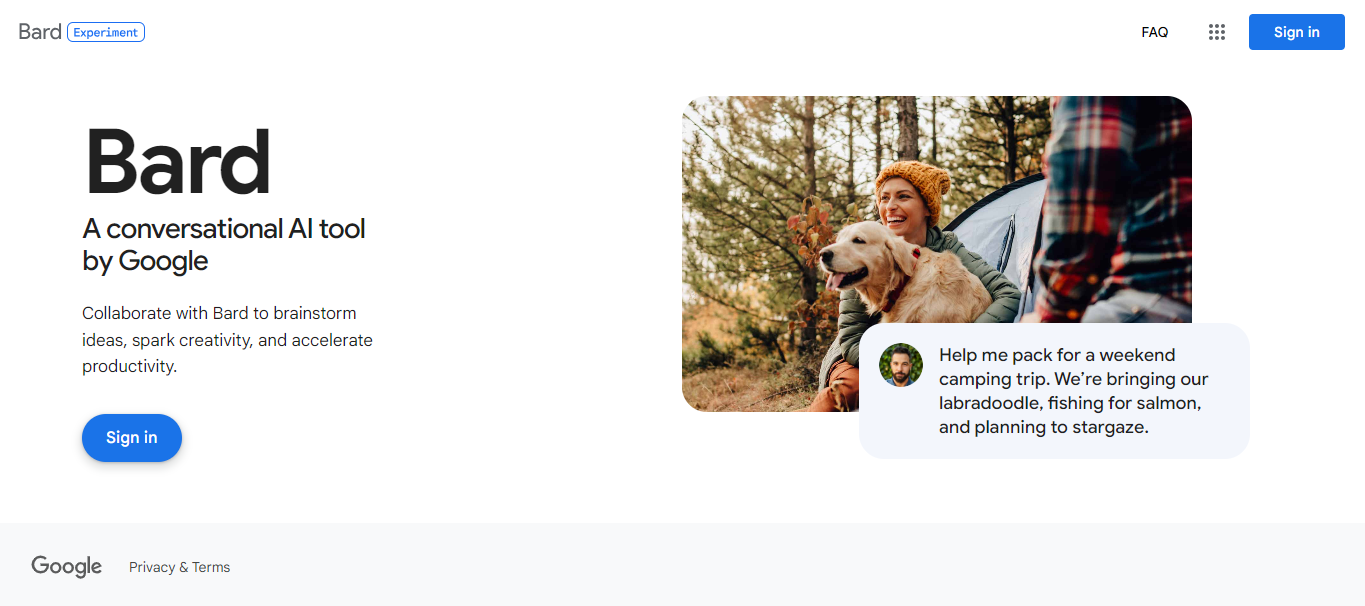
Google Bard, much like ChatGPT, is an advanced conversational AI chatbot designed to generate text across various contexts. You can pose questions on a wide range of topics, as long as they adhere to Google’s content policies, and Bard will provide you with a coherent and informative response. While Google Bard has not officially replaced Google Assistant, it outshines it as a more potent AI assistant.
The Power of LaMDA
At the heart of Google Bard’s prowess lies LaMDA, a Large Language Model based on Google’s extensive data and research. Just as OpenAI’s GPT-3.5 powers ChatGPT, Google’s LaMDA has been trained on an astounding number of parameters, enabling it to comprehend and generate natural language with remarkable fluidity. This results in a chatbot that can respond to inquiries in a truly conversational manner.
Is Google Bard AI Available?
Following its initial announcement, Google Bard was accessible to a select group of users through a waitlist. However, the game-changing moment arrived at Google I/O 2023 when Google declared that Bard was open to users worldwide, spanning 180 countries and territories.
Multilingual Capabilities
Furthermore, Google Bard now supports multiple languages, including Japanese and Korean, with plans to expand its language repertoire to encompass up to 40 languages in the near future. Despite its experimental status, Google Bard is now readily available for everyone to experience.
How to Use Google Bard AI
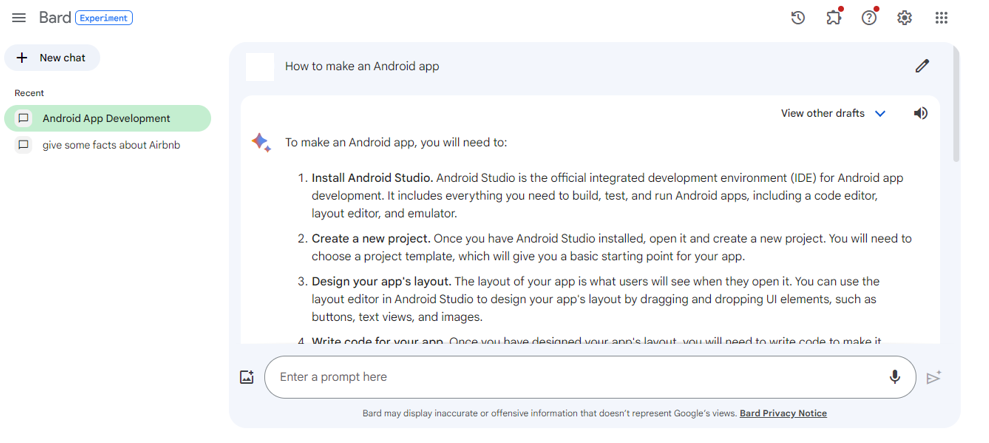
Using Google Bard is a straightforward process, designed to make accessing its powerful AI capabilities as user-friendly as possible. Here are step-by-step instructions on how to use Google Bard effectively:
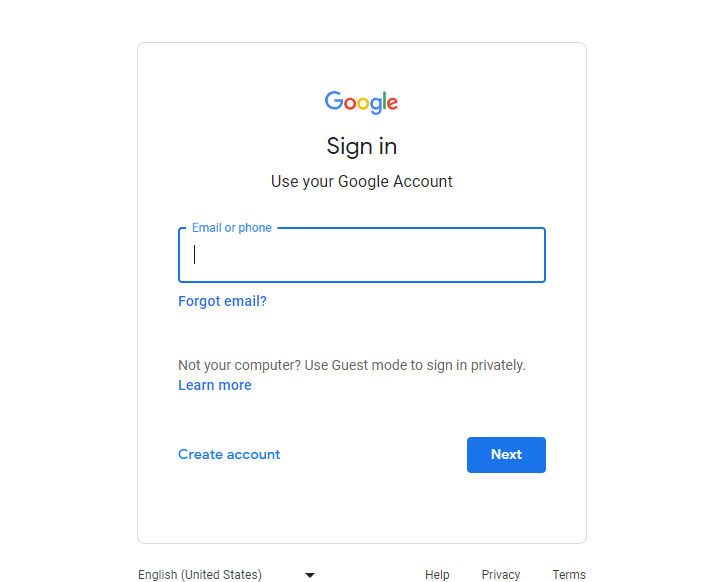
To use Google Bard, you’ll need to log in with your Google account. If you don’t have one, you can create a Google account easily.
Image showing the sign up popup
3. Accessing the Interface
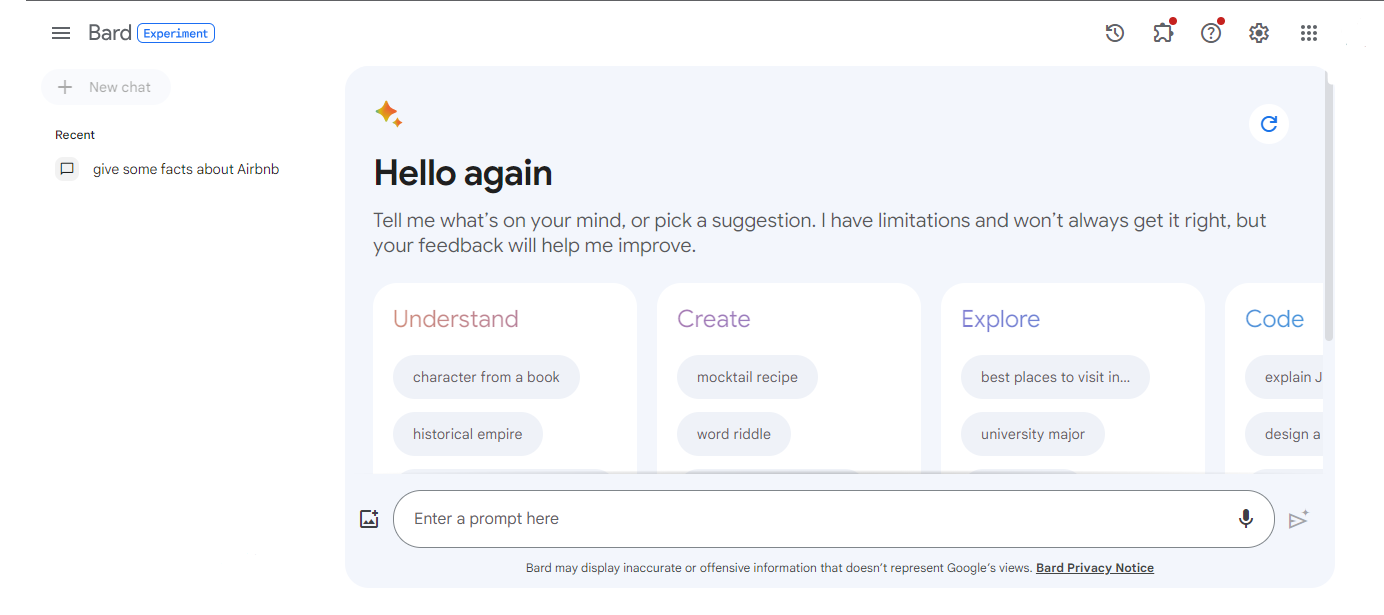
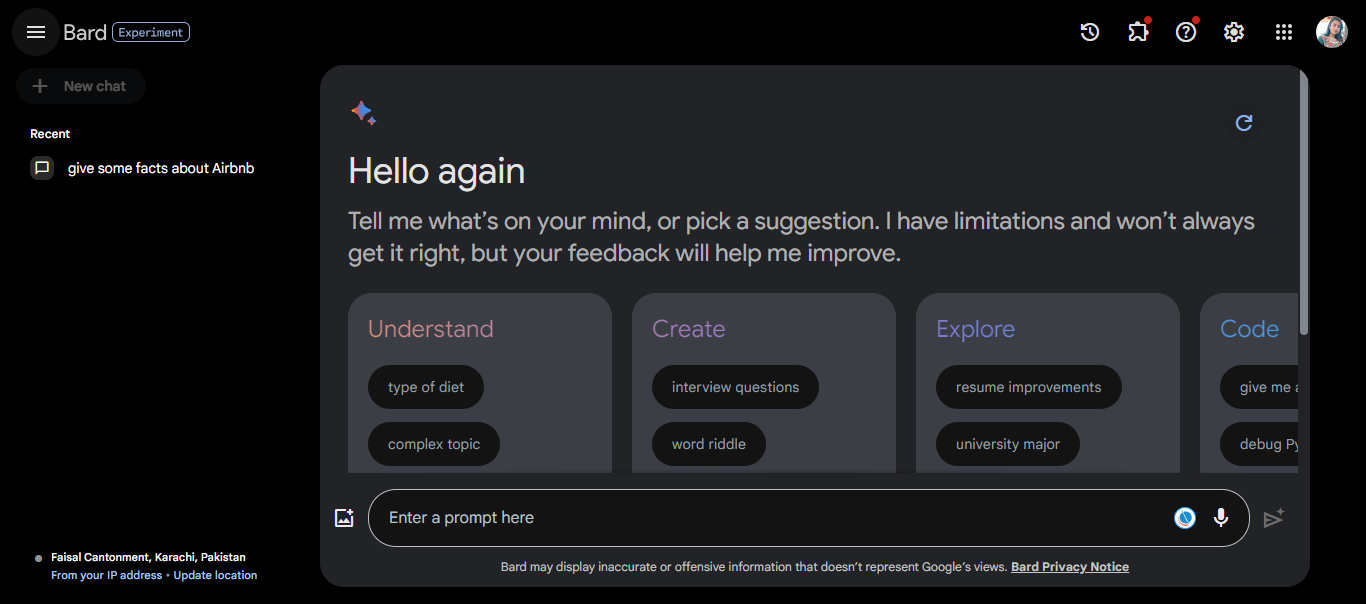
After agreeing to the terms, you’ll find yourself in the Google Bard interface.
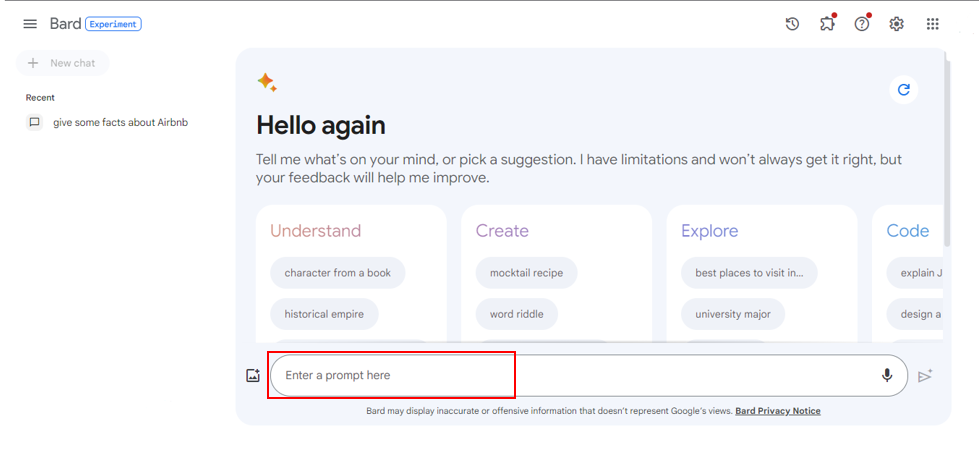
4. Enter Your Prompt
In the main window, you’ll see an empty text field with the prompt “Enter a prompt here.” This is where you start your conversation with Google Bard.
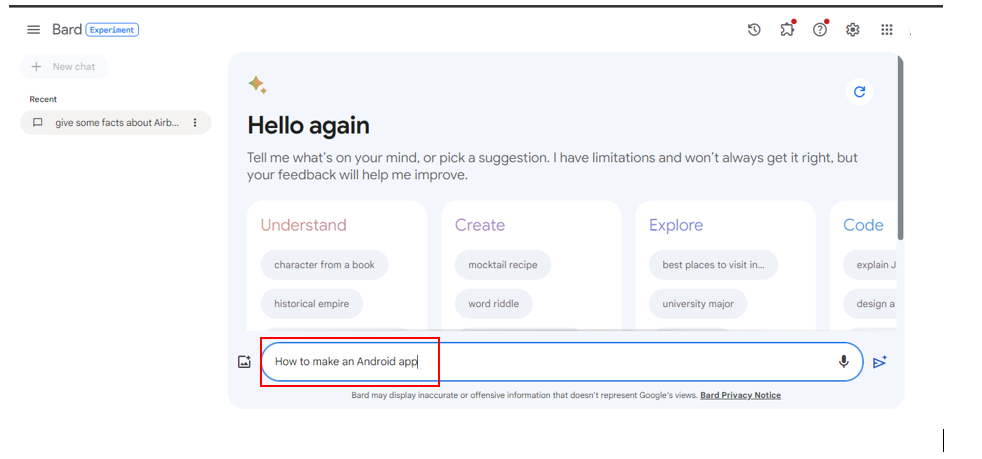
5. Type Your Question or Prompt
Begin by typing your question or prompt into the text field. You can ask anything within the boundaries of Google’s content policies.
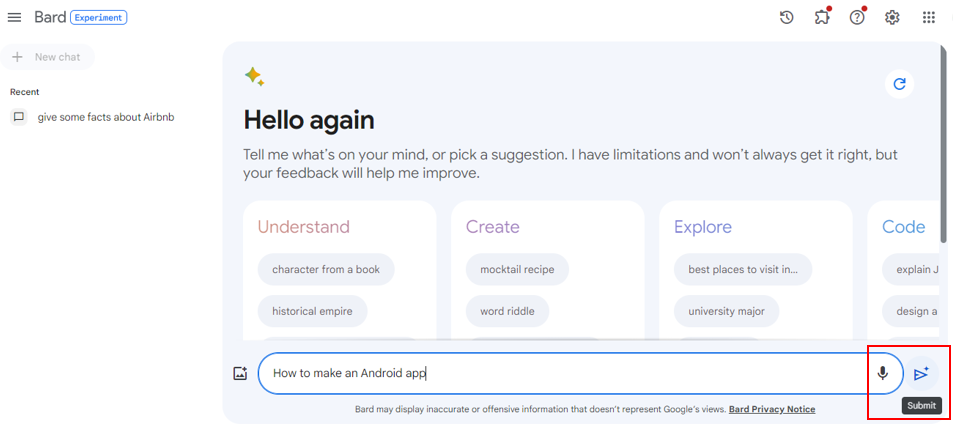
6. Receive the Response
Once you’ve entered your prompt, simply press Enter or click the relevant button to submit it. Google Bard will promptly generate a response based on your input.
7. Exploring Drafts
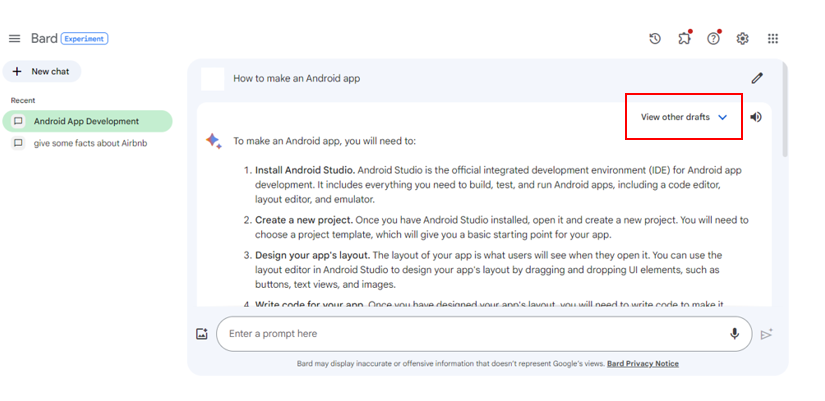
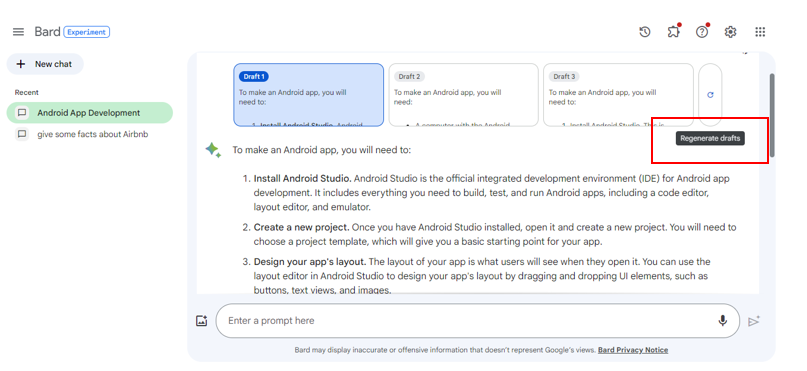
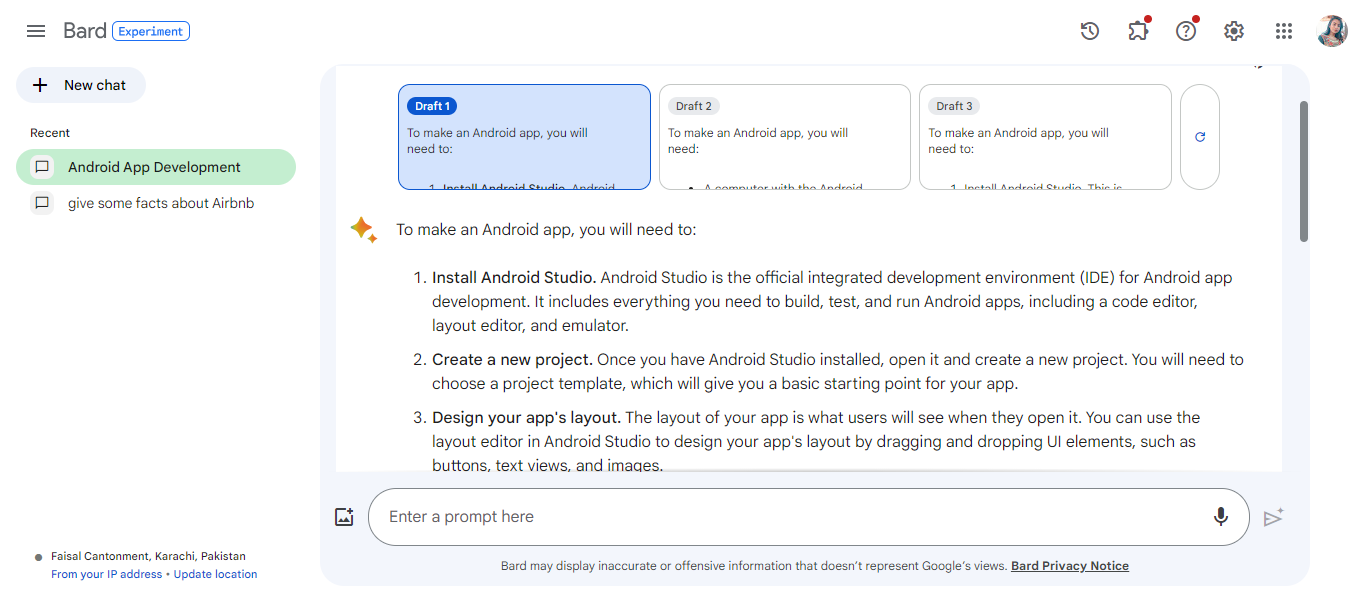
After receiving a response, you’ll notice that Google Bard provides two additional “drafts” of the same answer. These drafts offer alternative perspectives and insights related to your query. You can click on “View other drafts” to explore them.
8. Regenerating Drafts
If you’re not satisfied with the provided drafts, you can click “Regenerate drafts” to prompt Google Bard to generate fresh answers. Keep in mind that regenerating drafts often produces responses that are quite similar.
9. Exploring Chat History
All your interactions with Google Bard are contained within a single scroll window. It’s important to note that if you close this window, your chat history will be deleted. However, you can see and delete all the prompts you’ve used in “Bard activity” in the sidebar. Unfortunately, the actual answers from Google Bard are not accessible in the chat history.
10. Exporting Responses
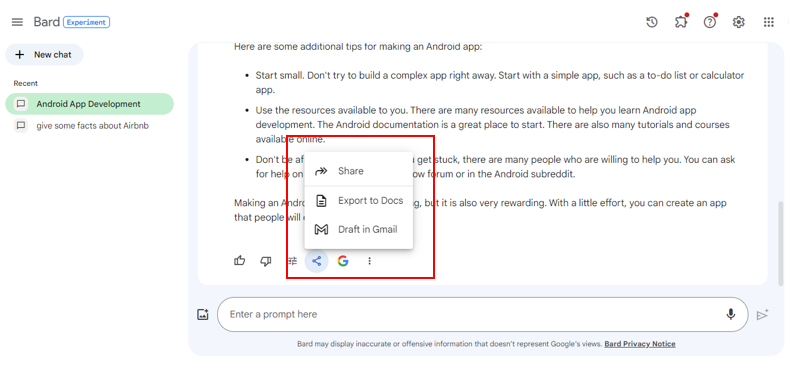
If you wish to save or share responses, Google Bard allows you to export them directly to Gmail, Google Docs, or Replit. Simply click the share icon under the answer you want to export and select your preferred destination.
11. Switch to Dark Mode
If you prefer a different visual style, you can enable Dark Mode by clicking on the toggle located in the bottom left of the sidebar.
By following these steps, you can effectively use Google Bard to generate responses, access alternative drafts, and export valuable information to other platforms. This user-friendly interface makes Google Bard a powerful tool for a wide range of tasks, from answering questions to content creation and more.
Unique Features of Google Bard
Google’s commitment to AI innovation takes a giant leap with Bard, an experimental conversational AI service powered by the Language Model for Dialogue Applications (LaMDA). Bard is designed to combine the vast expanse of the world’s knowledge with the intelligence and creativity of large language models. Here’s why Bard is set to be a game-changer:
Fresh and High-Quality Responses
Bard draws upon information from the web to provide fresh, high-quality responses. Whether you want to explain complex scientific discoveries to a child or dive into the world of sports, Bard can provide you with the information you need in an engaging and informative manner.
Scaling Accessibility
To make Bard accessible to a wider audience, Google is releasing it initially with a lightweight model version of LaMDA. This strategic move reduces the computing power required, ensuring scalability and more user feedback. Google’s commitment to quality, safety, and groundedness in real-world information remains unwavering.
AI in Everyday Products
Google has a rich history of using AI to enhance the search experience for billions of users. From BERT to MUM, the tech giant has continually pushed the envelope in understanding human language. Now, with AI technologies like LaMDA, PaLM, Imagen, and MusicLM, Google is poised to transform how we engage with information across various media formats.
Enriching Search
Google Brad is evolving to provide more than just factual answers. With AI-powered features, users can access a wealth of insights and understanding on a wide range of topics. Whether you’re comparing the piano and guitar for ease of learning or exploring various stargazing constellations, Google Bard with AI can be your trusted companion.
What is Google Bard Used For?
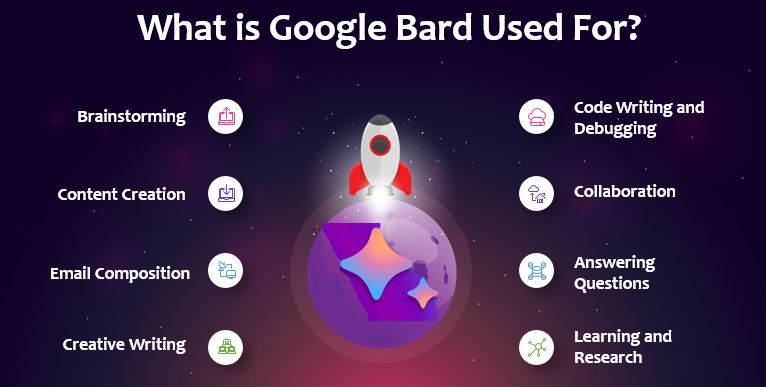
Google Bard has a wide range of versatile applications, making it a valuable tool in various contexts. Here’s a breakdown of what Google Bard can be used for:
1. Brainstorming
Google Bard can serve as an excellent brainstorming companion. Whether you’re working on a creative project, need ideas for a presentation, or want to explore new concepts, you can engage in productive brainstorming sessions with the AI.
2. Content Creation
Many users harness the capabilities of Google Bard for content creation. Whether you’re an author, journalist, or content marketer, you can use Google Bard to generate articles, blog posts, essays, and other written content. It provides a starting point for your work and helps overcome writer’s block.
3. Email Composition
Crafting compelling and informative emails is made easier with Google Bard. You can seek assistance in drafting professional emails, ensuring your communication is effective and well-structured.
4. Creative Writing
If you’re a writer or poet, Google Bard can assist you in generating creative content. It’s a valuable tool for writing stories, poems, and other imaginative pieces.
5. Code Writing and Debugging
For developers, Google Bard can be used to write and debug code. It provides code snippets and solutions to coding challenges, making it a handy resource for programming tasks.
6. Collaboration
Google Bard’s conversational abilities make it an effective collaborator. You can use it to brainstorm ideas with colleagues, co-write documents, or engage in discussions that require AI-generated content.
7. Answering Questions
Google Bard can be a quick source of information and answers. Whether you have questions about general knowledge, facts, or specific topics, you can rely on Google Bard to provide informative responses.
8. Learning and Research
Students and researchers can benefit from Google Bard when conducting research or seeking explanations on complex subjects. It can provide concise explanations and summaries of various topics.
9. Idea Exploration
If you have a concept or project in mind and need to explore different angles, Google Bard can assist by generating ideas, suggestions, and insights to help you refine your vision.
10. Translations
While Google Bard primarily operates in English, it can be a useful tool for quick translations between languages, especially with its multilingual capabilities.
11. Content Outlining
You can use Google Bard to outline the structure of articles, reports, or presentations. It can generate headings, subheadings, and key points to guide your content creation process.
12. Entertainment
If you’re looking for creative writing prompts, riddles, jokes, or entertaining responses, Google Bard can provide amusement and fun interactions.
However, it’s important to note that while Google Bard is a valuable resource for various tasks, its text generation should be used as a starting point. Depending on your specific needs, you may need to further edit and refine the content it produces to meet your standards, especially for critical or professional purposes.
Google Bard Limitations and Controversies
Despite its impressive capabilities, Google Bard is not without its limitations and controversies.
Accuracy: Unlike ChatGPT, Google Bard has access to the entire internet, which means it can reference current events and context. However, this does not guarantee 100% accuracy, and Bard is known to produce incorrect information on occasion.
Hallucinations: Google acknowledges that Bard is prone to hallucinations, leading to erroneous responses. These inaccuracies have led to criticism and affected Google’s stock price.
Chat Storage: One significant limitation is Bard’s inability to save chats. While you can export them, once you close the window, they are irretrievably lost.
Is Google Bard Better than ChatGPT?
Google Bard
ChatGPT
Yes, it can access the latest data from the internet.
Primarily based on data collected up to 2021.
Supports multiple languages and plans to expand.
Primarily English-based, with limited language support.
Allows exporting responses to Gmail, Google Docs, or Replit.
Limited export options.
Offers natural and engaging conversations.
Particularly strong in mimicking human interaction.
May not excel in creative content generation.
Strong in creative writing and brainstorming tasks.
Lacks chat storage capabilities.
Allows saving and organizing past conversations.
Simply put Comparing Google Bard and ChatGPT reveals distinct strengths and weaknesses. Google Bard taps into up-to-date information, thanks to its internet connectivity, giving it an advantage in providing current insights and data. ChatGPT excels in conversational questions and answers and is particularly adept at creative tasks. Recent developments suggest Google Bard is gearing up for a more competitive edge against ChatGPT.
The comparison between Google Bard and ChatGPT is a nuanced one, with each AI chatbot boasting its own set of strengths and weaknesses.
Google Bard has several noteworthy advantages:
Up-to-Date Information: Thanks to its internet connectivity, Google Bard can tap into the latest information and provide current insights. This is particularly advantageous for users seeking real-time data and context.
Multilingual Support: With support for multiple languages, including plans to expand further, Google Bard caters to a diverse user base, making it accessible and useful for a global audience.
Export Functionality: The ability to export responses directly to Gmail, Google Docs, or Replit is a valuable feature, enhancing productivity and content management.
On the other hand, ChatGPT has its own strengths:
Conversational Excellence: ChatGPT excels in natural, engaging conversation. It is especially adept at answering questions and providing responses that closely mimic human interaction.
Creative Tasks: If your tasks involve creative writing, brainstorming, or generating imaginative content, ChatGPT shines in these areas.
Chat Storage: Unlike Google Bard, ChatGPT offers the ability to save and organize your chats, making it more suitable for those who require easy access to past conversations.
The choice between Google Bard and ChatGPT ultimately depends on your specific needs and preferences. If you require real-time information and multilingual capabilities, Google Bard may be the better choice. However, if you prioritize conversational excellence and creative tasks, ChatGPT might be the preferred option.
The Future of Google Bard
In the midst of rapid AI advancements, Google remains steadfast in its commitment to responsible AI development. The company’s AI Principles, published in 2018, set the stage for ethical and responsible AI innovation. Google actively collaborates with governments, external organizations, and experts to ensure that AI remains safe and beneficial for society.
Google’s plans to integrate text-to-image creation, known as Firefly, into Bard’s capabilities is a testament to its commitment to innovation. This feature, in partnership with Adobe, promises to enhance Bard’s creative potential.
All things considered
In conclusion, Google Bard represents a formidable competitor in the world of conversational AI chatbots. Its powerful LaMDA foundation, multilingual support, and unique features make it a versatile tool for various applications. However, users should be mindful of its limitations and exercise discretion when using its text output. As Google continues to enhance Bard’s capabilities, it may soon become the go-to choice for a wide range of tasks, from content creation to brainstorming and beyond.
This guide equips you with the knowledge and insights needed to make the most of Google Bard, ensuring that you can harness its potential to enhance your productivity and creativity. As the AI landscape evolves, Google Bard stands as a testament to the boundless possibilities of artificial intelligence in the realm of language processing.
Let’s make the Next Google Bard AI Together
Here’s why TechnBrains is the best choice for custom software development and how we can collaborate to bring the next Google Bard to life:
Project Vision: We’ll start by thoroughly discussing your vision for the AI chatbot. What are your goals? What functionalities and capabilities do you envision for the next Google Bard? Understanding your vision is crucial for a successful collaboration.
Technical Blueprint: Our team of AI and software development experts will work closely with you to create a technical blueprint. This blueprint will outline the architecture, algorithms, and technologies required to build the chatbot.
Development Phases: We’ll break down the project into manageable phases, each with defined goals and milestones. This approach ensures that we make steady progress and maintain transparency throughout the development process.
Testing and Iteration: Rigorous testing and continuous iteration are essential to refine the chatbot’s performance. We’ll conduct comprehensive testing to ensure that the chatbot functions seamlessly and learns from user interactions.
Deployment and Maintenance: Once the chatbot is ready, we’ll assist with its deployment and provide ongoing maintenance and support to address any issues and implement improvements.
User Feedback: User feedback is invaluable in enhancing the chatbot’s capabilities. We’ll actively seek user input and incorporate feedback to make the chatbot more user-friendly and effective.
Future Enhancements: As AI and NLP technologies evolve, we’ll remain at the forefront of innovation. Our partnership will extend beyond the initial launch as we work together to implement future enhancements and features.
In conclusion, TechnBrains is the ideal partner to bring the next Google Bard to life. Our expertise, innovation-driven approach, and commitment to excellence align perfectly with the ambitious goal of creating a groundbreaking AI chatbot.
FAQs
1. What does Google Bard AI do?
Google Bard is an innovative conversational AI service developed by Google. It leverages the power of large language models to provide fresh, high-quality responses by drawing upon information from the web. It can simplify complex topics, making it an ideal tool for explaining various subjects, from scientific discoveries to sports statistics.
2. Is Google’s Bard AI available?
Yes, Google Bard is indeed available. Google has recently opened it up to trusted testers, and it’s on its way to becoming more widely accessible to the public in the coming weeks. This means you can soon explore its capabilities and experience the wealth of knowledge it can offer.
3. Is Google Bard AI worth trying?
Absolutely! Google Bard is poised to be a game-changer in how we access and interact with information. It combines the vast expanse of the world’s knowledge with the intelligence of AI. Whether you’re a curious learner, a researcher, or someone who simply wants insightful responses, Google Bard is certainly worth trying to simplify your information-seeking journey.
4. What is happening with Google Bard?
Google Bard is continuously evolving and improving. It is currently in the testing phase by trusted users to ensure its responses meet high standards of quality, safety, and accuracy. Google is actively seeking feedback to enhance Bard’s performance. So, stay tuned for more exciting developments with Google Bard in the near future!
Overview: Choosing the right JavaScript framework can be confusing with so many options available. To make an informed decision, it’s important to consider critical aspects. We’ve compared Angular vs React to help you choose the right one for your project requirements.
In the realm of web development, the choice of the right framework can make or break your project. It’s a decision that can shape the performance, scalability, and maintainability of your web applications. Angular and React are two of the most prominent contenders in this arena. Each has its own strengths and loyal following, but which one should you choose?
In this comprehensive guide, we embark on a journey through the intricate landscape of Angular vs React, providing you with an in-depth analysis to empower you in making an informed decision for your next web development venture.
Angular – A complete Overview
Angular, developed and maintained by the tech behemoth Google, stands as a comprehensive, open-source web application framework. It finds its roots in TypeScript, a statically typed superset of JavaScript. Its primary objective is to simplify the development of dynamic web applications. Angular encompasses a wide range of tools, libraries, and features, making it an attractive choice for developers aiming to create large-scale applications with complex functionalities.
Angular, one of the most popular JavaScript frameworks for building web applications, has a fascinating journey from its inception to its current prominence in the world of web development. Let’s delve into the story of how Angular came to be.
The Birth of AngularJS (Version 1)
Angular was created in 2009 by Google engineer Misko Hevery. Its purpose was to simplify and improve the development of dynamic web applications, which were often complicated and error-prone with conventional JavaScript. AngularJS development was officially released as an open-source project in 2010. It introduced the concept of two-way data binding, allowing developers to create interactive and responsive web applications with less code. This feature, along with the use of declarative HTML templates, made AngularJS a game-changer in web development.
The Rise of AngularJS
AngularJS gained rapid adoption and a loyal developer community. Its ability to create Single Page Applications (SPAs) and handle dynamic content made it a popular choice for building modern web applications. Major companies and organizations began using AngularJS for their web projects.
Angular Today
Angular has improved significantly since version 2, now up to version 8. It’s responsive to feedback and trends, with features like AOT compilation and tree-shakable dependencies. The ecosystem of tools and libraries increases productivity and maintainability. Angular is used by startups and large enterprises to create web and mobile apps. It embraces modern web standards and practices, ensuring stability and long-term support for developers.
Features of Angular
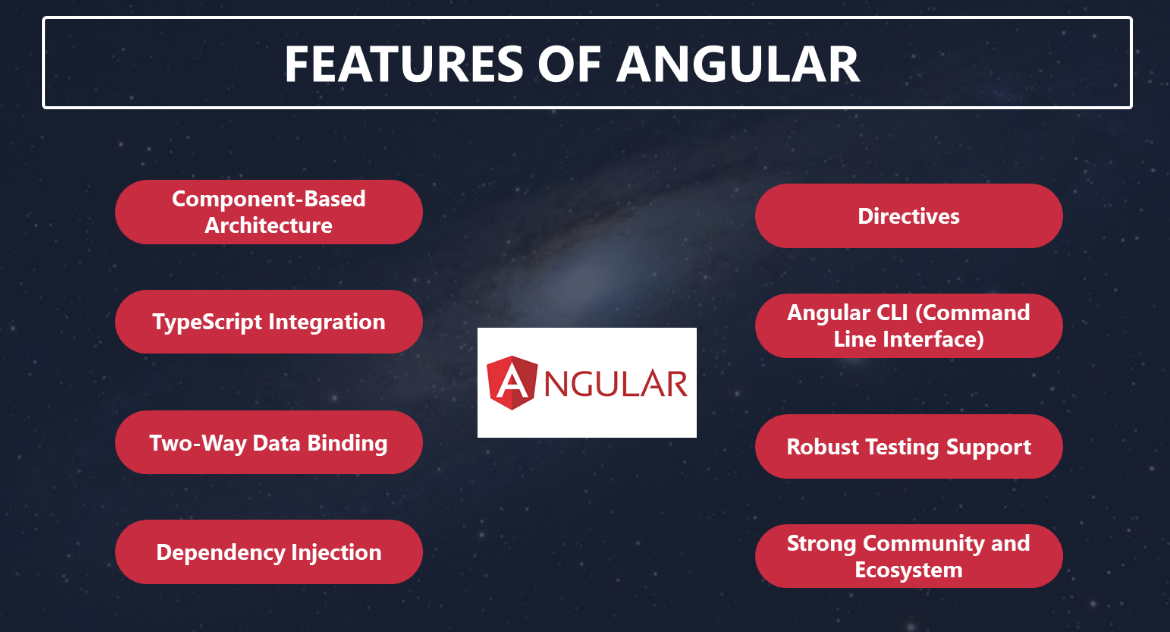
1. Component-Based Architecture
Angular embraces a component-based architecture, which promotes modularity and reusability. Developers can create encapsulated components for different parts of the application, facilitating easier maintenance and scaling of projects.
2. TypeScript Integration
Angular’s use of TypeScript, a statically typed superset of JavaScript, provides enhanced code quality and tooling. Developers benefit from features like type checking and autocompletion, reducing the likelihood of runtime errors.
3. Two-Way Data Binding
Angular features two-way data binding, a powerful mechanism that automatically synchronizes changes between the model (data) and the view (UI). When data changes, the view updates, and vice versa, simplifying the development of real-time applications.
4. Dependency Injection
Angular incorporates dependency injection, a design pattern that facilitates the management of dependencies and promotes testability. This feature makes it easier to swap out components, services, and modules as needed.
5. Directives
Angular introduces custom HTML elements called directives. These allow developers to extend HTML with additional behavior, making it easier to create dynamic and interactive user interfaces.
6. Angular CLI (Command Line Interface)
Angular CLI streamlines project setup, development, and testing. It automates common tasks, such as scaffolding components and services, enabling developers to focus on writing code rather than configuration.
7. Robust Testing Support
Angular’s built-in support for unit testing and end-to-end testing simplifies the process of writing and running tests. This ensures that applications remain stable and bug-free as they evolve.
8. Strong Community and Ecosystem
Angular boasts a large and active community of developers. This results in a rich ecosystem of third-party libraries, extensions, and tools, enhancing productivity and expanding capabilities.
All you need to know about React
React, in contrast, is not a framework but a JavaScript library maintained by Facebook. Renowned for its simplicity and flexibility, React is primarily used for building user interfaces (UIs), especially in the realm of single-page applications (SPAs). It takes a minimalist approach, focusing on rendering components efficiently while leaving other aspects of web development to external libraries and tools. This minimalism has earned React a devoted following, particularly among startups and companies seeking to build UI-rich applications. React, a JavaScript library developed by Facebook, has revolutionized web development. It’s now essential for front-end development and dominates the modern web development field.
React by Facebook
React’s story begins within the walls of Facebook, one of the tech giants that continually seeks innovative ways to improve user experiences across its platform. As Facebook expanded, the complexity of its user interface grew exponentially. Traditional approaches to managing this complexity, based on JavaScript and the Document Object Model (DOM), proved inadequate.
Virtual DOM
In 2011, Jordan Walke, a software engineer at Facebook, initiated a project called “FaxJS” as an experiment to address these challenges. FaxJS aimed to simplify the creation of complex UI components, making them easier to manage and maintain. It introduced a novel concept called the Virtual DOM.
The Virtual DOM was React’s breakthrough innovation. Instead of directly manipulating the browser’s DOM, React introduced an abstraction layer—the Virtual DOM. It acted as an intermediary representation of the actual DOM, enabling React to efficiently track changes and update only the parts of the DOM that required modification. This approach significantly improved performance and responsiveness.
React and Flux
React’s popularity stems from its implementation of the Flux architecture in 2015 and the addition of libraries like Redux for managing complex data flows. Its stable and sustainable development is due to its community-driven approach and commitment to backward compatibility. Significant updates, such as the introduction of hooks and concurrent mode, have improved developer experience and performance. React is now a leader in web development.
React Today
Today, React stands as one of the most widely used front-end libraries, with a vast and active community. It has shaped the way developers approach UI development, emphasizing declarative and component-based paradigms. React’s journey, from an internal experiment at Facebook to an open-source powerhouse, exemplifies how innovation and collaboration can reshape an industry and empower developers to create exceptional user experiences on the web and beyond.
Features of React
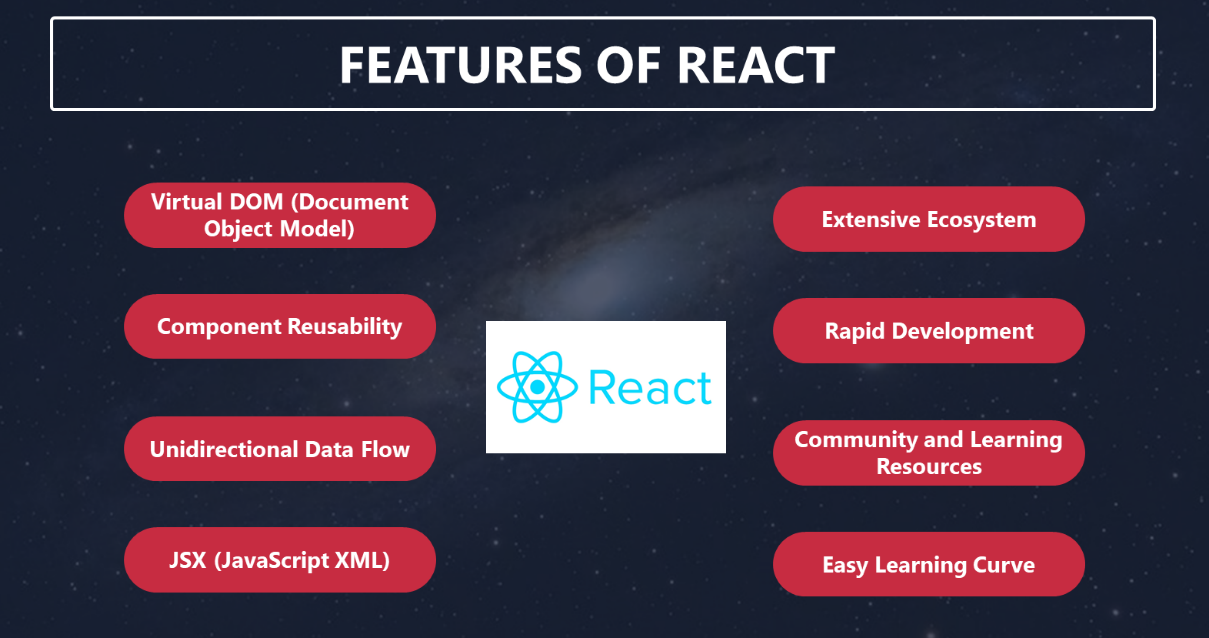
1. Virtual DOM (Document Object Model)
React’s virtual DOM is a virtual representation of the actual DOM in the browser. It allows React to efficiently update the UI by minimizing direct manipulation of the real DOM. This results in faster rendering and improved performance.
2. Component Reusability
React encourages the creation of reusable UI components. These components can be composed to build complex user interfaces, promoting a modular and maintainable codebase.
3. Unidirectional Data Flow
React enforces a unidirectional data flow, which simplifies data management and reduces the chances of unexpected side effects. Data flows in a single direction, from parent components to child components, making it easier to understand and debug code.
4. JSX (JavaScript XML)
JSX is a syntax extension for JavaScript used in React. It allows developers to write HTML-like code within JavaScript, making it more intuitive to define and render UI components.
5. Extensive Ecosystem
React’s popularity has led to a vast ecosystem of libraries, tools, and community-contributed components. This ecosystem accelerates development by providing pre-built solutions for common tasks.
6. Rapid Development
React’s simplicity and focused scope allow for rapid development of user interfaces. Developers can quickly create UI components and efficiently manage their state.
7. Community and Learning Resources
React benefits from an active community that produces a wealth of tutorials, courses, and documentation. This makes it accessible to developers of all skill levels.
Key Differences That Matter
In this epic battle of Angular vs React, it’s crucial to understand the significant differences between the two. These differences often dictate the choice between them for a particular project.
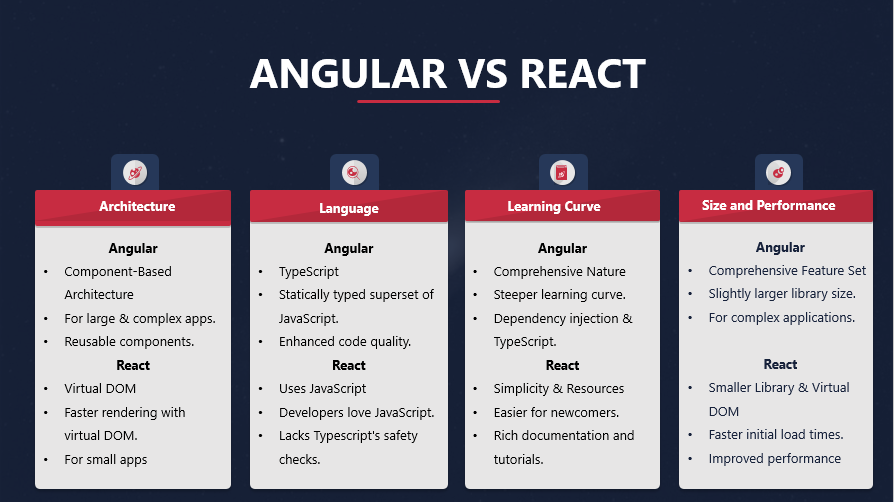
Architecture
Angular adopts a component-based architecture. This means that applications built with Angular are organized into a hierarchical structure of reusable components. This architectural approach is particularly well-suited for creating large and complex applications. React, on the other hand, utilizes a virtual DOM (Document Object Model) and a component-based structure. The virtual DOM enhances performance by minimizing direct manipulation of the actual DOM, resulting in faster rendering. React’s approach is simpler and more adaptable, especially for smaller projects.
Learning Curve
Angular’s comprehensive nature comes at a cost—a steeper learning curve. Its vast ecosystem and numerous concepts, such as dependency injection and TypeScript, require time and effort to master. In contrast, React’s simplicity and the abundance of learning resources, including official documentation and tutorials, make it more accessible, even to developers who are new to front-end development.
Language
One of the fundamental differences between Angular and React is the programming language they use. Angular embraces TypeScript, a statically typed superset of JavaScript. TypeScript provides enhanced tooling and type checking, which can catch errors at compile time rather than runtime, improving code quality and maintainability. React, on the other hand, relies on plain JavaScript. This choice makes React more straightforward for developers already familiar with JavaScript, but it lacks some of the strictness and safety checks that TypeScript offers.
Size and Performance
When it comes to size and performance, React often takes the lead. React’s library is relatively small compared to Angular, resulting in faster initial load times and improved performance. Additionally, React’s virtual DOM implementation minimizes the need for direct manipulation of the actual DOM, further enhancing speed and efficiency. However, it’s worth noting that Angular’s extensive feature set can be beneficial for complex applications, even if it means a slightly larger library size.
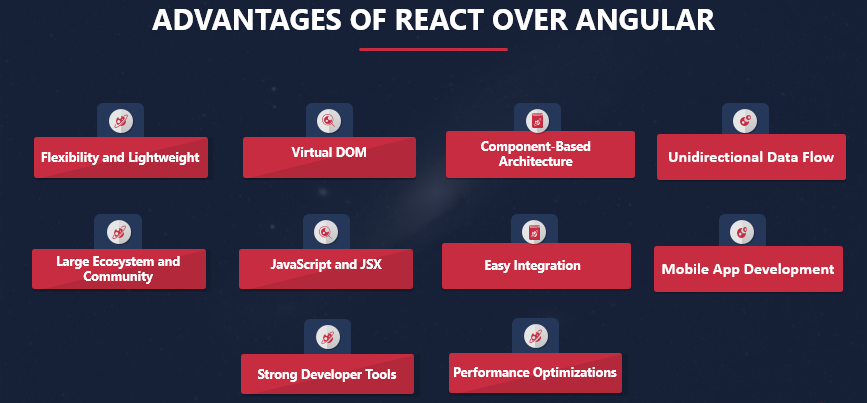
Advantages of React Over Angular
Simply put react Reacts component-based architecture promotes code reusability with reusable UI components over Angular. React’s meteoric rise in popularity in recent years is driven by its inherent advantages, which resonate with many developers and organizations:
1. Flexibility and Lightweight
React is often praised for its flexibility and lightweight nature. Unlike Angular, which is a comprehensive framework with a steeper learning curve, React is more of a library for building user interfaces. This lightweight approach allows developers to integrate React into existing projects easily and choose their preferred tools and libraries for other parts of the application.
2. Virtual DOM
One of React’s standout features is the Virtual DOM (Document Object Model). React uses a virtual representation of the actual DOM, and any changes are first made to this virtual DOM. Then, React efficiently calculates the difference between the virtual and real DOM and updates only the necessary parts. This approach significantly improves the performance of web applications, making React ideal for building responsive and high-performing UIs.
3. Component-Based Architecture
React promotes a component-based architecture, which encourages modularity and reusability. In React, developers break down UIs into small, reusable components and can compose them to build complex interfaces. This makes code maintenance easier and allows multiple developers to work on different parts of the application simultaneously.
4. Unidirectional Data Flow
React enforces a unidirectional data flow, which simplifies the way data is passed between components. In a React application, data flows in a single direction, from parent components to child components. This predictability makes it easier to debug and maintain applications, especially as they grow in complexity.
5. Large Ecosystem and Community
React has a vast and active community of developers, which means there is a wealth of resources, libraries, and third-party integrations available. This ecosystem makes it easy to find solutions to common problems, share knowledge, and access a wide range of tools to enhance development productivity.
6. JavaScript and JSX
React uses JavaScript and JSX (JavaScript XML) for creating UI components. JSX is a syntax extension that allows developers to write HTML-like code within JavaScript, making the creation of UI components more intuitive. While some developers may find JSX unusual at first, it ultimately simplifies the process of defining UI elements.
7. Easy Integration
React is designed to be easy to integrate into existing projects. You can gradually adopt React for specific parts of your application without having to rewrite the entire codebase. This flexibility is especially advantageous for companies with legacy systems that want to modernize their user interfaces.
8. Mobile App Development
React Native, a framework built on top of React, allows developers to build native mobile applications for iOS and Android using React. This enables code sharing between web and mobile applications, reducing development time and effort. Angular, on the other hand, has its own mobile development framework called Ionic.
9. Strong Developer Tools
React comes with a set of developer tools, including browser extensions and the React DevTools, which greatly aid in debugging, profiling, and inspecting React components. It also easier to build a native app with React especially when you have the code. Also, These tools provide valuable insights into the component hierarchy and state changes, making it easier to identify and resolve issues.
10. Performance Optimizations:
React provides various optimization techniques, such as memorization and PureComponent, to improve application performance. Developers can implement these optimizations selectively to prevent unnecessary rendering and improve the overall responsiveness of the application.
Making the Right Choice
As you stand at the crossroads of Angular and React, pondering the monumental decision of which framework to choose, consider the following factors:
Project Complexity
The complexity of your project should be a primary determinant. For large-scale enterprise applications with intricate features and requirements, Angular’s comprehensive nature and strong architectural foundation may be the better fit. It provides the necessary tools to manage complexity effectively.
Development Speed
If time-to-market and rapid development are your primary concerns, React’s simplicity and minimalism can significantly accelerate the development process. Its fast learning curve allows developers to start building UIs swiftly. An app like Instagram is also built will React.
Team Expertise
Evaluate your team’s expertise and familiarity with TypeScript and JavaScript. The choice between Angular and React should align with your developers’ skills. Leveraging your team’s existing knowledge can expedite development and reduce the learning curve.
Scalability
Consider the long-term scalability of your project. Both Angular and React offer strategies for scaling applications, but they differ in their approaches. Angular’s component-based architecture supports the development of large, complex applications from the outset, while React’s simplicity can require additional architectural considerations as your application grows.
All things considered
In this comparison of Angular and React, there is no definitive winner. The choice between these two formidable contenders hinges on the specific needs and objectives of your project. React’s simplicity, performance, and thriving ecosystem have made it a preferred choice for many, particularly in the realm of UI-focused applications. On the other hand, large-scale enterprise projects with intricate requirements benefit from Angular’s robust feature set and architectural strength.
The ultimate key to a successful web development journey lies not just in choosing the right framework but also in leveraging it effectively. Whether you opt for Angular or React, align your choice with your project’s demands and your team’s expertise. This alignment will enable you to harness the full potential of your chosen framework, ensuring the creation of a stellar web application that not only meets but exceeds your objectives.
Elevate Your Web Projects with TechnBrains
At TechnBrains, we are your trusted partner in the digital realm, offering comprehensive web development solutions that redefine excellence. Whether you’re in search of skilled Angular developers or seeking the expertise of a top-tier web development company, your journey to success begins here.
Hire Angular Developers
Our team of Angular developers is primed and ready to bring your web projects to life. With years of experience and a deep understanding of the Angular framework, we are well-equipped to tackle even the most ambitious endeavors. By choosing TechnBrains, you’re not just hiring developers; you’re gaining access to a wealth of technical knowledge and creativity.
TechnBrains: Your Trusted Web Development Company
As a leading web development company, TechnBrains is committed to delivering solutions that seamlessly merge innovation, functionality, and aesthetics. We take pride in our ability to transform your ideas into cutting-edge web applications that stand out in the digital landscape.
Elevate Your Digital Presence
TechnBrains is your gateway to achieving online excellence. By hiring Angular developers from our team or partnering with us as your web development company of choice, you’re embarking on a journey that leads to digital success.
Your Digital Dreams, Our Expertise
Don’t hesitate to get in touch with TechnBrains and take the first step towards realizing your digital dreams. With us by your side, you can hire Angular developers, embrace the latest in web technology, and watch your online initiatives flourish. TechnBrains is where your digital aspirations become a reality.
FAQs
How is React different from Angular?
These two popular JavaScript frameworks are often pitted against each other in the world of web development. React, maintained by Facebook, is a JavaScript library, while Angular, developed by Google, is a full-fledged web application framework.
How is Angular different than React?
Difference Between React and Angular: The primary distinction lies in their architecture and approach. React relies on a virtual DOM for efficient rendering, making it highly adaptable for building user interfaces. Angular, on the other hand, follows a component-based architecture, which is well-suited for complex applications.
React or Angular: The choice between React and Angular depends on your project’s specific needs. React is favored for its simplicity and performance, making it ideal for UI-focused applications. Angular shines in larger, complex projects where a robust framework is necessary.
Angular and React: Both frameworks have vibrant communities and extensive ecosystems, with a plethora of third-party libraries and tools to enhance development.
Is Angular better than React?
Advantages of React Over Angular: React’s advantages include flexibility, outstanding performance due to its virtual DOM, a thriving community, seamless integration with other libraries, and an abundance of learning resources.
How is React Different from Angular: React is a JavaScript library that focuses on building user interfaces efficiently, while Angular is a comprehensive web application framework with a more extensive feature set.
How is Angular Different Than React: Angular, being a framework, provides a complete solution for web development, including tools for routing, state management, and dependency injection, while React is a library for UI development.
Is Angular Better Than React: There’s no definitive answer; it depends on the project’s requirements. Angular excels in certain scenarios, while React is preferred for its simplicity and performance.
Why choose React over Angular?
Why Choose React Over Angular: React’s simplicity, virtual DOM, and rich ecosystem make it a compelling choice for projects where rapid development and excellent performance are key.
Is Angular easier than React?
Is Angular Easier Than React: React is generally considered easier to learn due to its simplicity and extensive learning resources. Angular’s learning curve can be steeper, primarily because of its comprehensive nature.
What is the difference between TypeScript and JavaScript?
TypeScript is a statically typed superset of JavaScript. It offers enhanced tooling and type checking, catching errors at compile time. JavaScript, on the other hand, is dynamically typed and more permissive. TypeScript adds strictness and safety to JavaScript development.
In an exclusive interview with ValiantCEO Magazine, Muhammad Muzammil Rawjani, the Co-Founder of TechnBrains, takes us on a journey through technology, business, and societal evolution. Rawjani’s visionary approach to technology has propelled his company to the forefront of digital advancement. In this interview, he shares his insights, achievements, and aspirations for a tech-driven future.
A True Leader
Muhammad Muzammil Rawjani is a true technology visionary who has dedicated over a decade to the IT industry. He co-founded TechnBrains, a company known for its modern-day revolutionary application development. Rawjani’s passion for technology is evident in his mission to transform businesses and empower people. His expertise spans various technologies, including C#, ASP.NET, MVC, MS Windows, and Linux.
TechnBrains, under Rawjani’s leadership, focuses on creating scalable, viable products that add real value to users’ lives. Their projects aren’t just about coding; they’re about revolutionizing entire industries. The company’s commitment to building a better future through technology sets them apart in the industry.
Greatest Business Achievement
In the past year, Rawjani and his team at TechnBrains celebrated a remarkable achievement—the successful launch and widespread adoption of their flagship mobile application. This innovative solution addressed a critical problem, offering a seamless user experience and cutting-edge features that garnered positive feedback from users and industry experts.
Valuable Advice and Improvements
Reflecting on his entrepreneurial journey, Rawjani wishes he had received advice on building a solid network of mentors and advisors. He recognizes the value of experienced guidance in navigating the challenges of entrepreneurship.
Looking ahead, Rawjani plans to enhance TechnBrains’ customer feedback process. Understanding customer needs and continuously improving their offerings is a top priority to stay competitive and aligned with customer expectations.
Capitalizing on the Digital Wave
The surge in online activities, including B2B and B2C interactions, virtual meetings, and remote work, has been unprecedented. Rawjani’s strategy for the coming year revolves around enhancing the company’s online presence and user experience. They aim to be at the forefront of the digital revolution and drive sustainable growth.
Embracing Technology for Growth
Although Rawjani hasn’t written a book yet, he envisions one that guides individuals and businesses in embracing technology for personal and professional growth. This book will explore how emerging technologies like AI can enhance productivity, creativity, and problem-solving while addressing the ethical implications of technology.
Thriving in 2023
2020, 2021, and 2022 challenged businesses globally. Rawjani’s critical lessons learned revolve around adaptability, resilience, and digital transformation. He emphasizes the importance of agility in decision-making, employee well-being, flexible work arrangements, diversifying supply chains, and staying connected with customers to thrive in 2023.
Defining Success
For Rawjani, success in 2023 means achieving significant business growth and recognition as a leader in providing innovative and impactful IT solutions. Personal success includes maintaining a healthy work-life balance, continuous learning, and fostering a collaborative and motivated team. Ultimately, success is defined as positively and lasting impacting clients, employees, and the community.
Muhammad Muzammil Rawjani’s journey and insights are an inspiring example of how technology can shape the future of business and society. His dedication to innovation and impact paves the way for a promising tech-driven future.
Overview: Low Code Platforms give businesses and developers a simple, visible tools to streamline their software development process. According to Gartner, Low code development will be used in 65% of application development projects by 2024. Low code platforms undoubtedly continue to be a wise investment for many corporate users even though Low code development challenges the conventions of traditional software development. Discover how experts of TechnBrains uncover the best low code platform for you to kick start as a developer.
In the rapidly evolving world of web design and development, businesses and developers are constantly seeking innovative ways to accelerate the creation of applications and websites. One powerful solution that has gained significant popularity in recent years is Low Code Platforms. These platforms allow users to build applications with minimal hand-coding, making the development process faster, more efficient, and accessible to a wider range of users.
In this blog post, we will explore the top 10 best low code platforms to consider using in 2023.
What Is Low Code Development?
Low code development is a software development approach that emphasizes visual development tools and minimal hand-coding. It enables developers, regardless of their coding proficiency, to create applications using a drag-and-drop interface and pre-built components. This approach significantly reduces the time and effort required to build applications, making it ideal for companies seeking rapid development and deployment.
Low code platforms provide an intuitive environment that empowers both professional developers and business users to collaborate effectively and streamline the development process. With a focus on visual modeling and automated code generation, low code platforms have become a game-changer in the software development industry.
Benefits of Low Code Development
Low Code Platforms provide benefits like increased productivity, ease of use, Cost-Effectiveness, Agility and Flexibility and collaboration. Before we delve into the best low-code platforms of 2023, let’s explore these benefits in detail that make them such a compelling choice:
Increased Productivity
Low code platforms eliminate the need for extensive manual coding, allowing developers to focus on designing and refining their applications. This results in a significant increase in productivity and faster time-to-market.
Ease of Use
With their user-friendly interfaces, low code platforms enable developers of varying skill levels to participate in the development process. Even those without extensive coding knowledge can contribute to application creation.
Cost-Effectiveness
By reducing the reliance on traditional coding methods, low code platforms cut development costs substantially, making application development more affordable for businesses of all sizes.
Agility and Flexibility
Low code platforms offer the flexibility to modify and adapt applications quickly, empowering businesses to respond rapidly to changing market demands and customer needs.
Collaboration
These platforms facilitate collaboration between developers, designers, and business stakeholders, resulting in better communication, enhanced teamwork, and improved outcomes.
Low-Code Platforms Use Cases
Low code platforms find applications across a wide range of industries and use cases. Some of the most common scenarios include:
Rapid Prototyping: Developers can quickly create prototypes to showcase ideas and gather feedback from stakeholders.
Internal Tools: Businesses can build custom internal applications for tasks like HR management, project tracking, and inventory management.
Customer-Facing Applications: From web and mobile apps to e-commerce platforms, low-code platforms can create a variety of customer-facing applications.
Legacy System Modernization: Low-code platforms can be used to modernize and streamline legacy systems, improving their efficiency and user experience.
Process Automation: Organizations can automate repetitive tasks and workflows, increasing efficiency and reducing human error.
9 Best Low-Code Platforms
Now that we understand the benefits and use cases of low-code development, let’s explore the top 9 low-code platforms that you should consider using in 2023:
Appian
Appian is a comprehensive Low code Platform that enables users to design, build, and deploy applications with ease. It offers a wide range of pre-built components and integrations, making it suitable for enterprise-level projects.
Features of Appian
Unified Platform: Appian is one of the best low code no code platforms that combines low-code development, process automation, AI integration, and data management, making it a comprehensive solution.
Intelligent Automation: It offers built-in AI and automation capabilities, allowing users to create intelligent, data-driven applications with ease.
Mendix
Mendix is known for its user-friendly interface and rapid application development capabilities. It empowers both technical and non-technical users to collaborate effectively in building feature-rich applications. Mendix is one of the most popular low code development platforms.
Features of Mendix
Smart Connector: Mendix offers a Smart Connector feature that simplifies integration with various systems, databases, and services, enabling seamless data exchange.
Collaboration Hub: Mendix’s Collaboration Hub fosters teamwork and real-time collaboration among developers, business analysts, and stakeholders.
OutSystems
OutSystems is a leading Low code Platform that emphasizes scalability and robustness. It offers a visual development environment and supports seamless integration with various technologies.
Features of OutSystems
TrueChange™: OutSystems’ TrueChange™ technology ensures smooth and reliable application updates and upgrades without impacting existing functionalities.
Reactive Web Apps: It supports Reactive Web Apps, allowing for highly interactive and responsive applications for an enhanced user experience.
Quickbase
Quickbase is a versatile Low code Platform that allows businesses to create customized applications for various use cases without extensive coding knowledge.
Features of Quickbase:
Customization Options: Quickbase provides extensive customization options, allowing users to tailor applications to their specific business needs and branding.
Role-Based Permissions: It offers granular control over access permissions, ensuring that the right users have appropriate levels of access to data and functionality.
Zoho Creator
Zoho Creator targets small and medium-sized businesses with its Low code approach. It offers a range of templates and features to streamline app development.
Features of Zoho Creator:
Deluge Scripting Language: Zoho Creator’s proprietary Deluge scripting language allows users to implement complex logic and workflows within applications.
Mobile App Preview: Users can instantly preview and test mobile applications on their devices using the Zoho Creator app.
Kissflow
Kissflow is a no-code/Low code platform that focuses on automating workflows and business processes. It is popular for its simplicity and ease of use.
Features of Kissflow
No-Code Capabilities: Kissflow offers a strong emphasis on no-code capabilities, enabling business users to create simple applications and automate workflows without coding.
Collaboration Tools: It comes with built-in collaboration tools, such as comments and notifications, fostering efficient communication within teams.
Salesforce Lightning
Salesforce Lightning is an extension of the Salesforce platform, providing Low code tools for building applications on top of the CRM system.
Features of Salesforce Lightning
Lightning App Builder: Salesforce Lightning provides a user-friendly App Builder with drag-and-drop functionality, making application development intuitive for users.
Lightning Experience: It delivers a modern and customizable user interface with the Lightning Experience, enhancing user engagement.
Microsoft Power Apps
Part of the Microsoft ecosystem, Power Apps enables users to create custom applications with minimal coding effort. It integrates well with other Microsoft services.
Features of Microsoft Power Apps
Common Data Service: Microsoft Power Apps leverages the Common Data Service, allowing users to create, manage, and integrate data entities seamlessly.
AI Builder: It offers AI Builder, enabling users to infuse artificial intelligence into their applications without extensive coding knowledge.
Nintex
Nintex specializes in workflow automation and process management. It empowers businesses to automate tasks and streamline operations with its Low code Platform.
Features of Nintex
Nintex Workflow Cloud: Nintex Workflow Cloud facilitates the automation of complex workflows that span across cloud and on-premises systems.
Mobile Forms: Nintex supports mobile-responsive forms, enabling users to complete tasks and approvals conveniently on their mobile devices.
How To Use Low-Code Platforms for Your Business
Implementing low-code platforms in your business can lead to significant improvements in application development and overall efficiency. Here are some steps to effectively leverage these platforms:
Identify Use Cases: Assess your business requirements and identify areas where low-code development can make a difference. Look for repetitive tasks, manual processes, or applications that need modernization.
Choose the Right Platform: Research and compare different low-code platforms to find the one that aligns best with your needs, budget, and existing IT infrastructure.
Training and Skill Development: Provide training to your development team and business users to familiarize them with the chosen low-code platform. This will help maximize its potential and encourage collaboration.
Start Small: Begin with simple projects or prototypes to get a feel for the platform and its capabilities. Gradually expand to more complex applications as your team gains proficiency.
Collaborate Effectively: Encourage collaboration between developers, designers, and business stakeholders to ensure that the final product meets everyone’s expectations.
Test Thoroughly: Even with low-code platforms, testing remains critical. Perform rigorous testing to identify and fix any issues before deployment.
Choose TechnBrains for Your Web Development Needs – Your Leading Web Development Company
TechnBrains, your one-stop destination for top-notch web development services. If you are in search of a leading web development company that can turn your digital dreams into reality, look no further! At TechnBrains, we combine innovation, expertise, and creativity to craft stunning websites that leave a lasting impression on your audience.
Why TechnBrains?
Expert Team of Web Developers
Our team of skilled and experienced web developers is our biggest asset. They are well-versed in the latest web development technologies and trends, ensuring that your website is at the cutting edge of the digital landscape.
Customized Web Solutions
We understand that every business is unique, and so are its requirements. At TechnBrains, we take a personalized approach to web development, tailoring solutions that perfectly align with your business goals and brand identity. We are efficient in building a website like eBay, apps like uber and much more.
Responsive and User-Friendly Design
A seamless user experience is paramount to the success of any website. Our experts ensure that your website is not only visually appealing but also responsive and easy to navigate across various devices.
Search Engine Optimization (SEO) Focus
As a leading web development company, we know the importance of SEO in driving organic traffic to your website. Our websites are designed with SEO best practices in mind, giving your business the online visibility it deserves.
Timely Delivery
We value your time and understand the importance of meeting deadlines. With TechnBrains, you can rest assured that your project will be delivered on time, without compromising on quality.
Transparent Communication
Clear and open communication is the cornerstone of our client relationships. Throughout the development process, we keep you informed, listen to your feedback, and ensure that your vision is reflected in the final product.
Our Web Development Services
Corporate Websites
Present your business to the world with a professional and engaging corporate website that showcases your products and services.
E-Commerce Solutions
Unlock the potential of online selling with our secure and feature-rich e-commerce websites, designed to drive sales and enhance customer experiences.
Content Management Systems (CMS)
Update and manage your website effortlessly with our user-friendly and customizable content management systems.
Responsive Web Design
Ensure an optimal user experience across all devices with our responsive web design solutions, boosting user engagement and search engine rankings.
Web Application Development
From small business tools to complex enterprise solutions, we develop robust web applications tailored to your unique requirements.
Website Maintenance and Support
We provide ongoing website maintenance and support services to ensure your website stays secure, up-to-date, and performs optimally.
Contact Us Today
When it comes to web development, TechnBrains is the name you can trust. Join our list of satisfied clients and take your online presence to new heights. Get in touch with us today to discuss your project and experience the expertise of a leading web development company. Let’s build a website that stands out in the digital realm and drives your business forward.
FAQ
Q: Are low code platforms suitable for large-scale enterprise applications?
Yes, many low code platforms are designed to handle large and complex enterprise-level applications effectively. However, it’s essential to choose a platform that aligns with your specific requirements and scalability needs.
Q: Can non-developers use low code platforms effectively?
Absolutely! Low code platforms are designed to be user-friendly, allowing non-developers to contribute actively to the application development process.
Q: What about security concerns with low code platforms?
Security is a vital aspect of any application development. Reputable low code platforms have robust security measures in place to safeguard your data and applications. Always opt for platforms with proper security certifications and features.
Q: Can I integrate my existing systems with applications built using low code platforms?
Yes, most low code platforms support integration with various data sources, APIs, and legacy systems, enabling seamless connections with your existing IT infrastructure.
Overview:Wondering “how to make an app like Snapchat” look no more because TechnBrains has got you covered. With Snapchat being the most popular app among people, it’s almost a joy to send a snap with the cartoon face lens to your friends and that too disappears within 10 seconds. The freedom of speech without breaching privacy is what added to Snapchat’s success. Learn to make an app like Snapchat, discover top Snapchat filters, cost of an app like Snapchat and how you can create a Snapchat face filter with TechnBrains.
Snapchat, a multimedia messaging app, has gained immense popularity among users worldwide due to its unique features that allow users to share fleeting content.
One of the most downloaded social media apps globally, Snapchat has over 350 million daily active users. Snapchat has achieved enormous success and swiftly seized the spotlight thanks to its top-notch features and capabilities. The fact that Snapchat introduced something novel to its consumers may have contributed to its popularity. Through filters and interactive lenses, this well-known messaging app has been a great innovator in delivering Augmented Reality to its users. You can share multimedia messages that “self-destruct” after a few days with the app.
As quoted in a Statista report, there were 361 million daily active Snapchat users globally just in the third quarter of 2022. Additionally, daily Snapchat creation by users exceeds 5 billion. Numerous business owners have been motivated by Snapchat’s success to research how to create similar apps and to invest in firms that specialize in developing social media mobile apps.
If you’re aspiring to create an app like Snapchat, this comprehensive guide will walk you through the essential steps, costs, and technology stack required to turn your idea into a reality.
Understanding Snapchat’s Success
If you’re familiar with popular mobile apps, it’s likely you’ve heard of Snapchat. Available for both iOS and Android users, this app was created about a decade ago in 2011 by students at Stanford University. One of the students, Reggie Brown, came up with the idea of a social media platform where users could share photos or videos that disappear after a short time. Brown presented the idea to Evan Spiegel and Bobby Murphy, and the trio worked tirelessly to develop the best app possible.
Snapchat’s popularity soared after introducing 10-second videos to the app, resulting in an impressive daily snap count of 50 million? Interestingly, Facebook’s CEO Mark Zuckerberg offered to purchase Snapchat for $3 billion just one year after its release. However, Snapchat’s CEO Evan Spiegel declined the offer, recognizing the app’s value. Spiegel’s decision proved to be correct, as Snapchat’s worth escalated to $10 billion in 2014, three times more than Zuckerberg’s initial offer. Remarkably, Snapchat generated a revenue of $389.82 million in 2018.
And before Snapchat gets on the very top of the social media world, you can jump onto the bandwagon and start developing your Snapchat alternative for Android or iOS. The trick is to find a feature that will make your app unique.
Before diving into the development process, it’s crucial to understand why Snapchat has been so successful. Snapchat revolutionized social media by introducing self-destructing messages, stories, filters, and lenses. The element of impermanence, combined with innovative features, has kept users engaged and curious, driving its popularity.
App like Snapchat: Market Research
Conduct thorough market research to identify your target audience and assess the demand for an app like Snapchat. Analyze competitors and user preferences to uncover gaps and opportunities. Understanding your potential users’ needs will help you tailor your app to meet their expectations effectively.
App like Snapchat: Features
An app like Snapchat would typically include the following key features:
1. App platform
Before we get into the features, you must determine the app platform you are going for, either iOS or Android. You can also go for a hybrid app using react.
2. Ephemeral Messaging
The app like Snapchat would allow users to send messages, photos, and videos that automatically disappear after a specific time, adding a sense of privacy and spontaneity to conversations.
3. Stories
Users can create and share Stories comprising a series of photos and videos that are visible to their followers for a limited time, usually 24 hours.
4. Filters and AR Effects
The app like Snapchat would offer a variety of filters, stickers, and augmented reality (AR) effects that users can apply to their media to add fun and creative elements. Talking about making your app interactive, an AR VR development company can help you with this.
5. Real-Time Chat
Users can engage in real-time chat with their friends or contacts, fostering instant communication within the app.
6. Multimedia Sharing
The app like Snapchat would support the seamless sharing of multimedia content, including photos, videos, and animated GIFs.
7. Snap Map or Location Sharing
A Snap Map feature, or similar location-sharing functionality, can allow users to see the real-time locations of their friends on a map, promoting social interactions and meetups.
8. Geo-filters
An app like Snapchat should offer geo-filters – location-based filters that users can apply to their media when they are in specific areas or events.
9. Video Calling
The ability to make video calls with friends directly within the app, enhancing real-time communication.
10. Discover Section or Content Feed
The app like Snapchat may include a Discover section or content feed that showcases content from brands, publishers, influencers, and other users, providing entertainment and monetization opportunities.
11. Memories or Saved Content
Users could have the option to save and store their favorite media and conversations for future viewing.
12. Snap Originals or Original Content
Like Snapchat’s Snap Originals, the app like Snapchat might offer exclusive original video series or content to keep users engaged.
13. Social Sharing
Users can easily share their Snaps and Stories with friends and followers through various social media platforms.
14. Privacy Settings
Robust privacy settings would be essential, giving users control over who can view their content and interact with them.
15. User Profiles and Followers
Users can create profiles and follow each other to stay updated with their friends’ activities.
An app like Snapchat would aim to provide a dynamic and engaging platform for multimedia messaging, fostering creativity and personal expression among its user base.
Cost of App like Snapchat:
The entire complexity of an app determines how much it will cost to produce. Additionally, the cost increases with the number of features and vice versa. In light of this, we will now provide you with a projected price and delivery date for the app like Snapchat.
App Type
Estimated Cost
Time
Simple App like Snapchat
with Basic Feature
$40,000- $60,000
3 to 6 months
Medium Complex App like Snapchat
with Advanced Features
$60,000-$100,000
6 to 9 months
Highly Complex App like Snapchat
with Highly Extensive Features
$100,000-$300,000
9+ months
Formula to determine the cost of App like Snapchat
The formula to calculate the precise cost to create an app similar to Snapchat is as follows:
Choosing the Right Tech Stack
The overall cost of developing a social media app similar to Snapchat is frequently influenced by the choice of a well-defined tech stack. Your app’s capacity to provide you with the maximum ROI increases with the strength and modernity of the technology it uses.
The technology stack you choose can significantly impact your app’s performance and scalability. Consider the following components:
Front-End Technologies
Select a front-end framework like React Native or Flutter for cross-platform compatibility and a smooth user experience.
Back-End Technologies
Opt for a reliable and scalable back-end framework such as Node.js or Django to handle user data and interactions. Data security is paramount when developing a messaging app like Snapchat. Implement robust security measures to protect user information and communication. Incorporate end-to-end encryption to ensure that messages and media are only accessible to the intended recipients. Add an extra layer of security by implementing two-factor authentication during user registration. Utilize SSL certificates to encrypt data transmitted between servers and users, preventing unauthorized access.
Database
Use a database system like PostgreSQL or MongoDB to store user-generated content securely.
Cloud Storage
Integrate cloud storage solutions like Amazon S3 or Google Cloud Storage to handle multimedia content efficiently.
How to build an app like Snapchat?
Building an app like Snapchat requires a well-structured and systematic approach. Here are the steps to guide you through the development process:
Step 1: Discovery Phase
During the discovery phase, you need to thoroughly research and understand the market, target audience, and competition. Identify the unique selling points and features you want to incorporate into your app. Conduct surveys, interviews, and gather feedback to validate your app idea and refine your concept.
Step 2: Documentation Phase
In the documentation phase, outline the app’s requirements, functionalities, and technical specifications. Create a detailed project plan, including milestones, timelines, and resource allocation. Define the user flow, wireframes, and mockups to visualize the app’s interface and user experience.
Step 3: Design Phase
In the design phase, work on the visual elements of the app. Design the user interface (UI) with a focus on simplicity, user-friendliness, and a consistent brand identity. Pay attention to color schemes, typography, and iconography. Ensure that the app design aligns with your target audience’s preferences and needs.
Designing User-Friendly Interfaces
A user-friendly interface is vital for the success of your app. Keep the following design principles in mind:
Simplicity: Ensure a clean and intuitive design to enhance user navigation and overall experience.
Consistency: Maintain consistency in design elements throughout the app to establish a cohesive brand identity.
Responsiveness: Create a responsive design that adapts seamlessly to various devices and screen sizes.
Step 4: Development Phase
The development phase involves turning your design and documentation into a functional app. Select the appropriate technology stack, including front-end and back-end technologies. Develop the core features of the app, such as messaging, media sharing, and filters. Implement real-time functionality and integrate APIs for geolocation and other services if required.
● Integrating Multimedia Features
Multimedia features are the heart of an app like Snapchat. Focus on providing users with a seamless multimedia experience. Enable users to capture photos and record videos directly within the app using their device’s camera. Incorporate editing tools such as text overlay, stickers, and drawing tools to enhance user-created content.
● Implementing Real-Time Functionality
Real-time functionality is critical to delivering a dynamic user experience. Use technologies like WebSockets to enable real-time interactions. Facilitate instant messaging and real-time chat between users to promote engaging conversations. Implement real-time push notifications to keep users updated about new messages, friend requests, and other activities.
Step 5: Quality Assurance Phase
Thoroughly test your app in the quality assurance phase to identify and fix bugs, usability issues, and performance problems. Conduct functional testing, usability testing, and compatibility testing on various devices and platforms. Ensure that the app meets your quality standards and provides a seamless user experience.
Step 6: Launching Your App
Prepare for a successful app like Snapchat launch. Conduct beta testing with a limited group of users to gather feedback and make improvements. Follow the guidelines of app stores like the Apple App Store and Google Play Store for a smooth submission process. You can also manage your app store rating and reviews to have a prominent app store presence. Develop a marketing plan to generate buzz and attract early users.
Step 7: Post-Launch Strategies
After the launch of your app like Snapchat, focus on user retention and growth. Listen to user feedback and continuously update and improve your app based on their suggestions. Encourage user engagement through interactive features and gamification. Release regular updates with new features and improvements to keep users excited and engaged.
Step 8: Marketing and User Acquisition
To attract a broader audience, employ effective marketing strategies for your app like Snapchat. Collaborate with influencers to promote your app to their followers. Utilize social media platforms to showcase your app and interact with potential users. Optimize your app’s description and keywords to improve its visibility in app store searches.
Step 9: Monetization Options
Explore various monetization strategies for your app like Snapchat. Integrate non-intrusive advertisements to generate revenue. Offer a basic version of the app for free with additional premium features available through in-app purchases. Collaborate with brands to showcase sponsored content in the discover section.
Additional Considerations
Security: Implement robust security measures, such as end-to-end encryption for messaging and secure data storage, to protect user information.
Scalability: Ensure that your app’s architecture and infrastructure can handle an increasing number of users and content without compromising performance.
User Feedback and Updates: Continuously gather user feedback after the app launch and release regular updates to improve and enhance the app based on user needs and preferences.
Marketing and Promotion: Develop a marketing strategy to promote your app and attract users. Utilize social media, influencer marketing, and other promotional channels to increase visibility.
Building an app like Snapchat requires a dedicated team of skilled developers, designers, and testers working in collaboration to create a successful and engaging app for your target audience.
Here are some of the best lenses of Snapchat that you can include in your app like Snapchat:
Dog Face: A classic and fun lens that adds floppy dog ears, a dog nose, and a tongue to the user’s face.
Rainbow Vomit: A trippy and colorful lens that makes it appear as if the user is vomiting rainbows.
Face Swap: This lens allows users to swap faces with another person in the camera frame, creating hilarious and sometimes uncanny results.
Baby Face: This lens gives users a cute and chubby baby face with big eyes and rosy cheeks.
Anime Eyes: An eye-enlarging lens that gives users an anime-inspired look with big, sparkly eyes.
Time Machine: A lens that adds an aging or reverse-aging effect, making users look older or younger.
Top Filters of Snapchat
Snapchat has been constantly updating and giving out new filters for the world to enjoy, to make an app like Snapchat you can also include some of these top ranked filters of Snapchat.
Snapchat Filters for Events: Snapchat frequently releases special filters for holidays, festivals, and events such as Halloween, Christmas, New Year’s Eve, and various cultural celebrations.
Weather Filters: Snapchat sometimes offers filters that change based on the weather conditions, such as rainbows on sunny days or raindrops on rainy days.
Time Filters: These filters display the time and date on Snaps, allowing users to show when the photo or video was taken.
Color Filters: Snapchat offers various color filters that can add a specific tint or hue to the photo or video, allowing users to create different moods and atmospheres.
Snapchat Stickers: Snapchat has a vast collection of stickers that users can add to their Snaps to express emotions or enhance their content.
How to create a Snapchat Filter?
Creating Snapchat filters requires some knowledge of image editing and a basic understanding of the Snapchat Lens Studio. Here’s a simplified step-by-step guide to get you started:
Step
Description
1.
Plan your filter design.
2.
Create the filter using graphic design software (PNG format).
3.
Set up a Snapchat Business Account.
4.
Download Lens Studio software.
5.
Import and customize the filter design.
6.
Add interactive elements and effects.
7.
Test the filter using Lens Studio preview.
8.
Submit the filter for Snapchat’s review.
Step 1
Install Lens Studio: Download and install the Snapchat Lens Studio from the official website. It’s available for both Windows and macOS.
Step 2
Create a New Project: Open Lens Studio and click on “New Project.” Choose the “Template” that suits your needs, or start from scratch with an empty project.
Step 3
Familiarize with Lens Studio Interface: Take some time to explore the Lens Studio interface. It consists of a 3D view, an Objects panel, a Resources panel, and a Preview panel.
Step 4
Import Your Assets: Import the images, 3D models, or animations you want to use for your filter. You can drag and drop them into the Resources panel.
Step 5
Build Your Filter: Use the Objects panel to arrange and modify your assets. You can add effects, animations, and interactivity using visual scripting.
Step 6
Filter Testing: Periodically test your filter using the Preview panel to ensure it looks and functions as intended.
Step 7
Test on Snapchat: When you’re satisfied with your filter, you can use Lens Studio’s “Send to Snapchat” feature to test your filter on your Snapchat app.
Step 8
Submit Your Filter: If you’re happy with the results and want to share it with others, you can submit your filter to Snapchat for review. If approved, it can be made available to other Snapchat users.
Remember, creating Snapchat filters can be a fun but sometimes complex process. Don’t hesitate to explore the available tutorials, documentation, and communities online to improve your skills and create impressive filters!
Why Choose TechnBrains to Create an App like Snapchat?
With years of expertise in the field, we have honed their craft and mastered the art of building seamless and user-friendly mobile applications. Our in-depth knowledge of various programming languages and platforms ensures that your app will be developed to perfection, meeting all your specific requirements.
2. Innovative Approach
TechnBrains understands this fundamental principle and prides itself on its ability to think outside the box. When creating an app like Snapchat, originality is crucial, and TechnBrains excels at conceptualizing groundbreaking features that will captivate your target audience.
3. User-Centric Design
TechnBrains places great emphasis on user-centric design, creating interfaces that are intuitive and engaging. We conduct extensive user research to understand the preferences and behaviors of your potential users, ensuring that the app delivers a seamless and enjoyable experience.
4. Cutting-Edge Technology
TechnBrains keeps abreast of the latest advancements in app development technology and incorporates them into their projects. By leveraging cutting-edge tools and frameworks, we deliver apps that are not only feature-rich but also perform seamlessly across various devices and operating systems.
5. Data Security and Privacy
TechnBrains follows stringent security protocols to safeguard user data and protect against potential breaches. When developing an app like Snapchat, where users share personal content, ensuring the utmost confidentiality is of utmost importance, and TechnBrains excels in this aspect.
7 Best Apps Like Snapchat Top Alternatives in 2023
Snapchat’s appeal lies in its unique features, including disappearing messages and playful filters. However, if you’re looking to expand your horizons and explore an app just like Snapchat with similar functionalities and more, you’re in for a treat. In this article, we’ll introduce you to the top seven apps like Snapchat that deserve your attention.
1. Instagram
Instagram, one of the leading social media platforms, has taken inspiration from Snapchat’s success and introduced “Stories.” With Instagram Stories it is just another app like Snapchat, users can share photos and videos that vanish after 24 hours, just like Snapchat. Additionally, Instagram offers a plethora of filters, stickers, and AR effects to make your stories engaging and fun
2. TikTok
TikTok has revolutionized short-form video content, captivating millions worldwide with its creative challenges and trends. While TikTok is not a direct competitor to Snapchat, it provides a different social media experience. You can also collaborate with a mobile app development company to build an app like tiktok. It is an app like Snapchat for android where users can share entertaining videos, add music, and explore a vast range of content created by a diverse community.
3. Wickr Me
If privacy and security are your top concerns, Wickr Me is an excellent alternative to Snapchat. This encrypted messaging app allows users to send self-destructing messages and media, ensuring that your conversations remain private and cannot be traced. It’s an ideal choice for those who prioritize confidentiality.
4. Telegram
Telegram is a popular messaging app known for its speed and security. While it offers various features, including group chats and file sharing, it also provides a “Secret Chats” option. In Secret Chats, messages have a self-destruct timer, providing an added layer of privacy and making Telegram a suitable app for secure communication.
5. Snapseed
Although Snapseed is not a messaging app, it’s an exceptional photo editing tool developed by Google. Just like Snapchat’s filters, Snapseed offers creative editing features to enhance your photos before sharing them on any platform. With a user-friendly interface and powerful editing options, Snapseed is a must-have app for photography enthusiasts.
6. Cluster
Cluster is a private group-sharing app that focuses on secure and intimate communication between friends and family. While it doesn’t have Snapchat’s disappearing messages, it allows users to share photos and videos in a controlled environment. Cluster is an app that looks like Snapchat for your precious memories are shared only with the people you trust.
7. Imgur
Imgur is a popular image hosting and sharing platform that offers a unique community-driven experience. While not an exact replica of Snapchat, Imgur allows users to share images and memes with others. It’s a fun app to explore and engage with a diverse community of content creators.
End Note
Creating an app like Snapchat requires careful planning, innovative features, and a robust tech stack. By understanding your target audience and implementing best practices, you can develop a captivating app that resonates with users and brings your vision to life.
FAQs
1. What Is an App Like Snapchat?
It refers to a multimedia messaging application that allows users to send ephemeral messages, photos, and videos that automatically disappear after a set time. It often includes features like stories, filters, lenses, and real-time chat, providing a fun and engaging platform for users to share moments and interact with others.
2. How to Make an App like Snapchat?
Creating an app like Snapchat requires careful planning and development. You’ll need to identify the key features you want to include, such as ephemeral messaging, stories, filters, and real-time functionality. Choose the right technology stack, including front-end and back-end technologies, databases, and cloud storage solutions. Design a user-friendly interface and prioritize data security with measures like end-to-end encryption and SSL certificates. Thoroughly test your app before launch and have a well-defined marketing and user acquisition strategy in place.
3. What App Has Filters Like Snapchat?
Several apps offer filters similar to Snapchat. Instagram, for example, has a wide range of filters and AR effects for photos and videos. TikTok also provides users with various filters and effects to enhance their content. Additionally, apps like Facebook and WhatsApp have incorporated similar filter features for images and videos.
If you’re looking for a reliable cross-platform app development framework, Flutter is a top choice. It offers the ability to create apps for embedded, web, desktop, and mobile platforms from one codebase, making it a popular option among developers. In this article, we’ll share our favorite Flutter App Development Tools that we use at our Flutter app development company. They’re user-friendly, well-documented, and reliable. Please have a look and judge for yourself!
1. DIO
Looking for a robust HTTP client for Dart? Look no further than DIO, this powerful tool that supports various features such as Interceptors, Global Configuration, FormData, Request Cancellation, File downloading, Timeout, and more. While Flutter does offer its HTTP package, it’s better suited for basic network tasks. For more advanced functions, this HTTP client is a much better option.
Key features of Dio
This Flutter App Development tool offers a user-friendly API that simplifies complex networking tasks. It seamlessly integrates with various libraries like Retrofit and pretty-dio-logger. With the ability to add interceptors, it becomes effortless to manage requests and errors, such as refreshing JWT tokens. Additionally, it simplifies handling multiple network requests while ensuring safety and error management. Overall, this tool significantly reduces the boilerplate code and simplifies it for a clearer understanding.
2. Hive
If you are looking for a fast and efficient key-value database for your Flutter project, Hive is an excellent choice. Written entirely in Dart, it is lightweight and offers easy maintenance. Selecting a suitable local database can significantly affect your application’s performance and development time.
Key Features of Hive
This Flutter App Development tools supports multiple mobile, desktop, and browser platforms. It comes with various built-in functions, such as strong encryption. Its performance is exceptional; you can learn more about it by checking out this article. It can even be used as a substitute for Shared Preferences, allowing you to rely solely on Hive instead of both Hive and Shared Preferences. Additionally, it supports multiple types, including basic ones and DateTime, Uint8List, and List and Map of any primitive types. Its API is simple, powerful, and intuitive. Hive is one of the most popular libraries, known for its stability, maturity, and battle-tested design.
3. BLoC
If you’re struggling to implement the BLoC design pattern, why not try utilizing a state management library? BLoC, otherwise known as Business Logic Component, effectively separates presentation and business logic layers, streamlining code maintenance, testing, and reusability.
Why BLoC?
We can break down the status of an application into smaller, clearly defined state machines that convert events into states. This Flutter App Development Tools is reactive, which means we can avoid managing complicated subscriptions and lifecycles. We have access to a variety of tools that are interconnected and can be found at this link. The bloc_test utility library is a great example of this, as it streamlines the testing of reactive code. It comes with thorough documentation and top-notch tutorials for different skill levels.
4. Panache
Panache is a widely regarded Flutter app development tools that offers the ability to create personalized themes for your flutter apps. With Panache, you can experiment with various shapes, colors, and themes, and then export these as .dart files to your Google Drive folder.
The process of using Panache is straightforward. You simply apply a theme to the entire app, add the generated theme file to your project/lib, and set the theme property in your main file to the generated theme. After completing the coding structure, you can evaluate the results.
Panache is currently used by over 40 million Flutter mobile app developers and is an excellent option for creating visually appealing themes for your users.
5. Codemagic
Codemagic has a precisepurpose: to streamline your app development process by facilitating smooth app processing and debugging until it is ready for an effective market release, free of any issues or complexities. The tool integrates seamlessly with any other app development tool and automates the code, eliminating the need for launch configuration.
By using Codemagic, you can release your app to the mobile app pipeline in the shortest possible time, making the entire launch process effortless.
Write exceptional code to build the best Flutter App Development Tools, set up your account on Codemagic, and make necessary changes to your .dart file to get up and running.
5. Appetize
Appetize is an excellent online-based tool for Flutter app development tools that can speed up the launch of iOS and Android platforms. It simplifies and makes the process more effective.
Here are just a few of the benefits Appetize offers:
Appetize simplifies access controls and permissions, and tracks usage by agents for easy auditing.
With Appetize, you can debug logs and video recordings, control network traffic, and view remote devices to identify and fix glitches.
Appetize is highly configurable and can be customized to work with single sign-on (SSO) for secure user auditing and provisioning. It can also be executed in your private cloud or data center.
Even if a user accesses the browser in these formats, Appetize can still run native mobile apps quickly and easily.
6. Visual Studio Code
When it comes to coding with languages like JavaScript, Node.js, Python, and C++, Visual Studio Code is a popular choice for Flutter App Development Tools. Developed by Microsoft, this free and open-source code editing tool is available on iOS, Linux, and Windows.
Visual Studio Code offers various features like debugging support, intelligent code completion, syntax highlighting, snippets, embedded GIT, and code refactoring. It’s a robust and lightweight tool, although it may struggle with complex workflows.
For more complicated projects, it’s recommended to use fuller-featured IDEs like Visual Studio IDE in combination with Visual Studio Code. However, Visual Studio Code is straightforward and easy to use, and it also comes with debugging plugins and Git control.
7. Android Studio
Google’s Android operating system has an official integrated development environment (IDE) called Android Studio. The software, based on JetBrains’ IntelliJ IDEA, enables developers to create Android apps in Kotlin and Java, as well as Flutter.
Android Studio offers various Flutter App Development Tools to help developers test and debug their apps. For instance, it has template-based wizards that allow previewing layouts on multiple screen configurations. It also includes an emulator that can verify app performance, usability, and version compatibility.
The IDE has many features such as syntax highlighting, code compilation, and widget editing support to make app development easier. After adhering to its developer content policy, you can publish an app on the Google Play Store once you have compiled it using Android Studio.
8. Supernova
Do you need a Flutter App Development Tools that can synchronize the design and code of all your components, patterns, tokens, and themes in real-time? Look no further than Supernova!
This highly interoperable tool allows you to easily fix fonts, colors, and other components across multiple platforms, while also facilitating co-creation among teams. By connecting DesignOps and DevOps, Supernova expands app development visibility.
Supernova is also capable of converting sketch and Adobe XD mobile designs into native frontend code for both iOS and Android. In addition, it offers design editing and real-time code change views.
If you’re working with Flutter, you’ll be pleased to know that Supernova has recently launched a feature called Flutter Interact, which can help you create UI code for your Flutter project. With Supernova, you can customize every component, style, and screen using just frontend code in your application.
9. DartPad
For beginners in Flutter development, Dartpad is an incredibly helpful tool. It offers a code editor, debugger, and simulator. Additionally, you can customize this Flutter App Development Tools theme and install plugins, such as Dart Code Linter, to simplify your development process.
Some of its key features include a customizable interface, accessibility from any modern computer, a built-in console that streamlines the testing process, and automatic tracking of scores for averages and percentages.
10. Vysor
Have you heard of Vysor? It’s a convenient chrome app that lets you display your Android phone screen on your computer. You don’t need an emulator and can connect your devices with a USB cable.
Using Vysor, you can easily showcase your apps to colleagues when working remotely. It’s as simple as sharing a link to a document.
Some of its key features include the ability to cast your screen to monitors and TVs, manage your applications, and take screenshots. It’s also free and very user-friendly, with a drag and drop option for added convenience. Plus, you can expect high-quality mirroring.
11. Count.ly
Count.ly is a well-known tool for Flutter App Development Tools that places a strong emphasis on data privacy and security. With the free version of Count.ly, you can track basic metrics and KPIs, while the premium edition includes additional features and metrics to help you get a more comprehensive understanding of your app’s performance.
This tool is particularly useful for developers looking to customize their products to meet the specific needs of their customers. By optimizing customer experiences on large digital platforms, Count.ly enables developers to create a better user experience through a single dashboard.
Some of the key features of Count.ly include in-app analytics, the ability to track investors and conversions, and crash reporting features that help developers identify and fix bugs quickly.
12. Firebase
Firebase is a useful tool integrated into the Flutter SDK that offers backend services for mobile apps. This includes authentication, storage, databases, and hosting without requiring you to maintain your own servers.
Using Firebase, you can quickly and easily sync and message data in real-time across various platforms such as Android, iOS, macOS, Unity, and web apps.
Some of the key features of Firebase Flutter App Development Tools include real-time updates, A/B testing capabilities, performance tracking and measurement, and easy integration with databases. Additionally, there is a wide range of customization options available, including the ability to host images and videos.
13. RevenueCat
RevenueCat is an all-in-one subscription and management tool designed for use within mobile apps. It is compatible with Android, iOS, and Stripe platforms. This Flutter App Development Tools offers a comprehensive package of features, including mobile app marketing analytics, conversion tracking, and churn rate, LTR, and MMR metrics.
Some of its key features include the ability to perform price testing, generate detailed reports, facilitate easy subscriptions and purchases, and provide flexible implementation options.
14. Instabug
Instabug is a Flutter App Development Tools that provides real-time contextual analytics for mobile apps. With Instabug, you can easily report bugs, in-app crashes, and feature requests for your Flutter apps. By integrating Instabug’s Flutter SDK, you can enable real-time bug reporting and experience analysis directly within your app.
The combination of Flutter SDK and Instabug allows users to report bugs without having to leave your app. Some key features of Instabug include bug reporting, crash reporting, app performance monitoring, and user surveys.
15. Sylph
Sylph is a command line tool that has been developed by Maurice McCabe and is available as open-source Flutter App Development Tools. It can be used on various operating systems, including Linux, Windows, MAC, and in CI environments. An added advantage of using Sylph is its compatibility with AWS Device Farm, which enables the integration of hundreds of iOS and Android devices.
Sylph provides several key features, such as the ability to create testable iOS apps to debug them easily. It also makes the entire testing process much simpler and more efficient, with support for more than 100 devices in one single run.
16. Flutter SDK
The Flutter SDK is a Flutter App Development Tools used to create top-notch native applications for both iOS and Android devices. It’s an open-source and free platform that uses a programming language called Dart. This language can be compiled into JavaScript or dart2js.
Some of the key features of Flutter include its hot reloading function, which allows developers to see code changes instantly. It also provides rich widgets that make it easy to create user interfaces and animated transitions between screens. Additionally, the platform offers a vast library of widgets designed specifically for modern mobile applications.
17. Square
With the Square in-app payment management platform, processing payments is made hassle-free for you. You can now begin accepting in-app payments using Flutter App Development Tools like Flutter SDK, which offers a customizable user interface that supports saved cards and digital wallets for instant purchases.
Square has over 2 million businesses utilizing their platform, with more than 100 million users. Some of the key features include a reflexive layout, making payments easy for all types of apps, and real-time updates on revenue made.
18. Airship
Airship’s client engagement technology allows companies to attract clients through in-app messages and push alerts. The Airship dashboard enables you to create message hubs or inboxes to send messages to multiple people at once. Airship is being used by well-known companies like Amazon and Adibe.
Some key features of Airship Flutter App Development Tools include automatic push messages, improved customer management, and omni-directional messaging.
If you’re in search of the ultimate partner for your Flutter app development needs, look no further than TechnBrains. We pride ourselves on being the foremost experts in Flutter app development, offering a range of services that will transform your app idea into a stunning reality.
Why Choose TechnBrains for Your Flutter App Development?
Expertise: Our team consists of highly skilled and experienced Flutter developers who have a deep understanding of the Flutter App Development Tools and its capabilities. We stay at the forefront of Flutter technology to deliver cutting-edge solutions.
Customized Solutions: We believe in tailoring our services to match your unique requirements. Our approach is not one-size-fits-all; we work closely with you to understand your vision and deliver a customized Flutter app that stands out.
User-Centric Design: TechnBrains places the user experience at the heart of every project. We craft visually appealing and highly intuitive interfaces that captivate users and keep them engaged.
Rapid Development: With Flutter’s hot reload feature, we ensure rapid development and testing, saving you time and resources. You’ll see your app come to life quickly.
Cross-Platform Excellence: Whether you need an app for Android, iOS, or both, our cross-platform expertise ensures that your app runs seamlessly on all major platforms.
Quality Assurance: We maintain stringent quality standards throughout the development process to deliver bug-free, reliable, and high-performance Flutter apps.
Make the smart choice for your Flutter app development project. Choose TechnBrains and embark on a journey to create a remarkable and successful mobile app. Contact us today to discuss your project and let’s bring your ideas to life with Flutter.
Overview: A hybrid application combines elements of both native and web applications. Hybrid app is an app that can be downloaded and installed on multiple platforms like Android and iOS. It allows Mobile App Developers to write one code that can be used everywhere. The most popular “hybrid app examples” are Instagram, Twitter, Gmail, Uber, App Store, iBooks, Evernote, etc.
Mobile Apps have been essential for businesses to reach out to their customers and create a visible brand identity. The mobile industry has rapidly expanded its range of powerful software and tools for app development. In 2012, Facebook revolutionized mobile app development services by introducing the concept of hybrid apps.
Whether you are an entrepreneur or an app developer, you have surely heard about hybrid apps. When developing a mobile app, the first decision to make is whether to create a web app, native app, or hybrid app. Each type has its own pros and cons, but hybrid apps are superior due to their advantages in areas such as cost, UI/UX, and user experience. Looking to increase code reuse and compatibility across platforms? Consider reaching out to a mobile app development company like TechnBrains.
In this blog, discover what hybrid apps are and check out the top hybrid app examples dominating the current market. These examples will help you figure out features your business’ mobile app must have and facilitate better communication with an app development company. So, without further ado, let us get into it.
What is a Hybrid Application or “Hybrid Apps”?
A hybrid application is a software app that combines elements of both native and web applications. Hybrid apps have a native app shell that connects to whatever capabilities the mobile platform provides through a browser that is embedded in the app. The browser and its plug-ins run on the back end and are invisible to the end user.
Hybrid apps allow developers to write code for a mobile app once and still accommodate multiple platforms, but they may perform slightly slower than native or web versions of the same app. To create a native app appearance, developers utilize WebView and Apache Cordova. These platforms hide the browser bar, filter website data, and create app features. Hybrid apps still connect with phone functionalities such as cameras and contacts, but plug-ins are required. You can distribute them on marketplaces like Apple App Store and Google Play Store, pending approval. We will also discuss the best Hybrid App examples for your inspiration.
Features of Hybrid Apps
The features of hybrid applications include
Functioning offline
Integration with the device’s file system and web-based services
Embedded browser for dynamic online content.
Hybrid vs. native vs. web
Developers create native apps for specific platforms to utilize device hardware. These apps are written in the same language as the platform’s OS, such as Objective-C and Swift for iOS. On the other hand, web apps, which are written in JavaScript, HTML, and CSS, do not require downloading and are accessed through a web browser. They cannot take advantage of a device’s hardware.
12 Hybrid App Examples to Inspire You for 2023
We recommend checking out the best hybrid app examples below before contacting an on-demand app development company. These hybrid apps prove that multi-platform frameworks can perform just as well as native apps:
1. Twitter
Twitter is a well-known social networking site with approximately 237.8 million active users. Its hybrid app handles high traffic and offers remarkable features, such as live streaming, posting tweets, and offline mode. It performs speedily and smoothly, disproving the common drawback of slow performance associated with hybrid apps.
Recently, the Bird Has Fled, New Twitter Logo Is Officially an ‘X’ still makes it the best hybrid app example. Here is what makes it one of the prime hybrid app examples:
Twitter’s hybrid design ensures a consistent user experience across devices.
It offers real-time updates and offline access for users.
Cross-platform compatibility reaches a wide audience efficiently.
Cost-effective development and easier maintenance with a single codebase.
Adaptive design and frequent updates enhance user satisfaction.
2. Uber
Uber Technologies Inc. is also one of the hybrid app examples that operates through digital means and connects with customers through its hybrid app. Its extensive network and advanced technology enable the provision of various services, including food, grocery, mobility business, and other delivery services. The company’s application aims to bridge the gap between customers and service providers. Be it Uber Eats or Uber itself, an app like Uber is sure to be a hit in the world of hybrid apps.
It is worth mentioning that Uber’s application was one of the fastest-loading apps, even compared to native apps. This impressive feat is a testament to the company’s commitment to providing a seamless user experience. Here is how Uber makes it on the list of hybrid app examples:
Uber is available worldwide, offering its ride-sharing services on both iOS and Android devices, ensuring accessibility to a global user base.
The hybrid app provides real-time tracking of drivers and their estimated arrival times, which is essential for ride-sharing services.
Developing a single hybrid app instead of separate native apps for iOS and Android can be more cost-effective, helping Uber allocate resources efficiently.
Uber can roll out updates and improvements swiftly due to its hybrid approach, ensuring the app remains up-to-date and user-friendly.
Ready to create an app like Uber to revolutionize ride-sharing apps? Get in touch with us now.
3. Gmail
Powered by Google, Gmail has become the go to app for many people out there. Gmail is the essential hybrid app example that have made us surprised by being the third on the list. Seeming simple yet customizable, it is a perfect example how Native and Web features synchronize so well together. It is a whimsical app for daily professional and personal life routines.
Gmail has given the market for cross-platform applications a fresh viewpoint. This is a request for a reliable email service. It has millions of downloads right now from app stores. The HTML5 app development is partly responsible for Gmail’s success. With a variety of useful, straightforward features and functionalities, it has improved the user experience. Gmail is as one of the best hybrid app examples for these reasons:
Gmail is accessible across various platforms, including web browsers, iOS, and Android, ensuring users can access their email seamlessly from different devices.
It provides a consistent and familiar user interface, regardless of the platform, making it easy for users to navigate and manage their emails.
It incorporates progressive web app (PWA) features, allowing users to access and respond to emails even when offline, which is crucial for productivity.
It can push updates and security enhancements simultaneously across platforms, ensuring users have access to the latest features and protection against threats.
4. Instagram
Instagram is one of the most popular social media platforms in 2023. With its hybrid approach, Instagram can analyze various types of media and support data in offline mode. It is one of the best instances of a hybrid app on the market, with more than 2 billion users. Instagram, operated by Meta, enables users to post photos and share them with their contacts. The platform has fundamentally altered both the social media landscape and the way we live. However, why is Instagram listed as one of the hybrid app examples? Here is why:
It is available on iOS Android, and as a web app, ensuring a wide and inclusive user base.
The app offers a uniform user interface across platforms, making it easy for users to navigate and interact with content.
Instagram’s hybrid design allows for limited offline access, enabling users to browse content and leave comments even without an internet connection.
Developing a single hybrid app reduces development costs and time compared to separate native apps for iOS and Android, making it a cost-effective choice.
You can create the next app like Instagram and skyrocket your sales. Why wait when TechnBrains is here to build a legacy for you?
5. Netflix
When you find Netflix on the list, you must be thinking, “Netflix is a Hybrid App?” The answer is yes. The hybrid app examples that we have are listed from every industry, so you can be inspired by everything. Netflix is a cutting-edge, over-the-top subscription streaming service and one of the best examples of a modern application. Despite the fact that Netflix does not offer hybrid app design and development, its advantages warrant notice. In addition, Netflix offers a Progressive Web App (PWA), which makes it comparable to the method used to create the previous hybrid app instances. For the following reasons, Netflix is one of the top hybrid app examples:
Netflix’s hybrid design makes it available on a wide range of devices, including smartphones, tablets, smart TVs, and web browsers, ensuring users can enjoy content on their preferred platform.
Subscribers can enjoy offline viewing due to Netflix’s hybrid capabilities.
Multi-platform accessibility ensures users can watch content on their preferred devices.
6. Airbnb
One of the most notable hybrid app examples, Airbnb, gives users access to a virtual marketplace for lodging options like hotels and vacation rentals. Users have the option to reserve either short- or long-term stays. Users can currently book vacation experiences at their selected locations through the program. However, from Airbnb, one of the best examples of a hybrid app, what can be the reason? Let’s look at a couple of points below:
Airbnb’s hybrid design allows it to serve a worldwide audience, accommodating travelers and hosts on both iOS and Android devices.
The app offers a uniform and intuitive interface, ensuring a seamless experience for users, whether they are booking accommodations or hosting guests.
Users can access booking information and communicate with hosts even without an internet connection, enhancing convenience and reliability during travel.
Airbnb benefits from cost-effective development by maintaining a single hybrid app, reducing development and maintenance expenses compared to separate native apps for each platform.
Ready to create your own app like Airbnb? Let us start building your dream vacation rental app today.
7. WhatsApp
WhatsApp stands out as one of the most versatile and widely used messaging apps, primarily due to its hybrid app design. This app seamlessly bridges the gap between iOS and Android, offering a unified messaging experience across platforms. Beyond accessibility, WhatsApp’s hybrid approach grants users the flexibility of offline messaging and ensures cost-efficient development, making it a prime choice for both developers and users alike. So why did WhatsApp make it to the list of hybrid app examples? Let us highlight its key features and advantages:
WhatsApp is available on both iOS and Android platforms, allowing for a broad user base globally.
The app provides a consistent and user-friendly interface across platforms, ensuring a seamless messaging experience for users.
WhatsApp’s hybrid design enables users to send and receive messages when offline, with messages queuing up for delivery as soon as an internet connection is restored, enhancing communication reliability.
8. Evernote
The Evernote software assistant is still thought to be a Native app by users. Of course, there are no doubts because of its flawless performance and excellent use on every device. However, Evernote is also one of the hybrid app examples. The success of Evernote today is a result of the extensive effort its developers put into building its features, security, and user interfaces. With camera capture and scanning, automated data synchronization, self-design, discussion, and note sharing, it can provide users with the most help possible.
Synchronizes user notes across several different devices.
Enables individuals to assist people they know by sharing notes.
Provides a scanning function with camera access.
9. Spotify
Over 517.69 million people are Spotify users as of 2023, of which 229 million are premium subscribers. As a result, it is without a doubt one of the best hybrid app examples, as well as one of the top music streaming services. In the following ways, the app serves as a hybrid app examples model:
Native technologies were used in the development of Spotify’s user interface to ensure a smooth user experience on both Android and iOS.
Spotify provides optimized performance and is simple to integrate with other device functions because of this.
For the seamless view and integration of web-based functionalities, the app combines WebView components with native app features.
Users can continually browse and engage with the various features because of this.
10. JustWatch
A hybrid app for TV streaming services is known as JustWatch. It can stream media from a variety of well-known websites, including Netflix, Dish Network, Amazon Prime, and others. It is a fully functional hybrid app example that locates internet videos from a variety of sources and streams them to you is well understood.
Right now, JustWatch sees millions of monthly active users. It is a fantastic illustration of a hybrid app with fast performance.
JustWatch maintains a consistent and user-friendly interface across different platforms, ensuring that users have a familiar experience whether they are using a web browser or a mobile app.
It is accessible through web browsers on desktops and laptops as well as through native mobile apps for both iOS and Android devices.
11. Apple App Store
A hybrid app created on HTML5 is the Apple App Store. It is also one of the hybrid app examples that had people reconsider the potential of hybrid apps. Users may quickly and easily find the mobile apps they need with the search tool by following a few easy steps. Additionally, it is one of the Hybrid App examples that is the very user-friendly layout and many exceptional features. It instantly displays to users the newest and trendiest mobile apps.
12. Crypotchange
Crypotchange is a powerful cryptocurrency app, and Blockchain Development Company loves it. It was developed with the intention of tracking price changes in cryptocurrencies. In the top 100 crypto apps, it was ranked in the top 100 crypto apps, so you can say that it needs to be in the list of best hybrid apps examples. This accomplishment was made possible in large part by being the currency app that is the best Hybrid App example.
TechnBrains can build the Successful Hit Hybrid App for you
At TechnBrains, we’re dedicated to delivering excellence in the world of hybrid app development. We understand that your business needs an application that seamlessly combines the best of both native and web-based technologies. That’s why we pride ourselves on being the go-to experts in crafting the perfect hybrid app solutions tailored just for you.
Hybrid apps are the perfect blend of native and web apps, offering the best of both worlds. They provide a consistent user experience across multiple platforms while keeping development costs in check. Whether you’re a startup looking to make a mark or an established enterprise seeking to expand your digital footprint, choose from these Hybrid App examples to be the game-changer you need.
Are you ready to take your business to the next level with a cutting-edge hybrid app? Let TechnBrains be your trusted partner in this exciting journey. Contact us today to discuss your project, and together, we’ll build an app that sets you apart in the digital landscape. Your success is our priority, and we can’t wait to be a part of it.
Overview: Online Auction is becoming increasingly popular. This article is a step-by-step guide to build an Auction website and estimates the cost involved. The most popular auction website example is a website like eBay. Read on to build your auction website.
Auction websites have been in existence for quite some time. However, their usage has significantly increased in the past few years. These platforms offer an opportunity for buyers and sellers to actively participate in bidding for the acquisition or sale of goods. Launching a business using an auction website is undoubtedly a smart decision as it enables seamless and fast-paced expansion of your customer base.
Selling goods through an auction website can effectively broaden your customer base, making it a wise choice for expanding your business. These websites are immensely popular among buyers as they offer lower-priced items, while sellers can easily sell their used goods. Creating a website like eBay requires custom web development to ensure the best solutions for your online auction business.
If you are eager to learn how to create a website like eBay, rest assured that it is not as difficult as you may initially think. In the following article, you will discover the necessary steps to build an auction website and make it a success.
What is an Auction Website?
An auction website is an online platform that facilitates buying and selling various items through bidding. Unlike traditional retail websites where prices are fixed, auction websites allow users to bid on items, with the highest bidder winning the right to purchase the item at the final price they offered. Here’s a breakdown of how to Build an Auction Website that will work:
Listing Items: Sellers create listings for the items they want to sell. These listings typically include a description of the item, clear images, and an initial starting price.
Bidding: Interested buyers place bids on the item. Bidders can see the current highest bid and choose to bid higher if they wish to secure the item.
Auction Timer: Auctions are usually time-limited, with a set duration for bidding. The timer creates a sense of urgency, encouraging competitive bidding.
Winning the Auction: The highest bidder wins the auction when the timer runs out. They are then obligated to complete the purchase at the final bid price.
What’s eBay?
eBay, founded in California by Pierre Omidyar in 1995, has grown from a hobby to a major source of income and has become a well-known online auction company. It is a popular online platform for buying and selling items, with approximately 187 million active users. Despite not being as popular as Amazon or social media for marketing, eBay has experienced a significant increase of 100 million users in the past 8 years. In the first quarter of 2021, eBay’s gross merchandise volume (GMV) was $27.46 billion.
Apart from buying and selling items, a website like eBay can also be used as a marketing platform. For example, Smudgy Monkey was able to Build an Auction Website to advertise its gifts and accessories on eBay and saw a 96.44% increase in revenue.
Build an auction website – It is more than a Hobby.
While many auction websites start as personal projects or hobbies, they often evolve into thriving businesses that solve real-world problems. These platforms provide a valuable service by connecting buyers and sellers in a dynamic online marketplace. Expert software development services play a pivotal role in turning your vision into a fully functional and user-friendly website. With the assistance of professional developers, you can create a platform that allows users to bid on items and conduct secure transactions in real time.
Take, for example, the success story of eBay, a global giant in the online auction industry. eBay provides individuals with a seamless platform to sell used electronics, cars, books, and various other items effortlessly. This not only extends the lifespan of products but also reduces waste by diverting items from landfills. Moreover, to Build an Auction Website, eBay empowers working-class individuals to access branded products and everyday essentials at more affordable prices, thereby enhancing their quality of life.
Why Build an Auction Website?
Building an auction website offers numerous advantages, from facilitating seamless transactions and rapidly growing a user base to cost-effectiveness and scalability. It fosters customer loyalty and provides a dynamic platform for buyers and sellers. Hiring expert developers is crucial for creating a secure, user-friendly, and competitive online auction space. Here is why you can consider to build an auction website:
Facilitating Transactions
The primary purpose to build an auction website is to provide a platform for individuals to buy and sell items. You don’t need to own any products yourself; your role is to facilitate transactions between users, making it an ideal business model.
Building a Following
If you are looking to rapidly grow a substantial following and generate substantial revenues, building an auction website can be a prime choice. Online auctions have an inherent appeal that can attract a large and engaged user base.
Cost-Effective Solution
Suppose you have a basic understanding of website design & development and want to avoid significant upfront costs. In that case, creating an auction website can be a cost-effective way to enter the online business world, especially when you hire expert developers who can efficiently bring your vision to life.
Fostering Customer Loyalty
Developing an auction website can be a strategic move to cultivate customer loyalty. Users who appreciate the convenience and value your platform offers are likely to return for future transactions, ensuring long-term success.
Scalability
Modern web development platforms and streamlined technical processes make it easier than ever to scale your website as it grows. You can expand your offerings and enhance user experiences without encountering significant technical challenges.
Build an Auction Website: Key Components and Strategies
When embarking on the journey to build an auction website, it’s essential to understand the fundamental aspects that shape its structure and functionality. In this discussion, we will explore various models and critical elements that should be integrated into your website.
Build an Auction Website – Choose your Model
These models are underpinned by specific principles:
Fixed Bid Model: In this model, the auction operates with a fixed bidding price, preventing customers from altering their bids. The product is ultimately sold at this predetermined price, disallowing higher bids.
Dynamic Bidding Model: Similar to traditional offline auctions, this model starts with a base price, but the product is eventually awarded to the highest bidder. In this scenario, bidders maintain anonymity, and proxy bidding software handles the bidding process on their behalf, ensuring a seamless experience.
When establishing your auction website, the chosen model will influence the selection of software and coding methods, but the core principles remain consistent. Furthermore, the revenue generated by your website will be contingent on the selected auction model. Now, let’s delve into the vital components that mirror renowned bidding platforms such as eBay:
Secure Payment Gateway
Ensuring a secure payment gateway is imperative to build an Auction Website. With concerns about data breaches and fraud, guaranteeing a safe and reliable payment portal is essential. Tailor your payment options to align with user preferences and consider regional variations.
Enhanced User Interaction
Effective communication is facilitated through proficient coding language. Your platform should foster communication between buyers and sellers to address any inquiries or uncertainties. Implement features like direct messaging or helplines to expedite communication, ensuring a swift and responsive user experience.
Optimized Imagery
High-quality images play a pivotal role in your website’s success, as they profoundly influence buyers’ decisions. When contemplating how to build an Auction Website, accommodate various image qualities and formats while establishing clear guidelines for file uploads. Consider creating a mobile application with an appealing design to optimize the platform for smartphone users. Remember, exceptional images lead to enhanced sales; thus, they enable multiple product images.
Effective Promotion
Once your website is operational, effective marketing is imperative. Utilize software tools to streamline marketing efforts, particularly when developing the website independently. These tools can facilitate automated email campaigns and offer valuable advertising recommendations to build an Auction Website.
Compelling Call to Action
Place a prominent call to action (CTA) strategically on your website. Whether it’s an “add to cart” or “buy now” button, ensure it’s easily identifiable and encourages visitors to take action. Select an appropriate color for the CTA button, considering the cultural nuances of your target audience. Additionally, be mindful of the text used, recognizing that certain words may convey different meanings in diverse regions.
When you are about to build an Auction Website, these key elements and strategies will guide you toward creating a meaningful and effective platform that meets the needs of both buyers and sellers. So why wait? Let’s build one with TechnBrains!
Build an Auction Website in Just 11 Steps.
Here is how you can build an auction website in just 11 steps:
1st Step: Buy a Domain Name and Get a Web Hosting Account
2nd Step: Finalize the Auction Model
3rd Step: Enlist Core Features
4th Step: Decide the Website Development Method
5th Step: Analyze Technical Requirements
6th Step: Craft UI/UX Design
7th Step: Finalize the Tech Stack
8th Step: Assemble a Development Team
9th Step: Develop an MVP
10th Step: Conduct Rigorous Testing
11th Step: Release MVP
Now let us look at these steps in detail below:
1: Buy a Domain Name and Get a Web Hosting Account
For Domain Name: This is your website’s address on the internet (e.g., www.yourauctionsite.com). It should be unique, easy to remember, and relevant to your auction business. You can register a domain name through domain registrars like Google Domains, NameCheap, or GoDaddy. The cost can vary from $1 to $4,000 per year, depending on factors like the domain extension to build an Auction Website (e.g., .com, .org) and its popularity.
For Web Hosting Account: Once you have a domain name, you’ll need a place to host your website’s files and data. Web hosting providers offer server space for this purpose. There are two main types of hosting:
Shared Hosting: This is cost-effective and suitable for smaller websites. Multiple websites share server resources, making it affordable (around $5 per month).
Exclusive/Dedicated Hosting: With this option, you have dedicated server resources, ensuring better performance and security. However, it comes at a higher cost, typically around $100 or more per year.
2: Finalize the Auction Model
Decide on the type of auction model you want to implement on your website. The choice depends on factors like the nature of the items you are auctioning and the user experience you want to provide. Common auction models include:
English Auction: Bidding starts low, and the price increases until a winning bid is accepted.
Penny Auction: Bids start at a minimum price, and participants increase the price incrementally until there are no more bids.
Dutch Auction: The auction starts at a high price, which gradually decreases until a bid is accepted.
Sealed Bid Auction: Bidders submit a single, hidden bid, and the highest bid wins.
Vickrey Auction: The highest bidder wins but pays the second-highest bid amount.
Double Auction: Multiple buyers and sellers submit offers, and the auctioneer determines the clearing price.
Selecting the right model is crucial as it determines how bidding and buying will work for you when you build an auction website.
3: Enlist Core Features
Make a list of essential features your auction website should have. These features will depend on your business needs and the type of auction model you choose. Key features often include:
Listing Management: Sellers should be able to add, modify, and delete items for auction.
Data Storage and Security: Ensure secure storage of sensitive data, such as user information and payment details.
Newsletter Sending: A feature to send newsletters to notify customers is essential to build an Auction Website about new listings and auctions.
Bidding Functionality: Implement the bidding strategies relevant to your auction model.
Auction Details: Display relevant information about auctions, including start times, current bids, and auction end times.
Payment Gateways: Integrate payment methods like PayPal, Stripe, or others for secure transactions.
Messaging System: Allow transparent communication between buyers and sellers.
Analytics: Provide insights to sellers, including product views, purchases, and conversion rates.
User Profiles: Allow users to create and manage their profiles.
Search Functionality: Implement a search bar for easy product discovery.
Bid Templates: Simplify the process for sellers listing multiple items.
Shopping Cart: Enable users to add multiple items to their cart and purchase them in a single transaction.
Ratings and Reviews: Allow users to rate and review sellers and products.
User Management: The admin should have control over user profiles.
Auction and Bidding Management: Admin should monitor and enforce auction rules.
Shipping Calculations: Calculate delivery costs and provide tracking information.
These features are the backbone of your auction platform and should be tailored to meet your users’ needs.
4: Decide the Website Development Method
Choose between an off-the-shelf solution or custom website development.
Off-the-Shelf Solution: This involves using existing platforms or CMS (Content Management System) like WordPress with auction plugins. It’s cost-effective and faster to set up but may have limited customization options.
Custom Website Development: This entails building a website from scratch, tailored to your exact requirements. It offers more flexibility but comes with higher upfront costs. It allows you to create a unique user experience and functionality.
The choice depends on your budget, timeline, and the level of customization you require.
5: Analyze Technical Requirements
Evaluate the technical aspects of your website. Consider factors like:
Website Structure: Plan the layout and hierarchy of web pages.
Wireframes: Create rough sketches of web page designs.
Expected User Load: Estimate the number of users who will visit your site to determine server needs.
Page Loading Speed: Ensure your site loads quickly for a better user experience.
Browser and Device Support: Make your site compatible with various browsers and devices.
Legal Compliance: Adhere to legal requirements like GDPR, HIPAA, or PCI DSS if applicable to your business.
Understanding these technical requirements helps you plan to build an auction website.
6: Craft UI/UX Design
Create an intuitive and visually appealing user interface (UI) and user experience (UX). Consider:
Navigation Simplicity: Keep navigation simple and avoid complex menus.
High-Quality Product Images: Use high-quality images to showcase products.
Trust-building Elements: Provide clear payment options and a visible refund policy.
Color Palette and Button Highlighting: Use a pleasing color scheme and highlight buttons for user engagement.
Daily Deals: Feature special offers to keep users engaged.
A well-designed UI/UX enhances user satisfaction and engagement.
7: Finalize the Tech Stack
Determine the technologies you’ll use for website development. This includes:
Front-End Technologies: HTML, CSS, JavaScript, and frameworks like React or Vue.js.
Back-End Technologies: Choose server-side technologies like Node.js or Ruby on Rails.
Database: Select a database system like MySQL or MongoDB for data storage.
Payment Gateways: Integrate payment processing services like Stripe, PayPal, or others.
Messaging APIs: Choose communication tools like Twilio, SendGrid, or Mailchimp for notifications.
Analytics Tools: Implement analytics solutions such as Google Analytics or Mixpanel.
Cloud Services: Consider cloud providers like AWS or Azure for hosting and scalability.
Selecting the right tech stack is critical for functionality, performance, and security.
8: Assemble a Development Team
Build a team of developers who will work on your project. Ensure developers understand your product vision and business goals. Select a development methodology (e.g., Agile, Waterfall) that suits your project to build an Auction Website. Use tools like Jira, Trello, or Zoho to manage tasks. List tasks for developers to work on during website development. Set up tools like Slack or Google Meet for team communication. Establish best practices to maintain code quality. A well-organized development team is essential for a successful project, and TechnBrains is here to give you all of that.
9: Develop an MVP
Instead of creating the full website, start with an MVP. Include only essential features to establish a product-market fit, reduce time-to-market, and gather user feedback. You can use this feedback to improve the final product. An MVP helps lower risks and ensures you focus on core functionality first.
10: Conduct Rigorous Testing
Before launching your website, perform comprehensive testing. Test the individual components of the site. Ensuring different parts of the site work together. Identifying and addressing vulnerabilities. Involving real users to provide feedback. Limited releases to gather user insights. Checking for unintended changes after updates. Thorough testing helps identify and resolve issues before launch.
11: Release MVP
Once the MVP passes testing, make it accessible on a web server. Decide whether to provide access to selected users or make it public. Continue to collect user feedback and make improvements based on user needs and market trends.
The release of the MVP is just the beginning, and ongoing enhancement is essential for long-term success.
By following these detailed steps, you can plan and execute the development of your auction website methodically, addressing various aspects from domain registration to user experience design and development.
How much does it cost to build an auction website?
Determining the cost of constructing to build an Auction Website auction website is not a straightforward matter. It hinges on a multitude of factors, including the features you want, where your developers are located, the size and complexity of the site, any added functions, the number of developers involved, and more. While an exact figure can’t be pinpointed, you can still arrive at a ballpark estimate.
To give you a rough idea, here’s an approximate breakdown of the expenses associated with developing a customized auction website. We’ve assumed an hourly developer rate of $50, which is an average rate across regions like the USA, Western Europe, Eastern Europe, and Asia. This breakdown is based on the estimated time required for each activity.
Features
Time (Hours)
Cost (As per $50/hour)
UX Development
50-60
$2500-$3000
UI Development
80-90
$4000-$4500
Project Setup
10-15
$500-$750
Database Design
20-30
$1000-$1500
Payment Gateway
50-60
$2500-$3000
Shipping Integration
20-30
$1000-$1500
Authorization and Authentication
60-70
$3000-$3500
User Profile
30-40
$1500-$2000
Home Page
70-80
$3500-$4000
Product Search and Filters
90-100
$4500-$5000
Product Page
30-40
$1500-$2000
Auction Functionality
150-160
$7500-$8000
Review Rating
40-50
$2000-$2500
Shopping Cart
50-60
$25000-$3000
Notification
20-30
$1000-$1500
Buyer Panel
110-120
$5500-$6000
Seller Panel
110-120
$5500-$6000
Admin Panel
170-180
$8500-$9000
Project Management
40-50
$2000-$2500
Quality Assurance
50-60
$2500-$3000
Code Review
40-50
$2000-$2500
Total Cost
1190-1445
$59,500-$72,250
The Role of Expert Developers in Building Your Auction Website
When it comes to build an Auction Website, hiring expert developers from a software development company specializing in custom websites is a strategic move. We are a custom website development company with professionals who possess the knowledge and experience to bring your vision to life and create a website that stands out in a competitive market.
Here’s how our expert developers can contribute to your project:
Tailored Solutions
Expert developers can customize the website to your specific requirements. We understand the nuances of auction platforms and can build features that enhance the user experience. Click here to get started.
Security
Online auctions involve financial transactions and personal information. Ensuring the security of your users is paramount. Expert developers implement robust security measures to protect user data and financial transactions.
User-Friendly Interface
A user-friendly interface is crucial for the success of an auction website. Expert developers design intuitive interfaces that make it easy for users to navigate, bid on items, and complete transactions.
Real-Time Functionality
Real-time bidding and transaction capabilities are essential for the seamless operation of an auction website. Expert developers can implement these features, ensuring that auctions run smoothly and efficiently.
Mobile Responsiveness
With the increasing use of smartphones and tablets, it’s imperative to build an Auction Website that is mobile-responsive. Expert developers optimize the site for various devices, providing a consistent user experience.
Scalability
As your website grows, it’s essential to have a scalable infrastructure in place. Expert developers design the website with scalability in mind, allowing for future expansion without major technical hurdles.
Build an Auction Website with Expert Software Development
Platforms like eBay have replaced traditional auction houses, offering a faster, more accessible, and more efficient means of trading. If you’re considering the idea of building an auction website, there are compelling reasons to do so. TechnBrains is a top software development company specializing in custom websites that can bring your auction website to reality.
All things considered
Building an auction website is a profitable venture that can solve real-world problems while generating revenue. Whether you’re looking to create a niche platform or compete in the broader online auction market, the expertise of professional developers from a software development company specializing in custom websites is invaluable. We can build an Auction Website, taking your concept and converting it into a fully functional, secure, and user-friendly website that attracts a loyal user base. So, if you’re ready to unlock the potential of online auctions, consider hiring expert developers and embark on your journey toward online business success through software development expertise.