Build and Scale Faster
150+ products shipped for startups and enterprises by engineers focused on real outcomes.
"Their ability to quickly understand an unfamiliar use case and respond creatively to it is impressive."

Anonymous
Executive, Pured Disc Golf

"TechnBrains resolved challenges efficiently and turned my vision into a solid, functional product with a strong foundation."

Jalen Gibbs
Founder, STREAMLINE LIVE
"The talent they provided was solid, but more importantly, they were quick to align with our way of working."

Nancy Snyder
Managing Director, MimeCast
Our trusted clients


Start Your Product Journey Today
Turn your idea into a working product. Share a few details and we'll help define the roadmap, timeline, and execution approach.
Android System Intelligence: What It Is, What It Does, and How to Turn It Off
Android System Intelligence is a built-in Google system app that powers features such as Live Caption, Smart Reply, Now Playing, app predictions, and smart text selection. Its package name is com.google.android.as, and it comes preinstalled on many Android phones.

Updated Jul 20, 2026
Android System Intelligence is one of those apps you never installed, cannot remember agreeing to, and cannot easily remove. It sits quietly in your app list, asks for permissions like your location, microphone, and contacts, gives you no button to open it, and explains almost nothing about what it does.
That instinct is widespread: 81% of US adults are concerned about how companies use their data, and about three-quarters feel they have little control over it. An app you never chose, quietly reading your context, is exactly what that worry is about.
This guide answers the real questions, shows what we found when we opened it on our own phone, and covers what it means if you build Android apps.
TL;DR
- What Android System Intelligence is: A Google system app (package com.google.android.as, formerly Device Personalization Services) that runs on-device machine learning to power smart Android features.
- What it does: Powers Live Caption, Now Playing, Smart Reply, Smart Text Selection, app predictions, and Screen Attention. The exact set depends on your phone.
- How it works: It runs AI models locally inside the Private Compute Core and learns from your usage, so the raw data stays on your device.
- Is Android System Intelligence spyware? No. It has no internet permission and processes data on-device, so it cannot send your personal data to Google by itself.
- Do you need it? No. Calls, texts, camera, and browsing work without it. You keep it only for the smart features.
- How to turn off Android System Intelligence: Disable it in Settings, Apps on most phones. Full uninstall needs ADB or root. Disabling breaks nothing essential.
- Battery and data: Usually low, and it works offline. Noticeable drain is almost always Live Caption running, not hidden background activity.
- What it does in the background: Runs on-device inference to keep features ready and update local models. It does not stream your activity anywhere.
- What users say: Opinion is split. Most keep it for the features; a vocal group disables it over the missing consent prompt.
- For app teams: ASI is a system component, not a developer SDK. The developer equivalent is on-device machine learning through ML Kit.
What Is Android System Intelligence?
Android System Intelligence (ASI) is a Google system app that runs machine learning on your device to power smart Android features, without sending your personal data off the phone. Its package name is com.google.android.as.
It is not new. ASI is a rebrand of Device Personalization Services, which shipped with Android 9 Pie in 2018. Google renamed it in September 2021, around the time Android 12 introduced the Private Compute Core. The package name stayed the same.
The name is vague because the features it covers have little in common. Captions, song recognition, and text suggestions share only one thing: they run on the same on-device intelligence layer.
What Does Android System Intelligence Do?
It powers on-device smart features across Android, including Live Caption, Now Playing, Smart Reply, Smart Text Selection, App Predictions, Screen Attention, and Smart Auto-rotate. Which ones you get depends on your phone.
| Feature | What it does | Permission or data it uses | Works offline |
| Live Caption | Captions any audio or video playing on the device in real time | Microphone/media audio | Yes |
| Now Playing (mainly Pixel) | Identifies music playing nearby and shows the track | Microphone, on-device song database | Yes |
| Smart Reply | Suggests short replies in messaging apps | On-device message context | Yes |
| Smart Text Selection | Recognizes addresses, numbers, and text so you can act on them | On-device text analysis | Yes |
| App Predictions | Suggests the app you are likely to open next | On-device usage patterns | Yes |
| Screen Attention | Keeps the screen on while you look at it | Front camera | Yes |
| Smart Auto-rotate | Rotates based on how you hold the phone | Front camera, sensors | Yes |
Feature availability remains fragmented across Android devices. Google’s December 2025 distribution data showed Android 15 running on only 19.3% of active devices, even though it had been available for more than a year.
How Does Android System Intelligence Work?
Android System Intelligence uses on-device machine learning to power smart features while keeping raw data on your phone. It runs inside Android’s Private Compute Core, a protected environment built for sensitive processing.
-
It Processes Data on the Device
Features like Smart Reply, Live Caption, and Now Playing analyze information locally instead of sending it to a server.
-
It Learns From Usage Patterns
Machine learning models use on-device activity to improve suggestions. This learned data stays local and can be cleared in settings.
-
It Runs Inside the Private Compute Core
The Private Compute Core is isolated from other apps and has no direct network access.
-
It Uses Private Compute Services
When external communication is needed, it goes through Private Compute Services, a separate privacy-focused component.

In simple terms, the intelligence comes to your data instead of sending your data elsewhere.
Is Android System Intelligence Spyware?
No. ASI runs its machine learning on-device inside the Private Compute Core, and the app does not hold the internet permission, so it cannot transmit your data to external servers by itself.
This is the actual answer to the fear. According to Google’s Private Compute Core documentation, ASI is sandboxed and does not have the android.permission.INTERNET permission. Anything that needs to leave the device routes through the separate, open-source Private Compute Services. In practice, the raw inputs it works with, what you type, what plays, where you are, stay on the phone.
The confusion is understandable. It runs constantly, uses some battery, and requests sensitive permissions. All three are normal for what it does. Independent teardowns that inspected its network behavior found no evidence of data leaving for tracking or advertising.
The spyware label usually comes from one real gap, not from evidence. ASI was never presented to you in a setup permission prompt the way a third-party app is, so it feels like it was slipped onto the phone. That is a fair complaint about consent and disclosure. It is a different thing from the app exfiltrating your data, which the architecture prevents.
What We Found Checking Android System Intelligence on Our Own Phone?
On our own device, a Samsung Galaxy A32 on Android 13, ASI behaved as the architecture describes: permissions present but revocable, no way to open it, and zero measured battery and data use.
Four things stood out in Settings.
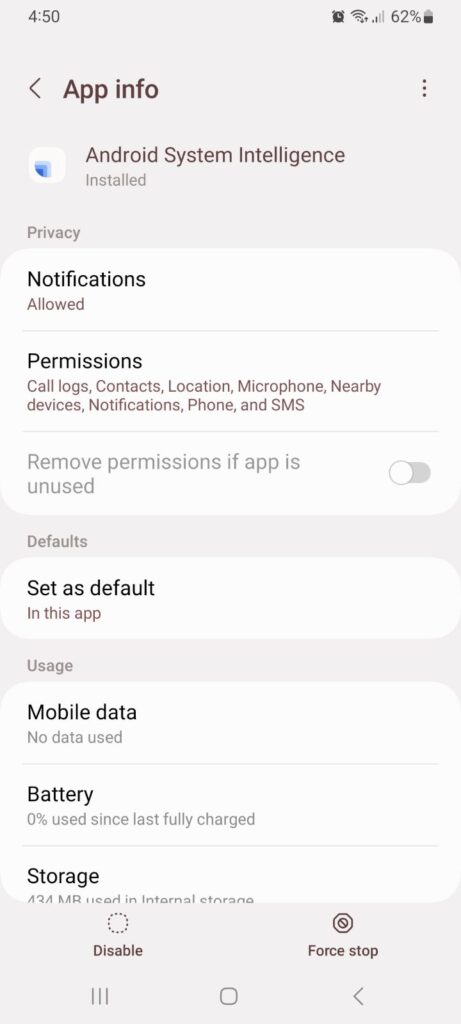
- You cannot open it. There is no launch button, only Disable and Force stop. It is a service, not an app you use, which is part of why it feels opaque.
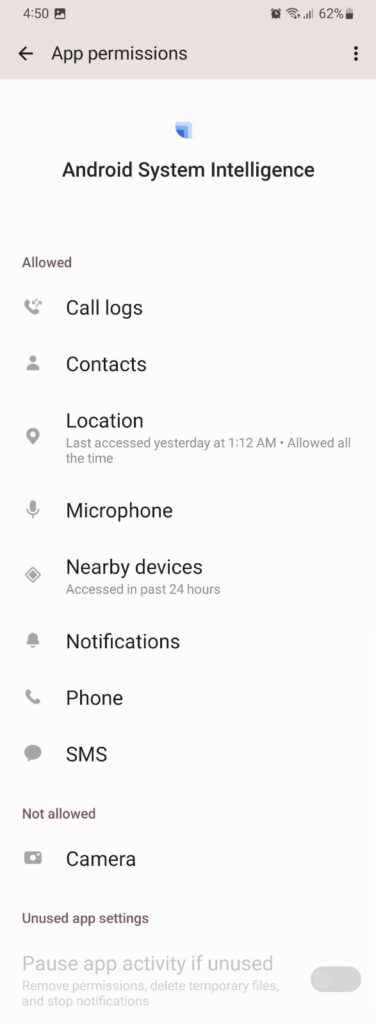
- The permissions are broad but under your control. Allowed on our device were Call logs, Contacts, Location, Microphone, Nearby devices, Notifications, Phone, and SMS. Camera was denied. Location was set to allowed all the time and had been used the day before, and all can be revoked in a tap.

- It sent no data. Its data usage read 0 bytes in foreground and background, and mobile data showed “No data used.” That matches the design: ASI holds no internet permission and routes anything outbound through Private Compute Services.

- Battery and storage were unremarkable. Battery read 0% used since the last full charge. Storage sat at 434 MB, most of it 342 MB of on-device model data, which clears from the Storage screen without breaking features.
In our experience, an app you cannot open, holding permissions from call logs to location with no in-context explanation, is a textbook trust problem. The data supports Google here, but the disclosure does not. For any mobile app or product team, permissions without a plain reason attached read as surveillance, whatever the code does.
What Android Users Say About Android System Intelligence
User opinion is split. Most users leave ASI enabled once they learn it powers everyday features, while a smaller, vocal group disables it over privacy and the lack of a consent prompt.
Battery reports stay inconsistent. After the May 2025 Pixel update, some owners blamed Android System Intelligence for overheating and high battery use, and a few improved things by clearing its data. Others measured almost nothing: one XDA thread clocked ASI at around 2% over six hours. The spread depends on the device, the update, and which features are running.
Privacy concerns have not gone away. Users still ask why a preinstalled service can reach contacts, location, microphone, phone, and messages with no introduction. On general Android forums the usual reply is that ASI is a legitimate on-device service; privacy-focused write-ups stay more critical of its default permissions and opt-out design.
A second recurring complaint is “Android System Intelligence keeps stopping” after an update, reported on Pixel and other brands. Users usually try updating, clearing cache and data, or restarting before disabling it.
The Samsung “no longer compatible with your device” error is older, mostly from the Android 13 and One UI 5 rollout in 2022, so it reads as a historical update issue rather than a current complaint.
5 Things You Can Do With Android System Intelligence
The most useful things it lets you do are caption any audio, translate on the fly, identify nearby songs, reply and act on text faster, and hand off screen behavior. Availability varies by device, with Pixel getting the fullest set.
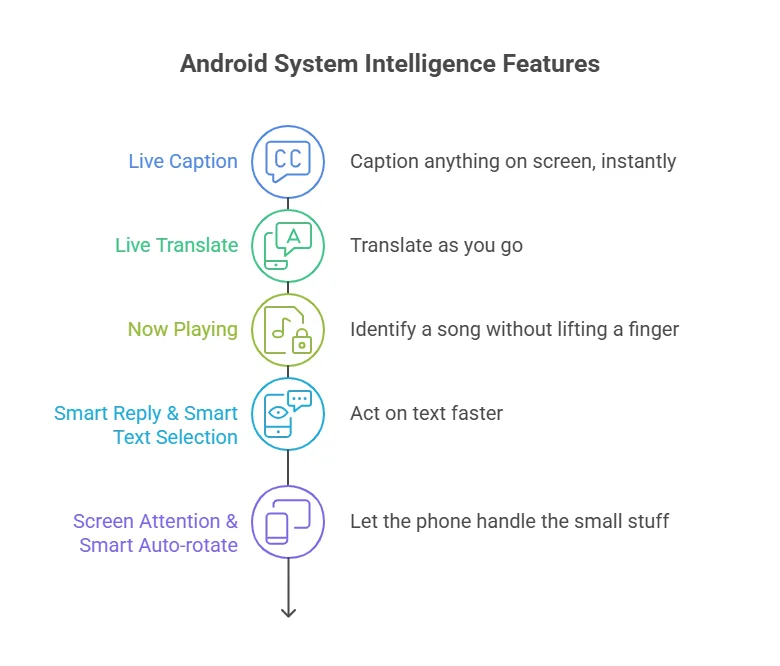
- Caption anything on screen, instantly. Live Caption adds real-time subtitles to any video or voice note, even offline. Turn it on under Settings, Sound, or with the volume shortcut.
- Translate as you go. On supported devices, Live Translate handles captions, messages, and camera text across languages without a separate app.
- Identify a song without lifting a finger. Now Playing, mainly on Pixel, matches ambient music against an on-device database and shows it on the lock screen.
- Act on text faster. Smart Reply suggests one-tap responses, and Smart Text Selection lets you long-press an address or number to get directions or dial.
- Let the phone handle the small stuff. Screen Attention keeps the display on while you read, and Smart Auto-rotate uses the front camera to rotate correctly.
How Do I Turn Off Android System Intelligence?
Disable it in Settings on most phones. You usually cannot fully uninstall it without ADB or root, because it is a system component. Turning it off removes smart features but does not break core phone functions.

Open Settings, go to Apps, find Android System Intelligence, and use Disable or Force stop. If Disable is greyed out, tap Uninstall updates first. Related privacy controls sit under Settings, then Privacy or Security and privacy, where you can also clear the data it has learned.
What you lose: Live Caption, Smart Reply, Now Playing, Smart Text Selection, and app predictions. What you keep: calling, texting, the camera, browsing, and every third-party app. Full removal through ADB or root is possible but not recommended, since it can cause glitches and blocks future updates.
What Does Android System Intelligence Do in the Background?
In the background it runs on-device inference to keep smart features ready. It updates local models, predicts your next app, and, if enabled, listens for Now Playing. It does not stream your activity to external servers.
This is why it always shows as “running.” The work is real but local, and because the app has no internet permission, that activity cannot turn into data leaving the phone on its own. When background battery use is high, the cause is usually a continuous feature like Live Caption or a temporary bug after an update.
Do I Need Android System Intelligence?
No, you do not need it for your phone to work. Calls, texts, the camera, and browsing run independently. You keep it for the smart features it powers.
Look at what you use. If Live Caption, Smart Reply, and app suggestions are part of your day, leave it on. If you never notice them, turning it off costs little. For most users, leaving it enabled is the reasonable default, since it stays on-device and updates through the Play Store.
Why Does Android System Intelligence Use Battery or Data?
For most users it uses little battery. Noticeable drain almost always comes from a continuous feature like Live Caption, or a bug after an update, not background surveillance.
If usage looks high, check whether Live Caption or another always-on feature is active, then clear the app’s cache under Settings, Apps, Android System Intelligence, Storage. Data use is low because the component works offline by design.
Why Does It Need My Location, Microphone, or Contacts?
It requests sensitive permissions because the features require them, not because it is harvesting data, and the inputs stay on the device.
Each permission maps to a feature. The microphone powers Live Caption and Now Playing. Contacts access lets it suggest calling a frequent contact. Location adds context to suggestions. The list looks intrusive, which is fair, but each permission is revocable and each is tied to a feature. If a feature is not worth the permission to you, turn that permission or the app off.
What Android System Intelligence Means if You Build Android Apps
ASI is a system component, not a development tool. You do not integrate it. If you want on-device AI features in your own product, you use Android’s on-device machine learning APIs and ML Kit, the developer-facing equivalent.
A lot of writing treats ASI as something teams “use to build smarter apps.” That is not how it works. It powers OS-level features. Your app benefits from the environment it sets, users expecting captions and smart text selection everywhere, but you do not call it as a service.
Real shipping examples of the same on-device pattern are Google Recorder’s offline transcription and Gboard’s Smart Reply.
When we worked on Android product with voice, personal text, or behavioral suggestions, the first architecture decision is what runs on-device versus in the cloud. That single call sets your privacy posture, your latency, and often your Play Store review risk. Teams that make it late end up rebuilding the data flow.
What we would check before launch: how each sensitive permission is requested, justified in-app, and handled when denied. The Play Store is strict about permission use, and ASI-style behavior draws scrutiny. Getting the permission story right early is cheaper than a review rejection.
Where Does On-Device Intelligence Like This Fit Across Industries?
The on-device pattern ASI represents, keeping data on the phone instead of sending it to a server, matters most in industries with strict privacy, low-latency, or offline needs. That is where it changes how an app should be built.
ASI is a Google system component, so these apps do not embed it. What carries over is the approach: running intelligence locally through Android’s on-device machine learning APIs.
| Industry | Why on-device intelligence fits |
| Healthcare | Patient data can be processed on the device, so sensitive health inputs do not have to leave the phone. |
| Fintech | Local checks on financial data reduce what is exposed in transit, while keeping fraud signals fast. |
| Logistics | Field devices work with weak signal, so on-device models keep scanning and routing offline. |
| Real Estate | Personalized suggestions can run from on-device behavior instead of shipping activity to a server. |
| On-Demand | Low-latency predictions like matching and ETAs benefit from local inference over a backend round trip. |
| Automotive | In-car features need to respond instantly and stay reliable without a connection. |
The Bottom Line
Android System Intelligence is a legitimate Google system app, not spyware. It runs on your device, holds no internet permission, and on our own phone showed zero data use, so it is not quietly sending your activity anywhere. It is also optional. Nothing critical breaks if you disable it, so the real question is whether the features it powers, like Live Caption and Smart Reply, are worth the permissions to you.
For most users they are, and leaving it on is reasonable. If they are not, you can turn it off in a minute with no lasting effect.
Table of Contents
Frequently Asked Questions
Yes. It is a legitimate Google system component that processes data on your device and cannot send raw personal data to external servers on its own. It is not malware or adware.
Usually not without ADB or root, because it is a system component. You can disable or force-stop it through Settings, which is enough for most users who want it off.
No. Calls, texts, camera, and browsing keep working. You only lose smart features such as Live Caption, Smart Reply, and app predictions.
No. Its processing is on-device inside the Private Compute Core, and the app does not hold internet permission, so it cannot transmit your data by itself.
For most users it does not. When usage is high, the cause is usually a continuous feature like Live Caption, or a bug after an update. Clearing the cache usually fixes it.
Usually a glitch after a system update. Clear its cache and data under Settings, Apps, Android System Intelligence, Storage, then restart. If it continues, uninstall updates and let the Play Store reinstall the current version.
Yes. It is the current name for what used to be called Device Personalization Services, renamed in 2021. The package name com.google.android.as is unchanged.
No. It is a system component, not an SDK. Developers who want on-device intelligence use Android's on-device machine learning APIs and ML Kit instead.
Yes. Samsung phones use the same Google system app, com.google.android.as, found on Pixel and other Android devices. It powers on-device features, although Pixel-only tools such as Now Playing may not be available.
Planning an AI-Powered Android App?
Build useful on-device intelligence with the right Android architecture.