Build and Scale Faster
150+ products shipped for startups and enterprises by engineers focused on real outcomes.
"Their ability to quickly understand an unfamiliar use case and respond creatively to it is impressive."

Anonymous
Executive, Pured Disc Golf

"TechnBrains resolved challenges efficiently and turned my vision into a solid, functional product with a strong foundation."

Jalen Gibbs
Founder, STREAMLINE LIVE
"The talent they provided was solid, but more importantly, they were quick to align with our way of working."

Nancy Snyder
Managing Director, MimeCast
Our trusted clients


Start Your Product Journey Today
Turn your idea into a working product. Share a few details and we'll help define the roadmap, timeline, and execution approach.
How Do iOS App Development Services Handle Post-Launch Maintenance?
iOS app development services handle post-launch maintenance through structured bug triage, iOS compatibility updates, security patching, performance monitoring, and controlled release management. Most teams allocate 15–20% of initial development cost annually to sustain stability and scale. You think you’ve cracked the hard part by shipping an iOS app that’s ready to win the market. I’ve seen dozens of teams feel...

Updated Aug 13, 2026
iOS app development services handle post-launch maintenance through structured bug triage, iOS compatibility updates, security patching, performance monitoring, and controlled release management. Most teams allocate 15–20% of initial development cost annually to sustain stability and scale.
You think you’ve cracked the hard part by shipping an iOS app that’s ready to win the market. I’ve seen dozens of teams feel that relief.
But launch is where the real operational pressure begins.
And with Apple reviewing 90% of submissions in under 24 hours, the ability to ship fixes safely becomes a business capability, not just an engineering one.
In my experience, the teams that treat post-launch maintenance as a system move faster, break less, and scale cleaner.
TL;DR
- iOS app development services handle post-launch maintenance by running a repeatable system: monitoring, triage, release gates, patch cadence, and compatibility planning.
- Budget 15–20% of build cost annually as a baseline, then adjust by release velocity, integrations, and compliance.
- Staff augmentation wins when you need continuity and speed without waiting on hiring cycles, but only if ownership is measurable and SLAs include resolution targets.
- Performance is a retention lever; iOS day-1 retention averages about 23.9%, so early stability work protects CAC and LTV.
- The highest ROI teams separate work into Run / Protect / Improve so emergencies don’t eat the roadmap.
What Happens After Your iOS App Goes Live?
Going live is not the finish line. It is the moment the app enters a harsh environment: real devices, real networks, real user behavior, and real failure points.
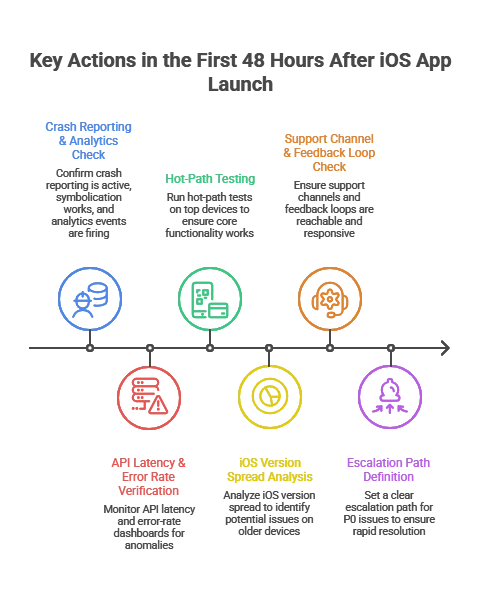
The First 48 Hours After Launch
I worked with a fintech startup that skipped structured monitoring during launch week. A silent authentication token issue caused 18% login failures on iOS N-1 devices. They discovered it through 1-star reviews instead of dashboards. That 72-hour delay cost them thousands in paid acquisition waste.
You are validating that:
- The release works across common device and iOS combinations
- Your backend handles real traffic patterns
- crash rate and performance metrics stay inside thresholds
- Your support channel and feedback loops are reachable and responsive
Apple’s review throughput means you often see production behavior quickly after approval and rollout.
What mature teams do immediately:
- confirm crash reporting is active and symbolication works
- Confirmconfirm analytics events and funnels are firing correctly
- verify API latency and error-rate dashboards
- run hot-path tests on top devices (login, onboarding, checkout, search)
- set a clear escalation path for P0 issues
What I’ve seen repeatedly: teams that skip this end up “discovering” critical issues through App Store reviews. That is the most expensive monitoring channel you can choose.
Immediate Monitoring: Crashes, Load, and iOS Version Spread
Device and OS-version diversity is the quiet tax on iOS maintenance. Even if adoption is strong for the latest OS, a meaningful part of your install base will lag behind.
Apple iOS usage reporting from Apple ecosystem outlets shows most devices move forward, but not all move together.
Operational implications:
- Most teams support current iOS plus two prior major versions unless industry requirements force a longer tail.
- Each new iOS release introduces regression risk, including permission flows, background execution behavior, networking edge cases, UI rendering changes, and privacy requirements.
This is why serious maintenance plans include an annual iOS release motion. You plan for it. You do not react to it.
What Does a Typical iOS App Maintenance Plan Include?
A credible post-launch plan is not “bug fixes when needed.” It is a set of repeatable responsibilities and measurable guarantees.
Maintenance Scope: What You’re Actually Paying For
| Maintenance Area | What It Covers | Why CTOs Care |
| Bug fixes and issue resolution | Crash fixes, functional defects, regression fixes | Protect revenue paths, reduce churn, reduce support load |
| iOS and device compatibility | Updates for new iOS versions, device layouts, SDK changes | Avoid breakage after iOS updates, avoid App Store issues |
| Security patches | Dependency updates, vulnerability remediation, auth hardening | Reduce incident risk and audit risk |
| Performance optimization | Startup time, UI jank, memory and battery, network efficiency | Directly affects retention and conversion |
| Monitoring and analytics | Dashboards, alerts, crash triage, funnel tracking | Faster diagnosis, fewer blind spots |
| App Store operations | Release notes, phased rollout, review response | More stable releases, fewer surprises |
| Continuous improvement | UX fixes, onboarding tuning, iteration based on data | Compounds product value over time |
Bug Fixes and Issue Resolution
High-performing teams actually perform way more than just fixing bugs. They run a triage pipeline:
- Detect: crash alerts, error logs, user support, backend incident signals
- Reproduce: device and iOS matrix, network simulation, test accounts
- Prioritize: severity plus business impact (revenue path vs edge case)
- Fix and verify: PR review, automated tests, QA regression pack
- Release: phased rollout, monitoring, rollback plan
Practical rule: Treat crashes and payment or auth bugs as stop-the-line. Everything else goes into a predictable cadence.
If a vendor cannot explain this pipeline clearly, you will feel it later as slow diagnosis, vague estimates, and avoidable regressions.
iOS Version and Device Compatibility Updates
This is the maintenance work executives underestimate until it bites. New iOS versions change behavior. Dependencies evolve. Apple deprecates APIs. Privacy policies shift.
Mature teams:
- test on iOS developer betas every year
- validate key flows on top devices your analytics shows
- keep SDKs updated on a monthly or quarterly cadence, not “once a year panic”
When teams skip beta testing, I commonly see onboarding, permissions, and login flows break after iOS GA. The fix is usually simple. The business impact is rarely small.
Security Patches, Zero-Days, and Patch Cadence
The easiest way to create a security incident is to make patching a “later problem.”
In early 2026, multiple outlets reported Apple patches for an actively exploited iOS vulnerability. That is a practical reminder that patch windows matter.
I’ve seen it myself that in one SaaS case, a third-party SDK vulnerability was disclosed publicly. Because patch cadence was quarterly instead of severity-based, legal and compliance escalated before engineering even triaged it. The issue was technical. The fallout was executive.
What CTOs should require in a maintenance plan:
- defined patch windows for critical issues
- an inventory of third-party SDKs and their update cadence
- release gates for auth, encryption, and sensitive data handling changes
- a rollback strategy if a patch breaks production behavior
SLAs and Support Models (Dedicated vs On-Demand)
An SLA is not a marketing line. It is your insurance policy during incidents.
A practical SLA structure defines:
- response time (how fast someone starts)
- resolution target (how fast it should be fixed or mitigated)
- severity definitions (P0, P1, P2 tied to business impact)
- availability (business hours vs 24/7)
When to pick which model:
- On-demand support fits small apps with low release frequency.
- A dedicated pod or staff augmentation fits teams shipping continuously, scaling MAU, or dealing with compliance and integrations.
Now let’s make that staff augmentation decision easy.
How to Decide If Staff Augmentation Is the Right Maintenance Model
If you’re evaluating whether to extend your internal team or build in-house, this often starts with deciding whether to hire iOS developers directly or bring in a structured augmentation pod aligned to your release cadence.
Staff augmentation is the right model when continuity and speed matter more than long hiring cycles, but only if ownership is measurable.
At TechnBrains, we structure staff augmentation differently for post-launch iOS apps. We don’t just assign developers. We build a maintenance-ready pod aligned to your release cadence, SLA requirements, and risk tolerance.
That typically includes a named iOS engineer, QA support for regression cycles, and optional DevOps integration when backend performance or scaling is part of the equation.
In-House vs Staff Augmentation vs Project-Based Maintenance
| Model | Best When | Risks if Misused | What to Demand |
| In-house maintenance | You have stable hiring capacity and clear ownership | Hiring delays, coverage gaps, slow ramp | On-call rotation, release engineering discipline |
| Staff augmentation | You need speed, continuity, and flexible capacity | “Body shopping,” weak accountability, fragmented quality | Named team, shared runbooks, measurable SLAs |
| Project-based support | Low change volume, defined backlog | Slow response in incidents, change requests inflate cost | Tight scope, escalation plan, clear exclusions |
Decision rule I use in practice:
If you ship at least twice a month, have meaningful integrations, or cannot tolerate multi-day incident response, staff augmentation becomes the safer operational choice. It gives you continuity without waiting for hiring cycles.
What an Effective Augmented Maintenance Pod Looks Like
For post-launch maintenance, you rarely need “more developers.” You need the right pod.
A practical pod for many products:
- iOS engineer (primary owner of app fixes and releases)
- QA engineer (regression packs, device matrix, release verification)
- DevOps or backend support (as needed for incidents and performance issues)
- Technical PM (lightweight, focused on triage, SLA, and release coordination)
If a vendor proposes a pod with no QA and no release discipline, you are buying future chaos.
What Changes Operationally With Staff Augmentation
Staff augmentation works when you treat the team like part of your engineering system:
- shared dashboards
- shared incident workflow
- shared definition of done
- predictable release cadence
- clear ownership for monitoring and triage
If the team is “outside the system,” you get slow diagnosis and finger-pointing.
How to Vet a Staff Augmentation Partner for Post-Launch Maintenance
This is the part buyers wish they had before signing.
The 12-Point Maintenance Vetting Checklist
Ask for proof, not promises:
- Can you show a real triage workflow with severity definitions?
- Who owns crash monitoring and alert thresholds?
- What is your device and iOS version test matrix strategy?
- How do you handle symbolication and crash reproduction?
- What is your patch cadence policy for critical vulnerabilities?
- What release gates exist before App Store submission?
- Do you use phased rollouts and rollback criteria?
- How do you prevent dependency drift?
- How do you handle App Store review risk and compliance changes?
- What is your typical weekly operating rhythm for maintenance?
- How do you report work in a way leadership can audit?
- What happens when you miss an SLA? What is the escalation path?
If the answers are vague, you will experience that vagueness during the first incident.
Cheap Support Vendors vs Operational Maintenance Partners
| Factor | Cheap Vendor Model | Operational Maintenance Model |
| Team | Rotating freelancers | Named continuity pod |
| Monitoring | Reactive | Instrumented + alert-based |
| SLA | Response-only | Response + mitigation targets |
| QA | Minimal device coverage | Structured regression matrix |
| Patch cadence | Monthly batch | Severity-driven |
| Release discipline | Manual | CI/CD gated |
How Much Should You Budget for iOS App Maintenance?
Most leadership teams under-budget maintenance because they treat it as a variable cost. In reality, it is driven by complexity, risk tolerance, compliance, and release cadence.
The 15 to 20 Percent Rule (Used Correctly)
A common benchmark is 15 to 20% of the initial build cost per year for ongoing maintenance.
Use it as a baseline, then adjust for:
- release frequency
- integrations (payments, healthcare systems, logistics, CRM)
- security posture and compliance requirements
- scale (MAU, concurrency, regions, API volume)
A CTO-Friendly Maintenance Budget Model
Instead of one number, split maintenance into three buckets:
- Run: bug fixes, compatibility, monitoring
- Protect: security hardening, compliance updates, audit support
- Improve: UX refinements, onboarding tuning, performance work, roadmap features
This model prevents a classic failure: maintenance gets consumed by emergencies, then roadmap work quietly stops.
Hidden Costs in Outsourced Maintenance Contracts
Common pitfalls:
- unclear scope, everything becomes “out of contract”
- vague SLA language, response does not mean mitigation
- no observability ownership, diagnosis takes too long
- missing release engineering, no CI/CD or automated test gates
- dependency drift, SDK updates ignored until they break
If you outsource, insist on clear deliverables and shared dashboards.
How iOS Development Services Handle Performance Optimization
iOS development services handle performance optimization by continuously monitoring crash rates, memory usage, API latency, and user flows, then prioritizing fixes based on measurable business impact and retention risk.
Performance is a retention lever. If it slips, revenue usually follows. Mature teams define performance budgets early, instrument the app for real-time observability, and treat regressions as release blockers rather than backlog items.
Business-of-Apps retention benchmarks show iOS day-1 retention around 23.9%, with a sharp drop-off over time. Early stability issues compound quickly.
Crash Reporting and Monitoring Tools (What CTOs Should Standardize)
At a minimum, your maintenance program should include:
- crash reporting with symbolication
- performance monitoring for startup time, latency, UI responsiveness
- alerting for error spikes and release regressions
The operating model is always: detect → triage → fix → verify → release.
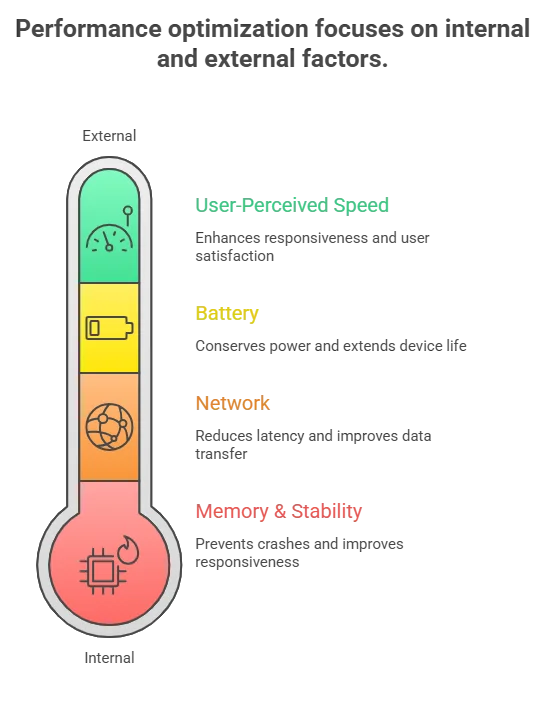
Performance Optimization Checklist (What Actually Moves the Needle)
Memory and stability:
- remove retain cycles and leaks in long sessions
- reduce image memory spikes with resizing and caching
- validate background task behavior
Network:
- define timeouts and retry policy intentionally
- reduce chatty API patterns
- cache safely where it reduces perceived latency
Battery:
- audit background fetch and location usage
- reduce unnecessary timers and polling
User-perceived speed:
- improve launch and first meaningful screen
- prefetch only what’s needed next
- reduce main-thread work during scrolling
Experience note: teams that cannot measure these reliably end up debating them. Teams with instrumentation fix them quickly.
Analytics and Retention: Why Maintenance Impacts Revenue
Multiple sources note steep early drop-off and rapid churn in the first days after install. That makes early stability and speed improvements disproportionately valuable.
Practical implication: if you reduce crash rate and improve startup and network performance in the first weeks, you protect marketing spend and reduce CAC waste because fewer users churn before activation.
What Maintenance Reveals About Product-Market Fit
A startup spent six months building a productivity app. Beta users liked it. Feedback was positive.
Production data told the truth.
Day-1 usage was healthy.
By Day-3, engagement dropped sharply.
By Week-1, most users had churned.
No major crashes. No infrastructure issues. The app worked. The problem simply wasn’t painful enough.
Post-launch maintenance analytics exposed that faster than any survey could.
Why Good Feedback Fails in Production
Compliments are not validation.
Product-market fit shows up in:
- Repeat usage
- 7-day retention
- Workflow replacement
- Willingness to pay
If users abandon within days, you don’t have a feature gap. You have a value gap. Maintenance instrumentation makes this visible.
Why Pain Level Determines Adoption
Users tolerate friction only when the problem is urgent.
If your product saves a few minutes, they forget it.
If it protects revenue or reduces risk, they adapt quickly.
Retention dashboards surface this distinction through behavior, not opinion.
Why Shipping Faster Beats Shipping More
The failure wasn’t building the wrong product. It was taking six months to discover it.
Slow cycles create:
- Feature creep
- Rising complexity
- Delayed validation
A disciplined maintenance cadence lets you ship small, measure real usage, and pivot before technical debt compounds.
The Staff Augmentation Angle
When iteration speed matters, hiring delays become strategic drag.
A structured augmented pod enables:
- Predictable release cycles
- Faster validation loops
- Capacity without permanent overhead
iOS app development and maintenance for startups is not just about stability. It is your product-learning engine.
Struggling to Ship Fast Enough to Validate?
If iteration speed is slowing down learning cycles, we help teams add dedicated iOS capacity without long hiring timelines. Structured augmentation. Defined release cadence. Measurable outcomes.
How iOS App Services Handle Security, OS Updates, and Compliance Risk
Mature teams do not react to iOS changes. They plan for them.
Responding to Apple iOS Major Releases
A reliable annual motion:
- test on iOS beta early
- freeze high-risk changes during OS rollout windows
- ship a compatibility update soon after iOS GA, often with phased rollout
This avoids the “new iOS release broke login or payments” incident.
Zero-Days and Patch Management (What’s Reasonable)
When an actively exploited vulnerability is disclosed, speed matters, especially in regulated industries and enterprise contracts.
Put this in the maintenance contract:
- severity-based patch windows
- monthly or quarterly dependency updates
- audit log of changes and release notes
- security regression tests for auth and sensitive data flows
Compliance (HIPAA, GDPR, SOC 2) as Maintenance Work
Compliance is ongoing work:
- privacy prompts and data minimization
- logging standards
- encryption and key management
- third-party SDK governance
- incident readiness
For enterprise buyers, a maintenance partner should map controls to audit needs, even if formal audits involve your compliance team.
How iOS Teams Manage Feature Releases and Technical Debt Post-Launch
Post-launch is where technical debt either stays manageable or forces a rewrite.
Refactoring and Architecture Evolution (How Mature Teams Budget It)
Refactoring is not “extra work.” It is velocity protection.
A simple operating rule:
- allocate a fixed percentage of each cycle for engineering health
- schedule architectural work in quarters, not emergencies
- expand automated tests so releases become safer over time
Safe Feature Rollouts (Flags, Phased Releases)
A maintenance-ready release model includes:
- feature flags for controlled rollout
- phased App Store releases
- rollback criteria based on crash rate and funnel health
- A/B testing where it reduces product risk
Scaling Past 100K MAU (What Changes)
At scale, you need:
- stronger incident response
- performance budgets and SLA thresholds
- deeper observability
- stricter dependency governance
- automated regression tests
This is where staff augmentation becomes a reliability strategy. You need continuity, not rotating support.
What Happens If You Delay iOS App Maintenance?
Delaying maintenance increases the probability of high-cost events: security incidents, outages, App Store issues, and churn spikes.
Downtime Cost (Why Incident Readiness Matters)
ITIC surveys are frequently cited for downtime cost ranges. For many organizations, downtime can exceed $300,000 per hour, and for some it is $1M+ per hour.
That is why mature maintenance includes alerting, on-call coverage, runbooks, and release controls.
App Store Risk and Operational Drag
Outdated apps accumulate risk: dependency vulnerabilities, compliance drift, compatibility regressions, and rising support costs. The cost stays invisible until something breaks and forces an urgent fix.
Post-launch maintenance also affects discoverability. Update frequency, stability, and ratings influence visibility. That’s why maintenance should align with your app store optimization for iOS applications strategy, not operate in isolation.
Performance Degradation and User Churn
Users do not file a ticket. They uninstall. With steep retention decay, stability work is often the highest ROI engineering investment after launch.
Is Your Next iOS Release Operationally Controlled?
If incident response, compatibility testing, and release cadence depend on availability instead of structured ownership, risk compounds quietly. We help engineering teams design a measurable post-launch model that supports stability, velocity, and scale
Planning for Long-Term iOS App Success
The best maintenance programs make the app easier to change.
A Simple 90-Day Post-Launch Maintenance Roadmap
Days 0 to 14: Stabilize
- fix critical crashes and hot-path issues
- baseline performance tuning
- validate analytics and dashboards
- establish review and support response workflows
Days 15 to 45: Protect
- dependency update plan
- security posture review
- compatibility plan for upcoming iOS changes
- expand automated test coverage
Days 46 to 90: Improve
- onboarding and activation optimization
- performance budgets for startup and API latency
- establish release cadence
- ship roadmap features safely with flags and phased rollout
Wrapping It Up
I’ve seen apps with strong launches lose momentum not because of product quality, but because post-launch ownership was vague. Incidents slowed releases. Compatibility fixes became reactive. Technical debt quietly accumulated.
The difference between stable growth and operational drag is rarely engineering talent. It’s structured ownership.
At TechnBrains, we don’t position maintenance as “support.” We structure measurable release rhythm, defined triage workflows, and predictable operational coverage through dedicated augmentation pods. That continuity is what protects velocity.
Table of Contents
Frequently Asked Questions
In most of the iOS projects I’ve worked on, a realistic starting point is 12–20% of the original build cost per year. That number increases if you have compliance exposure, frequent releases, or heavy integrations. If your app is core to revenue, under-budgeting maintenance is usually where instability begins.
Apple reviews about 90% of submissions within 24 hours on average. I’ve seen teams treat this as good news, but it also means fixes need to be ready just as fast. If your release process isn’t disciplined, that speed becomes pressure instead of advantage.
Because users rarely complain, they just uninstall. iOS day-1 retention averages around 23.9%, and I’ve seen apps lose traction simply because startup time increased by a few seconds after an update. Stability and performance are often the difference between growth and silent churn.
If you ship more than once or twice a month, or if downtime affects revenue or compliance, I’ve found that shared ownership models break down quickly. A dedicated team, whether internal or augmented, creates continuity, faster triage, and fewer production surprises.
Treat them as inevitable, not exceptional. Every serious app I’ve supported has faced at least one urgent patch cycle. What matters is having a written patch policy, clear ownership, and a defined escalation path before the incident happens, not during it.
Blocked by backlog or missing expertise?
Senior developers who build, fix, and ship — without slowing your team down.