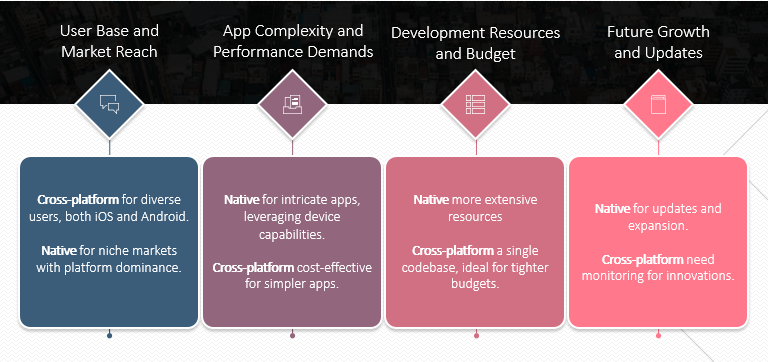







Native iOS prioritizes long-term performance, security, and scalability, while cross-platform prioritizes early cost efficiency and faster dual-platform launch.
I’ve worked with startups that moved fast on cross-platform, and others that rebuilt native after scaling pain hit. The decision between native iOS and cross-platform isn’t about trends.
It’s about how your architecture will behave at 200K users, how your team scales, and what your long-term maintenance curve looks like.
If speed-to-market is critical and resources are tight, cross-platform can validate quickly. If performance, deep iOS integration, and long-term control matter, native often pays off beyond year one.
This comparison breaks down cost, performance, and scaling realities.
Quick Overview
- React Native reduces early-stage burn when launching on both iOS and Android.
- Native iOS provides stronger performance predictability under high interaction density.
- Performance differences become measurable above ~250K MAU in feature-heavy apps.
- Cross-platform architectures often evolve into hybrid systems after 18–24 months.
- Long-term cost modeling should include optimization cycles, not just initial build hours.
- Enterprise environments prioritize security surface area and release predictability.
- The right decision depends on projected product complexity over the next 24–36 months.
Is Faster Time-to-Market Worth Long-Term Architectural Trade-Offs?
Well, It’s worth it only if your growth trajectory won’t outpace your architecture within 12–24 months.
Early speed can be strategic. Cross-platform frameworks help startups validate ideas faster, reduce early hiring pressure, and ship MVPs without building two separate codebases.
For Seed-stage teams, that acceleration can mean the difference between iteration and stagnation.
I’ve seen teams gain three months upfront, then spend six to nine months rewriting performance-critical modules once user load crossed meaningful thresholds.
This matters because mobile isn’t just experimental anymore.
What starts breaking first when cross-platform apps scale in users and feature complexity?
At scale, what breaks first in cross-platform apps is engineering velocity, not user-facing features, once native integrations, performance tuning, and release pressure compound.
In the first 6–12 months, I rarely see meaningful differences between Flutter and native iOS in real startup environments. The problems start appearing when:
- You’re shipping weekly
- You’ve layered 6–10 SDKs
- Your UI is state-heavy
- Your MAU crosses ~200K
- Your product team keeps expanding feature scope
At that point, performance optimization and debugging time begin to diverge.
Flutter adds a rendering engine and Dart runtime between your code and Apple’s system APIs. That abstraction helps early productivity.
But when something misbehaves in production, I’ve seen investigations cross three layers before identifying the root cause:
Dart isolate → platform channel → native SDK.
That multi-layer debugging costs compounds under release pressure.
In native Swift, profiling and crash diagnostics stay within Apple’s runtime, Xcode tools, and system-level logs. That shortens resolution cycles.
And that matters more than theoretical FPS benchmarks.
Where Cross-Platform Rendering Becomes a Real Cost
The issue is frame stability when:
- Background tasks fire
- Analytics SDKs log events
- Push notifications trigger UI updates
- Animations overlap with data refresh
Apple defines smooth rendering at 60 FPS (16ms per frame). Once frame processing exceeds that budget, users perceive lag.
Source: https://developer.apple.com/design/human-interface-guidelines/performance/
In high-interaction fintech or SaaS dashboards, I’ve seen native builds maintain more predictable frame consistency under concurrency.
In content-heavy or form-based apps, the difference is negligible.
Native API Depth: Where Abstraction Accumulates
When your product roadmap introduces:
- Advanced background processing
- Secure Enclave workflows
- Low-level Bluetooth
- Camera performance tuning
- Custom push handling
You begin writing native modules even in Flutter projects.
After 18–24 months, many cross-platform codebases I’ve reviewed are effectively hybrid systems: shared UI + growing native patches.
At that point, teams are maintaining both abstraction layers and platform-specific code.
Hiring Reality Under Growth Pressure
Flutter reduces early staffing complexity. One team, two platforms.
But once performance tuning becomes strategic, you still need engineers who understand:
- iOS memory management
- Threading
- Lifecycle edge cases
- Native profiling tools
I’ve seen teams assume cross-platform eliminates native expertise requirements. It doesn’t. It delays them.
Swift engineers are more specialized and harder to hire. They also reduce optimization cycles when scaling becomes critical.
Plugin & OS Update Exposure
Apple releases major iOS updates annually.
Native teams adapt immediately within Apple’s SDK cycle.
Flutter teams depend on framework and plugin alignment.
Most years, this works smoothly. Occasionally, ecosystem lag creates temporary friction.
For consumer apps, that’s tolerable.
For enterprise deployments, even small instability windows impact client confidence.
Why This Matters Financially
According to Grand View Research, the global mobile app market is projected to reach $756 billion by 2027.
When mobile becomes a primary revenue driver, predictability matters more than build speed.
Early cost savings from cross-platform can be offset later by:
- Extended debugging cycles
- Native rewrites
- Performance refactoring
- Release delays
Native iOS often carries higher upfront cost but lower architectural entropy over a 3–5 year horizon. For the build-side ranges behind this comparison, see our breakdown of iOS app development cost.
How does the 3-year total cost of ownership compare between React Native and native Swift?
Over three years, React Native usually lowers upfront cost if you are building for both iOS and Android, but native Swift often produces lower cumulative engineering overhead when iOS is a primary revenue channel.
Most founders compare only MVP cost. That’s incomplete. The real financial difference appears between months 6 and 24, when feature depth, SDK stacking, and optimization cycles expand.
In scaling SaaS and product companies I’ve reviewed (ARR $5M–$50M range), cost divergence typically follows a predictable pattern:
- Year 1: Cross-platform cheaper if dual-platform is required
- Year 2: Optimization effort increases in hybrid architectures
- Year 3: Maintenance and debugging hours compound differently
Mobile investment decisions matter because the mobile app economy continues expanding.
When mobile drives revenue, cost predictability matters more than launch savings.
Month 0–6: MVP Development Velocity
In the first six months, React Native shows measurable efficiency if you are launching both iOS and Android simultaneously.
MVP Timeline & Cost Snapshot (Moderate SaaS Product)
| Variable | React Native (Dual Platform) | Native Swift (iOS Only) |
| Platforms Delivered | iOS + Android | iOS |
| Typical Team | 2–3 RN engineers | 2 iOS engineers |
| Timeline | 12–16 weeks | 12–14 weeks |
| Estimated Cost (US rates) | $120K–$180K | $90K–$140K |
| Code Reuse | 70–85% shared | N/A |
| Early Burn Efficiency | High (dual launch) | High (iOS-first) |
If Android is strategic in year one, React Native reduces parallel hiring.
If the product is iOS-first, the cost advantage narrows significantly.
This is where many cost comparisons mislead buyers — they compare dual-platform React Native to single-platform native iOS without adjusting scope.
Month 6–18: Optimization & Native Module Expansion
This period determines whether early savings hold.
As features grow, teams typically add:
- Analytics & attribution SDKs
- Payments & subscription logic
- A/B testing frameworks
- In-app messaging
- Push segmentation
- Monitoring & crash tools
In React Native projects, I often see increasing native extensions during this phase.
Performance-critical screens, animation-heavy flows, and edge-case SDK integrations move into platform-specific modules.
Now teams manage:
- Shared business logic
- Native modules
- Platform bridges
- Cross-layer testing
Engineering time per optimization cycle increases because investigation spans multiple layers.
Native Swift teams optimize within a single runtime and toolchain. Profiling, memory inspection, and threading analysis remain inside Apple’s ecosystem.
This difference shows up in engineering hours per issue, not in marketing benchmarks.
Month 18–36: Maintenance, Debugging & DevOps Overhead
By year two, cost behavior stabilizes around architecture maturity.
In hybrid React Native codebases, QA scope expands because:
- Shared logic must be validated
- Native bridges must be regression-tested
- Platform-specific behavior must be re-verified per OS update
CI/CD pipelines also grow more layered.
Native Swift projects operate entirely inside Apple’s SDK, Xcode tooling, and profiling ecosystem. That reduces cross-layer release coordination.
The difference is rarely dramatic in small teams.
In 10+ engineer mobile teams shipping weekly, release friction becomes measurable.
Total Cost of Ownership: Engineering + QA + Infrastructure
Three-year cost modeling should include:
- Engineering salaries
- QA cycles
- Refactor time
- Performance optimization effort
- Native module maintenance
- CI/CD tooling
- Monitoring & observability
Here’s a simplified 36-Month View (iOS-Revenue-Focused Product)
| Cost Component | React Native | Native Swift |
| Year 1 Build | Lower (dual launch benefit) | Higher upfront |
| Year 2 Optimization | Moderate increase | Stable |
| Year 3 Maintenance | Hybrid complexity cost | Predictable |
| Native Extension Work | Increasing | Integrated |
| Total 3-Year Curve | Front-loaded savings | Flatter long-term curve |
If iOS drives 60–80% of revenue, I generally see native Swift produce steadier long-term cost behavior.
If both platforms are equally strategic from day one, React Native often delivers faster early ROI.
Model the next 36 months before committing to architecture.
Framework decisions compound over time. Map projected feature depth, integration load, and release cadence before locking your mobile stack.
How do native iOS and React Native perform under real-world load at 100K–500K users?
Under real production load, native iOS delivers more predictable performance consistency, while React Native remains competitive in moderate interaction scenarios but shows greater variability under high UI concurrency.
In controlled demos, both approaches perform well. The meaningful differences appear when:
- Background tasks overlap with UI updates
- Multiple SDKs run concurrently
- Users navigate quickly between heavy screens
- Data refresh frequency increases
Once total execution exceeds that window, users perceive lag.
In production SaaS apps with frequent UI redraws, I’ve seen native builds maintain tighter frame consistency during concurrent operations.
Cold Start Time Comparison
Cold start becomes visible when apps include multiple SDKs and background initialization routines.
Typical Cold Start Ranges (Moderate SaaS App)
| Scenario | Native Swift | React Native |
| Basic App (Minimal SDKs) | 400–700 ms | 600–900 ms |
| Moderate SDK Stack (5–8 SDKs) | 700–1,100 ms | 900–1,400 ms |
| Heavy Initialization | 1.2–1.8 sec | 1.5–2.2 sec |
React Native loads JavaScript bundles during initialization. Native Swift initializes directly through iOS runtime.
The difference is rarely dramatic under light conditions. Under heavy SDK stacking, the gap widens.
Google research shows even small load delays reduce engagement and session depth.
Frame Rendering Stability (60 FPS vs Jank)
Both frameworks target 60 FPS.
The difference appears during:
- Rapid scroll with dynamic content
- Simultaneous animation + API refresh
- Layered modals and transitions
Frame Stability Under Concurrent Activity
| Condition | Native Swift | React Native |
| Static UI | Stable 60 FPS | Stable 60 FPS |
| Moderate Animation | 55–60 FPS | 50–60 FPS |
| High Concurrency + Animations | 50–60 FPS (predictable) | 40–55 FPS (variable) |
Native Swift interacts directly with Core Animation and Metal.
React Native coordinates UI updates through the JavaScript bridge before hitting the native layer.
In content-driven apps, this difference is negligible.
In real-time dashboards or fintech apps, variability becomes measurable.
Memory Usage & Battery Drain
Memory overhead matters in long sessions.
React Native apps typically maintain a slightly higher baseline memory footprint due to JavaScript runtime overhead.
Average Memory Footprint (Moderate App)
| Metric | Native Swift | React Native |
| Idle State | 40–60 MB | 60–90 MB |
| Active Session | 80–120 MB | 110–160 MB |
| Battery Impact (Heavy Interaction) | Lower variance | Slightly higher variance |
These numbers vary by architecture, but JavaScript runtime introduces additional memory allocation and garbage collection cycles.
In long-session B2B apps (dashboards, field apps), I’ve seen native builds show more stable battery consumption patterns.
Real-Time Data & Complex Animation Handling
Performance pressure increases significantly when:
- WebSocket streams push data every second
- Charts redraw continuously
- Multi-layer transitions overlap
- Gesture-heavy interactions are frequent
In these environments:
- Native Swift executes rendering and event loops inside a unified runtime.
- React Native coordinates between JS thread and native thread.
The coordination overhead is small in isolation. It compounds during concurrency.
In fintech and analytics-heavy SaaS apps I’ve reviewed at 300K+ MAU, teams often move performance-critical screens to native modules inside React Native builds.
That is not a failure of React Native.
It is a recognition that certain UI workloads benefit from direct platform execution.
Decision Summary
If your roadmap includes:
- Real-time dashboards
- Data-heavy redraw cycles
- Advanced animations
- Hardware-dependent features
Native iOS provides more predictable performance behavior at higher concurrency.
If your app is:
- Form-driven
- Content-based
- Moderate interaction depth
- Primarily business-logic focused
React Native performs competitively.
The performance difference under real load is not catastrophic.
It is incremental and architectural.
At 20K users, it is invisible.
At 300K users with feature depth, it becomes measurable.
At what stage do startups regret choosing cross-platform over native iOS?
Startups regret choosing cross-platform when performance tuning, release delays, and native rewrites begin consuming more engineering time than feature development.
Regret rarely appears in the first year. It surfaces when growth, feature depth, and technical debt intersect.
In most scaling products I’ve reviewed, regret correlates with three measurable patterns:
- Performance KPIs degrade under concurrency
- Native modules grow beyond initial expectations
- Optimization cycles extend release timelines
Cross-platform is not inherently wrong. Misalignment with product trajectory is.
Crash Rate & Performance KPIs That Signal Rebuild
Engineering decisions should follow measurable signals. The following thresholds often trigger architectural reassessment:
| KPI Indicator | Risk Threshold |
| Crash-Free Sessions | < 99.5% |
| Cold Start Time | > 2 seconds on mid-tier devices |
| Frame Drops Under Interaction | Sustained < 50 FPS |
| Performance-Related Support Tickets | Increasing > 15% QoQ |
| Optimization Cycle per Issue | > 2–3 engineer-days |
When performance issues require repeated bridge-level investigation or native patching, engineering capacity shifts from innovation to stabilization.
That is typically the first internal signal.
Scaling Beyond 250K MAU: The Inflection Point
At ~250K–500K monthly active users, architectural inefficiencies become operational costs.
| Growth Phase | Typical Cross-Platform Behavior |
| <100K MAU | Minimal friction |
| 100K–250K MAU | Optimization effort increases |
| 250K–500K MAU | Native extensions accumulate |
| 500K+ MAU | Performance predictability becomes strategic |
This threshold is not about downloads. It’s about interaction density and concurrent usage patterns.
In high-frequency SaaS or fintech products, I’ve observed teams introduce native rewrites of performance-critical modules between 250K and 400K MAU.
That is usually the inflection point where early savings begin narrowing.
When Rewriting Costs More Than Building Native First
Rewrites become financially problematic when:
- Core UI layers must move to native
- State management logic requires restructuring
- Multiple platform bridges must be refactored
- QA scope doubles during migration
Here’s a simplified ROI comparison:
| Scenario | Cross-Platform Start | Native From Start |
| Year 1 Cost | Lower | Higher |
| Year 2 Optimization | Moderate | Stable |
| Year 3 Partial Rewrite | +20–40% additional engineering cost | Minimal |
| Long-Term Maintenance | Hybrid complexity | Single runtime |
In growth-stage companies, partial rewrites typically cost 20–40% of original build budget depending on scope.
The regret isn’t emotional. It’s financial.
Startups regret cross-platform when the rewrite cost exceeds the initial savings they gained.
Cost Inflection Points
Cross-platform regret correlates with:
- Rapid feature expansion
- High interaction density
- Heavy SDK stacking
- Enterprise-grade SLAs
- Long-term product roadmap
If the roadmap includes those elements, native investment earlier often produces cleaner cost curves.
If the roadmap is controlled, iteration-heavy, and dual-platform from day one, cross-platform remains strategically sound.
Regret is caused by choosing without modeling 24–36 months of product evolution.
Is cross-platform mobile development viable long-term for enterprise modernization?
Cross-platform is viable long-term in enterprise environments only when the application layer is business-logic dominant and not deeply dependent on platform-level capabilities or strict release control.
In modernization programs, the real evaluation criteria are:
- Security surface area
- Compliance exposure
- Release predictability
- Vendor and ecosystem dependency
- 3–5 year maintainability
Cross-platform frameworks can absolutely support enterprise apps. The decision becomes strategic when mobile is either revenue-critical or operationally mission-critical.
According to IBM, the global average cost of a data breach reached $4.45 million in 2023, emphasizing how architectural exposure impacts enterprise risk.
Enterprise leaders evaluate frameworks through the lens of risk containment and control depth, not only development velocity.
In modernization engagements I’ve reviewed, cross-platform viability depends heavily on how much the app interacts with sensitive data, hardware-level features, and regulated workflows.
Security, Compliance & Deep iOS-Level Access
Enterprise-grade apps frequently require:
- Biometric authentication
- Secure Enclave usage
- Advanced encryption handling
- Certificate pinning
- Background policy enforcement
Security Architecture Comparison
| Area | Native Swift | Cross-Platform |
| Secure Enclave Access | Direct | Via bridge |
| OS-Level Policy Integration | Native | Plugin/bridge dependent |
| Patch Responsiveness | Immediate (Apple SDK) | Framework + plugin alignment |
| Dependency Surface | Lower | Broader ecosystem |
Native builds reduce external abstraction layers. Cross-platform builds introduce additional runtime and plugin dependencies.
CI/CD Complexity & Release Management
Enterprise modernization programs prioritize release governance.
Native iOS operates within Apple’s Xcode toolchain and SDK ecosystem. CI/CD pipelines integrate directly with Apple’s build and signing infrastructure.
Cross-platform adds:
- Framework build layers
- Plugin compatibility checks
- Multi-runtime testing scope
Process Comparison
| Factor | Native iOS | Cross-Platform |
| Build Pipeline Layers | Single stack | Multi-layered |
| Regression Scope | Platform-contained | Shared + platform bridges |
| OS Update Adaptation | Direct | Framework dependent |
| Release Predictability | High | Conditional on ecosystem alignment |
In enterprise teams shipping under compliance deadlines, pipeline simplicity reduces operational risk.
Exit Strategy: Acquisition or IPO Readiness
In late-stage companies, architecture influences valuation.
During technical due diligence, acquirers examine:
- Code maintainability
- Dependency risk
- Scalability path
- Long-term technical debt
Hybrid architectures with growing native patches and cross-platform bridges increase complexity during audits.
In revenue-heavy iOS-first companies, I’ve observed native builds present cleaner long-term technical narratives during diligence processes.
Cross-platform remains viable when:
- The architecture is clean
- Native extensions are controlled
- Dependency management is disciplined
Enterprise modernization is not about whether cross-platform works.
It is about how much architectural control and dependency exposure the organization is willing to manage over a multi-year horizon.
Executive Summary
Cross-platform is strategically sound when:
- Business logic dominates
- Dual-platform coverage is essential
- Compliance sensitivity is moderate
Native iOS is strategically stronger when:
- Security posture is critical
- Revenue depends heavily on iOS
- Long-term maintainability influences valuation
- Release governance must remain tightly controlled
The framework choice should align with enterprise risk tolerance and 3–5 year product horizon.
Which approach should startups choose at each product stage: native iOS or cross-platform?
The decision should follow projected feature depth, platform revenue concentration, and release cadence over the next 36 months.
Here is the practical breakdown:
Seed to Early Series A
If capital efficiency and rapid validation matter most, and both iOS and Android are required from day one, cross-platform offers faster iteration and lower early burn. At this stage, architectural flexibility is more valuable than optimization depth.
Series A to Series B
If user growth is accelerating and feature complexity is increasing, framework decisions should align with revenue concentration. When iOS drives the majority of revenue or engagement, native investment reduces long-term optimization overhead and simplifies performance tuning under growth pressure.
Series C and Enterprise Modernization
When mobile becomes revenue-critical or operationally mission-critical, architectural predictability outweighs early cost savings. Native iOS provides tighter system integration, cleaner security posture, and stronger long-term maintainability.
| Product Stage | Strategic Priority | Recommended Direction |
| Early-stage validation | Speed + capital efficiency | Cross-platform |
| Growth & feature expansion | Performance predictability | iOS-first or hybrid |
| Revenue-critical / enterprise | Stability + long-term control | Native iOS |
Wrapping it Up
Model your expected user growth, interaction density, and integration depth over the next three years. Choose the architecture that minimizes future refactor cost.
If your mobile roadmap is central to revenue or modernization strategy, consult with iOS experts before locking in architecture.
Architecture is easier to design correctly than to rewrite later.
Evaluate your growth trajectory, not just your MVP scope, before finalizing your mobile strategy.