Build and Scale Faster
150+ products shipped for startups and enterprises by engineers focused on real outcomes.
"Their ability to quickly understand an unfamiliar use case and respond creatively to it is impressive."

Anonymous
Executive, Pured Disc Golf

"TechnBrains resolved challenges efficiently and turned my vision into a solid, functional product with a strong foundation."

Jalen Gibbs
Founder, STREAMLINE LIVE
"The talent they provided was solid, but more importantly, they were quick to align with our way of working."

Nancy Snyder
Managing Director, MimeCast
Our trusted clients


Start Your Product Journey Today
Turn your idea into a working product. Share a few details and we'll help define the roadmap, timeline, and execution approach.
Best AI Tools for Coding: 55% Faster Refactors, 6-File Debugging, and Real Workflow Results
Claude Code is the strongest choice for codebase discovery and complex debugging, especially when the affected files are not yet known. Cursor works better for fast, scoped edits once the change path is clear, while GitHub Copilot is the most practical option for everyday coding assistance and team-wide adoption.


Updated Aug 13, 2026
No single AI coding tool is best at every job. In our two-week evaluation, Claude Code performed best for codebase discovery, Cursor for scoped edits, and GitHub Copilot for everyday coding assistance.
We tested eight tool groups across refactoring, debugging, autocomplete, multi-file reasoning, and code review. For rapidly changing 2026 areas such as JetBrains integrations, pricing, and usage models, we used current vendor documentation and clearly separated those findings from our hands-on tests.
For teams looking for AI development, the goal is to know where AI saves time, where it adds review burden, and where experienced engineers still need to own architecture, testing, security, and production quality.
Key Takeaways: AI Coding Tools Comparison in 2026
The table below shows where each tool actually fits after testing, including where it saves time, where it needs review, and where it should not be overtrusted.
| Tool | Best For | Market Signal | Main Strength | Main Weakness | Productivity Impact |
| Cursor | AI IDE workflows, frontend edits, rapid prototyping | Reported $2B ARR in Feb 2026; most-loved score 19% in Pragmatic Engineer survey | Strong IDE UX, tab completion, visual diffs | Struggles with huge repos; credit/model trust complaints | Speeds up focused coding when developers control the flow |
| Claude Code | Debugging, reasoning, monorepos, backend refactors | Ranked most-loved AI coding tool at 46% among 906 developers | Strong repo reasoning and file discovery | Rate limits, session compaction, slower agent runs | Best for deep refactors and investigation-heavy tasks |
| GitHub Copilot | Autocomplete, GitHub-native teams, enterprise rollout | Most-loved score 9%; benchmark lead reported at 56% SWE-bench vs Cursor 52% | Reliable autocomplete and GitHub integration | Weaker complex multi-file orchestration | Helps large teams adopt AI coding at scale |
| Windsurf | Agentic IDE workflows, Devin-connected experiments | Google deal reported at $2.4B; Cognition claims 350+ enterprise customers | Agent-first direction and enterprise interest | Vendor-risk concerns after model-access disruption | Useful for teams testing agentic IDE futures |
| Tabnine | Regulated, private, on-prem coding environments | Individual plan cited at $59/mo; enterprise estimate $234K+ for 500 devs | Privacy, data controls, IP/compliance positioning | Low developer hype; less general community traction | Reduces AI adoption risk in sensitive environments |
| ChatGPT / Codex | Explanations, fallback coding, async tasks | Codex CLI security patches noted in Feb 2026; CLI 0.23.0 patched env issue | Flexible reasoning and fallback support | Less repo-native without tooling | Helps developers unblock, explain, and parallelize work |
| Aider | Terminal-first edits, senior dev workflows | Typical per-feature cost cited around $0.01–$0.10 | Git-native precision and model flexibility | Less beginner-friendly than IDE tools | Improves controlled code changes without hiding diffs |
| Jules / Devin | Async backlog work, dependency upgrades, autonomous PRs | Devin reported 31/38 Node.js dependency upgrades unsupervised in one test; Jules task quotas cited at 15–300/day | Delegated task execution | Pricing opacity and review burden | Turns repetitive backlog work into reviewable output |
Which AI Coding Tool Is Best for Each Task?
Cursor is better for fast, scoped edits, Claude Code for debugging and dependency discovery across a codebase, and GitHub Copilot for everyday autocomplete.
| If you need… | Start with | Why |
| Debugging across multiple files | Claude Code | Traces issues and dependencies across the repository |
| Multi-file refactoring | Claude Code / Cursor | Claude for dependency discovery; Cursor when files are already known |
| Fast edits in known files | Cursor | Strong inline editing and reviewable diffs |
| Code autocomplete | GitHub Copilot | Fast suggestions with broad IDE support |
| AI assistance in PyCharm or IntelliJ | Junie, Copilot, Cline, or Cursor | Multiple options for JetBrains workflows |
| Private or regulated codebases | Tabnine | Privacy-focused deployment options |
The main distinction is discovery vs. execution: use Claude Code when the tool needs to understand the codebase first, and Cursor when you already know what needs changing.
How We Evaluated These AI Tools for Coding?
We evaluated these AI coding tools over a 2-week review cycle across 5 practical development scenarios: frontend refactoring, backend debugging, autocomplete, multi-file reasoning, and production-style code review.
Our developers tested how each tool performed when real engineering judgment was required: finding related files, reducing repetitive edits, identifying test gaps, preserving developer control, and deciding whether the output was safe enough to ship.
| Evaluation Area | What We Looked For |
| Debugging | Could it trace issues across files and dependencies? |
| Multi-file editing | Could it update related files consistently? |
| Reasoning | Could it understand architecture and constraints? |
| Developer control | Were changes reviewable through diffs, plans, or Git? |
| Production readiness | Did it reduce work or create cleanup? |
We did not treat benchmarks as the final answer. Some tools perform well in controlled tests but feel weaker in real development workflows. The strongest tools were the ones that improved speed while still giving developers enough control, context, and confidence to ship production-ready code.
Need Developers Who Can Use AI Without Risking Code Quality?
TechnBrains helps you build faster with engineers who know when to use AI, when to review it, and when human judgment matters most.
The Best AI Tools for Coding in 2026: What We Found in Real Engineering Tests
Our developers evaluated each tool across refactoring, backend debugging, autocomplete, multi-file reasoning, code review, and production-readiness workflows to see where it actually improved delivery and where human review was still required.
1. Cursor

Cursor’s real strength is controlled acceleration. It performs best when the developer already knows the files, the change is scoped, and the work needs fast execution inside the editor.
What Stood Out in Use
During a React dashboard refactor workflow we evaluated at TechnBrains, Cursor helped reduce repetitive component rewiring and prop updates by roughly 55%, from about 45 minutes to 20 minutes. The speed gain came from inline suggestions, nearby edit prediction, and fast file-level review.
Final review still mattered. Cursor occasionally suggested inconsistent naming patterns, which means it worked best when a developer stayed in control instead of accepting every change blindly.
Deeper Research Signal
Power-user complaints cluster around large repos, credit opacity, hallucinated imports, and agent behavior that can become too aggressive.
The research also notes confusion after the Pro+ $60 tier, especially around which interactions consume credits versus include Tab usage.
Another important pattern is that many power users are not fully leaving Cursor. They are pairing it with Claude Code in a separate terminal, creating a combined workflow that costs around $40/month for many developers.
That pairing makes sense because Cursor is fast for scoped edits, while Claude Code adds a second review layer for deeper reasoning. It helps catch the kind of AI hallucinations in code that show up as broken imports, weak assumptions, or cleanup-heavy changes before release.
Output Quality
Cursor produced the cleanest results when changes were visual and reviewable:
- Component cleanup
- Prop and class updates
- Inline autocomplete
- Visual diff review
- Small multi-file edits
The weaker outputs appeared when it had to discover the system impact of a change without a clear file direction.
2. Claude Code

Claude Code’s value shows up before implementation. It is strongest when the first challenge is not writing code, but finding where the issue lives.
What Stood Out in Use
In a Node.js-style checkout workflow, Claude mapped the issue across route handling, validation, service logic, middleware, and tests. It identified the mismatch between validation.js accepting total > 0 and orderService.js rejecting totals below 10.
The stronger output was not just the bug. Claude also flagged validation risks, missing shape/type checks, and the need to confirm failure patterns with production 400 data before changing code.
Case Study
Claude Code Helped Convert a Pitch Deck Into a Deployable Backend Flow
One client came in with only a pitch deck and needed the first backend flow designed, built, and deployed quickly. We used Claude Code before implementation to convert screen-level assumptions into API rules, validation checkpoints, service behavior, and open engineering questions.
The biggest gain was handoff quality. The first backend review went from 3 clarification rounds to 1 focused review, because Claude helped group open decisions into 4 buckets: data rules, validation logic, service responses, and release risks.
What could have easily stretched into a month-long design, development, QA, and deployment cycle was completed in 4 days with one assigned resource, because the team had clearer implementation rules before coding began.
Deeper Research Signal
The strongest unique signal is token efficiency. Claude Code completes a heavy agentic task with around 33K tokens, while Cursor required around 188K tokens for a similar task. That is roughly a 5.5x difference in token use on heavier work.
The weakness is usage reliability. In March 2026, some Max 5x users reported their 5-hour windows depleting in 1–2 hours, while one Max 20x user reported usage jumping from 21% to 100% on a single prompt. Long sessions also created context issues after repeated auto-compactions.
Output Quality
Claude Code produced stronger planning and investigation output:
- File discovery
- Dependency tracing
- Multi-layer debugging
- Change-path explanation
- Backend refactor planning
The tradeoff was speed and continuity. In some cases, agent runs were slower than manual prompt workflows, with one recurring comparison noting 18 minutes for an agent task versus around 4.5 minutes when piped manually into Claude.ai.
3. GitHub Copilot
Copilot is useful because it fits into existing engineering environments. It does not always feel transformative, but it is predictable, familiar, and easier for teams to standardize.
What Stood Out in Use
Copilot worked well in smaller coding moments: completing functions, generating simple tests, filling boilerplate, and supporting GitHub-connected workflows. It felt less convincing when asked to manage a broader change across multiple files.
Deeper Research Signal
The most useful non-obvious data point is request burn. On the Copilot Pro plan, developers have reported that the 300 premium requests/month allowance can be exhausted within two weeks under heavy agent usage. That makes Copilot feel stable for normal assistance but more limited when teams push it into agentic workflows.
Output Quality
Copilot’s strongest outputs were steady and low-friction:
- Function completions
- Boilerplate suggestions
- Test stubs
- GitHub-aware assistance
- Familiar team adoption
Its weaker outputs appeared when the task needed repo-wide reasoning or consistent edits across several files.
4. Windsurf
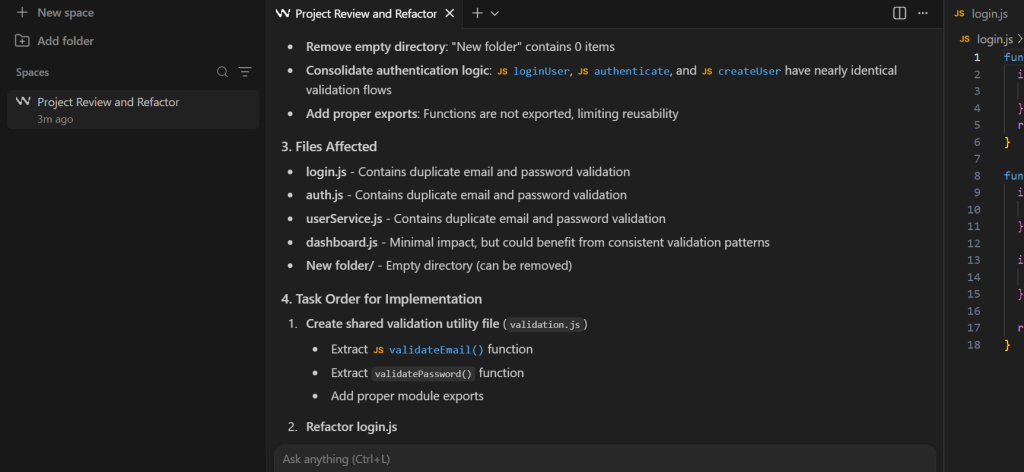
Windsurf is less useful to review like a normal autocomplete tool. Its bigger story is how unstable AI coding workflows can become when model access, acquisitions, and product direction change.
What Stood Out in Use
In our usage review, Windsurf made the most sense when we treated it as a coordination layer rather than a pure code-writing assistant.
It was useful for taking a broad cleanup request and turning it into smaller, reviewable tasks: grouping related files, suggesting task order, and showing where developer review should happen first.
The output felt more like backlog triage than autocomplete, which is exactly where Windsurf’s agentic IDE direction becomes interesting.
Deeper Research Signal
Windsurf was loved in 2024 as a Cursor alternative because of Cascade. Then Anthropic pulled Claude models in mid-2025, creating a visible exodus. Windsurf 2.0 later launched on April 15, 2026 with an Agent Command Center, essentially a kanban-style interface for agents.
Output Quality
Windsurf’s best value appears in structured agent workflows:
- Coordinated coding tasks
- Agent-managed cleanup
- Review-based output
- Multi-step development flows
- Devin-style experimentation
The weaker point is product confidence. Once developers experience model disruption, they become cautious about making the tool central to daily work.
5. Tabnine

Tabnine does not compete on excitement. It competes on approval, control, and reduced governance risk.
What Stood Out in Use
In hands-on testing, Tabnine felt conservative compared with Cursor or Claude Code. It stayed close to developer-controlled assistance: edit, test, fix, explain, document.
That made it less useful for broad autonomous refactors, but safer for workflows where developers want AI support without giving the tool too much control.

Deeper Research Signal
Tabnine’s enterprise value is specific: zero code retention, no training on customer code, IP indemnification, and deployment options across SaaS, VPC, on-premises, and fully air-gapped environments.
Its Code Assistant Platform starts at $39/user/month annually, while the Agentic Platform starts at $59/user/month annually.
Output Quality
Tabnine’s strongest value showed up in controlled environments:
- Private coding support
- Data governance alignment
- Compliance-friendly deployment
- Lower code privacy risk
- Better fit for restricted repos
It felt weaker for deep reasoning, agentic refactors, and complex repo navigation.
6. ChatGPT / Codex

ChatGPT and Codex are most useful around the coding task: explaining, planning, debugging, reviewing, and helping developers reason before touching the repo.
What Stood Out in Use
In a checkout debugging review, ChatGPT connected validateOrder() and createOrder() into one failure chain, identified missing boundary tests, and flagged rollout risk for mobile checkout behavior.
The useful signal was not just bug detection. Most tools can spot a simple mismatch. The stronger value was recognizing test gaps, customer impact, and release risk before code changes started.
Deeper Research Signal
Developers often use ChatGPT/Codex as the fallback when Claude Code hits limits. Codex CLI’s async cloud-task model is also useful when developers want parallel tasks.
This matters especially in mobile app development, where a backend validation issue can become a checkout failure, abandoned cart, or poor app experience.
Output Quality
In our evaluation, ChatGPT/Codex was strongest when the task required engineering judgment before implementation: failure-chain analysis, boundary-test planning, rollout-risk review, and production monitoring. It became weaker when the work required repo access, test execution, or verified code changes.
7. Aider
Aider’s value is not visual comfort. Its value is control. It fits developers who want AI edits to behave like reviewable patches, not hidden agent actions.
What Stood Out in Use
In mature codebases, Aider made more sense when every change needed inspection. It kept the developer close to Git and made AI output easier to evaluate before merging.
That matters when a small incorrect edit can create technical debt or regression risk.
Deeper Research Signal
Aider users repeatedly describe it with phrases like “surgical changes,” “precision tool,” and “keeping the developer in control.” It is also model-agnostic and known for auto-Git commits with descriptive messages.
Output Quality
Aider’s strongest outputs were controlled and reviewable:
- Focused file edits
- Patch-style output
- Git-aware changes
- Descriptive commit flow
- Less hidden automation
Its limitation is accessibility. Developers who prefer visual IDE workflows may find it slower or less intuitive.
8. Jules / Devin
Jules and Devin should be evaluated as async engineering agents, not normal coding assistants. Their best use case is narrow, repeatable work that returns as a reviewable PR.
What Stood Out in Use
These tools fit backlog-style work: dependency upgrades, cleanup tickets, small test additions, and repetitive maintenance. They are less useful when developers need constant interactive control.
The right prompt is not “build my whole app.” It is “take this defined engineering chore and return something I can review.”
Deeper Research Signal
Jules has been described in hands-on reports as completing a test-suite fix in 51 minutes while the developer did other work. Devin’s pricing dropped from $500/month to a $20/month entry tier in April 2025, but ACU overages kept real cost unpredictable.
That is the tension: the workflow is promising, but cost and review burden still shape whether it feels efficient.
Output Quality
The best outputs looked like PR-style engineering work:
- Dependency update attempts
- Test additions
- Maintenance cleanup
- Async task completion
- Review-later output
The weakest point was confidence. Autonomous output still needed engineering review, especially when touching production systems.
Turn AI Coding Speed Into Production-Ready Software
We help teams build, refactor, debug, and scale apps with developers who understand AI workflows, architecture, QA, and release risk.
What Is the Best AI Coding Tool for PyCharm and JetBrains?
For PyCharm and other JetBrains IDEs, there is no single best AI coding tool. JetBrains AI Assistant currently integrates Junie, Claude Agent, Codex, and GitHub Copilot, while external agents can connect through ACP. Cursor uses ACP, and Cline and Windsurf also support JetBrains through their own integrations.
The practical choice depends on how you want AI to work inside your existing development environment.
| Tool | JetBrains integration | Best fit |
| Junie | Integrated through AI Assistant | JetBrains-native agent workflows and multi-step changes |
| Codex / Claude Agent | Integrated through AI Assistant | Teams already using OpenAI or Anthropic agents |
| GitHub Copilot | Integrated agent with GitHub authentication | Teams standardized on GitHub and Copilot |
| Cursor | External agent through ACP | Developers who want Cursor’s agent without leaving JetBrains |
| Cline / Windsurf | JetBrains extensions/plugins | Developers who prefer plugin-based agent workflows |
| Tabnine | IDE integration with private deployment options | Regulated or privacy-sensitive development teams |
JetBrains treats Junie, Claude Agent, Codex, and GitHub Copilot as integrated coding agents, while ACP provides a path for compatible external agents such as Cursor. Tabnine separately supports major IDEs and offers SaaS, VPC, on-premises, and air-gapped deployment options.
Which AI Tool Is Best for Debugging and Multi-File Refactoring?
Claude Code is a stronger fit when the tool first needs to discover where a problem lives. Cursor works better when you already know which files need changing. The key difference is whether the task requires repository discovery or fast execution.
Best AI Tool for Debugging Across Multiple Files
In our backend test, Claude Code traced a checkout failure across routes, validation, service logic, middleware, and tests. It identified a mismatch between two validation rules that looked correct when viewed separately.
The useful part was not just finding the bug. Claude Code also surfaced related validation gaps and showed which parts of the application could be affected before suggesting a change.
That makes repository reasoning more valuable when you do not know where the failure originates. If the problematic file is already known, Cursor can move faster on the edit, while ChatGPT or Codex can help explain failure chains, missing test cases, and potential side effects.
Best AI Tool for Multi-File Refactoring
Multi-file refactoring falls into two categories:
- Scoped refactoring: You already know which files need changes. In our React dashboard test, Cursor reduced repetitive component rewiring and prop updates from roughly 45 minutes to 20 minutes, although the final diff still needed review.
- Discovery-based refactoring: The tool must first identify dependencies and affected files. Claude Code performed better for this type of repository exploration. In our heavier agentic tests, Claude Code used roughly 33K tokens compared with about 188K for Cursor on comparable work.
Whichever tool you use, keep the scope controlled. Ask for a plan before editing, limit unnecessary file changes, and review the final diff rather than treating an agent-generated refactor as finished code.
What is the pricing of AI coding tools in 2026?
AI coding tools increasingly combine subscriptions with usage limits, credits, or metered agent work, so the monthly seat price does not tell the whole story.
- GitHub Copilot: Paid plans include monthly AI Credits. Chat and agent workflows consume credits, while code completions and next-edit suggestions remain unlimited on paid plans.
- Cursor: Pro starts at $20/month and Teams at $40/user/month. Plans include model usage, with additional usage available when included limits are exhausted.
- Tabnine: Code Assistant is $39/user/month and Agentic Platform $59/user/month, billed annually.
- Devin: Current self-serve plans include Free, Pro at $20/month, Max at $200/month, and Teams starting at $80/month. Enterprise usage is billed through Agent Compute Units.
For teams using agents heavily, compare included usage and overage mechanics, not subscription price alone.
What is the productivity impact of AI coding tools in 2026?
AI coding tools change where your time goes more than how much time you save. They speed up scoped, well-understood edits and shift effort toward review and fixing almost right output. Whether the net result is faster depends on the task, the codebase, and how disciplined the review is.
| Productivity signal | What the evidence shows | Source |
| Perceived vs measured speed | Felt 20% faster, measured 19% slower on mature repos | METR RCT, 2025 |
| Adoption vs trust | Usage 84%, positive sentiment 60%, distrust 46% vs trust 33% | Stack Overflow 2025 |
| Scoped-edit speed (our test) | React component rewiring cut roughly 55%, 45 minutes to 20 | TechnBrains internal test |
| Token efficiency | Claude Code about 33K tokens vs about 188K for Cursor on a heavy task, roughly 5.5x | TechnBrains evaluation |
The gain is real on scoped work and fades on large unfamiliar code, exactly where the METR result lands. The tool writes fast, then the team pays it back in review. Treat vendor “% faster” claims as best-case scoped-edit numbers, and plan around the review cost.
What is the best AI agent for coding in VS Code?
For agentic coding in VS Code, the strongest options are Cursor, GitHub Copilot agent mode, and Windsurf. Cursor and Windsurf are VS Code forks built around an agent, so they give the deepest agent UX. Copilot agent mode is the GitHub-native choice if you want stock VS Code, and open extensions like Cline suit developers who want an inspectable agent in their existing editor.
| Option | VS Code fit | Best for |
| Cursor | VS Code fork | Fast scoped edits and prototyping with strong diff review |
| Copilot agent mode | Stock VS Code extension | GitHub-native teams wanting autocomplete plus light agent work |
| Windsurf | VS Code fork, agent-first | Teams testing agent-managed, multi-step workflows |
| Cline and similar | Open stock-VS-Code extension | Developers who want an inspectable, open agent in the editor |
CTO risk: An in-editor agent editing several files at once is only as safe as the diff review around it. Pick the one your team will actually review, not the one with the boldest autonomy.
What TechnBrains’ Research Found Across Developer Communities
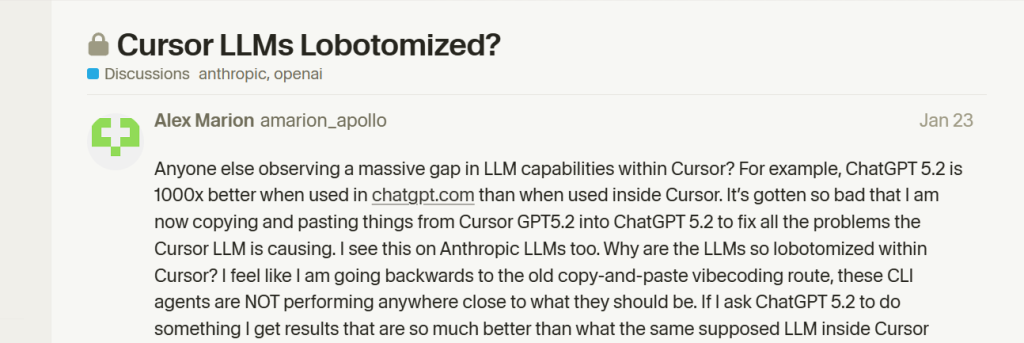
When TechnBrains ran sentiment across Reddit, Hacker News, GitHub discussions, Cursor Forum threads, and AI coding communities, the strongest pattern was not “which tool writes more code.” Developers were talking about trust, control, quota limits, security, and review burden.
-
Developers are losing trust when models feel “nerfed” or inconsistent
A major sentiment pattern was emotional language. Developers used words like “lobotomized,” “nerfed,” and “going backwards” when Cursor responses felt weaker than expected.

-
Developers are frustrated by unpredictable Claude Code limits
Claude Code sentiment was strong, but usage-limit frustration was one of the loudest complaints. In a Reddit thread, one user reported a single prompt burning 56% of a Pro session limit, while another thread described weekly usage jumping from 50% to 79% in five minutes.
-
Developers are confused by Copilot Premium request accounting
A Reddit thread titled “What constitutes a premium request?” shows users debating whether follow-ups, steering messages, and simple replies consume quota. GitHub’s own docs confirm premium requests, model multipliers, and monthly resets are now formal usage mechanics.
-
Developers are treating security as a procurement gate
Security is now central to AI coding adoption. BeyondTrust reported a critical OpenAI Codex command-injection issue that could expose GitHub user access tokens, while Check Point researchers reported Claude Code flaws involving remote code execution and API key theft.
-
Developers are moving toward open-source tools for control
Aider and similar tools show a different developer reaction: AI is useful, but changes must stay inspectable. Aider’s GitHub page highlights codebase mapping, Git integration, and automatic commits with sensible messages, which aligns with developer demand for reviewable AI changes.
-
Developers are already seeing AI agents enter PR workflows at scale
AI coding agents are no longer limited to demos. The AIDev research dataset tracks 932,791 agent-authored pull requests across 116,211 repositories and 72,189 developers, covering agents including Codex, Devin, Copilot, Cursor, and Claude Code.
Final Verdict
Our evaluation found that the best AI coding setup is not one tool. It is a controlled workflow stack where each tool has a clear job and a clear review boundary.
| Workflow Decision | Best Fit | TechnBrains Insight |
| Fast scoped edits | Cursor | Use when files are known and changes need quick reviewable execution. |
| Backend investigation | Claude Code | Use before implementation when the issue spans services, validation, routes, or tests. |
| Team autocomplete | GitHub Copilot | Use when adoption, IDE familiarity, and team standardization matter more than agent depth. |
| Agent coordination | Windsurf | Use for cleanup planning and task breakdown, but keep developer review in the loop. |
| Governed coding | Tabnine | Use when privacy, deployment control, and compliance matter more than hype. |
| Engineering review | ChatGPT / Codex | Use before coding for failure chains, test gaps, rollout risk, and monitoring logic. |
| Patch control | Aider | Use when Git visibility and reviewable changes matter more than visual comfort. |
| Async backlog work | Jules / Devin | Use only for bounded tasks that can return as reviewable PRs. |
TechnBrains takeaway: AI tools can accelerate delivery, but they do not replace engineering ownership. The safest teams will combine AI-assisted speed with developers who know when to accept, reject, test, or rewrite AI output.
Build Faster Without Losing Engineering Control
Use AI tools for speed and embed vetted developers for architecture, testing, security, and delivery ownership.
Table of Contents
Frequently Asked Questions
The best AI coding tools are Cursor, Claude Code, GitHub Copilot, Tabnine, ChatGPT/Codex, Aider, Devin, and Jules. The right choice depends on workflow: Cursor is strongest for IDE-based coding, Claude Code for reasoning-heavy development, Copilot for enterprise autocomplete, and Tabnine for private coding environments.
Claude Code is the best AI tool for debugging complex code issues because it can trace logic across multiple files, dependencies, backend layers, and larger code structures. ChatGPT is useful for explaining errors, while Cursor works better when the bug location is already known.
Claude Code is best for deep multi-file editing and refactoring, especially when related files need to be discovered first. Cursor is better for controlled multi-file edits inside the IDE where developers want visual diffs and direct oversight.
Cursor is the best AI IDE for most developers because it combines a VS Code-like experience with AI autocomplete, inline editing, Composer workflows, and visual diff review. It is especially useful for frontend development, rapid prototyping, and iterative product work.
Cursor is better for AI-native IDE workflows and multi-file editing, while GitHub Copilot is better for autocomplete, enterprise rollout, and repo-connected development environments. Cursor feels more flexible for active coding, while Copilot is easier to standardize across large teams.
Claude Code is better for reasoning, large codebases, backend debugging, and multi-file refactoring. Cursor is better for IDE-based coding, frontend edits, autocomplete, and visual control. Many developers use both together because they solve different workflow problems.
Cursor is the best AI coding tool for most startups because it supports fast prototyping, frontend iteration, and product development without a steep learning curve. As the product scales, startups often add Claude Code for backend reasoning and architecture-heavy work.
Claude Code is the best AI coding tool for large codebases because it performs better at monorepo understanding, file discovery, dependency tracing, and multi-file reasoning. Cursor is useful for scoped edits, while Aider is strong for controlled, review-driven changes.
Cursor and GitHub Copilot are the best AI tools for code autocomplete. Cursor is stronger for fast, AI-native development workflows, while Copilot is more reliable for structured enterprise environments and teams already using GitHub-based workflows.
GitHub Copilot for GitHub-native standardization, Tabnine for regulated or air-gapped environments needing zero code retention and IP indemnification, and Windsurf for teams investing in agent workflows.
Claude Code, for tracing an issue across files, routes, validation, and tests before writing a fix. ChatGPT or Codex pairs well for failure-chain and test-gap reasoning. Both also help debug AI-generated code, which 45% of developers call a top frustration.
Blocked by backlog or missing expertise?
Senior developers who build, fix, and ship — without slowing your team down.