


App Store Optimization for iOS Applications

App store optimization for iOS applications directly determines how often your app appears in search results and how effectively it converts page views into installs. Since nearly 65% of App Store downloads happen after a search, weak ASO means lost growth before users even evaluate your product.

I’ve worked with technically strong apps – clean Swift architecture, stable releases, solid retention curves that still hit growth plateaus. The issue wasn’t engineering or product-market fit. It was discoverability and conversion inside the App Store. 

If your listing doesn’t align with search intent and convert fast, users never reach onboarding, and growth stalls at the storefront.

TL;DR 

  • Metadata precision: Apple indexes the title, subtitle, and 100-character keyword field. Structured, relevant metadata directly impacts rankings.
  • Conversion mechanics: Average iOS CVR is ~25%, but top-performing listings achieve 35%+. Strong visuals, messaging, and iterative screenshot testing amplify install velocity and keyword momentum.
  • Apple Search Ads can accelerate growth, but strong ASO maximizes efficiency and lowers acquisition costs.
  • Predictive keyword modeling, LLM-powered review clustering, behavioral cohort analysis, and AI-driven screenshot iteration improve targeting accuracy and conversion outcomes.

What App Store Optimization for iOS Applications includes

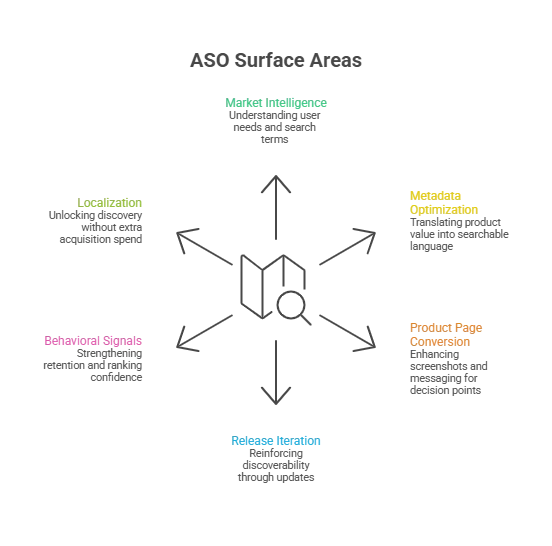
ASO improves visibility, conversion, and ranking stability through precise metadata, behavioral signals, and conversion-focused creatives. Beyond listing tweaks, ASO functions as a repeatable growth system:

  • Market & intent intelligence: Understand user language, needs, and search behavior.
  • Metadata & positioning: Translate your product’s value into searchable, intent-aligned language.
  • Product page conversion: Optimize screenshots, icons, videos, and messaging for decision points.
  • Release-aligned iteration: Reinforce discoverability with updates and launches.
  • Behavioral signals: Retention, engagement, reviews, and crash stability sustain ranking.
  • Localization: Expand discovery internationally without extra paid acquisition.

Case Insight: We helped a 5-person iOS team recover 25% of lost visibility in 30 days without delaying releases, showing how ASO compounds growth quickly.
app store optimization for ios

How ASO Differs from Traditional SEO

Many executives assume SEO expertise transfers directly to ASO. It doesn’t. Both optimize for search, but mechanics, constraints, and ranking physics differ:

Dimension SEO (Web) iOS ASO (App Store)
Indexable Surface Full-page content, headings, schema Title (30), Subtitle (30), Keyword Field (100)
Keyword Depth Virtually unlimited Strict character limits
Ranking Signals Backlinks, authority, content depth Install velocity, CVR, retention
Behavioral Signals CTR, dwell time, bounce rate Page-to-install CVR, engagement stability
Update Mechanics Continuous crawling Manual updates via App Store Connect
Optimization Cycle Rolling Structured 3–4 week cadence
Visual Impact Supportive Core driver: screenshots often determine installs
User Intent Informational Immediate problem-solving + install intent
Geography hreflang, subfolders Native storefront localization

Platform architecture also influences App Store performance. Native iOS experiences enable smoother onboarding, faster load times, and stronger retention signals, reinforcing ranking durability.

Understanding the differences between native and cross-platform development can clarify how technical decisions influence growth outcomes.

App Store metadata and ranking factors: what moves the needle in 2026

High-performing ASO teams treat discoverability, metadata, conversion, and behavioral signals as a single growth system. Each layer compounds the next: eligibility → visibility → conversion → velocity → ranking → impressions → retention → algorithm confidence.

Layer Purpose Optimization Focus Priority
Intent Architecture Search eligibility Keyword portfolio, intent mapping, competitive positioning Critical
Metadata Engineering Precision & coverage Title, subtitle, keyword field, category Critical
Conversion Mechanics Install momentum Screenshots, icon clarity, preview video, first-screen messaging Strategic
Behavioral Reinforcement Ranking stability Retention curves, review velocity, crash signals Strategic
Compounding Differentiation Durable advantage Custom pages, in-app events, localization, visual iteration Advanced

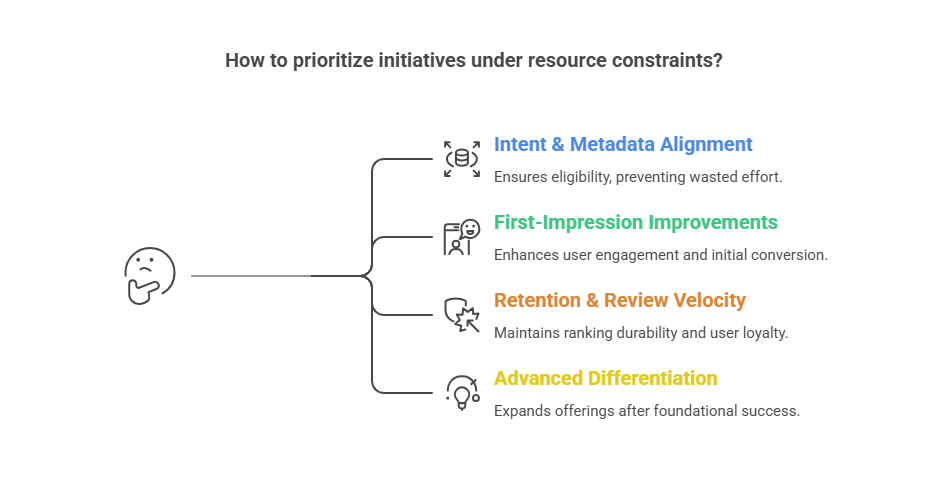
Prioritization for limited resources:

  1. Intent + metadata → eligibility & accurate positioning
  2. First-impression conversion → screenshots, icon, subtitle clarity
  3. Retention & reviews → stabilize ranking
  4. Advanced differentiation → custom pages, localization, in-app events
    app store optimization for ios

AI & Predictive Layer: The Modern ASO Advantage

AI is transforming ASO from reactive optimization to predictive decision-making:

  • Predictive Keyword Modeling: Forecast high-volume, high-conversion terms before competitors.
  • LLM-Powered Review Clustering: Identify emerging pain points and feature trends from user feedback at scale.
  • Behavioral Cohort Analysis: Determine which keywords and features drive retention in different user segments.
  • AI-Driven Screenshot Iteration Testing: Predict which visual assets maximize install conversion and iterate faster.

Strategic Impact: AI reduces experimentation risk, accelerates iteration, and allows lean teams to compete with larger organizations.

What Changed in ASO from 2023–2026

The App Store landscape has shifted significantly in the last few years, making traditional ASO tactics less effective:

  • Behavioral signals dominate rankings: Install velocity, retention, and engagement stability now outweigh keyword stuffing.
  • Visual conversion is critical: Screenshots, preview videos, and icon clarity have a larger impact on installs than ever.
  • Metadata constraints tightened: Apple continues to enforce strict character limits and indexing rules, requiring more precise keyword strategies.
  • AI & predictive insights emerging: Predictive keyword modeling, LLM-powered review clustering, and behavioral cohort modeling are enabling teams to anticipate trends and optimize proactively.
  • Localization drives incremental growth: Country-specific storefront optimization is now a major lever for discovery and installs.

Execution Insight

Strong strategy alone isn’t enough. Many teams stall due to bandwidth: iterative updates, visual experiments, and localization require consistent execution. 

Staff augmentation and hiring ASO specialists or iOS developers can maintain release cadence while running optimization cycles, reducing risk, and accelerating compounding growth.

Real-World Scenario: Sudden 30–60% Organic Install Drop

Even apps with strong ratings (4.3–4.6), low crashes, and unchanged metadata can lose 30–60% of impressions in 2–4 weeks. Causes include:

  • Ranking compression: Small keyword position shifts can cut traffic 40%+.
  • Competitor momentum: Paid campaigns, feature releases, or seasonal spikes.
  • Search demand shifts: Keyword volumes fluctuate, affecting installs.
  • Algorithm updates: Retention, review recency, or engagement changes impact visibility.
  • Browse/recommendation changes: Loss from “Similar Apps” slots or collections.

Mitigation: Audit keyword positions, refresh screenshots, optimize metadata, and align paid campaigns. Staff augmentation can accelerate these responses without pulling internal engineering off core development.

iOS keyword field optimization tips that teams get wrong

The 100-character iOS keyword field is one of the most impactful and technically demanding elements of App Store Optimization (ASO). Optimizing it correctly drives visibility, ranking, and ultimately installs.

Core Rules

  1. Total Characters: Max 100 (English; varies by language)
  2. Comma-Separated: No spaces after commas
  3. Avoid Duplication: Don’t repeat words in title, subtitle, or category
  4. Singular/Plural: Automatically indexed
  5. Case Insensitive: Lowercase works fine

Keyword Portfolio Approach

Instead of a random list, build a portfolio aligned with core value and user intent. This allows targeting different competition levels while reflecting search intent:

Bucket Focus Examples
Core category Primary ranking surface budget tracker, invoice, fitness plan
Feature Capability-driven discovery scan receipts, expense alerts, meal planner
Use-case Situational relevance freelancer invoices, student budget
Audience Conversion alignment small business, new parents

Optimization Strategy:

  • 2–4 from Core category (high-value, competitive)
  • 6–10 from Feature + Use-case (mid-competition, relevant)
  • 2–4 from Audience (improves conversion and ICP alignment)

Common Mistakes

Mistake Impact Fix
Keyword Duplication Wastes space; Apple ignores repeats Audit all fields; use unique terms
Brand Name in Keyword Field Already in title; no added value Replace with high-value keywords
Overusing Broad Terms Generic keywords have minimal ranking impact Focus on intent-driven, specific terms
Ignoring Localization Limits market relevance Prioritize country-specific keywords

App Store Metadata Execution: Title, Subtitle, and Hidden Tradeoffs

Your app’s title and subtitle are primary ranking and conversion assets. The challenge is balancing recognition with discoverability.

  • Brand clarity: Makes the app memorable and easy to recognize.
  • Intent clarity: Aligns metadata with real search queries to improve visibility.

Category Positioning That Drives Conversion

In competitive or trust-sensitive categories (fintech, health, identity), early impressions shape both installs and credibility:

  • Differentiation: Communicate your unique value immediately.
  • Conversion-focused visuals: The first screenshots often determine install decisions.
  • Credibility cues: Ratings, reviews, press mentions, and compliance signals reinforce trust and ranking stability.

Strong title, subtitle, and first-impression alignment make your listing discoverable, persuasive, and defensible, reducing acquisition friction while supporting long-term growth confidence.


Your High-Investment App Deserves Maximum Visibility

If your app’s discoverability, retention, and ranking rely on ad hoc efforts instead of specialized expertise, growth stalls and acquisition costs rise. We help teams augment engineering capacity with ASO-aware iOS experts to ensure your app gets found, converts, and scales.

Visual ASO: Screenshots & Video Previews That Drive Conversion

In the Apple App Store, visuals aren’t just design—they’re your primary acquisition interface. Icons, screenshots, and preview videos directly impact tap-to-install conversion.

Screenshot Narrative Framework:
High-performing listings reduce decision friction:

Hook → Proof → Feature → Outcome → Differentiator → Trust → CTA

Icon Strategy:
Avoid icons that are overly abstract, too similar to competitors, or unreadable at small sizes. Icons should instantly communicate category; creativity belongs inside the app.

Preview Video Tips:

  • Show the core action immediately
  • Highlight the “after” result
  • Keep understandable without sound 
  • Audio-dependent previews often reduce conversion.

CRO Focus: Funnel Decisions

  1. Impression → Tap: Optimize search visibility & first impression
  2. Tap → Install: Persuade via page clarity and visuals
  3. Install → Activation: Ensure the app fulfills its promise

Highest-Impact CRO Levers (Priority):

  • First 2 screenshots — convey value instantly
  • Subtitle clarity — remove ambiguity around core benefit
  • Trust signals — ratings, credibility, compliance
  • Preview video — only if faster/more effective than screenshots

Testing & Paid/Organic Strategy in the Apple Ecosystem

Structured testing: Use Apple Product Page Optimization to run iterative experiments on screenshots, icons, and metadata. Treat it as a repeatable process, not a one-off, to sustain conversion gains and ranking momentum.

Paid vs Organic: Many teams overspend on Apple Search Ads (ASA) assuming it substitutes for weak ASO. In reality, paid amplifies strong ASO but cannot fix poor metadata or low-converting visuals. 

Decision Guide:

  • Lean on ASA when launching, entering new regions, or validating keywords quickly.
  • Lean on organic ASO when retention/referrals are strong, building category positioning, or reducing long-term paid dependency.
  • Combine both to refine keywords from paid insights, scale installs, and support 6–12 month compounding growth.

Key takeaway: Paid is an acceleration and insight layer; ASO is the foundation for sustainable, cost-efficient acquisition.

Staff Augmentation: When to Bring in ASO Experts

For many teams, internal bandwidth or expertise isn’t enough to maintain high-performing ASO. Structured staff augmentation provides specialized skills, accelerates results, and sustains growth without premature full-time hires.

When to Augment vs Hire In-House

Augment When:

  • ASO is critical but not a full-time function.
  • Rapid audits, metadata updates, or experiments are needed.
  • Product/growth teams lack deep App Store expertise.
  • High release velocity requires optimization alongside development.

Hire In-House When:

  • ASO is a permanent growth channel with predictable workload.
  • Tight cross-team collaboration and long-term ownership are required.
  • Continuous experimentation and institutional knowledge are priorities.

Skill Profile for Success

An effective ASO specialist should combine:

  • Metadata & keyword strategy: structured targeting, portfolio management.
  • Conversion-focused marketing: persuasive messaging and visual experimentation.
  • Data & experimentation: analyze results to guide iteration.
  • App Store Connect familiarity: seamless implementation with release cycles.

Red Flags for Failed Engagement:

  • Focuses only on metadata, ignoring conversion.
  • Reports rankings without linking to installs, retention, or revenue.
  • Slow experimentation or poor collaboration with product/design teams.

Budget & Engagement Models

Model Focus Duration Cost
Project-Based Audits, repositioning, localization ~3 months $5k–$15k
Fractional Specialist Ongoing optimization, part-time (~10–20 hrs/wk) 6–12 months $3k–$7k/mo
Embedded Contributor Integrated with releases & growth sprints Ongoing $8k–$15k/mo

Budgets depend on iteration speed: faster testing → faster ranking recovery & compounding growth.

Delivery & Success Metrics

Delivery Risk Considerations:

  • Frequent, actionable reporting vs. slow updates.
  • Ability to influence design/product/release workflows.
  • Clear success metrics: visibility, conversion lift, retention, install growth, ranking recovery.
  • Knowledge transfer to reduce dependency.

KPIs for Success:

  • Install lift: % increase in organic installs.
  • Conversion rate improvement: Tap-to-install CVR, especially first 2–3 screenshots.
  • Keyword ranking recovery: Core category & feature terms.
  • Retention impact: 7–30 days post-install.
  • Revenue effect: In-app purchases/subscriptions (if applicable).

Takeaway: A structured, buyer-focused augmentation plan clarifies costs, engagement models, and expected outcomes, helping teams accelerate ASO growth while minimizing internal risk.

The 90-day ASO plan you can execute

If you want an execution blueprint for app store optimization for iOS applications, here is a plan I’ve used across multiple launches and relaunches.

Days 1-15: Audit and intent mapping

  • Pull baseline: impressions, taps, installs, CVR
  • Identify top 10 competitors and their positioning
  • Map your keyword portfolio (A/B/C/D buckets)
  • Rewrite title/subtitle/keyword field with intent clarity
  • Define your screenshot narrative (Hook → Proof → Outcome)

Deliverable: ASO strategy doc + metadata draft + visual storyboard

Days 16-45: Ship the first conversion upgrade

  • Create new screenshot set (start with the first 3)
  • Update subtitle and first screenshot headline to match top intent
  • Improve trust cues (reviews prompts inside app, support clarity)
  • Launch Product Page Optimization test if you have enough traffic

Deliverable: Conversion-focused listing v1 + active test

Days 46-90: Scale what works and stabilize

  • Apply winning assets from tests
  • Expand into localization targets if justified
  • Align ASA keyword learnings with organic metadata
  • Build a quarterly refresh rhythm tied to releases

Deliverable: ASO operating system (repeatable cadence)

Conclusion: Optimizing App Visibility and Conversion for Business Success

Across multiple launches, I’ve seen that visibility rarely improves through isolated ASO efforts. It compounds when discoverability evolves with the product and becomes part of how releases are planned, not something addressed after launch.

The apps that sustain organic growth are usually the ones where eligibility, first impressions, and post-install experience are refined continuously. That consistency improves acquisition stability and strengthens trust within the Apple App Store.

In most cases, the challenge isn’t strategy but execution bandwidth. I’ve found that extending teams with specialists like TechnBrains helps maintain optimization momentum without pulling focus away from core engineering priorities.

Native iOS vs Cross-Platform: 3-Year Cost & Performance

Native iOS prioritizes long-term performance, security, and scalability, while cross-platform prioritizes early cost efficiency and faster dual-platform launch.

I’ve worked with startups that moved fast on cross-platform, and others that rebuilt native after scaling pain hit. The decision between native iOS and cross-platform isn’t about trends. 

It’s about how your architecture will behave at 200K users, how your team scales, and what your long-term maintenance curve looks like.

If speed-to-market is critical and resources are tight, cross-platform can validate quickly. If performance, deep iOS integration, and long-term control matter, native often pays off beyond year one.

This comparison breaks down cost, performance, and scaling realities.

Quick Overview

  • React Native reduces early-stage burn when launching on both iOS and Android.
  • Native iOS provides stronger performance predictability under high interaction density.
  • Performance differences become measurable above ~250K MAU in feature-heavy apps.
  • Cross-platform architectures often evolve into hybrid systems after 18–24 months.
  • Long-term cost modeling should include optimization cycles, not just initial build hours.
  • Enterprise environments prioritize security surface area and release predictability.
  • The right decision depends on projected product complexity over the next 24–36 months.

Is Faster Time-to-Market Worth Long-Term Architectural Trade-Offs?

Well, It’s worth it only if your growth trajectory won’t outpace your architecture within 12–24 months.

Early speed can be strategic. Cross-platform frameworks help startups validate ideas faster, reduce early hiring pressure, and ship MVPs without building two separate codebases. 

For Seed-stage teams, that acceleration can mean the difference between iteration and stagnation.

I’ve seen teams gain three months upfront, then spend six to nine months rewriting performance-critical modules once user load crossed meaningful thresholds.

This matters because mobile isn’t just experimental anymore. 

What starts breaking first when cross-platform apps scale in users and feature complexity?

At scale, what breaks first in cross-platform apps is engineering velocity, not user-facing features, once native integrations, performance tuning, and release pressure compound.

In the first 6–12 months, I rarely see meaningful differences between Flutter and native iOS in real startup environments. The problems start appearing when:

  • You’re shipping weekly
  • You’ve layered 6–10 SDKs
  • Your UI is state-heavy
  • Your MAU crosses ~200K
  • Your product team keeps expanding feature scope

At that point, performance optimization and debugging time begin to diverge.

Flutter adds a rendering engine and Dart runtime between your code and Apple’s system APIs. That abstraction helps early productivity. 

But when something misbehaves in production, I’ve seen investigations cross three layers before identifying the root cause: 

Dart isolate → platform channel → native SDK.

That multi-layer debugging costs compounds under release pressure.

In native Swift, profiling and crash diagnostics stay within Apple’s runtime, Xcode tools, and system-level logs. That shortens resolution cycles.

And that matters more than theoretical FPS benchmarks.

Where Cross-Platform Rendering Becomes a Real Cost

The issue is frame stability when:

  • Background tasks fire
  • Analytics SDKs log events
  • Push notifications trigger UI updates
  • Animations overlap with data refresh

Apple defines smooth rendering at 60 FPS (16ms per frame). Once frame processing exceeds that budget, users perceive lag.
Source: https://developer.apple.com/design/human-interface-guidelines/performance/

In high-interaction fintech or SaaS dashboards, I’ve seen native builds maintain more predictable frame consistency under concurrency.

In content-heavy or form-based apps, the difference is negligible.

Native API Depth: Where Abstraction Accumulates

When your product roadmap introduces:

  • Advanced background processing
  • Secure Enclave workflows
  • Low-level Bluetooth
  • Camera performance tuning
  • Custom push handling

You begin writing native modules even in Flutter projects.

After 18–24 months, many cross-platform codebases I’ve reviewed are effectively hybrid systems: shared UI + growing native patches.

At that point, teams are maintaining both abstraction layers and platform-specific code.

Hiring Reality Under Growth Pressure

Flutter reduces early staffing complexity. One team, two platforms.

But once performance tuning becomes strategic, you still need engineers who understand:

  • iOS memory management
  • Threading
  • Lifecycle edge cases
  • Native profiling tools

I’ve seen teams assume cross-platform eliminates native expertise requirements. It doesn’t. It delays them.

Swift engineers are more specialized and harder to hire. They also reduce optimization cycles when scaling becomes critical.

Plugin & OS Update Exposure

Apple releases major iOS updates annually.

Native teams adapt immediately within Apple’s SDK cycle.

Flutter teams depend on framework and plugin alignment.

Most years, this works smoothly. Occasionally, ecosystem lag creates temporary friction.

For consumer apps, that’s tolerable.
For enterprise deployments, even small instability windows impact client confidence.

Why This Matters Financially

According to Grand View Research, the global mobile app market is projected to reach $756 billion by 2027

When mobile becomes a primary revenue driver, predictability matters more than build speed.

Early cost savings from cross-platform can be offset later by:

  • Extended debugging cycles
  • Native rewrites
  • Performance refactoring
  • Release delays

Native iOS often carries higher upfront cost but lower architectural entropy over a 3–5 year horizon.

How does the 3-year total cost of ownership compare between React Native and native Swift?

Over three years, React Native usually lowers upfront cost if you are building for both iOS and Android, but native Swift often produces lower cumulative engineering overhead when iOS is a primary revenue channel.

Most founders compare only MVP cost. That’s incomplete. The real financial difference appears between months 6 and 24, when feature depth, SDK stacking, and optimization cycles expand.

In scaling SaaS and product companies I’ve reviewed (ARR $5M–$50M range), cost divergence typically follows a predictable pattern:

  • Year 1: Cross-platform cheaper if dual-platform is required
  • Year 2: Optimization effort increases in hybrid architectures
  • Year 3: Maintenance and debugging hours compound differently

Mobile investment decisions matter because the mobile app economy continues expanding.

When mobile drives revenue, cost predictability matters more than launch savings.

Month 0–6: MVP Development Velocity

In the first six months, React Native shows measurable efficiency if you are launching both iOS and Android simultaneously.

MVP Timeline & Cost Snapshot (Moderate SaaS Product)

Variable React Native (Dual Platform) Native Swift (iOS Only)
Platforms Delivered iOS + Android iOS
Typical Team 2–3 RN engineers 2 iOS engineers
Timeline 12–16 weeks 12–14 weeks
Estimated Cost (US rates) $120K–$180K $90K–$140K
Code Reuse 70–85% shared N/A
Early Burn Efficiency High (dual launch) High (iOS-first)

If Android is strategic in year one, React Native reduces parallel hiring.
If the product is iOS-first, the cost advantage narrows significantly.

This is where many cost comparisons mislead buyers — they compare dual-platform React Native to single-platform native iOS without adjusting scope.

Month 6–18: Optimization & Native Module Expansion

This period determines whether early savings hold.

As features grow, teams typically add:

  • Analytics & attribution SDKs
  • Payments & subscription logic
  • A/B testing frameworks
  • In-app messaging
  • Push segmentation
  • Monitoring & crash tools

In React Native projects, I often see increasing native extensions during this phase. 

Performance-critical screens, animation-heavy flows, and edge-case SDK integrations move into platform-specific modules.

Now teams manage:

  • Shared business logic
  • Native modules
  • Platform bridges
  • Cross-layer testing

Engineering time per optimization cycle increases because investigation spans multiple layers.

Native Swift teams optimize within a single runtime and toolchain. Profiling, memory inspection, and threading analysis remain inside Apple’s ecosystem.

This difference shows up in engineering hours per issue, not in marketing benchmarks.

Month 18–36: Maintenance, Debugging & DevOps Overhead

By year two, cost behavior stabilizes around architecture maturity.

In hybrid React Native codebases, QA scope expands because:

  • Shared logic must be validated
  • Native bridges must be regression-tested
  • Platform-specific behavior must be re-verified per OS update

CI/CD pipelines also grow more layered.

Native Swift projects operate entirely inside Apple’s SDK, Xcode tooling, and profiling ecosystem. That reduces cross-layer release coordination.

The difference is rarely dramatic in small teams.
In 10+ engineer mobile teams shipping weekly, release friction becomes measurable.

Total Cost of Ownership: Engineering + QA + Infrastructure

Three-year cost modeling should include:

  • Engineering salaries
  • QA cycles
  • Refactor time
  • Performance optimization effort
  • Native module maintenance
  • CI/CD tooling
  • Monitoring & observability

Here’s a simplified 36-Month View (iOS-Revenue-Focused Product)

Cost Component React Native Native Swift
Year 1 Build Lower (dual launch benefit) Higher upfront
Year 2 Optimization Moderate increase Stable
Year 3 Maintenance Hybrid complexity cost Predictable
Native Extension Work Increasing Integrated
Total 3-Year Curve Front-loaded savings Flatter long-term curve

If iOS drives 60–80% of revenue, I generally see native Swift produce steadier long-term cost behavior.

If both platforms are equally strategic from day one, React Native often delivers faster early ROI.

Model the next 36 months before committing to architecture.

Framework decisions compound over time. Map projected feature depth, integration load, and release cadence before locking your mobile stack.

How do native iOS and React Native perform under real-world load at 100K–500K users?

Under real production load, native iOS delivers more predictable performance consistency, while React Native remains competitive in moderate interaction scenarios but shows greater variability under high UI concurrency.

In controlled demos, both approaches perform well. The meaningful differences appear when:

  • Background tasks overlap with UI updates
  • Multiple SDKs run concurrently
  • Users navigate quickly between heavy screens
  • Data refresh frequency increases

Once total execution exceeds that window, users perceive lag.

In production SaaS apps with frequent UI redraws, I’ve seen native builds maintain tighter frame consistency during concurrent operations.

Cold Start Time Comparison

Cold start becomes visible when apps include multiple SDKs and background initialization routines.

Typical Cold Start Ranges (Moderate SaaS App)

Scenario Native Swift React Native
Basic App (Minimal SDKs) 400–700 ms 600–900 ms
Moderate SDK Stack (5–8 SDKs) 700–1,100 ms 900–1,400 ms
Heavy Initialization 1.2–1.8 sec 1.5–2.2 sec

React Native loads JavaScript bundles during initialization. Native Swift initializes directly through iOS runtime.

The difference is rarely dramatic under light conditions. Under heavy SDK stacking, the gap widens.

Google research shows even small load delays reduce engagement and session depth.

Frame Rendering Stability (60 FPS vs Jank)

Both frameworks target 60 FPS.

The difference appears during:

  • Rapid scroll with dynamic content
  • Simultaneous animation + API refresh
  • Layered modals and transitions

Frame Stability Under Concurrent Activity

Condition Native Swift React Native
Static UI Stable 60 FPS Stable 60 FPS
Moderate Animation 55–60 FPS 50–60 FPS
High Concurrency + Animations 50–60 FPS (predictable) 40–55 FPS (variable)

Native Swift interacts directly with Core Animation and Metal.

React Native coordinates UI updates through the JavaScript bridge before hitting the native layer.

In content-driven apps, this difference is negligible.
In real-time dashboards or fintech apps, variability becomes measurable.

Memory Usage & Battery Drain

Memory overhead matters in long sessions.

React Native apps typically maintain a slightly higher baseline memory footprint due to JavaScript runtime overhead.

Average Memory Footprint (Moderate App)

Metric Native Swift React Native
Idle State 40–60 MB 60–90 MB
Active Session 80–120 MB 110–160 MB
Battery Impact (Heavy Interaction) Lower variance Slightly higher variance

These numbers vary by architecture, but JavaScript runtime introduces additional memory allocation and garbage collection cycles.

In long-session B2B apps (dashboards, field apps), I’ve seen native builds show more stable battery consumption patterns.

Real-Time Data & Complex Animation Handling

Performance pressure increases significantly when:

  • WebSocket streams push data every second
  • Charts redraw continuously
  • Multi-layer transitions overlap
  • Gesture-heavy interactions are frequent

In these environments:

  • Native Swift executes rendering and event loops inside a unified runtime.
  • React Native coordinates between JS thread and native thread.

The coordination overhead is small in isolation. It compounds during concurrency.

In fintech and analytics-heavy SaaS apps I’ve reviewed at 300K+ MAU, teams often move performance-critical screens to native modules inside React Native builds.

That is not a failure of React Native.
It is a recognition that certain UI workloads benefit from direct platform execution.

Decision Summary

If your roadmap includes:

  • Real-time dashboards
  • Data-heavy redraw cycles
  • Advanced animations
  • Hardware-dependent features

Native iOS provides more predictable performance behavior at higher concurrency.

If your app is:

  • Form-driven
  • Content-based
  • Moderate interaction depth
  • Primarily business-logic focused

React Native performs competitively.

The performance difference under real load is not catastrophic.
It is incremental and architectural.

At 20K users, it is invisible.
At 300K users with feature depth, it becomes measurable.

At what stage do startups regret choosing cross-platform over native iOS?

Startups regret choosing cross-platform when performance tuning, release delays, and native rewrites begin consuming more engineering time than feature development.

Regret rarely appears in the first year. It surfaces when growth, feature depth, and technical debt intersect.

In most scaling products I’ve reviewed, regret correlates with three measurable patterns:

  1. Performance KPIs degrade under concurrency
  2. Native modules grow beyond initial expectations
  3. Optimization cycles extend release timelines

Cross-platform is not inherently wrong. Misalignment with product trajectory is.

Crash Rate & Performance KPIs That Signal Rebuild

Engineering decisions should follow measurable signals. The following thresholds often trigger architectural reassessment:

KPI Indicator Risk Threshold
Crash-Free Sessions < 99.5%
Cold Start Time > 2 seconds on mid-tier devices
Frame Drops Under Interaction Sustained < 50 FPS
Performance-Related Support Tickets Increasing > 15% QoQ
Optimization Cycle per Issue > 2–3 engineer-days


When performance issues require repeated bridge-level investigation or native patching, engineering capacity shifts from innovation to stabilization.

That is typically the first internal signal.

Scaling Beyond 250K MAU: The Inflection Point

At ~250K–500K monthly active users, architectural inefficiencies become operational costs.

Growth Phase Typical Cross-Platform Behavior
<100K MAU Minimal friction
100K–250K MAU Optimization effort increases
250K–500K MAU Native extensions accumulate
500K+ MAU Performance predictability becomes strategic

This threshold is not about downloads. It’s about interaction density and concurrent usage patterns.

In high-frequency SaaS or fintech products, I’ve observed teams introduce native rewrites of performance-critical modules between 250K and 400K MAU.

That is usually the inflection point where early savings begin narrowing.

When Rewriting Costs More Than Building Native First

Rewrites become financially problematic when:

  • Core UI layers must move to native
  • State management logic requires restructuring
  • Multiple platform bridges must be refactored
  • QA scope doubles during migration

Here’s a simplified ROI comparison:

Scenario Cross-Platform Start Native From Start
Year 1 Cost Lower Higher
Year 2 Optimization Moderate Stable
Year 3 Partial Rewrite +20–40% additional engineering cost Minimal
Long-Term Maintenance Hybrid complexity Single runtime

In growth-stage companies, partial rewrites typically cost 20–40% of original build budget depending on scope.

The regret isn’t emotional. It’s financial.

Startups regret cross-platform when the rewrite cost exceeds the initial savings they gained.

Cost Inflection Points

Cross-platform regret correlates with:

  • Rapid feature expansion
  • High interaction density
  • Heavy SDK stacking
  • Enterprise-grade SLAs
  • Long-term product roadmap

If the roadmap includes those elements, native investment earlier often produces cleaner cost curves.

If the roadmap is controlled, iteration-heavy, and dual-platform from day one, cross-platform remains strategically sound.

Regret is caused by choosing without modeling 24–36 months of product evolution.

Is cross-platform mobile development viable long-term for enterprise modernization?

Cross-platform is viable long-term in enterprise environments only when the application layer is business-logic dominant and not deeply dependent on platform-level capabilities or strict release control.

In modernization programs, the real evaluation criteria are:

  • Security surface area
  • Compliance exposure
  • Release predictability
  • Vendor and ecosystem dependency
  • 3–5 year maintainability

Cross-platform frameworks can absolutely support enterprise apps. The decision becomes strategic when mobile is either revenue-critical or operationally mission-critical.

According to IBM, the global average cost of a data breach reached $4.45 million in 2023, emphasizing how architectural exposure impacts enterprise risk.

Enterprise leaders evaluate frameworks through the lens of risk containment and control depth, not only development velocity.

In modernization engagements I’ve reviewed, cross-platform viability depends heavily on how much the app interacts with sensitive data, hardware-level features, and regulated workflows.

Security, Compliance & Deep iOS-Level Access

Enterprise-grade apps frequently require:

  • Biometric authentication
  • Secure Enclave usage
  • Advanced encryption handling
  • Certificate pinning
  • Background policy enforcement

Security Architecture Comparison

Area Native Swift Cross-Platform
Secure Enclave Access Direct Via bridge
OS-Level Policy Integration Native Plugin/bridge dependent
Patch Responsiveness Immediate (Apple SDK) Framework + plugin alignment
Dependency Surface Lower Broader ecosystem

Native builds reduce external abstraction layers. Cross-platform builds introduce additional runtime and plugin dependencies.

CI/CD Complexity & Release Management

Enterprise modernization programs prioritize release governance.

Native iOS operates within Apple’s Xcode toolchain and SDK ecosystem. CI/CD pipelines integrate directly with Apple’s build and signing infrastructure.

Cross-platform adds:

  • Framework build layers
  • Plugin compatibility checks
  • Multi-runtime testing scope

Process Comparison

Factor Native iOS Cross-Platform
Build Pipeline Layers Single stack Multi-layered
Regression Scope Platform-contained Shared + platform bridges
OS Update Adaptation Direct Framework dependent
Release Predictability High Conditional on ecosystem alignment

In enterprise teams shipping under compliance deadlines, pipeline simplicity reduces operational risk.

Exit Strategy: Acquisition or IPO Readiness

In late-stage companies, architecture influences valuation.

During technical due diligence, acquirers examine:

  • Code maintainability
  • Dependency risk
  • Scalability path
  • Long-term technical debt

Hybrid architectures with growing native patches and cross-platform bridges increase complexity during audits.

In revenue-heavy iOS-first companies, I’ve observed native builds present cleaner long-term technical narratives during diligence processes.

Cross-platform remains viable when:

  • The architecture is clean
  • Native extensions are controlled
  • Dependency management is disciplined

Enterprise modernization is not about whether cross-platform works.

It is about how much architectural control and dependency exposure the organization is willing to manage over a multi-year horizon.

Executive Summary

Cross-platform is strategically sound when:

  • Business logic dominates
  • Dual-platform coverage is essential
  • Compliance sensitivity is moderate

Native iOS is strategically stronger when:

  • Security posture is critical
  • Revenue depends heavily on iOS
  • Long-term maintainability influences valuation
  • Release governance must remain tightly controlled

The framework choice should align with enterprise risk tolerance and 3–5 year product horizon.

Which approach should startups choose at each product stage: native iOS or cross-platform?

The decision should follow projected feature depth, platform revenue concentration, and release cadence over the next 36 months.

Here is the practical breakdown:

Seed to Early Series A

If capital efficiency and rapid validation matter most, and both iOS and Android are required from day one, cross-platform offers faster iteration and lower early burn. At this stage, architectural flexibility is more valuable than optimization depth.

Series A to Series B

If user growth is accelerating and feature complexity is increasing, framework decisions should align with revenue concentration. When iOS drives the majority of revenue or engagement, native investment reduces long-term optimization overhead and simplifies performance tuning under growth pressure.

Series C and Enterprise Modernization

When mobile becomes revenue-critical or operationally mission-critical, architectural predictability outweighs early cost savings. Native iOS provides tighter system integration, cleaner security posture, and stronger long-term maintainability.

Product Stage Strategic Priority Recommended Direction
Early-stage validation Speed + capital efficiency Cross-platform
Growth & feature expansion Performance predictability iOS-first or hybrid
Revenue-critical / enterprise Stability + long-term control Native iOS

Wrapping it Up

Model your expected user growth, interaction density, and integration depth over the next three years. Choose the architecture that minimizes future refactor cost.

If your mobile roadmap is central to revenue or modernization strategy, consult with iOS experts before locking in architecture.

Architecture is easier to design correctly than to rewrite later.

Evaluate your growth trajectory, not just your MVP scope, before finalizing your mobile strategy.

Why do you need iOS mobile application for your Startup?

Mobile apps are also increasing with the increasing number of mobile phone users in the mobility era. These devices turn out to be smart devices that can connect to the Internet. Users are binding this power of devices as more and more people use these mobile apps for everyday activities such as online shopping, gaming, and paying through their devices. The question remains: Why do you need iOS application for your startup?

Like other global companies, the professional iOS app development company in the USA is experiencing unusual growth. Apps are people’s natural choice because they make your lifecycle easier and easier to use. There are numerous platforms for designing these mobile apps, ensuring the highest user expectations for your target audience.

MOBILE APPLICATION DEVELOPMENT

As mobile technology plays a central role in today’s world, enterprises strive to make great strides in mobile. As mobile tech keeps customers connected, businesses look beyond the desktop to meet customer needs. TechnBrains provides mobile/tablet app solutions that help businesses communicate with their clients via mobile devices. We use our company’s technical background to design and shape apps that enable user-friendly and fast data processing.

Our expertise lies in creating mobile apps, web apps, and other related software that communicate with current or new web apps. We have developed consumer mobile apps and corporate applications. Mobile games generally don’t run. Developed custom iPhone/iPad-based mobile apps, Android solutions, and hybrid mobile outlines. Contact us to see previous apps we have developed in your business.

DEVELOPING MOBILE IOS APPLICATIONS

The iOS app works on both Apple iPhones and iPads. Our designers create native iOS applications in Obj C, C#, or Swift based on your app’s architecture and requirements. Web applications and APIs are typically developed in parallel as needed. So far, we have developed on-demand apps, e-commerce apps, directions apps, planner apps, audio/video apps, education apps, and social apps for customers in various industries.

The smartphone market is dominated by Android mobile phones, with more than 85% in the Google Play store and more than 2.5 billion mobile phone apps available. Despite all these numbers, the choice of provider remains in the iOS stage. Due to this, the mobile app development marketplace is dominated by iOS app companies.

Some of the reasons for choosing iOS mobile application development for startups:

User experience

A user base dedicated to iPhone users aims to make them loyal customers. A favorite of mobile app developers, this operating system from Apple offers an improved user experience.

Increase app revenue and quality

The iPhone has always been for the premium market, aiming for higher revenues. So you will always choose the better service tool, even if it costs more. The higher the monetization, the better the results and the higher the level of earnings. The nature of iOS makes piracy more difficult than Android apps.

iOS is a closed platform, and Apple fully controls its devices. They are their designers, whether they are software, letting strict guidelines for their interactions. The reason why developers prefer iOS for developing mobile applications is because of the available Due to limited number of devices and little difference from the previous hardware version. Device fragmentation for Android devices has proven more useful. In addition, iOS users can easily obtain the latest operating system versions, resulting in higher adoption rates than the Android operating system.

Complexity

You can easily create her UI/UX for your iOS device. It’s user-friendly and allows you to work with simpler frameworks. It will improve the user experience.

Verification process

While the validation process for iOS app development is much more time-consuming, the strict guidelines Apple must follow when using the iOS platform result in high-quality apps.

Minor bugs

The limited number of iOS-based devices makes it easier to develop bugs with fewer bugs. It is one of the greatest advantages of Apple’s operating system. Fewer errors are generated because Apple’s code also requires less code.

Developer tools

Apple has fast, stable, and great developer tools for mobile app development compared to other platforms.

Increase awareness in the App Store 

Apple’s app store is organized into categories and ranked using a complex algorithm. The iTunes App Store has ratings and reviews that make app selection easy. Android-based devices outnumber iOS devices, making them Apple’s strongest competitors for the operating system.

PROGRAM LANGUAGES OF IOS

Choosing an iOS programming language There are currently two programming languages ​​for iOS app development.

Objective-C: 

Objective-C was developed in the early 1980s and has been the primary programming language for ios apps for years. Many designers leave their legacy apps written in Obj-C instead of mixing them with the Swift framework introduced in 2014.

Swift: 

Swift programming language is new in the ios market. It shares many similarities with Obj-C but is designed to use a simpler and focus more on safety than its predecessors. The runtime with Obj-C, so you can easily integrate legacy code into efficient apps. Swift is stress-free to learn, even for those just starting to code. Swift is faster, safer, and easier to use than Objective-C, so unless you have compelling reasons to stick with Objective-C, you should plan to use Swift for iOS app development.

ENDNOTE

TechnBrains is one of the leading professional iOS app development company for startups in the US and has experienced tremendous growth for over two years. Their success point is that they are up to date with the latest technological advances related to mobile app development and have wide experience working with different platforms.