We don't just develop apps; we engineer experiences, innovate
solutions, and redefine possibilities. With a legacy of over a
decade, our commitment to excellence, cutting-edge technologies,
and a talented team of professionals is what sets us apart.
You have successfully launched your app and celebrated its success by putting app monetization strategies into action, enjoying the excitement of seeing your idea become real. However, as time goes by, the initial thrill fades, and you face an important reality: App Maintenance Cost. You must now manage updates, fix bugs, optimize performance, and add new features. With proper maintenance, your app can stay updated, active, and relevant, which can lead to fewer users, negative reviews, and loss of revenue.
Questions like “How much does app maintenance cost?” or “What factors affect mobile app maintenance costs?” are not just overwhelming—they can also lead to poor budgeting. App owners often struggle with unexpected maintenance costs. Just like we discussed in AI App Development Cost, business owners might not understand why some apps cost more to maintain or why certain updates use up more of their budget. This confusion can lead businesses to either spend too little on maintenance or set their budgets too high, which isn’t good for long-term growth.
This blog will explain the different factors that affect the cost of maintaining an app. We will provide tips on how to plan for these costs to avoid surprises. By breaking down the costs of app maintenance, you’ll understand why some tasks are more expensive and how to manage costs effectively. You’ll also learn about the types of app maintenance and the long-term benefits of investing in-app updates.
How Much Does App Maintenance Cost?
The average cost to maintain an app is about 15% to 20% of what it originally cost to develop. The app maintenance cost is influenced by several key factors, such as the app’s complexity, the technology used, and the region where the app is being developed or maintained. Typically, app maintenance costs per year is approximately $2,000 to $2,500 each month at the start to maintain the app’s optimal performance.
Why Is App Maintenance Important?
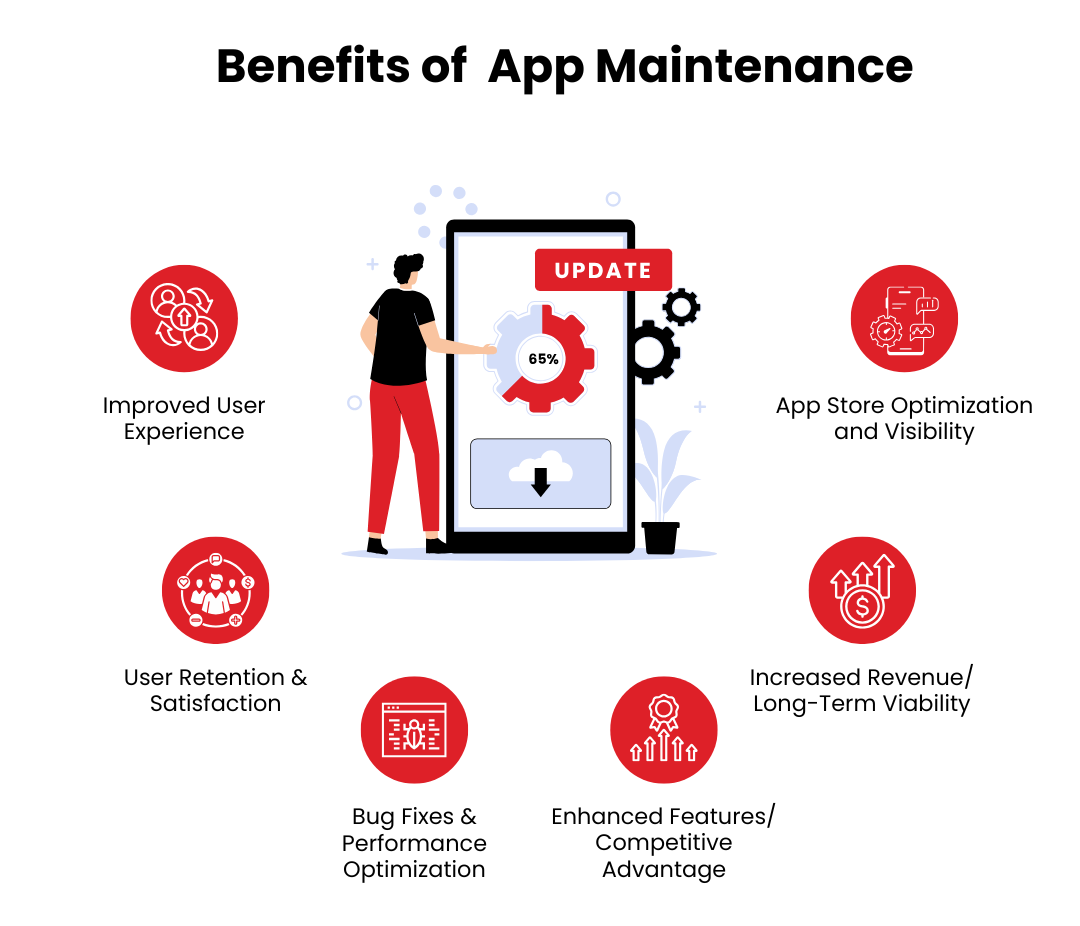
As a business owner or startups, we understand the importance of maintenance applications, but we may overlook the extensive benefits they offer. Here’s a more in-depth look at why app maintenance is a crucial investment for any app owner or business:
Improved User Experience
One of the most important reasons for regular app maintenance is to enhance the user experience (UX). Regular updates are key to ensuring the app continues to function seamlessly and that users remain satisfied. Factoring in application development and maintenance as part of the process ensures smooth functionality and user satisfaction.
Bug Fixes & Performance Optimization
Frequent maintenance allows for identifying and correcting bugs that might degrade the user experience. Small errors, whether visual glitches or functionality issues, can frustrate users, leading them to abandon the app. Regular updates help control the App Maintenance Cost, preventing expensive overhauls.
Smooth Functionality Across Devices
As new devices and operating systems (OS) are released, your app needs to stay compatible. Regular maintenance ensures your app performs well on the latest smartphones, tablets, or wearables. Managing App Maintenance Costs proactively ensures your app stays relevant and functional.
Enhanced Features
By introducing new features continuously, you keep the app fresh and exciting for users. Whether it’s new functionality or improving an existing feature, these updates maintain user engagement. While these improvements may increase the costs of maintaining an app, the enhanced user experience justifies the investment.
Faster Load Times & Optimized Performance
Performance optimization, such as reducing app load times and enhancing speed, directly influences user perception. A faster app keeps users happy and engaged. Considering app maintenance Costs here as an investment in user satisfaction can lead to long-term gains.
User Retention & Satisfaction
Consistently improving the app’s performance and resolving issues builds trust. A well-maintained app attracts positive reviews and retains users effectively. The recurring App Maintenance Cost ensures users keep returning, fostering loyalty and growth.
Increased Revenue
Many apps rely on in-app purchases (IAP) for revenue generation. Regular updates that add new, desirable features encourage users to spend more on your app. Allocating resources to App Maintenance Costs for feature enhancements drives revenue growth.
Subscription Retention
Apps with subscription-based models thrive on user retention. Continuous updates keep users engaged, reducing churn, and ensuring renewals. The App Maintenance Cost becomes a necessary investment for maintaining a steady subscription revenue stream.
Ad Revenue Growth
Better app engagement leads to higher ad revenue. Updated apps with fresh content and bug fixes encourage users to interact with ads more. While these updates involve App Maintenance Cost, the resulting ad revenue increase often outweighs the expense.
App Store Visibility
Apps that release consistent updates are favored by app stores like Google Play and the Apple App Store. Reliable, well-maintained apps rank higher, leading to more downloads and visibility. Investing in App Maintenance Cost enhances your app’s reputation and ranking.
Competitive Advantage
Regular maintenance keeps your app evolving, outperforming stagnant competitors. Innovative features and consistent improvements attract new users and maintain existing ones. Though this increases the App Maintenance Cost, staying competitive demands continuous investment.
Cost Savings
Regular maintenance ensures your app remains relevant, adaptable, and competitive. Apps left stagnant lose users to newer solutions. Proactive maintenance avoids the higher App Maintenance Cost of complete overhauls.
Preventing Major Issues
Addressing minor bugs early avoids costly emergency fixes. Neglecting maintenance allows small issues to escalate, leading to significant expenses. Keeping App Maintenance Cost low requires consistent, preventive measures.
Avoiding Downtime
An app with frequent crashes or downtime frustrates users and loses revenue. Ongoing maintenance minimizes downtime, ensuring consistent performance. Factoring in App Maintenance Cost helps reduce potential losses from unavailability.
Security Patches
Regular maintenance keeps your app protected with updated security protocols and vulnerability patches. It’s more cost-effective to include these updates as part of App Maintenance Cost than to recover from a data breach.
Long-Term Viability
Continuous updates keep your app relevant and valuable over time. Neglecting maintenance results in outdated apps requiring complete redevelopment. Maintaining regular App Maintenance Cost ensures your app adapts to market needs without significant investments later.
What factors affect mobile app maintenance costs?
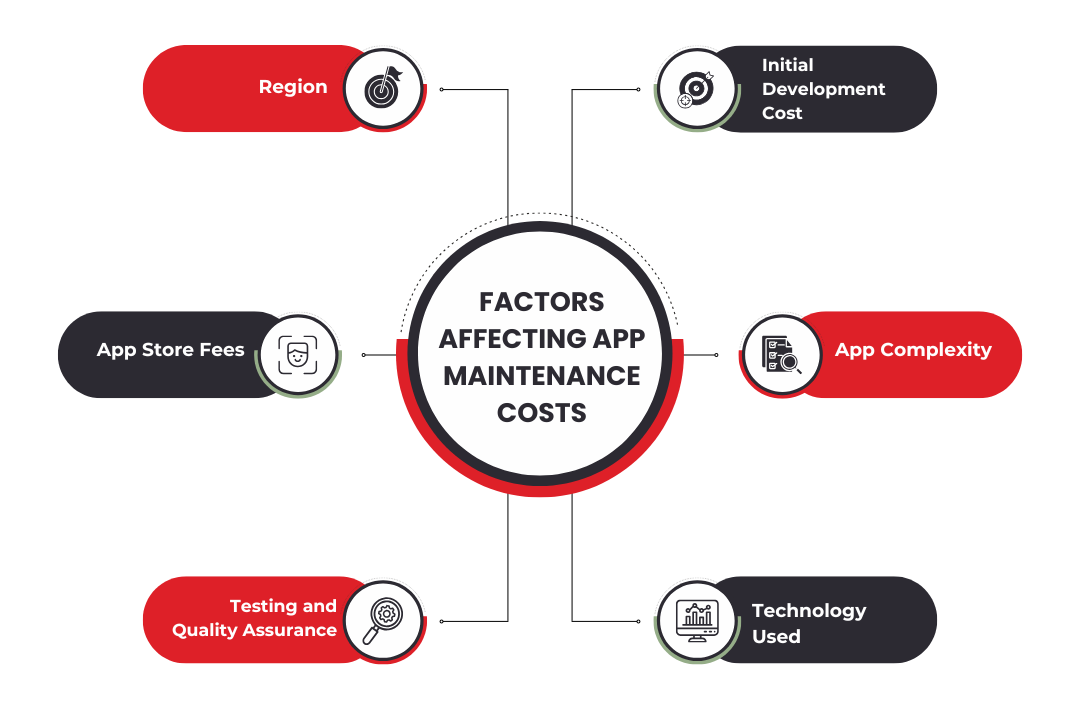
As discussed above, there are many factors contributing to the App Maintenance Cost. Let us breakdown each of the factors in detail to have a better understating of App Maintenance Cost:
Initial Development Cost
The initial development cost refers to the expense incurred when the app is first created. This includes the design, coding, testing, and deployment of the app. Once the app is launched, maintenance costs are typically calculated as a percentage of this initial cost.
First-Year Maintenance Costs
In the first year after launch, app maintenance can reach up to 50% of the initial development cost. This is the period when most app owners face the largest costs, as updates, bug fixes, and performance optimizations are required to ensure the app performs well in real-world scenarios. Also, user feedback often results in necessary updates that weren’t initially planned.
Ongoing Maintenance Costs
After the first year, the costs typically drop to 15-20% of the original development cost per year. This reflects a more stable phase of app maintenance where minor updates, bug fixes, and security patches are needed.
App Complexity
The more complex your app is, the more expensive it will be to maintain. Complexity can refer to the following factors:
Number of Features: Apps with multiple features (e.g., user profiles, payment processing, real-time interactions) will require more ongoing work.
App Functionality: Apps that depend on third-party integrations, cloud services, or complicated databases tend to have higher maintenance costs.
Security: More complex apps, especially those dealing with sensitive data (e.g., financial apps, healthcare apps), will require frequent security updates to stay compliant with industry standards and to protect against new vulnerabilities.
Cost Estimate: For complex apps, the maintenance cost may reach 25-30% of the initial development cost annually. Complex apps need more resources to ensure they remain secure, efficient, and feature-rich over time.
Technology Used
The technology that your app is built on can significantly impact application development maintenance costs. Apps that rely on cutting-edge technologies or have multiple integration points (e.g., payment systems, third-party APIs, or AI features) will require more frequent updates to stay aligned with new developments. As technology evolves, you may need to update your app to accommodate the latest trends, ensuring your app remains relevant and competitive.
Region
Where your app is maintained also plays a significant role in determining costs. App maintenance rates vary depending on the region:
North America and Western Europe: These regions generally have the highest rates due to higher labor costs and the need for skilled developers.
Eastern Europe and Asia: These regions tend to offer more affordable rates due to lower labor costs, making them attractive options for outsourcing app maintenance.
Cost Estimate: Maintenance costs in North America can be up to 40% higher than in regions like Eastern Europe or India, where hourly rates for developers are lower.
Maintenance Task
Estimated Monthly Cost
Bug Fixes
$500 – $1,500
App Updates (OS and Feature)
$1,000 – $3,000
Security Updates
$500 – $2,000
Backend Server Maintenance
$1,000 – $5,000
User Support and Feedback Handling
$500 – $2,000
Performance Optimization
$1,000 – $3,000
The costs above are approximate and depend on the complexity of your app, the type of maintenance required, and the geographical location of your development team.
Other Factors Affecting App Maintenance Costs
App maintenance cost is influenced by several additional factors beyond regular updates and bug fixes. For instance, server costs are a recurring expense as you maintain, upgrade, or scale servers to ensure fast load times and reliability for growing user bases. Push notifications, often facilitated through third-party services, can add up in cost, especially with frequent usage.
Similarly, apps that process payments incur expenses for transaction fees and periodic updates to maintain secure payment integrations. Hosting fees are another significant factor, particularly for apps with substantial data needs, and choosing scalable hosting solutions can help optimize costs.
App Store Fees
App store fees are another recurring expense, as platforms like the Apple App Store and Google Play Store charge developers to maintain apps and ensure compliance with store guidelines. Providing customer support services also increases the app maintenance cost, especially if you allocate resources for live chat, email support, or a dedicated helpdesk. Additionally, apps leveraging third-party APIs for features like maps or analytics face usage-based pricing that can grow with user demand. Security updates and compliance with data protection laws like GDPR or CCPA require constant monitoring and may involve legal consultations, making them essential yet costly components of maintenance.
Testing and Quality Assurance
Other factors that affect app maintenance cost include regular testing and quality assurance to ensure compatibility with new devices and operating systems. Apps often rely on analytics and monitoring tools, which typically involve subscription fees. Additionally, marketing efforts such as retention campaigns and user engagement strategies indirectly contribute to costs but are crucial for sustained success. By understanding and accounting for these diverse factors, businesses can effectively plan and manage their application maintenance & support budget while ensuring a seamless user experience.
Proactive Budget Management
To better manage these additional expenses, it’s crucial to:
Periodically review all ongoing and potential costs to avoid surprises.
Choose solutions and infrastructure that can scale efficiently as your app grows.
Allocate a portion of the budget for unexpected updates, such as compliance with new regulations or emergency bug fixes.
For third-party services like hosting, APIs, or notification platforms, explore bulk discounts or cost-effective alternatives to reduce expenses.
By planning and addressing these factors proactively, you can keep app maintenance costs manageable while ensuring your app continues to perform optimally and deliver value to users.
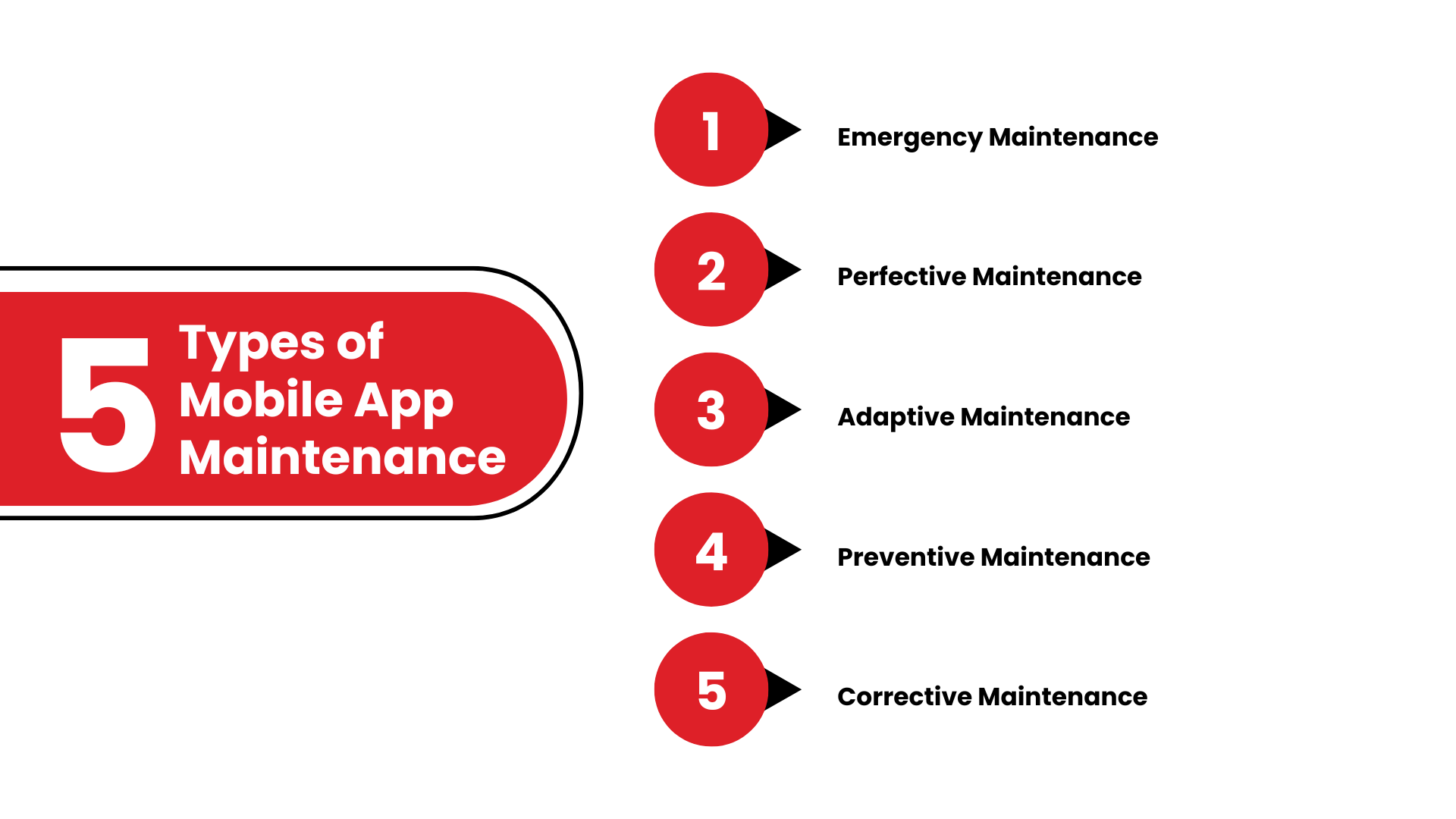
Types of Mobile App Maintenance
Yes you read that tight, there are types of app maintenance that can add to the overall App Maintenance Cost. Knowing the different types of app maintenance helps you decide how to allocate your resources for ongoing support effectively. Let’s take a closer look at each type of maintenance:
1. Emergency Maintenance
This type of maintenance is required to address critical issues that arise unexpectedly. For instance, if your app suddenly crashes or experiences a security breach, emergency maintenance becomes necessary. Here are some examples:
Crashes: An app might crash upon launch, during certain actions, or when a user interacts with specific features. Emergency fixes are needed to ensure your users don’t face app failures, which could lead to uninstalls or negative reviews.
Security Breaches: If your app is hacked or compromised, emergency fixes are necessary to patch up vulnerabilities and protect sensitive user data. Data leaks, especially those involving personal information, can lead to legal issues and a damaged reputation.
Server Downtime: If the backend servers go down, emergency maintenance is needed to bring the app back online and avoid losing user trust.
The goal of emergency maintenance is to restore the app to full functionality as quickly as possible, minimizing disruptions to users and preventing long-term damage to your brand.
2. Perfective Maintenance
Perfective maintenance focuses on improving and enhancing the functionality of your app. This is typically driven by user feedback and evolving market trends. It may entail introducing new, appealing features can significantly enhance the user experience. For instance, implementing social sharing capabilities or integrating with other applications can create a more seamless interaction. Then we have UI/UX Improvements, as user expectations and design trends continuously evolve, it’s crucial to keep the user interface (UI) and user experience (UX) current and in line with these changes.
User Feedback Integration is actively listening to and integrating user feedback is key to ensuring your app remains relevant. When users request specific improvements or features, effective maintenance helps meet those needs promptly.T his type of maintenance makes sure your app stays competitive and engaging over time, improving user satisfaction and engagement.
3. Adaptive Maintenance
As new operating systems (OS), devices, or third-party integrations emerge, adaptive maintenance ensures your app remains compatible. Some tasks involved include:
OS Updates: Every time Android or iOS releases an update, your app needs to be tested and updated to ensure it functions well on the new version. Without this, the app may malfunction or fail to open.
New Device Compatibility: When new devices (such as phones or tablets) are released, the app should be tested to ensure it works on these devices, especially if the devices come with new screen sizes, processors, or features.
Third-party Integrations: Many apps rely on external APIs or services (such as payment systems or data feeds). When these services update, your app may need adjustments to stay compatible.
Adaptive maintenance is necessary to make sure your app can evolve with technological changes and keep working seamlessly as the environment around it changes.
4. Preventive Maintenance
Preventive maintenance is about fixing problems before they happen. First, we have code refactoring. This means cleaning up the code to make it work better and easier to maintain later. This can help prevent slow performance or crashes caused by old or inefficient code. Next is Data Management. Regular checks on how the database runs and how storage is used keep your app performing well and able to grow.
Finally, there’s testing. Periodic testing of all app parts, including backend services and APIs, helps find weaknesses or potential performance issues. By stopping problems before they start, you save time, money, and resources that would be spent fixing issues after they affect users.
5. Corrective Maintenance
Corrective maintenance focuses on fixing bugs and addressing errors that users or developers have identified. These bugs may include:
Functional Errors: Bugs that cause certain features or functions to break.
UI Bugs: Small issues in the user interface, such as misaligned buttons, broken images, or text that doesn’t display correctly.
Crash Fixes: If users are experiencing app crashes on specific devices or under certain conditions, corrective maintenance addresses those errors.
Corrective maintenance is about keeping the app error-free, ensuring a smooth and stable experience for users.
Wrapping it Up
App maintenance is not an afterthought—it’s an integral part of the app lifecycle. By investing in regular updates, fixing bugs promptly, optimizing performance, and adapting to changing technology, you ensure your app remains relevant, functional, and user-friendly. On average, app owners should expect to invest around $2,000 to $2,500 app maintenance cost per month initially to ensure their app operates at peak performance.
Understanding the cost of app maintenance and the various factors that impact it helps you prepare better, plan ahead, and allocate resources effectively. Remember, maintenance is an ongoing investment that directly affects your app’s user experience, security, and long-term success. By managing these costs wisely, you can continue to provide value to your users and enjoy the rewards of a thriving mobile app.
Why Choose TechnBrains for App Maintenance?
When it comes to managing app maintenance services, TechnBrains stands out as a reliable partner for all your needs. Whether you require comprehensive mobile app maintenance services or tailored solutions for application development and maintenance services, we have the expertise to ensure your app performs flawlessly.
As a leading application maintenance company, we offer a wide range of mobile application maintenance services, including server optimization, bug fixes, feature updates, and security enhancements. Our team specializes in crafting strategies that keep your mobile maintenance app compatible with the latest devices and operating systems, ensuring a seamless user experience.
Looking for an app for maintenance services that delivers both quality and affordability? At TechnBrains, we are the leading mobile app development company in Texas. We combine industry-leading practices with cutting-edge technology to help you manage your app efficiently and cost-effectively. Let us take care of your app’s needs so you can focus on growing your business. Connect with us today to explore how we can support your app maintenance goals!
As 2025 is only a month away, more healthcare providers and startups want to develop a healthcare app for tech-savvy patients. The main question here is “healthcare app development cost.” With the rising costs of developing healthcare apps make this difficult. Advanced features like telemedicine, patient portals, and AI integration increase expenses. Balancing innovation with limited budgets is a challenge, especially with new regulations and security standards.
Creating a medical app in 2025 requires more than just technology skills; you also need a good understanding of what’s next in healthcare. This blog will explore what affects the cost of developing a healthcare app. We’ll discuss key features like telemedicine, patient portals, and AI, as well as the latest trends in medical mobile apps.
We’ll provide strategies to help you design a cost-effective healthcare app that meets high security and usability standards. Whether you are making a specialized medical app or a general healthcare solution, this guide will help you make smart, cost-conscious decisions for your project.
After thorough analysis, healthcare app development costs between $100,000 and $500,000. The cost of healthcare app development varies depending on the type of app, the complexity, and, most importantly, the features you are going to need to make one of the best healthcare apps in 2025.
The State of Healthcare in 2025
In 2025, healthcare app development costs will be influenced by an evolving healthcare ecosystem. Mobile health applications now play an important role in patient and provider interactions, offering innovative ways to manage health.
Telemedicine apps, for example, have become mainstream, enabling patients to consult doctors remotely. To further claim this, The telemedicine market worldwide was valued at USD 97.15 billion in 2023 and is expected to be worth USD 107.52 billion in 2024. It is anticipated to grow to USD 432.31 billion by 2032, achieving a compound annual growth rate (CAGR) of 19.0% throughout the forecast period. Telemedicine apps are invaluable for people in underserved or remote areas. However, integrating secure video conferencing and maintaining reliable connections can significantly increase the cost of mobile health application development.
Personalization and AI-Powered Features
The healthcare app development market is dominated by mobile apps that offer personalization as a top priority. As more people search for a Mobile app development company Dallas to integrate these features in the Dallas area, the healthcare app development cost is expected to rise.
AI and machine learning enable apps to tailor treatment plans based on individual health data. These intelligent solutions not only improve patient care but also contribute to preventative measures that can reduce long-term healthcare expenses. Yet, developing apps with sophisticated algorithms adds to the healthcare app development cost due to the need for advanced AI infrastructure and data processing capabilities.
The Rise of Wearables and IoT
Wearables like smartwatches and health trackers are projected to become more popular in 2025. We all have that smartwatch that we dearly love, don’t we? The reason is that they allow users to track vital health metrics in real time. Healthcare apps that support IoT integration can be invaluable for managing chronic conditions, providing a deeper connection between patients and providers. Again, integrating these features drives up development costs due to the need for secure data syncing and reliable connectivity.
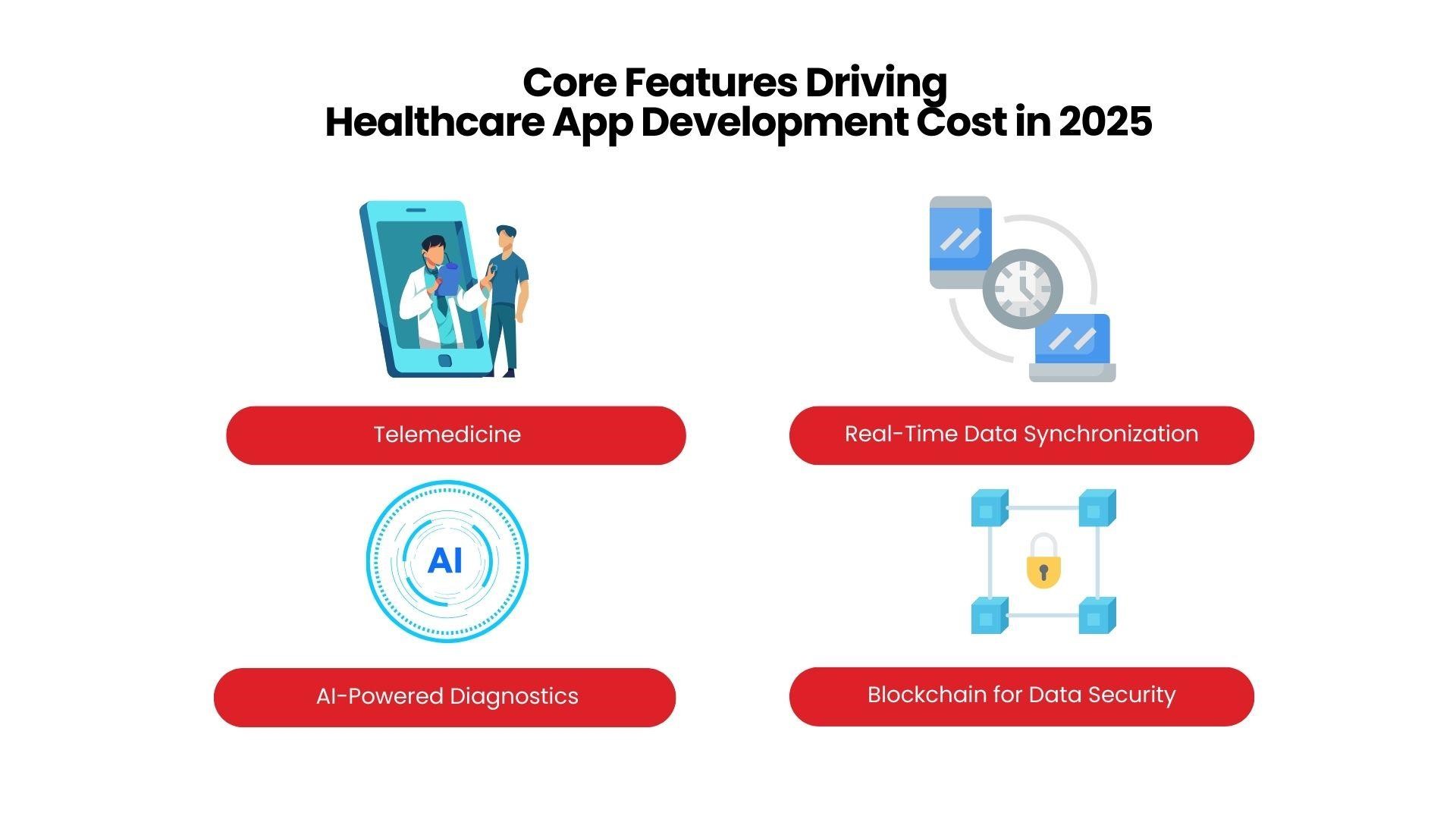
Core Features Driving Healthcare App Development Cost in 2025
Building a healthcare app in 2025 requires more than basic functionality. Key features, many of which are now expected, add complexity and cost to medical mobile app development. Here are some of the major features influencing the healthcare app development cost:
Telemedicine
As we’ve discussed above, Telemedicine allows patients to connect with healthcare providers virtually, significantly expanding access to care. Developing secure video streaming, integrating chat functions, and ensuring compliance with healthcare regulations add to the medical mobile app development cost.
Real-Time Data Synchronization
The integration of wearables with mobile health apps is a benefit on its own. However, This feature requires complex back-end infrastructure to securely sync and store real-time data, increasing development expenses.
AI-Powered Diagnostics
Healthcare apps are beginning to influence AI for diagnostics. As AIRPM quoted, “From 2020 to 2023, the healthcare AI market expanded by 233%, increasing from $6.7 billion to $22.4 billion.” This shows the power of Artificial Intelligence Services in enabling earlier disease detection and individualized treatment plans. Building AI-driven capabilities requires a high healthcare app development cost, but these features can greatly enhance the app’s value.
Blockchain for Data Security
As data security remains a top concern in healthcare, blockchain technology is gaining traction for medical mobile application development. Blockchain ensures secure and transparent management of sensitive patient records but also requires specialized development expertise, impacting costs.
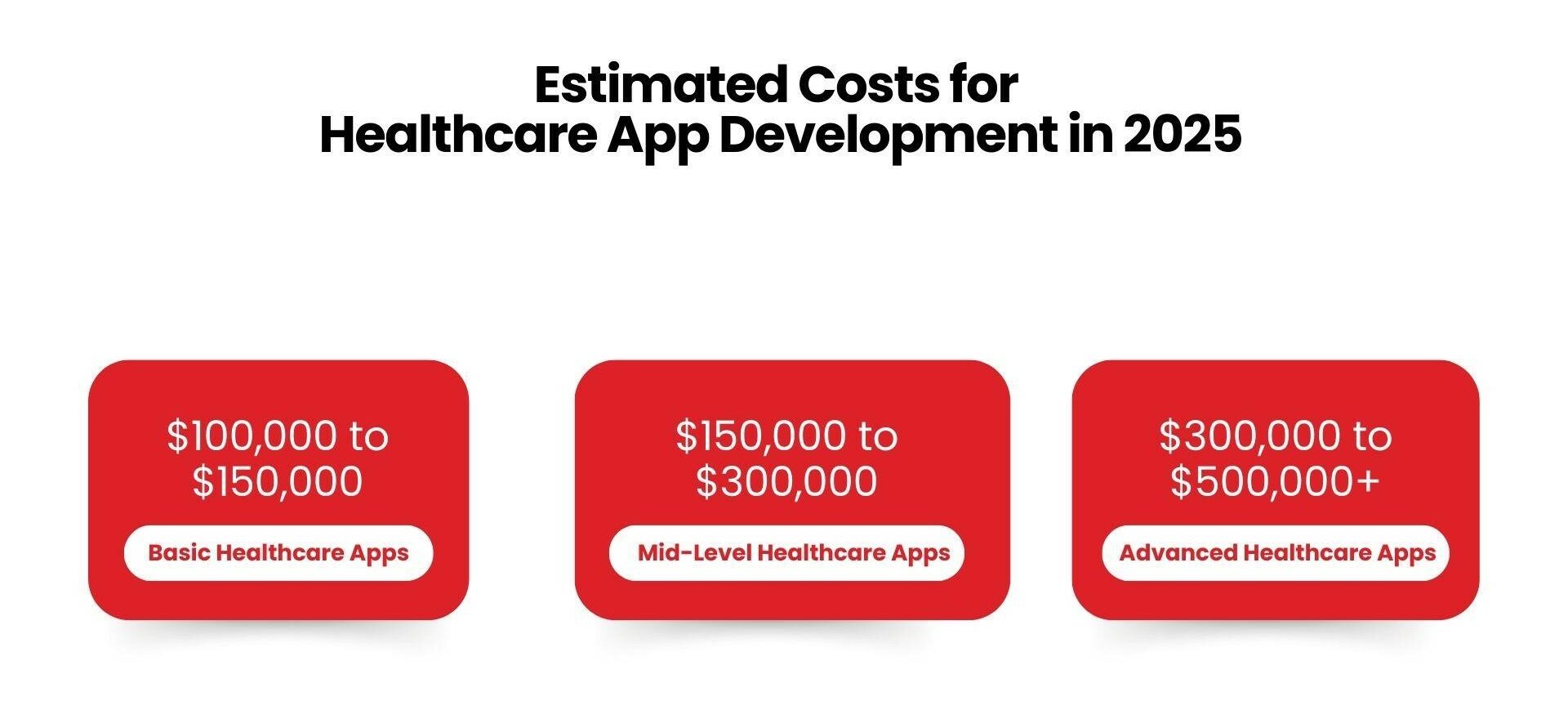
Estimated Costs for Healthcare App Development in 2025
The healthcare app development cost in 2025 will vary depending on the app’s complexity, features, and security requirements. Here’s an approximate cost breakdown based on different types of healthcare apps:
Basic Healthcare Apps
Basic health-tracking apps with essential functions like medication reminders or appointment scheduling typically cost between $100,000 and $150,000. Their simpler functionality and lack of advanced integrations keep development costs at the lower end of the spectrum.
Mid-Level Healthcare Apps
Apps that provide telemedicine, wearable device integration, and basic data security features usually range from $150,000 to $300,000. This category might include hospital mobile app development for tasks like patient records management, appointment booking, and virtual consultations.
Advanced Healthcare Apps
Complex healthcare apps featuring AI-driven diagnostics, blockchain for secure data management, and IoT device compatibility can exceed $300,000 to $500,000. These projects require specialized teams and extensive development, which increases the cost of healthcare app development significantly.
How is Healthcare App Development Cost Calculated?
Estimating the healthcare app development cost involves considering several key factors: the app’s complexity, platform choice, location of the development team, and the technology stack used. Here’s a breakdown of how each element impacts costs:
1. App Complexity and Features
The complexity of a healthcare app largely determines its development cost. Basic apps, like health trackers or wellness platforms, which focus on monitoring simple health metrics, are more affordable. These types of mobile health application development projects generally cost between $100,000 and $200,000.
However, for more feature-rich apps, such as telemedicine platforms, AI diagnostic tools, or those with electronic health record (EHR) or electronic medical record (EMR) integration, costs can range significantly due to the need for advanced coding, secure data handling, and robust API integrations. For these types of apps, the healthcare app development cost can vary widely, typically falling between $200,000 and $500,000 depending on the level of functionality and security required.
2. Platform Choice
Native apps, created specifically for iOS or Android, deliver optimized performance and an enhanced user experience but come at a higher price. Due to the need to maintain separate codebases, healthcare app development costs for native apps are generally higher, particularly if you need both Android and iOS versions.
Cross-platform frameworks like Flutter and React Native enable you to develop a single codebase that works across multiple platforms. This reduces costs compared to native apps, making cross-platform a popular choice for mobile app development for healthcare that requires broad reach without doubling development efforts.
3. Geographic Location of Development Teams
Location is an important consideration when managing healthcare app development costs. TechnBrains’ staff augmentation services allow you to hire developers at just $99 per day, making it an efficient way to keep costs down.
US-Based Developers: They tend to have higher hourly rates but offer expertise in local regulations like HIPAA, which is crucial for compliant medical app development.
Offshore Development Teams: Skilled developers in Eastern Europe or Asia are often available at lower costs, significantly reducing healthcare app development expenses. However, challenges such as time zone differences and language barriers need careful management.
4. Technology Stack Used
Each technology integrated into your app influences the healthcare app development cost:
AI adds valuable functionality, such as diagnostics and predictive analytics, to medical mobile application development. However, AI integration requires specialized expertise, which can add to the total cost.
Cloud Computing
Platforms like AWS or Google Cloud support scalability and data security for high-volume apps. Although cloud infrastructure increases development costs, it’s essential for ensuring stability and data handling, especially in mobile healthcare application development.
Blockchain
Blockchain technology is increasingly used for secure patient data management. While implementing blockchain raises the healthcare app development cost, it offers data transparency and tamper-proof security, which are crucial for apps handling sensitive medical information.
5. Security and Compliance Costs
Ensuring compliance and security is a non-negotiable aspect of healthcare mobile app development, particularly in the U.S., where healthcare data must comply with stringent regulations:
HIPAA-Compliant Apps: For apps that manage patient information, HIPAA compliance is essential. Building a HIPAA-compliant mobile healthcare application involves features like encryption and audit trails, which add to the development cost but are crucial for regulatory adherence.
Encryption and Data Privacy: Apps handling sensitive data must include strong encryption and secure data storage solutions. While these measures increase healthcare app development costs, they are necessary to protect user privacy and maintain trust.
6. UI/UX design
A well-designed healthcare app is important for getting users to adopt and enjoy it. Users tend to engage more with apps that are easy to use and visually attractive. Hiring professionals for UX/UI design can enhance user satisfaction and may lower support for healthcare app development development costs in the long run. The cost of good UX/UI design often starts at $10,000 and can increase depending on how complex the design is.
1. Regulatory Compliance
Following healthcare rules like HIPAA (in the U.S.) and GDPR (in the EU) is paramount, especially for apps that handle sensitive health information. Ensuring compliance includes using encryption, secure access, and audit trails, which can raise healthcare app development costs. Not following these regulations can lead to fines and damage to your reputation, so investing in compliance is wise. Adding compliance features can increase total development costs by about 10-20%.
2. Data Privacy and Security
Strong security measures are necessary to protect patient data. Healthcare app development Costs include encryption, secure data storage, and regular security checks to prevent data breaches and keep user trust. Security features like encryption, firewalls, and audits can add between $10,000 and $20,000 to development costs, depending on the required security level.
3. Testing and Quality Assurance
Quality assurance includes unit testing, integration testing, and user acceptance testing, which ensures the app works smoothly on different devices and platforms. Testing costs usually account for about 15-20% of the total cost to develop a healthcare app, ranging from $15,000 to $50,000 based on app complexity.
4. Maintenance and Updates
After launching the app, ongoing maintenance and updates are needed to fix bugs, add features, and ensure compatibility with updated operating systems and devices. Long-term maintenance costs are typically estimated at 15-20% of the initial development cost per year, covering updates, bug fixes, and security patches.
5. Marketing and Promotion
Creating the app is just the beginning. It is equally important to attract users through good marketing. You can get help from app monetization strategies. Marketing costs can include app store optimization (ASO), social media campaigns, and paid advertising. Initial promotion might cost between $5,000 and $20,000, depending on how far-reaching and intensive the marketing efforts are.
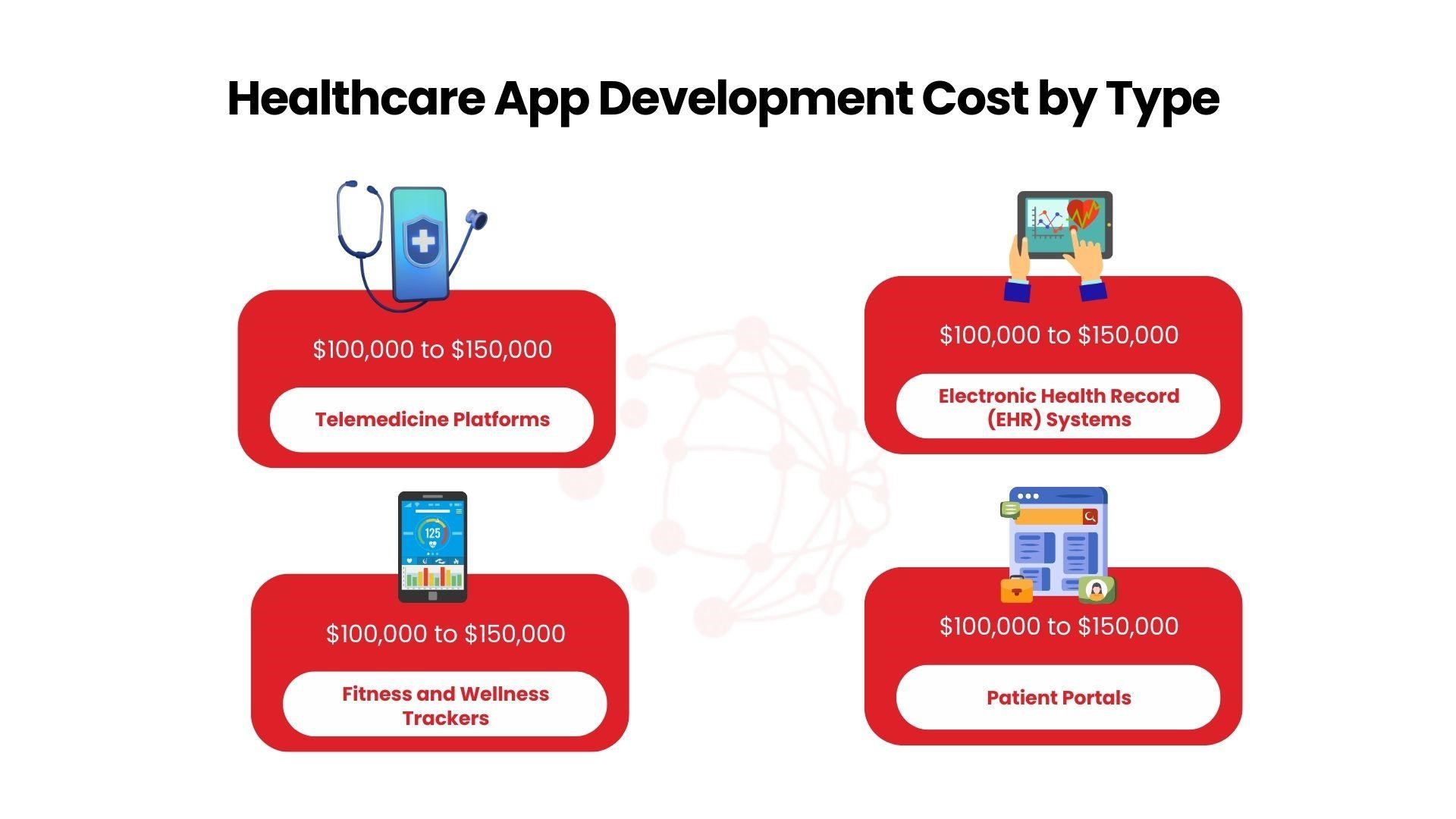
Healthcare App Development Cost by Type
The cost of healthcare app development varies widely depending on the type of app, required features, security protocols, and compliance standards. Here’s a breakdown of typical costs for the most popular types of mobile medical application development:
Telemedicine Platforms
Telemedicine apps, which allow virtual consultations and remote patient monitoring, are among the most in-demand healthcare apps. Developing a basic telemedicine platform with essential features like video conferencing, scheduling, and electronic prescriptions generally costs between $80,000 and $250,000. For more advanced telemedicine apps with AI diagnostic tools, EHR integration, and multi-device compatibility, costs can rise to $300,000 or more.
Electronic Health Record (EHR) Systems
EHR systems are complex applications designed to securely store and manage patient medical records. Due to the sensitive data involved, they require HIPAA-compliant encryption, multi-level security, and robust cloud integration. The development cost for an EHR system generally starts around $100,000 and can reach up to $500,000 for comprehensive systems with real-time data synchronization, patient portals, and integration with other healthcare tools.
Fitness and Wellness Trackers
Fitness and wellness apps have become popular for monitoring physical activity, diet, sleep patterns, and other health metrics. Basic apps with limited tracking features, such as step counters and workout logs, cost between $20,000 and $60,000. However, advanced trackers that include integrations with wearables, AI-driven insights, and personalized health suggestions can increase costs to $100,000 or more.
Patient Portals
Patient portals provide a convenient way for patients to access their medical information, manage appointments, and communicate with healthcare providers. Simple patient portals that offer basic functionalities like viewing test results and scheduling visits can cost around $50,000 to $150,000. For more advanced portals with features like telemedicine, secure messaging, and payment options, costs can go up to $200,000 or higher.
The healthcare app development cost varies not only by the type of app but also by the complexity, platform, and compliance needs specific to each solution.
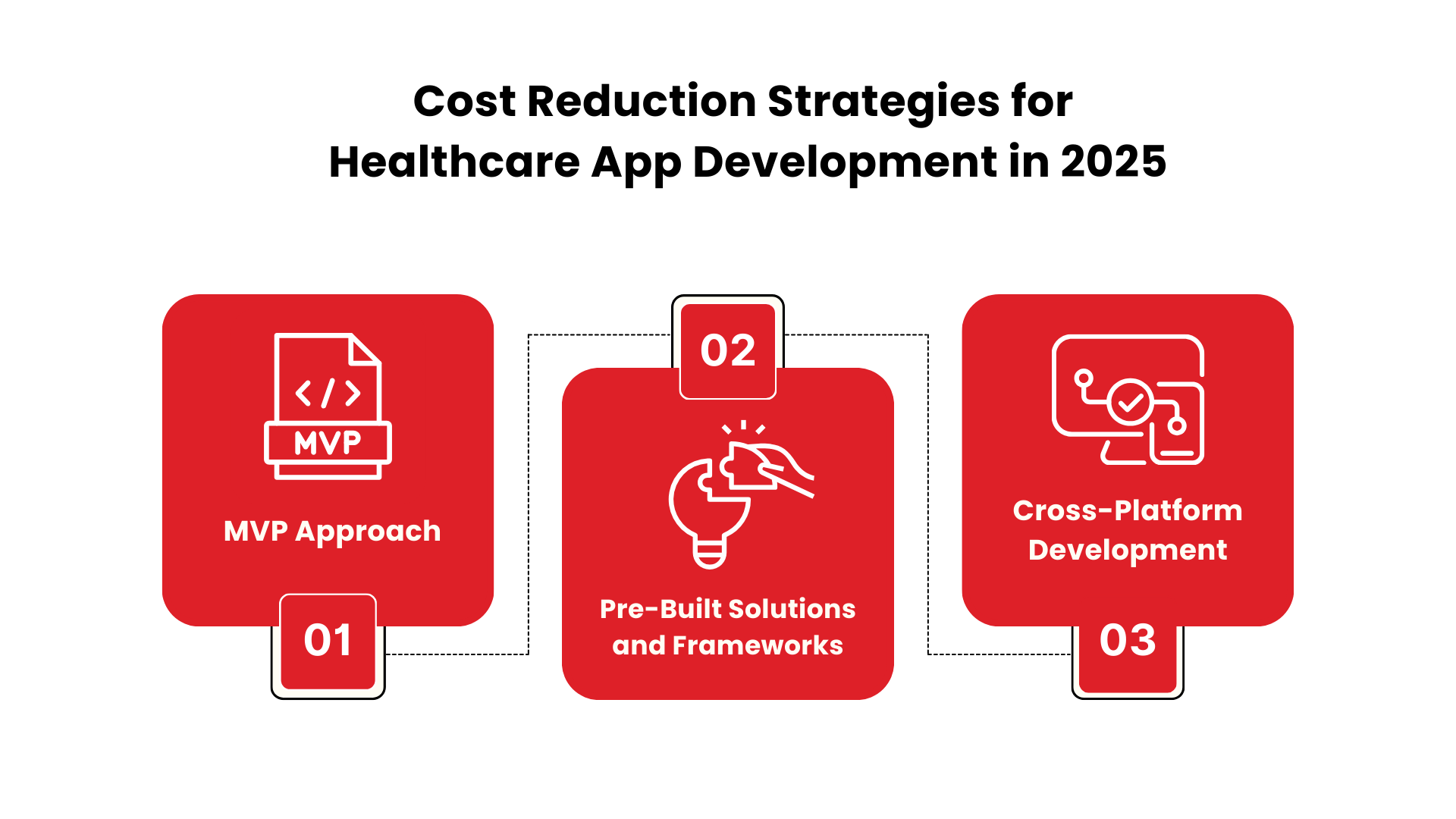
Cost Reduction Strategies for Healthcare App Development in 2025
With costs likely to rise, there are ways to minimize expenses on mobile medical app development and achieve your healthcare mobile app development goals. Here are effective strategies for cost reduction:
MVP (Minimum Viable Product) Approach
One of the most impactful ways to cut down on healthcare app development costs is by starting with core functionalities only. MVP app development helps you add essential features, like basic health tracking or telemedicine. This not only keeps initial costs low but also helps gauge user demand and preferences early on in the medical mobile application development process.
Pre-Built Solutions and Frameworks
Incorporating pre-built tools and APIs is a smart move to reduce both development time and costs. Many cloud-based tools offer features like authentication, encryption, and secure data storage, which are fundamental for medical mobile app development. Third-party APIs for essential functions, such as payments or messaging, streamline development, further reducing the healthcare app development cost.
Cross-Platform Development
Opting for cross-platform frameworks like Flutter or React Native allows you to create an app that functions on both iOS and Android with a single codebase. This approach not only expands your user base but also minimizes the mobile healthcare application development cost by eliminating the need for separate development efforts for each platform.
The Future of Healthcare Apps – What’s Coming in 2025 and Beyond?
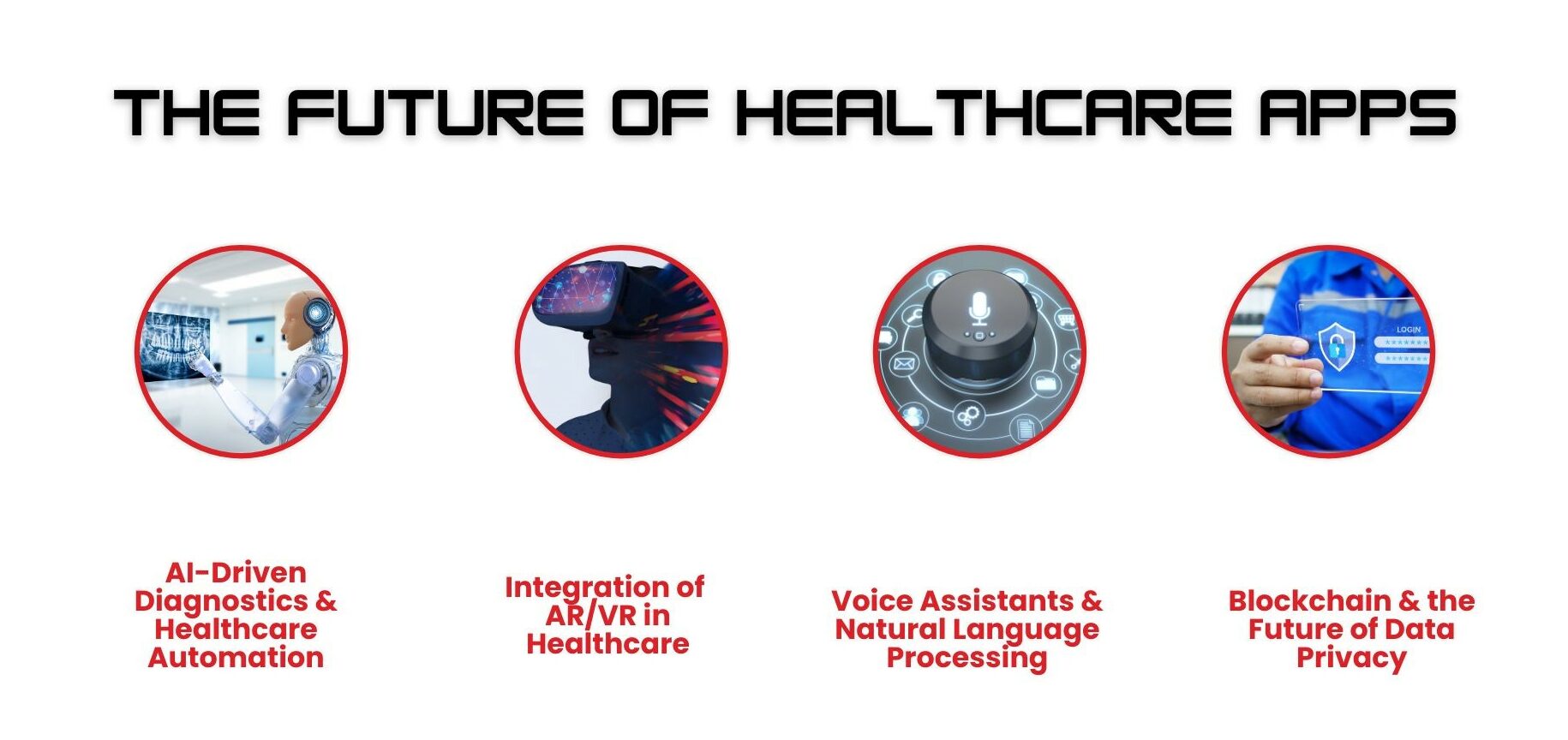
As we progress into 2025, healthcare app development costs will likely be influenced by emerging trends and technologies designed to enhance efficiency and user experience. Here are some trends that are expected to shape the future of medical mobile app development and potentially impact costs.
1. AI-Driven Diagnostics and Healthcare Automation
The integration of AI will continue to improve healthcare apps, offering AI-driven diagnostics and automating routine tasks. As AI technology advances, the cost of implementing it will decrease, making it an affordable solution in mobile health application development.
2. The Integration of AR/VR in Healthcare
Augmented reality (AR) and virtual reality (VR) technologies will enhance hospital mobile app development by adding functionalities for training, patient care, and therapy. Though initially costly, AR and VR are expected to become more affordable as they gain traction in the healthcare sector.
3. Voice Assistants and NLP (Natural Language Processing)
Voice technology, such as natural language processing, will continue to shape healthcare mobile app development. As voice assistants become more advanced and widely adopted, the cost of implementing them is expected to decrease, offering more options for app functionality.
4. Blockchain and the Future of Data Privacy
Blockchain is revolutionizing healthcare data security, allowing secure storage and access to patient records. As more healthcare providers adopt blockchain for patient data management, the healthcare app development cost for blockchain-integrated apps is expected to become more affordable.
Healthcare App Development Trends in Dallas
Dallas is one of the largest and fastest-growing cities in Texas. As a result, there is a strong demand for new healthcare technology in the area. People expect healthcare services to be accessible, efficient, and of high quality. This makes Dallas a great place for creating healthcare apps. Many hospitals and healthcare providers in Dallas are starting to use mobile apps. These apps help improve patient engagement, simplify medical processes, and enhance the quality of care overall.
Popular Healthcare App Types in Dallas
In Dallas, people commonly use healthcare apps like telemedicine platforms, electronic health record (EHR) systems, fitness and wellness trackers, and patient portals. These tools help users access medical information, manage appointments, and communicate with healthcare providers. Since Dallas has a fast-paced lifestyle, these apps need to be convenient, efficient, and secure. There is a strong focus on telemedicine and patient monitoring, making healthcare mobile app development services essential for supporting the healthcare system in Dallas.
Your Healthcare App Development Partner in Dallas
As the demand for mobile healthcare application development continues to rise, Dallas remains at the forefront of the healthcare tech revolution in 2025. Whether you’re looking to build a healthcare app, develop a mobile health application, or integrate AI and IoT into your solutions, TechnBrains is your trusted partner. With local expertise, advanced technologies, and a commitment to security and compliance, TechnBrains is the best choice to bring your healthcare app vision to life in Dallas.
Ready to make an impact in healthcare? Partner with TechnBrains and take your healthcare app to the next level in 2025.
The wellness and fitness industry has grown substantially. In 2023, the U.S. health and wellness industry reached $1,280.77 billion and is projected to grow to $2,204.18 billion by 2033. This growth is fueling demand for fitness apps like Yoga Go, which has gained millions of users worldwide. But just how much does the Yoga Go app cost? And what features make it so popular?
Yoga Go offers tailored workouts, tracking tools, and an easy-to-use interface, making it a top choice for users who want to integrate wellness into their daily routines. With over 7,100 monthly searches for the “Yoga Go app,” the demand for accessible, personalized fitness at home or on the go is clear. If you’re thinking about creating a fitness app like Yoga Go, understanding the cost of developing such an app and the features that keep users engaged is essential.
This guide will explore the Yoga Go app’s cost, features, and development considerations, helping you see what it takes to build a top-notch fitness app. With TechnBrains, a top mobile app development company in Dallas, you’re one step closer to bringing your fitness app idea to life.
Yoga Go App Cost Breakdown
The Yoga Go app is available for free download. It offers a range of in-app purchases and subscriptions to unlock premium content and features. Here’s a quick breakdown of the Yoga Go app cost:
12-Month Subscription: $52.99 annually, which averages to about $4.42 per month.
1-Month Basic Subscription: $4.99 monthly, a more budget-friendly option with limited features.
One-Time Purchase of Guides: $29.99 for access to yoga guides that users can refer to anytime.
This pricing structure gives users flexibility, allowing them to choose a subscription plan based on their fitness goals and budget. The variety of options ensures Yoga Go caters to a wide range of users, from those looking for short-term engagement to those who plan to stick with the app long-term.
An App Like the Yoga Go App
To make an app like Yoga Go app involves six steps:
Understanding the Core Features of the Yoga Go App
Deciding on Your Monetization Strategy
Designing a User-Friendly Interface
Building Effective Onboarding and Customer Support
Integrating Personalized Features and Content
Ensuring Seamless Subscription and In-App Purchase Options
Key Features Affecting the Yoga Go App Cost
Developing an app like Yoga Go goes beyond coding; it’s about creating a platform that users find engaging, effective, and worth the cost. To understand the Yoga Go App Cost, let’s break down the core features users expect:
Diverse Workouts
Offering a variety of yoga styles, including wall pilates and somatic exercises, ensures accessibility for all skill levels.
Personalized Fitness Plans
Users can set goals such as weight loss, flexibility, or relaxation, which enhances engagement.
Guided Yoga Challenges
These challenges motivate users to stay consistent and build a routine, increasing the app’s value.
Atmospheric Sounds
Relaxing sounds, like birds chirping, improve the overall experience, making it a key feature many users appreciate.
User Feedback Mechanisms
Allowing users to adjust class difficulty based on feedback helps retain engagement.
These features not only enhance user experience but also influence the Yoga Go App Cost, as they require high-quality design and development.
Monetization Strategies and Their Impact on the Yoga Go App Cost
Monetizing a fitness app like Yoga Go requires a careful balance of cost and accessibility. Here are the primary revenue models that impact the Yoga Go App Cost:
Freemium Model: Offering basic features for free and prompting users to upgrade for additional benefits encourages initial downloads.
Subscription-Based Model: A common choice for fitness apps, monthly or annual plans provide ongoing access to premium features, driving recurring revenue.
In-App Purchases: Users can pay for specific features, making the app affordable while catering to those willing to invest more in their wellness journey.
Careful Ad Placement: Ads offer an income stream without overwhelming users, especially if users can opt to go ad-free for a fee.
Each of these app monetization strategies impacts the Yoga Go App Cost and its overall user experience. Choosing the right one can ensure the app’s success and user retention.
Designing a User-Friendly Interface that Justifies the Yoga Go App Cost
A fitness app’s design can significantly impact its cost-effectiveness and user engagement. A streamlined, intuitive interface is critical to justifying the Yoga Go App Cost. Here’s what it takes to create a winning interface:
Clear Navigation: Organizing tabs for workouts, challenges, and settings makes it easy for users to find what they need.
Minimalist Design: Clean visuals help users focus on their practice without distractions.
Responsive Layout: A responsive app that functions across devices enhances accessibility.
Personalization Options: Customizable options, like workout preferences and reminder settings, can make users feel the app is tailored to them.
A well-designed interface not only improves the experience but also builds value, helping users see the worth in the Yoga Go App Cost.
Building Effective Onboarding and Customer Support
When it comes to making users feel welcome in an app, your first impression does the job for you. With the Yoga Go App Cost in mind, you need to have an effective onboarding so that your users see value right away.
When a user first opens the app, a quick and clear walkthrough introduces them to the main features, making it easy to get started without feeling lost. Make the initial sign-up process as easy as possible. Make sure to use tooltips, walkthroughs, and in-app videos to help users learn how to use the app. You can also introduce features gradually as users become more comfortable with the app. Gather feedback so you can adjust the onboarding process based on how users behave and what they like. This first experience matters because it reduces the chances of frustration and increases the likelihood that users will keep coming back.
To provide the best customer support, use multiple channels like email, social media, and in-app feedback. Set clear response time goals, known as service level agreements (SLAs), and useArtificial Intelligence services to handle common questions quickly. Focus on urgent issues and give friendly and check-in to make sure everything is resolved. Having easy access to help when they need it creates a positive experience, showing users that the Yoga Go App Cost is worth it.
Personalized Content and Subscription Flexibility
Personalization is a big advantage for fitness apps like Yoga Go, especially at a reasonable Yoga Go App Cost. Users enjoy features like custom workout plans, reminders, and progress tracking. When the app suggests exercises based on goals such as weight loss, flexibility, or relaxation, it helps users stay motivated and feel connected to their fitness journey.
This personalization shows that each user’s unique path is important. By offering features that adapt to individual needs, the cost of the Yoga Go App becomes worthwhile. It provides an engaging and relevant experience for users.
Streamlining Subscription and Payment Options
A smooth subscription and payment process is important for fitness apps like Yoga Go. When users decide to subscribe, they want a quick and easy experience, especially when paying for an app at a specific price point like the Yoga Go App Cost. Complicated payment options or unclear subscription details can frustrate users and lead them to abandon their purchases. Research shows that around21% of users in the USA give up on purchases due to confusing or long payment processes. By making the subscription flow simple, an app boosts user satisfaction, builds trust, and makes the Yoga Go App Cost feel worth the cost.
To create this smooth experience, fitness apps should offer clear subscription plans. Yoga Go provides several payment options: a yearly subscription for $52.99, a monthly premium plan for $19.99, and a basic monthly plan for $4.99. This variety allows users to choose a plan that fits their budget and fitness goals, making the Yoga Go App Cost accessible to many users. Additionally, offering one-time purchases for yoga guides lets users pay only for specific resources if they prefer, enhancing the value of the Yoga Go app.
It’s also important to support multiple payment methods, like credit cards, PayPal, and sometimes Google Pay or Apple Pay. This flexibility improves user experience and convenience, letting users choose the payment method that works best for them. The app should show all fees clearly to ensure transparency in pricing. When users feel confident in the subscription and payment process, they are more likely to stay subscribed, which justifies the Yoga Go App Cost and strengthens their long-term relationship with the app.
Balancing Features with the Yoga Go App Cost
Creating an app like Yoga Go is an intricate process, requiring careful planning, feature integration, and seamless functionality. A well-structured app with clear monetization options and user-centered features not only keeps users engaged but also makes the Yoga Go App Cost worthwhile.
Working with a trusted partner, whether it’s a mobile app development company in Dallas, a tech hub in Austin, or product teams in Miami, helps balance quality and cost effectively. Building an app with features like personalized workouts, guided challenges, in-app purchases, and easy navigation will typically cost between $50,000 and $150,000.
The Yoga Go App Cost depends on the features and design complexity you choose. This investment includes planning, design, development, and testing. Our experienced fitness app developers will work with you to ensure your app meets user needs and stands out in the fitness industry. Let us discuss how we can bring your app idea to life within your budget!
The mobile app development market is exploding. The app market in the United States is anticipated to expand by 10.06%, leading to a market volume of US$230.40 billion by 2027. With that being said, custom mobile app development companies are rushing to capitalize on it.
But many find themselves at a crossroads: Should they opt for a cheaper, off-the-shelf solution or invest in custom mobile app development? Now, here’s a scenario: You launch an app that’s supposed to serve your customers, but it’s generic, clunky, and fails to meet your business needs. Customers lose interest, your competitors gain an edge, and you’re left with an app that does more harm than good. This can seriously hurt your brand’s image.
Here’s where custom mobile app development can save the day. A tailor-made app offers a personalized user experience, aligns perfectly with your business goals, and ensures you stay ahead of the competition. In this blog, we will take a closer look at why TechnBrains is the best custom mobile app development company for the job. Let’s explore why custom mobile apps are truly worth the investment.
Why Custom Mobile App Development Is on the Rise
The numbers don’t lie—custom mobile apps are driving business success like never before. According to a survey by Clutch, 50% of small to medium-sized businesses in the U.S. have either developed or plan to create a custom mobile app by 2025.
This shows a clear trend: businesses are moving away from one-size-fits-all solutions and investing in personalized, custom apps to serve their audience better.
According to Grand View Research, the global custom mobile app development market will reach $510.39 billion by 2030. Businesses are increasingly realizing that investing in custom mobile apps offers long-term benefits that go far beyond short-term savings on off-the-shelf solutions.
We all have searched the “benefits of custom mobile app development” which are:
Efficiency
Scalability
Integration
User experience
Customer loyalty
Data security
Cost-effectiveness
Targeted marketing
Building credibility
Economic benefits
It will be 2025 in just 2 months. Do you think these benefits are enough to convince you to invest? We don’t think so. Let’s get down to why you should really invest in custom mobile app development with fresher perspectives:
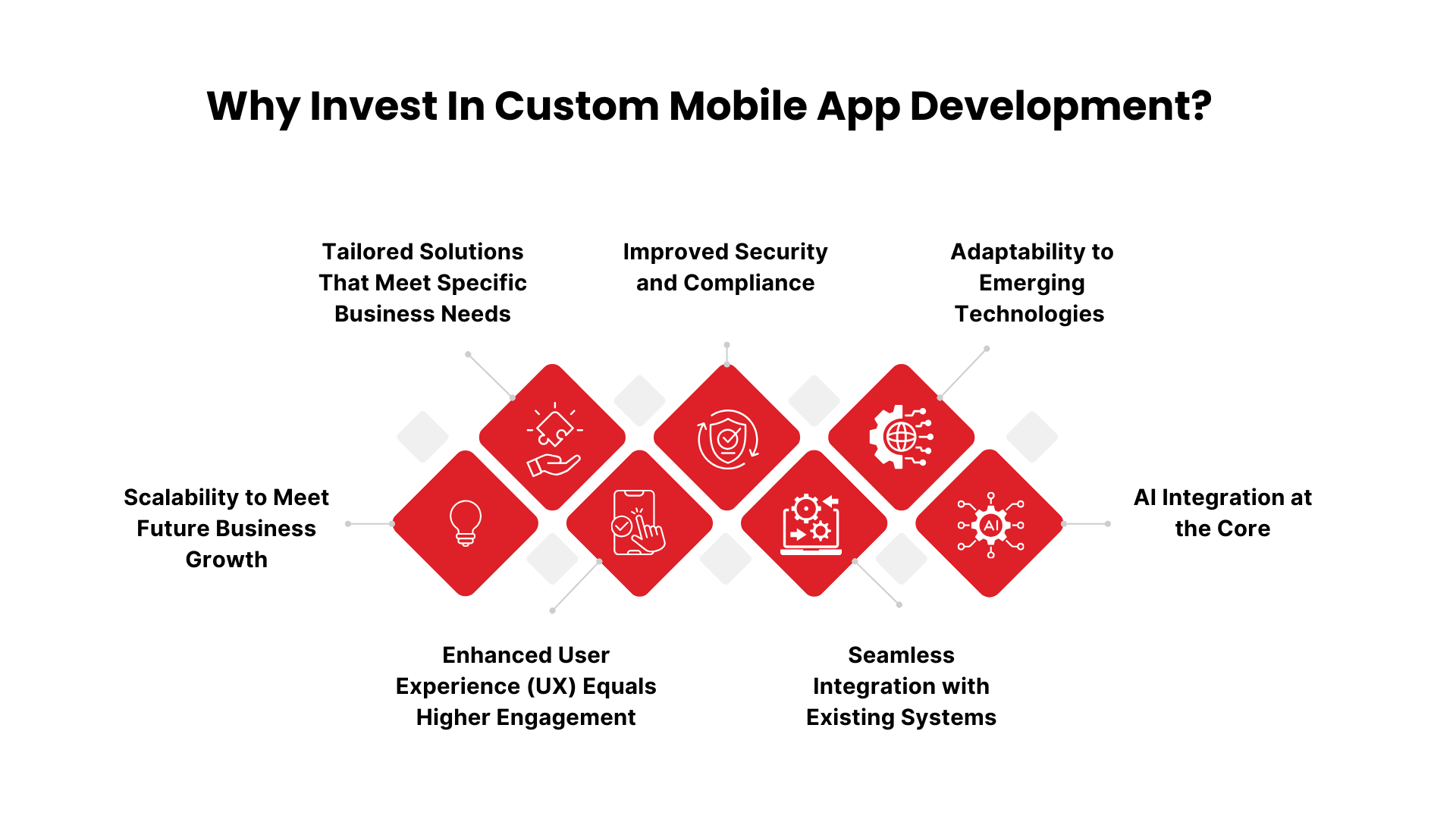
1. Tailored Solutions That Meet Specific Business Needs
Businesses today face unique challenges that off-the-shelf solutions simply cannot address. Generic mobile apps often lack the flexibility to meet the specific needs of different enterprises. Otherwise, if you have been through it, it results in inefficiencies and limited growth opportunities.
Imagine trying to fit your company’s distinct workflows into a one-size-fits-all app—compromises are inevitable. As your team grows or your services expand, you’re left frustrated by the app’s inability to keep up. This limits not only your operational efficiency but also your ability to deliver a seamless customer experience. You won’t do that to the business you have spent years to built right?
Custom mobile app development offers a solution designed precisely to meet your business goals. It is built with the vision you had for your business and completely replicates it (As for TechnBrains, we make it even better) to bring the kind of app you have manifested throughout the years.
Custom mobile app development will have the exact features, design, and functionalities to align with your objectives. Be it integrating custom CRM systems, automating processes, or improving customer interactions, a custom app enhances productivity and performance at every level.
A study conducted by GoodFirms indicates that companies utilizing custom mobile applications experience an 88% increase in efficiency and a 62% boost in customer satisfaction. Custom mobile app development is worth each dollar you invest as it aligns with your business goals and model perfectly while empowering you to make a difference.
2. Scalability to Meet Future Business Growth
As your business grows, so do the demands on your mobile app. Many companies that rely on off-the-shelf solutions struggle to keep up with the increasing user and feature requirements. These limitations can slow down your app’s performance and create frustrations for your customers.
Imagine the impact it can have while your company is expanding, it comes a surge in users and more complex operations. But your current app can’t handle the new volume. Loading times increase, crashes become frequent, and adding new features is either impossible or prohibitively expensive. As a result, your growth even ROI is hindered by a lack of scalable tech solutions.
Custom mobile app development offers scalability that can grow alongside your business. As your company expands, new features, integrations, and capacity can be seamlessly added to your app without affecting performance. Custom solutions are built with future growth in mind, giving you the flexibility to adapt as your business evolves.
As per Gartner, by 2025, 75% of businesses with custom mobile apps are projected to scale their apps to meet new business demands, achieving 50% more customer engagement than those using off-the-shelf solutions. This shows that scalability is not just a perk but a competitive advantage when investing in custom mobile app development. As you grow, you can seamlessly expand the app’s features and handle increased traffic without sacrificing performance, ensuring your app remains relevant and reliable.
3. Custom Mobile App Development for Startups
Startups really need to stand out in a crowded market, and having a unique digital presence is key. While off-the-shelf apps might seem like an easy and cheap option, they often miss the mark when it comes to the specific needs of the business. Custom mobile app development for startups is a total game-changer. By putting your capital into a custom solution, you can create an app that truly represents your brand, fits snugly with your business model, and delivers an awesome experience for your users. Plus, custom apps can grow alongside your startup, letting you scale up easily and adapt on the fly to any changes in the market.
Investing in custom mobile app development for startups is worth it because it is built with the startup’s goals and challenges in mind. Whether you’re launching an e-commerce site, a social networking platform, or a specialized service, a tailored app will fit right into your business model. According to Clutch, by 2024, around 78% of startups that go for custom apps will see better efficiency within their first year. These apps can help streamline processes, save you time, and keep your customers happy.
4. Enhanced User Experience (UX) Equals Higher Engagement
This is common, and we have businesses struggling to keep users engaged with their mobile apps. Having a mediocre app leads to high uninstall rates, low retention, and, ultimately, lost revenue.
Did you know that 94% of first impressions of a mobile app are design-related? What does that mean? It means that if your app doesn’t provide a seamless and intuitive user experience, users will quickly look elsewhere. With so many options available, your app needs to stand out and keep users coming back.
Investing in custom mobile app development allows you to create an app tailored specifically to your target audience. A custom app ensures that users get intuitive navigation, personalized features, and responsive design, resulting in a more enjoyable experience. Furthermore, businesses that prioritize user experience can see a 400% increase in conversions compared to those that don’t, according to Adobe.
5. Improved Security and Compliance
As data breaches and privacy concerns escalate, users are more cautious about sharing personal information through mobile apps. Many businesses overlook robust security measures, which can lead to devastating consequences if sensitive data is compromised.
A staggering 43% of cyberattacks target small businesses, and many of them go out of business within six months of a breach. That is why TechnBrains develops custom apps in accordance with regulations like the California Consumer Privacy Act (CCPA) and the General Data Protection Regulation (GDPR). An app must ensure compliance to avoid hefty fines and loss of customer trust.
Custom mobile app development allows you to implement advanced security measures tailored to keep your users’ data safe and secure. We suggest our clients incorporate features such as end-to-end encryption, biometric authentication, and regular security updates to protect user data and build trust.
6. Seamless Integration with Existing Systems
Businesses today often have multiple system, —such as CRM, ERP, and POS system, which are alle essential for daily operations. However, many companies struggle to integrate these systems into one cohesive mobile solution.
Imagine a scenario where your sales team can’t access critical customer information from the CRM on their mobile app. Or your inventory data doesn’t sync with your mobile store, leading to operational inefficiencies and poor customer experiences. These disconnects can cost companies time, money, and lost opportunities.
Custom mobile app development ensures seamless integration with your existing systems. By developing an app tailored to your specific infrastructure, you create a unified system where all data is synchronized, improving workflow and overall efficiency.
In 2024, custom apps can integrate with your existing software to increase operational efficiency by up to 45% due to better system coordination and streamlined processes. This means fewer errors, faster decision-making, and a better user experience across all platforms.
7. Adaptability to Emerging Technologies (2024-2025)
Technology is evolving at a breakneck speed. From 5G and blockchain technology to augmented reality (AR) and the Internet of Things (IoT), businesses need mobile apps that can adapt quickly to these emerging trends. Unfortunately, off-the-shelf apps aren’t built with future technologies in mind.
Imagine missing out on the benefits of 5G-speed connectivity or being unable to offer AR-powered experiences because your app wasn’t built to support such innovations. Your competition, meanwhile, is delivering futuristic experiences that captivate users. This technology gap could leave your business lagging.
Investing in custom mobile app development ensures your app is adaptable to emerging technologies. Whether it’s upgrading to support 5G speeds, incorporating AR experiences, or integrating blockchain for secure transactions, a custom app can easily evolve alongside technological advancements.
By 2025, Gartner predicts that businesses investing in apps adaptable to emerging technologies like 5G and blockchain will see a 30% higher user engagement rate compared to those relying on outdated platforms. As we always say, Custom apps future-proof your business by being flexible and ready to integrate with the next wave of innovations.
8. AI Integration at the Core
Modern consumers expect their apps to anticipate their needs, from personalized recommendations to automated customer service. Without Artificial intelligence services, apps are becoming outdated, missing opportunities to provide intelligent, data-driven experiences. By 2024, McKinsey projects that businesses that integrate AI into their apps will see 40% higher conversion rates due to improved user experiences. AI doesn’t just make apps smarter; it makes them more engaging and efficient, driving both customer satisfaction and revenue.
Your apps need to offer personalized shopping recommendations like Amazon’s or have an AI-driven chatbot like many successful e-commerce platforms. Custom mobile app development allows for deep AI integration. You can add personalized content recommendations, real-time customer service, or predictive analytics. AI-driven apps offer experiences that feel more tailored and interactive.
Invest in Custom Mobile App Development with TechnBrains
Now that we’ve explored why investing in custom mobile app development is the smarter choice, it’s time to highlight why TechnBrains is the leading custom mobile app development company for you to choose from. We don’t just build apps; we create tailored, future-ready solutions that align with your business goals and set you up for long-term success. Here’s why TechnBrains is the best custom mobile app development company:
Expertise Across Multiple Industries
At TechnBrains, we bring vast experience from working across a broad spectrum of industries. Whether you’re in healthcare, fintech, retail, or logistics, we’ve done it all. Our team knows the intricacies of each sector and is adept at solving unique challenges.
We built an app for Marquita Waters that offered users ad custom fitness solutios. Our versatility means we don’t offer cookie-cutter solutions. Instead, we tailor the app to your business needs, ensuring it addresses your specific pain points and drives tangible results.
Cutting-Edge Technology
TechnBrains isn’t just about delivering mobile apps for today—we build solutions designed for the future. We integrate future-ready tech, such as AI-powered features, blockchain security, and machine learning. Our American Made Tactical project is a testament to this, as it combines user-friendly design with robust backend functionalities.
Customer-Centric Development
Ever worked with a development team that bombards you with jargon and leaves you confused? At TechnBrains, we take the opposite approach. We believe in collaboration and transparency throughout the development process. From ideation to launch, we work closely with you to make sure every aspect of the app aligns with your vision.
We keep our process transparent and collaborative. Just like we have done for Good Filter Company, we can help your businesses scale with customized solutions by understanding their core requirements. We prioritize your business’s unique needs, offering continuous communication and making sure the final product is exactly what you imagined—only better.
Future-Ready Solutions
In the fast-paced world of tech, building for the future is non-negotiable. We at TechnBrains specialize in creating future-ready solutions that evolve as your business grows. From AI integrations to 5G capabilities, we ensure your app isn’t just equipped for today but will remain relevant and competitive for years to come. Whether integrating AI, AR/VR, or 5G, we future-proof your app. We did this for Immunacy, ensuring their app could seamlessly integrate IoT capabilities, ensuring long-term scalability.
AI and 5G Integration
2024 and 2025 are ushering in the era of AI and 5G, and your app needs to be ready for this transformation. AI isn’t just a nice-to-have anymore—it’s becoming essential for delivering personalized user experiences, improving customer support, and driving automation. Meanwhile, 5G enables faster data transmission and better performance, making your app quicker and more responsive than ever before.
AR/VR Capabilities
Augmented Reality (AR) and Virtual Reality (VR) aren’t just for gaming anymore—they’re transforming industries like retail, education, and real estate. Whether you’re looking to provide immersive customer experiences, offer interactive learning, or visualize architectural projects in real-time, AR/VR integration can elevate your app to the next level. Our IoT expertise helped Generations Broadcasting create an ecosystem for seamless media sharing.
Wrapping It Up The Future is Custom
As they say in Chopped, if your app doesn’t cut it, you will be chopped. Luckily, you have certified app developers for hire for custom mobile app development to blow your competitors out of the water.
Investing in custom mobile app development allows businesses to create solutions that fit their specific needs and growth goals. Unlike standard apps, custom apps can adapt, scale, and work with particular business processes. This leads to long-term benefits such as improved efficiency, a better customer experience, and enhanced security.
By working with a custom mobile app development company, businesses can create an app that addresses current needs and can grow with technological changes. Custom mobile app development gives you a future-ready solution that helps your business stand out, build customer loyalty, and improve returns on investment. In a competitive digital world, this level of personalization and innovation is essential.
If you’re ready to future-proof your business with custom mobile app development, contact TechnBrains today. Together, we’ll create the app that sets you apart and drives your success.
AI Software development has always been about streamlining efficiency, improving quality, and reducing costs. Traditional methods struggle to keep up with today’s demands for rapid delivery and flawless execution.
Software developers for hire face the challenge of balancing speed with perfection. For AI software development companies the pressure to innovate while maintaining flawless code is overwhelming, and human error remains a persistent obstacle.
This is where AI software development takes the center stage. Based on the 2024 Stack Overflow Developer Survey, approximately 82 percent of developers stated that they are actively using AI tools to assist with coding. With cutting-edge tools and services, AI is revolutionizing custom software development, optimizing workflows, reducing coding errors, and automating complex tasks.
In this blog, we’ll explore the top AI tools, services, and their impact on software development in 2025.
What is AI?
Artificial Intelligence is the simulation of human intelligence in machines programmed to think, learn, and solve problems. In software development, Artificial Intelligence services can assist by automating repetitive tasks, analyzing vast datasets, and even generating code. AI has several subfields, such as:
Machine Learning (ML): Teaches systems to learn from data patterns.
Natural Language Processing (NLP): Enables machines to understand and interpret human language.
Deep Learning: A subset of ML that uses neural networks to mimic human decision-making.
User Interaction: Users interact with CashWise through a chatbot powered by NLP, which helps them navigate the app and understand their options.
Personalization: Using ML algorithms, CashWise learns from user interactions, tailoring financial advice and advance offers to meet individual needs.
Risk Assessment: The app employs predictive analytics to determine whether users qualify for cash advances and how much they should receive, thereby reducing the chances of defaults.
Verification Process: Users can securely verify their identity by uploading photos of their IDs, which the app processes using computer vision technology.
Security Protocols: Finally, CashWise employs AI-driven security measures that monitor user activity for any unusual patterns, ensuring that the app remains a safe platform for financial transactions.
By incorporating these AI subfields into the app development process, a mobile app development company in Dallas can create innovative and effective financial solutions that resonate with users. When built with AI, apps like Klover not only improve user experience but also establish trust and security, which are essential in the financial sector.
What is AI Software Development?
AI software development is the process of building software applications that use artificial intelligence to solve problems. At TechnBrains, AI Software development has led us to speed up processes while ensuring higher application quality and security. Think of AI and software development as creating super-smart apps that can think, learn, and act on their own. AI-assisted software development doesn’t mean robots are taking over (yet), but it does mean apps are getting a lot smarter.
For example, when you open Netflix, it recommends shows based on what you’ve watched—that’s AI at work. Or you ever used Siri, Alexa, or Google Assistant? These tools learn your voice, habits, and preferences. That’s artificial intelligence improving your experience every time.
Here’s where AI software development gets exciting
Speed: AI can help developers create apps much faster. It automates repetitive tasks like debugging, testing, and even generating code. Remember how Iron Man has J.A.R.V.I.S. helping him build the suit? AI tools work the same way for developers.
Smarter Decisions: AI doesn’t just help you build; it learns from data. That means the more it works, the better it gets. Just like a chef who learns from every dish they make, AI improves its accuracy and performance over time.
Fewer Mistakes: Humans are awesome, but let’s face it—we make mistakes. ai and software developmen on the other hand, can analyze huge amounts of data and spot issues in code that a human might overlook. It’s like having a superpower that helps you catch bugs before they cause problems.
Still with me?
Here’s a fun fact: The first AI program was created in the 1950s by a guy named Arthur Samuel. He taught a computer how to play checkers, and it eventually got better than he did! Fast-forward to today, and we have AI building everything from self-driving cars to recommendation engines that know our guilty pleasures (yes, I watched all the “Fast and Furious” movies—don’t judge!).
The Impact of AI Software Development
The impact of AI software development on the industry in 2025 is undeniable. From reducing manual coding efforts to enabling rapid prototyping and deployment, AI tools and services are transforming how companies develop software.
AI-driven software development has drastically shortened the development lifecycle, allowing companies to launch products faster and more efficiently. According to recent reports, businesses using AI software development have seen a 30% increase in productivity, thanks to tools like AutoKeras and Claude that streamline machine learning tasks. Custom software development companies can be at the top of the list by adopting AI software development services. (Like TechnBrains is!)
Furthermore, outsourcing software development strategically can enhance this transition, allowing companies to tap into specialized expertise and reduce costs. If you haven’t considered AI software development yet, the time is now. The competitive landscape is shifting, and businesses that don’t integrate AI risk becoming obsolete.
Benefits of Using AI Software Development
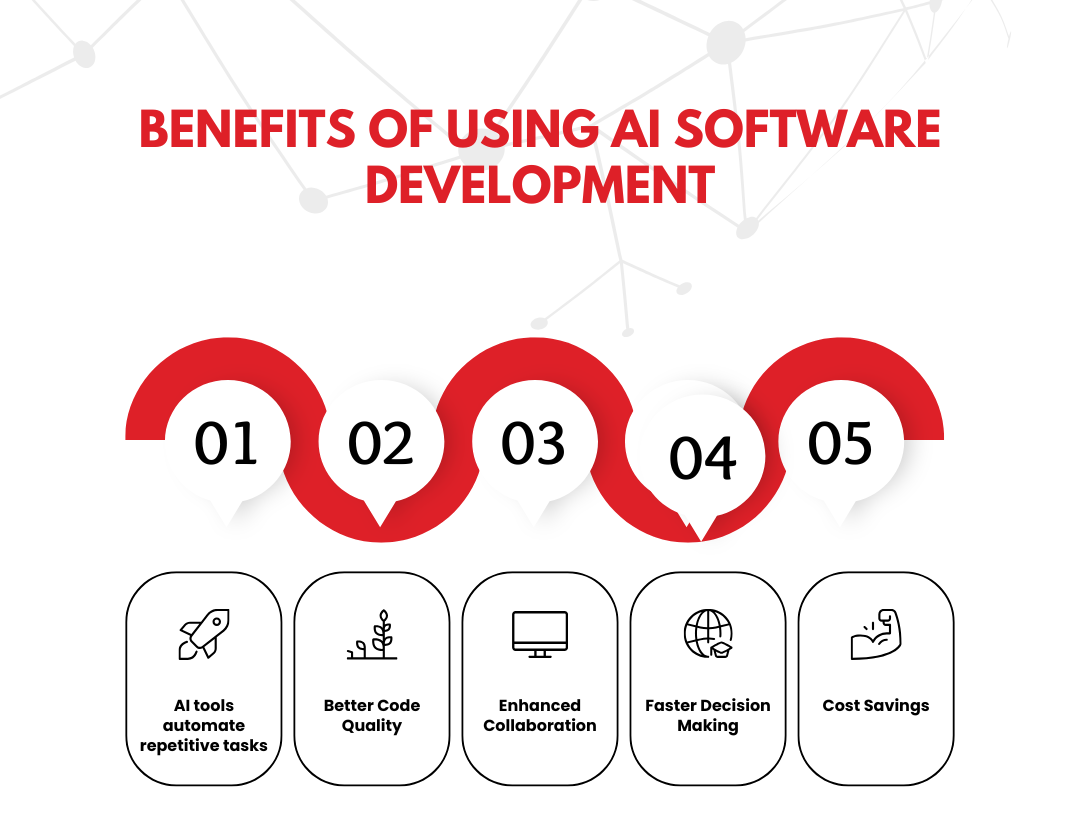
AI Software Development is cost-effective and helps you increase efficiency, improve code quality, enhance collaboration, and make faster decisions.
AI tools automate repetitive tasks: This allows developers to focus on more complex problems. With less manual work, teams can deliver projects faster.
Better Code Quality: Tools like DeepCode provide insights into your code. They suggest improvements, leading to higher quality and more maintainable code.
Enhanced Collaboration: AI tools can facilitate better communication among team members. For example, using platforms like GitHub with integrated AI helps team members share and review code more effectively.
Faster Decision Making: AI can analyze vast amounts of data quickly. This helps teams make informed decisions about design, features, and user experience.
Cost Savings: By improving efficiency and code quality, AI tools can reduce development costs. Fewer bugs and faster testing mean lower expenses in the long run.
AI Tools for Software Development
AI tools for software development are software applications that utilize artificial intelligence to assist developers. They help automate tasks, analyze data, and improve coding efficiency. AI tools can suggest code snippets as you type. This reduces the time spent on coding and minimizes errors. These tools can identify bugs and vulnerabilities in your code. Early detection helps prevent costly fixes later.
AI can automate testing processes, ensuring that your software works as expected without manual intervention. AI tools can analyze large datasets quickly. This is useful for making data-driven decisions during development.
Here are some popular AI software development tools that you might find useful:
GitHub Copilot
This tool acts like a coding assistant. It suggests code and functions based on the context of what you are writing. Developers report that it speeds up the coding process significantly.
Tabnine
Tabnine is an AI-powered code completion tool. It learns from your coding patterns and suggests completions to enhance your workflow.
DeepCode
This tool scans your code for potential issues. It provides suggestions to improve code quality and performance. DeepCode uses AI to learn from millions of codebases.
Test.ai
Automated testing is crucial for software development. Test.ai uses AI to create test cases and run them automatically, making the testing process faster and more reliable.
Codex by OpenAI
Codex is a powerful AI that understands and generates code. It can help in various programming languages, making it a versatile tool for developers.
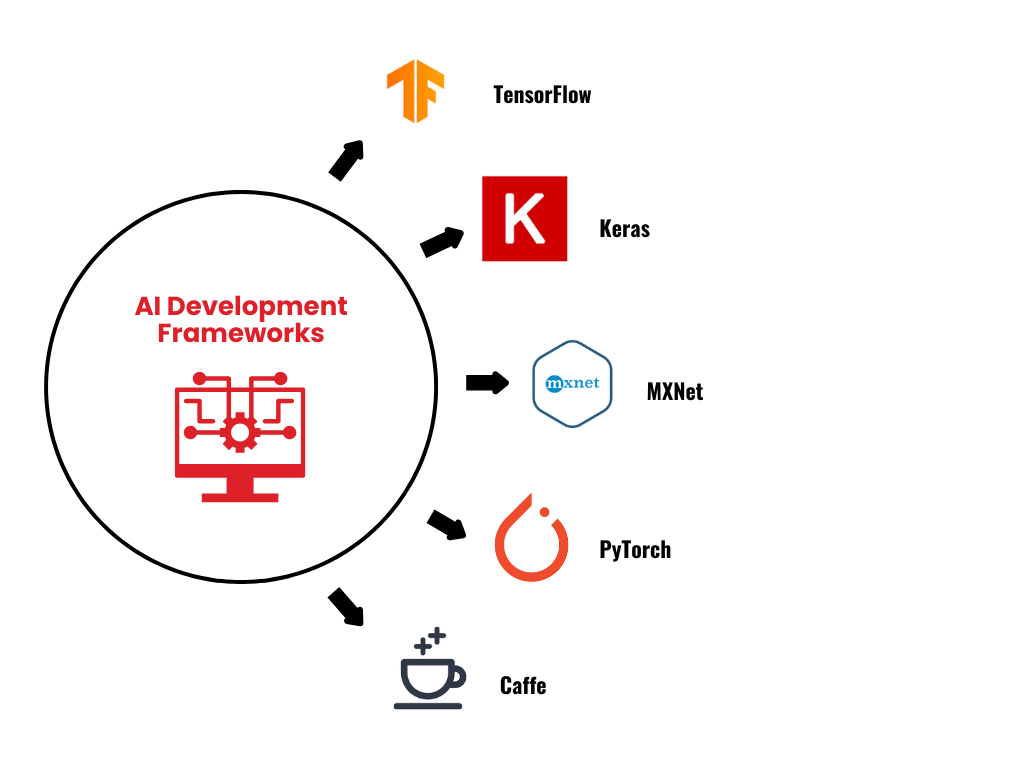
AI Development Frameworks
Creating intelligent AI applications requires more than just coding skills. You need the right framework to support your AI ambitions. A strong AI framework is like a well-built foundation for a house—it holds everything together and ensures stability.
Here are the top AI development frameworks leading the way in 2025:
1. TensorFlow
This heavyweight champion, developed by Google, offers support for everything from deep learning to complex neural networks. It’s versatile, powerful, and widely adopted by AI engineers and researchers.
2. Keras
If TensorFlow is Captain America, Keras is more like Spider-Man—agile, flexible, and easy to use. Built on top of TensorFlow, Keras simplifies the development of AI models without sacrificing functionality.
3. MXNet
Known for its performance and scalability, MXNet can run across multiple GPUs, making it ideal for deep learning tasks. It’s also used by companies like Amazon for building large-scale AI systems.
4. PyTorch
Loved by researchers and developers alike, PyTorch is praised for its flexibility and dynamic computational graph. It allows you to change your model on the go, which is great for research purposes.
5. Caffe
Caffe is a deep learning framework that’s known for its speed. It’s particularly useful for image classification tasks and has been widely adopted in the research community.
Top AI Tools 2025 Every Developer Should Use
AI is changing the way developers work. By 2025, it will be almost impossible to write code without using some form of AI assistance. These tools are not just “nice-to-haves” anymore; they’re essential. Why? Because they help developers write cleaner code, save time, and avoid errors. Below are the top AI tools every developer should use by 2025:
1. GitHub Copilot
It’s like having a superpower! Copilot helps you write code faster by suggesting whole functions, fixing bugs, and even generating test cases. Think of it as your coding buddy. It learns from the code you write and anticipates what you’ll do next.
You’re writing a function to process data. Just as you’re about to start, Copilot suggests the whole function. Boom! You just saved 15 minutes.
2. TabNine
If you’ve ever wished for magic to write code for you, this is pretty close. It works across most IDEs and provides AI-driven suggestions as you type. Whether you’re writing JavaScript, Python, or Ruby, TabNine offers context-aware completions to help you stay in the flow.
3. DeepCode
No more late-night bug hunts! DeepCode uses AI to analyze your code and suggests security fixes, performance improvements, and best practices. It’s like having an experienced mentor who’s always watching your back.
4. Otter.ai
Otter.ai is an AI-powered meeting assistant that enhances productivity by transcribing conversations in real time. It differentiates speakers, making it easier to follow discussions in large meetings.
Otter automatically generates summaries, highlights key points, and identifies action items for assignment. You can search transcripts for specific keywords and playback recordings synchronized with the text. It also enables easy sharing of transcripts and recordings, keeping everyone aligned.
AI for Ethical Use and Bias Detection
Ethical concerns in AI are no longer just a side topic. They’re front and center in discussions about the future of technology. AI, as advanced as it is, can sometimes reflect biases in the data it’s trained on. That’s a huge problem, especially in areas like hiring or legal decisions where fairness is critical. How do we combat that? Thankfully, there are powerful tools to keep your AI in check.
Let’s dive into some of the best tools to detect and reduce bias in AI:
IBM AI Fairness 360
This toolkit does exactly what its name promises: it helps make AI fairer. It offers metrics to test for bias and algorithms to reduce it. For instance, if your model shows favoritism toward one group over another, AI Fairness 360 can highlight the issue and suggest ways to fix it. Example: Imagine you’re building a loan approval model, and without realizing it, the model favors applicants from a particular zip code. AI Fairness 360 will catch this bias and suggest ways to re-balance the data. It’s like having a fairness referee for your AI!
Fairlearn
Python developers, this one’s for you. Fairlearn helps you assess your machine learning models’ fairness and tweak them for better results. It’s not just about detecting bias but offering options for improvement too. Remember in “The Matrix” when Neo learns to control the system? Fairlearn lets you do the same, only instead of dodging bullets, you’re dodging bias.
Google’s What-If Tool
This tool is fantastic for visualizing what might happen if your model changes. You can play out various scenarios and see if they lead to biased outcomes. It’s especially useful in complex decision-making models where biases can be subtle but harmful. It’s like having a crystal ball for your AI—you get to see the future consequences of your code and prevent any ethical disasters before they happen.
Aequitas
Aequitas is all about fairness audits. It checks how your models perform across different demographic groups and helps make sure the outcomes are balanced. If you’re working on public-facing software, this is your go-to tool for ensuring transparency. Think of Aequitas like a dietician for your AI. It examines everything to make sure your model is not just “healthy” but also ethical.
Themis-ml
This tool targets fairness directly in machine learning. Themis-ml tests your models for discrimination and includes techniques to correct any biases it finds. It’s like having an AI bias detective on your team. You can think of Themis-ml as Sherlock Holmes for AI. It searches through your data and models to uncover any wrongdoing, making sure justice is served.
AI Software Development in Business and Productivity
AI Software development has a profound impact on business productivity. Companies are increasingly adopting AI tools to streamline operations, reduce costs, and enhance efficiency. For instance, Grammarly aids in producing error-free content quickly, while SEO.ai automates search engine optimization.
Automation is a major advantage of AI. Tools like Canva AI enable rapid creation of marketing visuals, cutting creative task time in half. In content-heavy industries, Jasper automates text generation for blogs and social media.
AI is also revolutionizing data analysis. Tools like Tableau AI and Google Cloud AI help businesses uncover insights from large data sets, facilitating data-driven decisions. Furthermore, AI-driven chatbots and virtual assistants enhance customer service by managing inquiries and sales, freeing employees for strategic tasks.
Emerging AI Software Development Trends
Businesses need to capatlize on AI Software Development need to stay updated to maintain their competitive advantage. Here are some of the key emerging trends reshaping industries:
1. Edge AI
Edge AI refers to the use of AI technologies on devices located at the “edge” of the network—closer to where data is generated (such as IoT devices or mobile phones). This reduces the need for data to be sent to centralized cloud servers, cutting down on latency and improving real-time decision-making. For example, smart devices like self-driving cars and drones use Edge AI to process data locally, allowing them to make decisions quickly and efficiently.
2. Quantum AI
Quantum computing is another emerging trend in AI software development. This trend promises to revolutionize industries by solving problems that traditional computers cannot. Quantum AI uses quantum computing’s immense processing power to tackle complex optimization problems and enhance machine learning models. While still in its early stages, companies that invest in quantum AI are positioning themselves at the forefront of technological innovation.
3. Hyper-automation
This involves using AI to automate every aspect of business operations, from supply chain management to HR processes. By integrating AI with robotic process automation (RPA) and machine learning, businesses can create highly efficient, end-to-end automated workflows. Hyper-automation reduces human error, increases accuracy, and can significantly cut costs in industries like manufacturing, logistics, and finance.
4. AI in DevOps
In AI software development, AI is now integral to DevOps (Development and Operations). AI tools optimize various stages of the software development lifecycle, such as continuous integration, deployment, and monitoring. With AI-driven solutions, developers can benefit from predictive analytics that foresee potential issues before they occur, helping teams solve problems in real-time. For instance, AI can detect vulnerabilities or inefficiencies in code, allowing for quicker fixes and more reliable software releases.
5. Natural Language Processing (NLP)
NLP is becoming more sophisticated and widely used. Businesses are leveraging NLP for customer service automation, sentiment analysis, and even for automating content generation. For example, AI-powered chatbots using NLP can understand and respond to customer queries with near-human accuracy, improving customer experience while reducing the burden on human customer service teams.
Generative AI Tools in AI Software Development
Generative AI tools are systems powered by machine learning models designed to create content, from text to images and even videos, based on user inputs.
How Does This Help Businesses?
Generative AI tools are reshaping industries by enhancing productivity and saving time. Tools like GPT-5 automate writing tasks, freeing teams for creative strategies. Developers can use tools like GitHub Copilot to accelerate coding by receiving suggestions from AI.
AI software development tools like ChatGPT engage with customers, efficiently providing 24/7 support. MidJourney generates unique images, while Synthesia creates high-quality videos rapidly, reducing the need for production teams.
Generative AI not only saves time but also fosters business growth for AI software development. Tools like Synthesia cut production costs dramatically. AI accelerates content and product launches. By handling routine tasks, AI allows teams to focus on creative brainstorming. As generative AI tools evolve by 2025, their roles in software development will grow, requiring a balance of automation and human oversight to maintain creativity and quality.
The Future of AI Software Development
AI software development is the future for smart software development. The software development ai tools for 2025 are GitHub Copilot, Tabnine, DeepCode, Test.ai and Codex by OpenAI. These tools will help how developers work, enabling them to be more productive, efficient, and innovative. However, AI should be viewed as an assistant rather than a replacement—developers are still critical for innovation, problem-solving, and ensuring that AI solutions align with business needs.
Supercharge Your Business with AI Software Development at TechnBrains
At TechnBrains, we pride ourselves on being a leading AI software development company dedicated to delivering cutting-edge AI software development solutions tailored to meet your unique business needs. Our AI-assisted software development process enhances efficiency, improves code quality, and streamlines collaboration, ensuring you receive the best possible product.
AI Software Development Services
We offer AI Software Development Services to help you innovate with ease.At TechnBrains, we offer a variety of custom AI solutions tailored to enhance productivity and efficiency for businesses. Our machine learning development services create models that analyze data and automate decision-making processes. We specialize in natural language processing (NLP) to develop chatbots and virtual assistants that improve customer interactions.
Our AI-powered analytics solutions provide actionable insights from large datasets, while computer vision applications enable systems to interpret visual information, beneficial in sectors like security and healthcare. We also utilize AI-assisted software development tools to speed up coding, testing, and deployment.
Additionally, our predictive maintenance solutions help businesses anticipate equipment failures, and robotic process automation (RPA) streamlines repetitive tasks for better accuracy and efficiency. Our AI-driven testing services ensure high-quality code, and our AI consulting services guide businesses in effectively integrating AI technologies into their operations.
These services reflect TechnBrains’ commitment to being a leading AI software development company in the USA, offering comprehensive AI software development solutions to businesses looking to leverage the power of AI in their operations.
Enterprise IT, also known as enterprise-grade or enterprise IT, includes hardware, software, and IT services designed for large organizations. It is different from the consumer or small and medium-sized business class. While there is no single standard for enterprise-class IT, it usually emphasizes reliability, availability, serviceability, compatibility, and security.
It will be 2025 in two months. Mobile app development companies and businesses must keep up with digital transformations to stay competitive. By 2024, IT spending is projected to skyrocket to an incredible 5.3 trillion dollars globally.
Any large organization can find it challenging to manage vast networks, secure sensitive data, and ensure smooth operation 24/7. With the right Enterprise IT services, businesses can avoid downtime, security breaches, and inefficiencies that could cost them millions. Implementing the right enterprise IT services and solutions helps optimize business operations, secure data, and manage technology infrastructure seamlessly.
But what exactly is enterprise IT? And why is it so essential? Let’s break down the problem, agitate a little, and then offer a solution. To fully grasp the concept of enterprise IT, let’s start with the basics.
What is Enterprise IT?
Enterprise IT refers to the technology services and infrastructure that support the daily operations of a business, particularly large organizations. It covers everything from hardware to software, networking, and cloud-based solutions. Essentially, enterprise IT acts as a business’s nervous system, ensuring communication, data management, and operational efficiency.
Why Enterprise IT?
Without effective enterprise IT solutions, a company risks falling behind its competitors. Enterprise IT solutions help you in managing sensitive customer data and streamlining workflow processes.
Key Enterprise IT Services Every Business Needs
Businesses can use various enterprise IT services to enhance their efficiency. Let’s explore some of the most crucial ones.
1. Enterprise IT Security
In the current climate, where cyber threats are constantly evolving, safeguarding company data is crucial. Enterprise IT security services provide comprehensive protection, from firewalls to real-time monitoring. Without strong security protocols, businesses leave themselves vulnerable to breaches, which can result in financial loss and damage to their reputation.
Fun Fact: Did you know that 43% of cyber-attacks target small businesses? That’s a wake-up call for companies of all sizes to invest in enterprise IT security solutions.
2. Enterprise Managed IT Services
Managing IT infrastructure in-house can be both costly and complicated. That’s where enterprise managed IT services come into play. Outsourcing these services to a third party allows businesses to focus on their core operations while IT experts handle system maintenance, security updates, and network monitoring. It’s like having a personal tech guru available 24/7!
A great example is TechnBrains, a Dallas app development company that also offers robust enterprise IT support to ensure smooth project delivery for clients.
Enterprise IT Solution Areas
Enterprise IT services cover a broad spectrum of specialized areas. These solution areas are designed to help businesses streamline their processes, enhance security, and support digital transformation.
1. Business and Intelligence Analytics
Data is one of the most valuable assets for modern businesses. With business and intelligence analytics, companies can collect, process, and analyze data to gain insights into customer behavior, market trends, and internal processes. This it enterprise solutions helps businesses make informed decisions that drive growth and innovation.
2. Integrated Cybersecurity Services
In a world where cyber threats are always lurking, integrated cybersecurity services provide a multi-layered approach to security. From threat detection to incident response, these services ensure that businesses remain protected against emerging threats while maintaining compliance with industry regulations.
3. Applications Development and Testing
Building custom applications is crucial for businesses looking to stay competitive. With applications development and testing services, companies can design and deploy custom software solutions that meet their specific needs. Rigorous testing ensures that these applications are secure, reliable, and user-friendly.
4. Cloud and Data Center Infrastructure Transformation
As more businesses move their operations to the cloud, cloud and data center infrastructure transformation services have become essential. These services help companies migrate their data and applications to the cloud, reduce operational costs, and enhance scalability. By optimizing data centers and utilizing cloud technologies, businesses can streamline operations and improve overall efficiency.
5. Business Process Management and Enterprise Managed Service Delivery
Efficient processes are at the heart of every successful enterprise. Business process management ensures that workflows are optimized, reducing redundancies and improving productivity. Coupled with enterprise managed service delivery, businesses can focus on core operations while leaving IT management to the experts.
6. Enterprise and Cloud Systems Integration
Integrating different IT systems can be complex. Enterprise and cloud systems integration services ensure that all systems, whether on-premises or in the cloud, work seamlessly together. This integration enhances communication, data sharing, and collaboration across departments, resulting in increased efficiency.
7. Digital Workplace Transformation and Enterprise Mobility Services
The modern workplace is evolving, and businesses must adapt to stay relevant. Digital workplace transformation focuses on implementing tools and technologies that enable employees to work remotely and collaborate in real-time. Coupled with enterprise mobility services, these solutions ensure that employees can access company resources securely from any location.
Why Enterprise IT Solutions Matters for Business Growth
The difference between companies that thrive and those that stagnate often comes down to how they manage technology. Enterprise IT solutions provide businesses with the tools they need to streamline processes, scale their operations, and stay competitive.
Efficient Operations
For large enterprises, managing different systems across departments can become chaotic. With robust enterprise IT systems, companies can integrate all their business processes into one seamless infrastructure. This reduces redundancy and increases efficiency across the board.
Enhanced Security Measures
With the rise of cyber threats, security has become a top priority. Enterprise IT security solutions protect sensitive business data from unauthorized access. These solutions include real-time monitoring, data encryption, and threat response systems. By securing your network, you can prevent breaches that could cost your business millions.
Real-Time Data and Analytics
In the digital age, data is gold. Companies that leverage business and intelligence analytics through their enterprise IT systems gain invaluable insights into their operations, customers, and market trends. With these insights, businesses can make informed decisions that drive innovation and growth.
Reliable IT Support
One often overlooked aspect is enterprise IT support. Whether it’s troubleshooting a network issue or preventing downtime, a reliable IT support system ensures that businesses stay operational. Continuous support means fewer disruptions and faster solutions when problems arise.
Seamless Integration Across Platforms
As businesses adopt new technologies, integrating them into existing systems becomes crucial. Enterprise and cloud systems integration allows businesses to ensure that new software and hardware work harmoniously with what’s already in place. This avoids potential conflicts, ensuring smoother operations across the board.
Custom Enterprise IT Solutions for Every Business
One-size-fits-all solutions rarely meet the specific needs of a growing company. Enterprise IT solutions are customizable to match your business’s unique requirements. Need specialized software for accounting? Or maybe an advanced marketing automation tool? No problem. Customized IT systems allow your business to innovate, automate processes, and respond quickly to new opportunities.
Enhancing IT Enterprise Infrastructure for Scalability
Enterprise IT infrastructure is all about ensuring that growth is supported. This can be done through robust systems that can handle increased traffic, data storage, and operational complexities.
Let’s look at some ways enterprise IT infrastructure enhances business scalability:
Cloud Computing: Migrating to the cloud allows businesses to store massive amounts of data securely and access it from anywhere.
Automation: Automating routine processes reduces manual workload and minimizes human error, allowing employees to focus on more value-added tasks.
Data Management: With strong enterprise IT infrastructure, businesses can manage and analyze vast amounts of data, providing actionable insights for growth.
Enterprise Mobility Services: Enterprise mobility services ensure your workforce can stay connected and productive, no matter where they are.
Digital Workplace Transformation: The traditional workplace is transforming into a digital hub. Tools like collaboration platforms and cloud-based storage allow employees to work from anywhere.
Business Process Management: Managing workflows can be a complex task for large enterprises. With business process management systems, companies can automate repetitive tasks. This will improve collaboration between departments, and ensure that projects are completed on time.
The Role of Enterprise IT in Mobile App Development
The demand for mobile apps is soaring. Leading mobile app development companies need robust support systems to keep up. With a Enterprise IT solution, you can prevent security vulnerabilities, operational glitches, or difficulty scaling as the user base grows.
Our mobile app developers for hire believe that enterprise IT management plays an important role in ensuring that your mobile apps operate smoothly. From managing backend infrastructure to ensuring tight security protocols, the right IT support will have your back. That is exactly why TechnBrains is here! Our enterprise mobile app development services are here to blow your competitors out of the water.
Security
In mobile app development, security is a top concern. Enterprise IT systems provide the backbone for robust security features, ensuring that your app and user data remain protected. Enterprise IT security monitors for potential threats and implements safeguards like encryption, secure access controls, and threat detection. This proactive approach keeps both your business and customers safe.
Without solid IT security, an app can be as vulnerable as an unlocked front door. You wouldn’t leave your house open—so don’t leave your apps unprotected.
For more insights on app security, you can check out our Android app development cost blog, which breaks down the costs associated with creating a secure app.
Scalability
As your business grows, so will your mobile app’s user base. You need an IT infrastructure that can handle increasing traffic and data loads. Enterprise IT infrastructure ensures that your app can scale seamlessly, whether it’s adding more users or integrating advanced features. By leveraging tools like cloud computing and automated updates, you can ensure your app remains efficient even as demand grows.
Curious about how strategic planning plays into development? Our blog on strategic software development outsourcing explains how outsourcing certain IT tasks can boost efficiency while scaling your operations.
Keeping Apps Running Smoothly
A mobile app is only as good as its performance. Enterprise IT management ensures that your app’s backend infrastructure operates efficiently. This includes managing servers, databases, and cloud services. Reliable IT systems prevent downtime and ensure your app runs smoothly, offering users a seamless experience. No business can afford prolonged outages or system failures, especially when customers rely on your mobile app.
For businesses in competitive markets like New York, maintaining seamless app operations is crucial. Learn more about this in our Mobile App Development in New York blog.
Wrapping it Up
Having the right enterprise IT services and solutions can be the difference between success and failure. From securing your systems against cyber threats to managing your infrastructure for growth, enterprise IT is no longer just a “nice-to-have” but a necessity. By investing in the right solutions, you can future-proof your business, enhance operations, and most importantly, scale confidently.
So, whether you’re looking to secure your network, optimize your IT infrastructure, or streamline your operations, enterprise IT should be at the top of your priority list.
TechnBrains is Your Ultimate Partner for Enterprise IT Solutions and Support
At TechnBrains, we understand cyber-attacks can cost companies millions and damage their reputation. That’s why our enterprise IT services are designed to protect your business with real-time threat detection, advanced encryption for sensitive data, and reliable backup and recovery systems. With TechnBrains, you’ll have the peace of mind that your enterprise IT security solutions are protected and resilient.
But security is only part of what we offer. Our enterprise IT managed services and support ensure that all your technical needs, from software troubleshooting to hardware management, are taken care of efficiently. We work proactively to minimize downtime and ensure your business runs smoothly, acting like the Avengers of your IT infrastructure—always ready to step in and keep everything operational. When you choose TechnBrains, you’re choosing a partner dedicated to safeguarding your business and ensuring continuous growth.
Android App Development Cost is the most important factor for a successful Android App. Developing an Android app can feel like walking through a jungle with countless paths, each leading to a different destination—and a different price tag. You’ve got the idea, but figuring out the cost to turn it into a reality? Well, that’s another beast altogether.
As of August 2025, the Google Play Store offered the largest number of apps for Android users, with 2.3 million apps available. So, in this vast sea of apps, how will your app stand out from the others?
This blog will break down the different costs involved in Android app development to help you plan your budget effectively. It will also offer tips for finding a qualified Android app developer and showcase case studies of successful Android apps.
For quick answers: How much does it cost to build an Android app? The cost to build an Android app can range from $20,000 to over $300,000.
How much does Android App Development cost?
After thorough analysis, the Average Android App Development Cost ranges from $20,000 to $300,000. This cost of Android app development depends on several factors, including app complexity, type of app, features of the app, development price, development team’s location, design, testing, and marketing.
Factors Affecting Android App Development Cost
Below are some of the important factors that add to the overall cost of Android App Development.
1. App Complexity
Think of app complexity like Snapchat’s evolution. At launch, an app like Snapchat was just an app where users could send disappearing photos. However, as new features like Stories, filters, AR lenses, and Bitmoji were added, the app became far more complex.
Just like Snapchat’s growth, the more features you want in your app, the higher the cost. You can start simple, but if you want a full-fledged experience with interactive features, expect the price to go up!
So that brings us down to Android App Development Costs in three categories:
Basic App – $20,000 – $40,000
A Basic Android App Costs around $20,000 – $40,000. This is an Android app with basic and minimal features. They don’t need a backend and aren’t flashy with their UI. These apps are quick to develop therefore the price tag is affordable. Just as we discussed Snapchat being an app where users can send photos that’ll disappear in some time.
Moderately Complex App: $40,000 – $100,000
A moderate complex Android app costs between $40,000 – $100,000. These apps have more features and might integrate with external APIs (Learn More About APIs here), use a database, or require real-time updates. Think about apps like food delivery services, fitness trackers, or messaging platforms.
Highly Complex App: $100,000 – $300,000 or more
Now we’re talking about Uber level apps. An app like uber, so think real-time GPS navigation, cloud syncing, in-app purchases, and a fully integrated backend. These apps are intricate and require longer development cycles and more resources. Hence, the android app development price is $100,000 – $300,000 or more.
So that brings the average app development cost to:
Simple App: $20,000 – $40,000
Moderately Complex App: $40,000 – $100,000
Highly Complex App: $100,000 – $300,000 or more
2. Type of App
Choosing the type of Android app you want to develop is going to be an important factor in determining your overall Android App Development Costs. There are three major types of apps, each with its pros and cons. Let’s break it down each :
Native Apps
Built specifically for Android, they use programming languages like Kotlin or Java to give users the best possible performance and experience.
But here’s the catch: native apps are more expensive because they require specialized skills to develop. The android app development price for a native app can range from $30,000 to $100,000, depending on the complexity. This cost to cost to develop an app is an investment, but if performance and a seamless user experience are top priorities for your business, going native is a smart move.
Hybrid Apps
Now, if you’re looking to save on the cost of Android app development, hybrid apps are a more budget-friendly alternative. Hybrid apps are built using web technologies like HTML, CSS, and JavaScript, and they work on both Android and iOS. This is a great way to hit two birds with one stone—you’re saving on development costs and reaching a wider audience.
However, you get what you pay for. While hybrid apps can reduce the android app development price, they won’t match the performance of a native app.
But if your app doesn’t require advanced features, hybrid could be a great way to keep costs in check. The typical cost for a hybrid app ranges from $5,000 to $25,000+ for more complex features.
Web Apps
Web apps are websites designed to behave like apps when accessed via a browser, making them the most cost-effective option. The downside? Web application development offers limited functionality compared to native or hybrid apps.
They’re perfect for simpler, content-based apps but won’t hold up for something interactive. For a simple web app, the cost to build an app starts at around $3,000 and can go up to $150,000 for more complex builds.
3. Features of the App
Let’s talk features. Every extra feature you add to your app increases the cost of Android app development. It’s like building your own gaming PC—every component adds up.
Basic vs. Advanced Features
Basic features like user authentication, real-time notifications, or social media logins are pretty common and won’t break the bank. But if you’re looking to add advanced features like AI-powered chatbots, augmented reality (AR) filters (hello, Snapchat!), or blockchain integrations, be prepared for the cost to climb.
For instance, a basic app might just let users upload a photo and add a caption. But as soon as you introduce filters, geolocation services, in-app purchases, and social sharing, you’re looking at much more development time and a higher Android app development price.
The cost can range anywhere from a few thousand dollars for basic integrations to tens of thousands for complex features like augmented reality. Advanced features could even push the cost to develop an android app past the $150,000 mark.
4. Development Team’s Location
Where your development team is located can have a huge impact on your android app development costs. Hiring a development team in the U.S. or Western Europe is getting you get top quality but of course with a price tag.
However, outsourcing also involves other considerations, such as time zones, language barriers, and communication challenges. That’s where a smart staffing solution comes into play.
TechnBrains’ $99/Day Staff Augmentation
What if you could get the best of both worlds? At TechnBrains, we offer staff augmentation at just $99 per day. This gives you access to highly skilled developers from different parts of the world without the hassle of managing a remote team on your own.
Be it a simple or complex Android app, our team can provide the expertise and support you need. That too at a fraction of the cost to develop an Android app in traditional markets. It’s a smart way to cut down your costs without sacrificing quality or efficiency.
5. Design Costs
Now, the way your app looks and feels is the moment your app is a success or just an ordinary Android app out of thousands. As for iOS App Development, you can use Apple Intelligence to get the job done for you. We haven’t had any advancements in Android app development yet, so this is where your creative head gets to work.
Think of the revolution of Instagram. An App like Instagram at the beginning was a plain and simple app with the Cluttered Polaroid Camera Logo. There weren’t many signups then but as it got popular we know Instagram now as one of the most colorful social media app.
Now for the Android App Development Cost, it is influenced by app design. Mainly on the complexity of the user interface (UI) and user experience (UX) design, as well as the level of customization required.
UI/UX Design: A basic design with a simple layout will be cheaper compared to a sophisticated design that includes custom animations, interactive elements, and a visually appealing user interface.
Wireframing & Prototyping: These early design stages help visualize how the app will look and function. While wireframes provide a skeletal outline, prototypes simulate user interactions.
That brings us to the Cost Estimate:
Basic Design: $5,000 – $10,000
Custom Design: $10,000 – $50,000 or more depending on complexity
6. Testing Costs
Let’s face it—no one likes bugs or glitches in your app. Testing is the stage where you ensure your Android app works flawlessly across various devices, screen sizes, and Android versions.
Imagine launching your shiny new app only to have users bombarded with errors. That’s a nightmare you can avoid with thorough testing. But it adds to the Android App Development Cost. We have two options when it comes to testing:
Manual Testing
Think of this like the human version of debugging. Actual testers go through your app step by step, trying out different scenarios, usage patterns, and even the oddball stuff like “What happens if I press all the buttons at once?” It’s a time-consuming process, but nothing beats the human eye when it comes to spotting weird bugs that machines might miss.
Automated Testing
Now, this is where the robots come in. Automated testing uses scripts to run your app through various scenarios faster than any human could. It’s efficient and can cover a lot of ground quickly, but the setup can be expensive. You’ll need the right tools, and those don’t come cheap. Think of automated testing as the Tony Stark of app testing—fast, tech-savvy, but you’ll have to invest in the suit.
Cost Breakdown
Manual Testing: $5,000 – $15,000, depending on how in-depth the testing is and how many devices you’re targeting.
Automated Testing: $10,000 – $30,000. The upfront cost for setting up automated scripts can be steep, but it’s worth it if you’re planning regular updates or need to test across a large number of devices.
7. Marketing Costs
Have you heard of The “If You Build It, They Might Not Come” Dilemma? You could create the most flawless, feature-rich app in the world, but if no one knows about it, what’s the point?
Just like launching a new movie or game, your app needs a solid marketing plan to hit the right audience and generate downloads. Without it, your app could end up like the early seasons of Breaking Bad—a masterpiece waiting to be discovered.
App Store Optimization (ASO)
If your app doesn’t show up when users search for something related in the Google Play Store, you’re already losing the battle. If you want to submit your Android App on the Google Play Store the fee is one-time only $25.00.
This involves optimizing your app’s title, description, keywords, and even the screenshots. ASO is essentially the “trailer” for your app—if it’s not appealing, people might not even give it a second glance.
Ready to pull out the big guns? Google Ads, social media ads, and influencer marketing are all great ways to target specific user demographics.
Google Ads, for instance, can display your app when people search for similar products. Want a younger crowd? Try TikTok ads or influencer partnerships. Just keep in mind—more eyeballs mean more dollars.
PR & Outreach
If you want people talking about your app, you’ve got to make some noise. Whether it’s engaging with tech journalists, sending out press releases, or getting featured on app review sites, public relations can give your app the spotlight it needs.
Remember when Google Bard AI hit the scene, and everyone was discussing its potential to rival ChatGPT? That buzz wasn’t just organic—it was the result of strategic PR efforts that placed Bard AI in the center of tech conversations. Good PR can make your app the talk of the town.
Cost Breakdown:
ASO: $1,000 – $5,000, depending on the level of optimization you need.
Paid Advertising: $5,000 – $50,000 or more, based on how many platforms you advertise on and the reach of your campaigns.
PR Campaigns: $3,000 – $20,000, depending on the extent of your media outreach and whether you hire a PR firm.
Tips to Hire an Android App Developer
You want an Android App Developer who not only has the technical skills but also the creativity and communication skills to bring your vision to life. The Android App Development Costs are significant, so you need to get the most out of them by choosing the right person or team. Here’s how you can hire Android App Developer:
1. Check Portfolios
Before committing to any developer, always ask to see their portfolio. A good portfolio will show you examples of previous Android apps they’ve developed. Ideally, look for apps that are similar in complexity and function to what you’re aiming to create.
2. Read Client Reviews
Let’s face it—every developer will tell you they’re the best. But what do their past clients think? Platforms like Clutch and Upwork are treasure troves of client feedback, offering real insights into the reliability, communication skills, and expertise of the developer
Positive reviews will highlight the developer’s ability to meet deadlines, stay within the agreed cost of Android app development, and maintain effective communication. However, don’t ignore the negative reviews, as they often shed light on potential red flags.
3. Ask for References
Getting references from a developer’s past clients is like getting insider information.Reach out to their previous clients and ask honest questions about their experiences.
Did the developer meet expectations? Were there any unexpected Android app development costs? How did they handle roadblocks or changes in the project?
If a developer can provide positive references from reputable clients, that’s a solid green flag. If they dodge your request for references, it might be time to explore other options.
4. Evaluate Their Technical Expertise
When hiring an Android developer, ensure they’re proficient in the necessary programming languages and development tools. For Android, this means being skilled in Java or Kotlin, having hands-on experience with Android Studio, and understanding modern app architectures like MVVM (Model-View-ViewModel).
Remember, technical expertise is key to avoiding hidden cost to develop an Android app. A developer who knows their tools will streamline the process, reducing the time and money spent on bug fixes and performance issues.
5. Communication Skills
Tech skills are great, but if your developer can’t communicate, you’re in for a bumpy ride. Miscommunication can lead to costly misunderstandings, extended timelines, and unnecessary features being added (which can inflate your Android app development price). Make sure that you’re kept in the loop about changes in the cost to build an Android app.
Duolingo – A Low-Cost App Success Story
Duolingo is a prime example of how you can achieve success in the crowded app market without breaking the bank. The app, which helps users learn new languages, has gained over 500 million users globally while keeping Android app development costs relatively low.
The Concept
When Duolingo launched in 2012, it focused on one primary feature: teaching languages through gamified lessons. The team didn’t attempt to create a comprehensive platform right away. Instead, they built a simple yet engaging interface that allowed users to learn vocabulary and grammar through fun exercises. This approach kept the Android app development price manageable while still delivering value to users.
Minimum Viable Product (MVP)
Duolingo’s team started with a Minimum Viable Product (MVP). This allowed them to test their idea with real users without investing huge sums in a fully developed app. They gathered feedback and iterated on the app, gradually adding features that users wanted. By using an MVP, Duolingo minimized the cost of Android app development while maximizing user engagement.
Lean Design Approach
This mobile learning app’s design is colorful, straightforward, and user-friendly. They avoided overly complex designs that would have increased development time and costs. The app focuses on what matters most—helping users learn languages effectively.
The Gamification Factor
Duolingo incorporated gamification to enhance user experience. Features like points, levels, and rewards keep users motivated. This element not only engages users but also encourages them to return to the app regularly, leading to increased user retention.
Marketing Strategies on a Budget
Duolingo’s marketing approach was also smart and cost-effective. They relied heavily on word-of-mouth and social media to grow their user base. By creating shareable content and engaging with users online, they spread the word about their app without incurring hefty marketing costs. Currently, 80% of Duolingo users come through organic channels.
Results and Achievements
As of today, Duolingo boasts over 500 million users worldwide. Its successful combination of effective language learning has made it a standout app in the education category. The android app development costs for Duolingo’s initial launch were minimal compared to the massive user base and revenue streams they’ve since generated.
Quite impressive, right? The next section is all about how you can save on Android App Development Cost.
Android App Development Cost Saving Tips
Now that we discussed how we can have an estimate of the Android App Development Cost in 2025, lets get to how we can save us some bucks. There are several strategies you can use to reduce your development expenses without sacrificing quality or functionality.
Here are some practical ways to save money on Android app development:
1. Build a Minimum Viable Product (MVP)
One of the most effective ways to save money during the development process is by starting with a Minimum Viable Product (MVP). An MVP is the most basic version of your app that includes only the essential features needed to solve a core problem.
An MVP enables you to test your app idea in the real world without investing in a full-scale product. This approach allows you to gauge user interest and identify areas for improvement based on real data.
You avoid spending money on features that users may not want or need. Early feedback helps you fine-tune your app before committing to a full-scale development project.
2. Choose the Right Development Company
Selecting the right development company is crucial for saving money on Android app development. Not all developers are created equal, and some companies may charge significantly higher fees for similar services. Here are some tips for choosing a cost-effective development company:
Review the company’s past projects to ensure they have successfully developed apps similar to what you need. A company with relevant experience is more likely to deliver a high quality product within your budget.
Choose an app development company that offers a clear and transparent pricing model. Some companies may offer fixed pricing, while others work on hourly rates. Choose the model that best fits your budget and the scope of your project.
Partner with TechnBrains, and we’ll ensure a smooth, efficient process that delivers top-quality results—on time and within budget. Let’s bring your Android app idea to life!
3. Focus on Essential Features
Another strategy to save money is to prioritize the essential features of your app. Many businesses make the mistake of wanting to include too many features in the initial version of their app. Reducing the initial feature set allows for a faster, less Android App Development Cost and development cycle.
You can focus your budget on the most valuable features rather than spreading it thinly across unnecessary functionality.
4. Use Cross-Platform Development Tools
While this blog focuses on Android app development, another way to save money, especially if you plan to launch on multiple platforms, is by considering cross-platform app development tools.
With frameworks like React Native or Flutter, you can build apps that run on both Android and iOS using the same codebase. Instead of building separate apps for Android and iOS, you can develop one app that works across both platforms, effectively cutting Android App Development Costs in half.
5. Pre-Built Solutions and APIs
Instead of developing everything from scratch, take advantage of pre-built solutions and third-party APIs. Pre-built solutions and APIs can save you a significant amount of time, which in turn reduces development costs.
You can also capitalize on Android App Development Services to get started on your initial idea. This will help you to focus your budget for the features that truly differentiate your app from competitors.
6. Plan for Post-Launch Updates Gradually
Many businesses try to include every possible feature in their app from the beginning. However, a more cost-effective approach is to launch with the core functionality. This will help reduce the Android App Development Cost.
You can avoid over-investing in features that may not be necessary. This phased approach lets you manage your budget more effectively. Always remember continuously improve the app based on real user data.
Invest Wisely in Android App Development with TechnBrains
Saving money on Android app development doesn’t mean cutting corners. By starting with a Minimum Viable Product (MVP), focusing on essential features, and choosing the right development partner, you can build a high-quality app that fits your budget. Whether you’re developing a simple app for a small business or a complex enterprise solution, careful planning, prioritization, and leveraging pre-built solutions will ensure a cost-effective process without compromising on quality.
As a leading Android App Development Company, we specialize in developing Android apps for various industries and complexity levels. Our experienced Andriod app can guide you through the development process, from design and testing to marketing, ensuring your app meets user needs and achieves your business goals. Our Android App Development Services cater to your needs, be it a simple app or a robust enterprise solution. Partner with TechnBrains for a seamless and successful Android app development experience.
Ready to bring your Android app idea to life? Contact TechnBrains today to turn your vision into a reality while staying on track and within budget.
As developers, we’re constantly seeking ways to make apps smarter, faster, and more user-friendly. Apple Intelligence is a set of AI tools that promise to revolutionize the iOS ecosystem. Whether it’s crafting smarter notifications, cleaning up photos, or transcribing phone calls, Apple Intelligence is poised to change the way we develop apps.
The big question is: How do you use it to give your apps an edge? If you’re ready to explore this exciting new frontier, read on to discover what Apple Intelligence can do and how you can use it to elevate your iOS app development.
What Is Apple Intelligence?
At its core, Apple Intelligence is a suite of AI-powered tools designed to make iOS apps smarter and more intuitive. Rolled out with iOS 18 developer beta in July. Apple Intelligence is available to public beta users as of September 2024. These features are not just bells and whistles—they’re practical tools that enhance app usability, personalization, and efficiency. Think of Apple Intelligence as your AI-powered sidekick, offering everything from text summaries to real-time call transcriptions.
What can Apple Intelligence do?
Well, it can proofread your emails, clean up unwanted objects from your photos, and even create personalized Memories based on your images. Understanding and using these Apple AI tools will be key to staying ahead in 2024.
When Does Apple Intelligence Come Out?
Apple Intelligence will be officially released in October 2024 with iOS 18.1. Currently, it is available for users on the iOS 18 developer beta and public beta. Following the official release, full access will be provided to all users.
Apple Intelligence Features
Apple Intelligence introduces several cutting-edge features designed to improve everything from communication to photo management. Here’s a breakdown of the most notable Apple Intelligence features and their availability.
1. Writing Tools
Imagine a built-in editor that proofreads, summarizes, and even changes the tone of your writing. With Apple Intelligence’s writing tools, this is now possible. Whether you’re drafting an email, a social media post, or a lengthy document, the AI can tweak the tone—professional, concise, or friendly. While it occasionally stumbles with controversial topics, the tool is perfect for enhancing everyday communications.
2. New Siri with AI Makeover
Siri has received an upgrade, and it’s not just cosmetic. With an AI-powered revamp, Siri is now better equipped to understand natural language—even when you change your request mid-conversation. This makes it easier to give dynamic commands like “set a timer for 10 minutes… no wait, 15 minutes!” Plus, Siri can now act as a how-to assistant for Apple products, answering questions like, “How do I change my screen brightness?”
3. Image Cleanup in Photos
Apple Intelligence brings a Google Magic Eraser-like feature to the Photos app. It allows users to remove unwanted objects or people from photos with ease. Simply select the unwanted elements, and Apple Intelligence fills the space intelligently, preserving the aesthetic of the picture.
4. New Memories in Photos
The Photos app will now create Memories through prompts. This means that Apple Intelligence can better understand what’s in your images. You can also search for images using natural language, making it easier to find that picture of your dog from last summer.
5. Notification Summaries
No more feeling overwhelmed by multiple notifications! Apple Intelligence will summarize notifications from apps like Mail, Messages, and third-party apps such as WhatsApp. This helps users quickly catch up on important updates without having to scroll endlessly.
6. Mail Summaries
Managing your inbox just got easier. With Apple Intelligence, your Mail app will display a one-line summary of each email. It will even prioritize important emails, placing them at the top of your inbox. Additionally, AI-powered smart replies will help you respond faster to emails.
7. Phone and Notes Updates
One of the most powerful features of Apple Intelligence is its ability to transcribe phone calls in real time. These transcriptions will be saved to the Notes app, allowing you to refer back to important conversations quickly. Voice notes can also be summarized, making note-taking more efficient than ever.
How to Get Apple Intelligence
To access these features, you’ll need to be using the Apple Intelligence beta. Signing up for the beta is simple through Apple’s developer portal, and from there, you can test and integrate these AI features into your apps. Once the official release is available in October, expect a smooth transition for beta users into the full feature set of iOS 18.1.
How to enable Apple Intelligence?
Once you’ve updated to iOS 18.1, tweaking your app settings to take advantage of Apple Intelligence features like AI-powered notifications and real-time photo editing is simple.
How to Use Apple Intelligence
Here’s a step-by-step guide to using Apple Intelligence effectively.
Step 1: Get the Latest iOS 18 Beta or Update
To start using Apple Intelligence, you’ll need access to iOS 18.1, which is currently available to developers and public beta testers. Follow these steps to get started:
Download the latest beta version of iOS 18.1 on a compatible device (iPhone 15 Pro, Pro Max, or iPhone 16 series).
Once released in October, update your iPhone to iOS 18.1 if you’re not on the beta version.
Step 2: Activate Apple Intelligence Features
Apple Intelligence is embedded into various apps and system functionalities, so you don’t need to install additional software. Here’s how to activate some of its core features:
Writing Tools
These AI-powered tools can proofread, summarize, or change the tone of text (e.g., professional, concise, or friendly).
How to Use Writing Tools :
Open any app that involves typing (e.g., Mail, Messages, Notes).
As you type, suggestions for summaries or tone adjustments will appear.
Choose from available AI-powered tone suggestions or summaries for quick edits.
Writing tools can be used for Emails, social media posts, and work documents.
New Siri with AI Overhaul
Siri’s AI makeover allows it to handle more complex commands and chat interactions with better context understanding.
How to Use New Siri with AI Overhaul :
Activate Siri by voice or by tapping the screen.
Give Siri dynamic commands such as “Set a timer for 10 minutes… no wait, 15 minutes.”
For text-based interactions, tap Siri at the bottom of your screen to type out your queries.
Ask Siri how-to questions about Apple products or for assistance with settings.
New Siri with AI Overhaul can be great for Setting timers, managing schedules, and adjusting device settings.
Image Cleanup in Photos
Similar to Google’s Magic Eraser, you can remove unwanted objects or people from photos with this tool.
How to Use Image Cleanup in Photos:
Open the Photos app and select an image.
Tap on Edit and choose the new Image Cleanup tool.
Manually select or draw over unwanted objects or people in the photo.
Press the cleanup button to remove the elements.
Image Cleanup can be ideal for Editing travel photos, event pictures, or any images with distracting background objects.
Photo Memories and Search
AI-driven Memories and enhanced image search allow you to organize and search photos based on prompts or natural language queries.
How to Use Photo Memories and Search :
Open the Photos app.
Go to the Memories section to view AI-generated photo collections.
The search bar allows you to find images using phrases like “dog in the park” or “summer vacation.”
It can work best when you are finding specific photos quickly and creating meaningful photo collections.
Step 3: Customize Notifications and Mail Summaries
AI-powered notification summaries will group updates from various apps to give you a concise overview of important messages.
How to Use:
Go to Settings > Notifications.
Enable Notification Summaries for apps like Mail, Messages, and third-party apps like WhatsApp.
View your summarized notifications in the notification center.
This can help you Keep track of important updates without being overwhelmed by alerts.
Mail Summaries
The Mail app will use Apple Intelligence to provide a summary of your emails and prioritize important messages.
How to Use:
Open the Mail app.
At the top of your inbox, you’ll see AI-generated one-line summaries of your emails.
Use the smart replies feature for quick email responses based on AI suggestions.
You can manage your email efficiently and quickly respond to important emails with Mail Summaries.
Step 4: Transcribe and Summarize Calls and Voice Notes
One of the standout features of Apple Intelligence is the ability to transcribe phone calls and voice notes and generate summaries.
How to Use:
During a phone call, you’ll see an option to record and transcribe the call.
After the call, the transcription will be saved in the Notes app.
Voice notes saved in the Notes app will also have the option for AI-powered summaries.
You can capitalize on this feature when making business calls or meetings or capturing important conversations.
As an iOS app developer, this is the perfect time to start incorporating Apple Intelligence into your apps, giving users more interactive and intelligent experiences. So go ahead, explore these features, and stay ahead in the ever-evolving iOS ecosystem!
Upcoming Features and What’s Next?
The AI capabilities don’t stop here. Apple is continually working to enhance Apple Intelligence, with several exciting features expected in the coming months:
Image Playground and Genmoji: This will allow for AI-generated images and custom emojis.
Priority Notifications: Customizable notifications based on urgency.
Siri: Personal Context and In-app Actions: Siri will offer deeper, more personalized experiences, allowing users to perform actions directly within apps.
These features are expected to roll out to beta users first and expand to all users over the next year.
Apple Intelligence is compatible with the following devices:
iPhone 15 Pro and Pro Max
iPhone 16 Series
The features will be available with the release of iOS 18.1 in October 2024. However, due to hardware limitations, some AI features may need to be fully supported for earlier models.
As with any new technology, there are regional restrictions. Unfortunately, Apple Intelligence won’t be available in China and parts of the EU due to privacy regulations. However, by late 2024, localized English support will roll out in regions like Australia, Canada, New Zealand, South Africa, and the U.K. Additional languages like Chinese, German, and Japanese will follow in 2025.
How Developers Use Apple Intelligence in iOS App Development
As a leading iOS app development agency, we are always at the forefront of innovation. Apple Intelligence opens up new opportunities for our app developers to create smarter, more efficient apps.
With a range of new APIs, App Intents, and frameworks, certified iOS mobile app developers at TechnBrains easily integrate system-level features to enhance functionality and user experience. Here’s how:
Siri Integration: Our Developers capitalize on Siri’s enhanced AI capabilities to allow users to control app features via voice commands or text input. This makes apps more interactive and accessible, providing users with a seamless hands-free experience.
Writing Tools: We integrate AI-powered Writing Tools into the iOS apps to help users with tasks like proofreading, summarizing, or even changing the tone of their text. This is especially beneficial for apps focused on communication, content creation, or productivity.
Image Playground: TechnBrains developers utilize the Image Playground feature to enable users to remove unwanted objects from images or enhance visuals. This tool allows apps to offer advanced image editing capabilities without the need for external software.
By incorporating these advanced AI features, TechnBrains can create an iOS app that is not only more powerful but also intuitive and user-friendly.
With Apple Intelligence, apps become more personalized, responsive, and capable of effortlessly handling complex tasks.
So what are you waiting for? Get your Apple Intelligence Powered iOS App with TechnBrains now!
Its 2024, we rely on technology to handle tasks, answer questions, manage our lives, do bank transactions and what not. Virtual assistant apps come in handy to manage all of these for us. They’re like having a personal assistant in your pocket—ready to help at the tap of a screen.
Investing in a AI virtual assistant app isn’t just about staying trendy; it’s about solving real problems. Be it managing your schedule, streamlining communication, or even monitoring your health, these apps have revolutionized how we operate day to day.
And guess what? The demand for them is skyrocketing. Statista says that The market for intelligent virtual assistants is projected to achieve a value of $129.61 billion by the year 2032. From Amazon’s Alexa to Google Assistant, these digital helpers are part of an everyday tech toolkit. If you’re thinking of building your own, now’s the perfect time.
In this post, we’ll dive into everything you need to know about building your own virtual assistant app in 2024. So let’s get started!
What is a Virtual Assistant App?
A virtual assistant app is a software application that uses artificial intelligence (AI) to perform tasks or services for individuals based on their voice commands or text inputs. These apps are designed to assist users with a wide range of tasks, such as setting reminders, answering questions, managing schedules, sending messages, controlling smart home devices, or even making recommendations.
Best virtual assistant app assistants like Siri, Google Assistant, and Amazon Alexa, all of which offer personalized assistance by learning from user behavior and preferences.
Why Invest in a Virtual Assistant App?
Imagine a world where you no longer have to manually manage schedules, answer emails, or even remind yourself to buy milk. Enter the virtual assistant app—a personal assistant on your smartphone that handles mundane tasks while you focus on more important things, like binge-watching your favorite Netflix series or beating your high score on Candy Crush. With the rise of remote work and smart homes, the demand for voice assistant app development is skyrocketing.
Virtual assistants like Siri, Google Assistant, and Alexa have paved the way, but there’s plenty of room for new, innovative players in the market. For instance, consider a virtual health assistant app. This type of app can track your fitness goals, remind you to take medications, schedule doctor appointments, and even provide real-time health tips based on your activity levels.
By investing in a virtual health assistant app, you’re not just jumping on a tech trend—you’re creating a tool that can enhance well-being and improve daily life for users. So, if you’re thinking of building a AI virtual assistant app, now is the perfect time to dive in and make a significant impact.
What Virtual Assistants Do and the Challenges They Face
Virtual assistants are like the best co-workers you could ever have—minus the small talk and coffee breaks. A virtual assistant app can help you with:
However, creating a virtual assistant app isn’t as simple as teaching it to say, “Hello, world!” The primary challenge lies in enabling the app to understand human language. Natural Language Processing (NLP) and Machine Learning (ML) are essential for your virtual assistant to interpret various accents, dialects, and even sarcasm (though teaching an AI to understand sarcasm is like asking your cat to do your taxes).
Moreover, ensuring data privacy and security is crucial. No one wants a virtual assistant that’s eavesdropping on private conversations or leaking sensitive information. Ensuring encryption and compliance with data privacy laws will be key to the success of your app.
Benefits of Virtual Assistant App
If you’re still on the fence about whether to invest time and resources into building a virtual assistant, let’s talk benefits:
Automation and Efficiency
Virtual assistants automate repetitive tasks, saving both individuals and businesses valuable time. For example, instead of hiring someone to schedule meetings, a virtual assistant app can do it automatically.
24/7 Availability
Unlike human assistants who need sleep (lazy, right?), virtual assistants are available around the clock. Whether it’s 3 AM or 3 PM, your assistant can perform tasks when needed.
Personalization
Virtual assistants can learn user preferences over time, providing more personalized and efficient assistance. Imagine having an assistant who knows you like your coffee black and your meetings short—no more unwanted 2-hour Zoom calls!
Cost-Effective
Hiring human employees comes with salary, benefits, and training costs. Virtual assistant apps, on the other hand, offer a one-time development cost (plus maintenance), saving businesses thousands in the long run. For small businesses, this is a game-changer! Think of it as having a dedicated assistant who works tirelessly without asking for a paycheck—or coffee breaks. The cost-effective nature of virtual assistants, you can also implement app monetization strategies to help you profit from the app.
Scalability
As your business grows, so can your virtual assistant. A well-built virtual assistant app can handle increasing volumes of tasks without breaking a sweat. No need to hire multiple assistants when your app can scale to meet the growing demands of your business. You could say it’s the Superman of task management!
Improved Customer Service
Virtual assistants can provide quick, consistent responses to customer inquiries, improving customer satisfaction. This helps businesses respond faster to clients, without the risk of human error or exhaustion. If you’ve ever dealt with grumpy customer service reps, you know how valuable this can be!
Data Collection and Analysis
Virtual assistants are great at collecting data about user behavior and preferences. With AI and machine learning, the app can analyze this data to improve services over time. This means smarter recommendations, better user experiences, and a data-driven approach to improvement. It’s like having a data analyst baked right into your assistant!
Voice Interaction
Let’s face it—typing is so 2020. Today, voice interaction is the future. With voice recognition tech improving every day, virtual assistants can handle tasks just through voice commands. It’s like having your very own “Jarvis” from Iron Man but in your pocket. No suits of armor required!
How to Create a Virtual Assistant App
To create a Virtual Assistant App follow these steps:
Planning and Ideation
Development
Tools and Technologies
Testing
Launch and Marketing
Now, let’s break down the process of how to create a virtual assistant into manageable steps:
1. Planning and Ideation
Before jumping into development, it’s crucial to outline the goals of your app. Who is your target audience? Is it for businesses, personal use, or both? What problems will your app solve? During this stage, decide on the primary features your AI virtual assistant app will offer, such as task scheduling, voice commands, or integration with other apps.
Example: If you’re creating a personal assistant app for remote workers, think about features like calendar management, file sharing, and integration with platforms like Slack or Zoom.
2. Development
This is where the magic happens. You’ll need to choose the right technology stack for your app. Here are some key technologies:
Natural Language Processing (NLP): Allows your app to understand and interpret user commands.
Machine Learning (ML): Helps the app learn from user behavior and improve its responses.
Cloud Computing: Enables the storage of massive data sets and allows for real-time interaction with the app.
Looking to develop your virtual assistant app for iOS? Let TechnBrains’ iOS app development experts guide you through creating a seamless experience on Apple devices.
3. Tools and Technologies
To build a virtual assistant, you’ll need a combination of advanced tools and technologies. Let’s break them down:
Natural Language Processing (NLP): Libraries like SpaCy or Google’s Dialogflow can help your app interpret human language.
Machine Learning (ML): TensorFlow and PyTorch are excellent for integrating machine learning algorithms.
Voice Recognition: Google’s Speech-to-Text API or Apple’s SiriKit are great for developing voice functionalities.
Imagine using these technologies to build virtual assistant capabilities that allow users to control smart home devices or manage emails, all through voice commands.
It’s worth noting that platforms like Amazon Web Services (AWS) and Google Cloud offer solutions for voice assistant app development and can drastically speed up the process.
Pro Tip: Start with a Minimum Viable Product (MVP)—a basic version of your app with essential features. You can add more bells and whistles later.
Ready for cutting-edge AI for your virtual assistant app? Explore how TechnBrains’ artificial intelligence services can bring your ideas to life!
4. Testing
Testing is critical. You want to ensure your app works seamlessly across different devices and understands various accents and speech patterns. Conduct beta tests with real users and collect feedback to fine-tune the app’s performance. No one wants a virtual assistant that schedules a meeting when you ask it to set a reminder!
5. Launch and Marketing
Once your app is fully developed, it’s time to launch! But don’t just drop it in the app store and hope for the best. Create a marketing strategy to attract your target audience. Utilize social media, email campaigns, and maybe even a quirky YouTube video that shows your virtual assistant app in action. (Because who doesn’t love a fun promo video, right?)
Best Practices to Create a Virtual Assistant App
Creating a virtual assistant app isn’t just about throwing together some code and calling it a day. To truly make an impact in a crowded market, your app needs to stand out by offering not only excellent functionality but also a seamless user experience. Below are some best practices that can help ensure your virtual assistant app achieves lasting success:
1. Define the Target Audience
Before writing a single line of code, you need to answer a key question: Who is this app for? Knowing your target audience is the foundation of building a successful app. If you’re designing a virtual assistant for business users, it may need to focus on task management, scheduling, and integration with tools like Slack or Google Workspace.
On the other hand, a virtual assistant app for personal use might focus more on reminders, shopping lists, or even fitness goals.
Think of how Apple’s Siri and Amazon’s Alexa differ. Siri is integrated tightly into Apple’s ecosystem, focusing on personal tasks like sending texts, setting alarms, or controlling smart home devices.
Alexa, while also used for personal tasks, offers features that make it more compatible with home automation and even business applications. Your app needs the same level of thoughtfulness in targeting its audience.
2. Create a User-Friendly Interface
One of the most critical aspects of a successful virtual assistant app is ease of use. No matter how intelligent or powerful the app is behind the scenes, if users find it confusing or difficult to navigate, they won’t stick around.
Your interface should be clean and intuitive. If it takes more than a few seconds to figure out how to perform a task, your users may move on to a competitor. Consider the “one-thumb rule,” where all actions should be accessible with just a single thumb. This helps users—especially those less tech-savvy—get comfortable with the app quickly.
Remember when Netflix redesigned its app to be simpler? Users could now navigate with just a thumb swipe, making it effortless to binge-watch their favorite shows. That level of simplicity is what you should aim for. As Steve Jobs famously said, “Simple can be harder than complex, but it’s worth it in the end.”
3. Scalability
Your virtual assistant app might start with a small user base, but if you’re aiming for success, you need to think big. Scalability is crucial to ensure that your app can handle more users, features, and data without compromising performance.
One of the most effective ways to ensure your app is scalable is by leveraging cloud services such as AWS, Google Cloud, or Microsoft Azure. These platforms allow you to scale resources as your user base grows, ensuring that your app can handle the increased load without crashing.
Example: Think of how apps like Zoom were able to scale during the COVID-19 pandemic. Suddenly, millions more users were flocking to the platform, and their infrastructure had to scale almost overnight to handle the demand. Your virtual assistant app should be ready for its own explosion of users.
4. Ongoing Support and Updates
Once your app is live, the work doesn’t stop there. In fact, ongoing support and regular updates are vital to your app’s long-term success. The tech landscape is always changing—whether it’s improvements in AI, new machine learning models, or evolving user expectations. Your app needs to stay fresh and relevant by continuously updating its features, fixing bugs, and improving performance.
Implement new technologies like voice interaction improvements, natural language processing (NLP) advancements, and AI-driven predictions to stay ahead of the competition. Users will appreciate the ongoing improvements and stay engaged with your app.
Imagine if Microsoft had stopped updating Windows after version 95—today’s generation would be struggling with slow, outdated systems. Similarly, your app must evolve over time to stay competitive.
5. Security and Privacy
Virtual assistant apps often deal with sensitive data, from personal information to confidential business details. Ensuring that your app has strong security and privacy features is critical to gaining and maintaining user trust.
Make sure all user data is encrypted, both at rest and in transit. Add multi-factor authentication (MFA) to enhance security, especially for business users.
Remember the massive data breaches at companies like Equifax? Events like that show how disastrous weak security can be for a company’s reputation. By ensuring that your app is secure from the get-go, you can prevent such catastrophes and safeguard your users’ trust.
6. Voice Interaction and Natural Language Processing (NLP)
Virtual assistant apps rely heavily on voice interaction and Natural Language Processing (NLP) for interpreting user commands and responding appropriately. Voice recognition needs to be highly accurate and responsive for a virtual assistant to be effective.
Tools like Google Cloud’s NLP API or Microsoft’s Cognitive Services can enhance your app’s ability to understand natural speech patterns and provide intelligent responses.
Google Assistant is a great example of a virtual assistant that continually improves its NLP capabilities. It understands regional accents, context, and even jokes! That’s the level of finesse you should aim for in your app.
7. Focus on Integration
Your virtual assistant app should be able to integrate with other apps and services that your target audience uses daily. Whether it’s integrating with email, calendars, smart home devices, or CRM systems, seamless integration will increase the app’s utility and make it indispensable to users.
Example: Slack bots, which act like virtual assistants within the Slack app, can integrate with third-party apps like Google Drive, Salesforce, and Trello. This seamless connectivity keeps users engaged and ensures long-term success.
Virtual Assistant App Examples
We are going to take a look at the best virtual assistant apps and why they’ve been successful:
Siri (Apple): Seamless integration with iOS devices and apps. Siri makes managing daily tasks and controlling Apple products effortless.
Google Assistant: Renowned for its advanced AI and wide range of integrations, Google Assistant is best virtual assistant app for android.
Alexa (Amazon): Dominates in smart home automation, with extensive compatibility across various smart devices, making home management a breeze.
Cortana (Microsoft): While less prominent, Cortana integrates well with Microsoft Office and Windows, focusing on productivity and business environments.
Bixby (Samsung): Known for its deep integration with Samsung devices and unique features like image recognition and device control.
The success of these apps boils down to their ability to continuously evolve, adapt to user needs, and offer reliable service.
Discover how TechnBrains’ expert Android app development team can help build the best virtual assista nt app for Android!
Lets Make The Best Virtual Assistant App With TechnBrains
In 2024, creating a virtual assistant app is not just a fun project; it’s a smart business move. With advancements in NLP, ML, and cloud computing, the possibilities are endless. Whether you’re building a personal assistant app to help individuals manage their daily tasks or a more complex business-oriented assistant, the future is bright for AI-powered assistants.
So, are you ready to create a virtual assistant app like Siri or Alexa? TechnBrains is here to support your virtual assistant app project from start to finish! The next step is yours to take!