


How to Choose iOS App Development Services for Startups in 2026

I’ve seen startups make one critical mistake again and again: they choose an iOS app development partner based on cost or brand appeal instead of long-term scalability. 

In the early stages, it feels logical to optimize for speed and budget. But once real users arrive, architectural shortcuts surface fast, and fixing them is rarely cheap.

Choosing iOS app development services for startups is not just a vendor decision. It’s a risk management decision. The right partner should understand product validation cycles, runway sensitivity, and how to architect an app that can scale beyond MVP without a painful rebuild.

The stakes are high. According to the U.S. Bureau of Labor Statistics, nearly 20% of startups fail within their first year, and almost 50% fail within five years, often due to poor execution and unsustainable operational decisions.

That’s why evaluating iOS development partners requires more than reviewing portfolios or comparing quotes. It requires assessing whether they can balance speed, cost control, and scalable engineering from day one.

This guide breaks down exactly how to do that, strategically, financially, and technically.

Executive Summary

  • Prioritize architectural discipline over low upfront cost; early structural decisions determine whether your app scales smoothly or requires an expensive rebuild.
  • Align development scope with your financial runway; phased MVP execution reduces burn-rate exposure and preserves flexibility.
  • Evaluate agencies based on live deployments, backend complexity, and scalability signals.
  • Ensure modular architecture, API versioning, CI/CD automation, and crash monitoring are implemented from day one.
  • Structure contracts carefully: secure source code ownership, repository access, App Store control, and clearly defined maintenance terms.
  • Choose a partner who understands Apple’s annual iOS update cycle and plans proactively for ecosystem changes and long-term optimization.


What Should Startups Prioritize When Choosing an iOS Development Partner?

Startups should prioritize MVP velocity, architectural scalability, and capital efficiency over agency size, awards, or branding.

When I advise founders, I start with execution risk. Early-stage companies fail because they run out of time or money before validating product-market fit. 

According to CB Insights, the top reason startups fail is running out of cash, cited in 38% of failed cases.

That’s why choosing an iOS development partner is fundamentally a runway decision.

I frame this using the Startup Risk Triangle: Speed, Cost, and Scalability.

If you optimize only for speed, you accumulate technical debt that becomes expensive once growth accelerates. If you optimize only for cost, quality and ownership clarity often suffer. If you over-engineer for scalability too early, you burn capital before validating demand.

A strong iOS development partner understands this balance. They build an MVP fast enough to test assumptions, but architect it modularly so scaling doesn’t require a rewrite at 50,000+ users. They align technical scope with financial runway.

For startups, discipline in early architecture is a survival strategy.

Step 1: Evaluate iOS Developer Portfolios 

You should evaluate iOS developer portfolios based on live deployments, backend complexity, scalability evidence, and retention signals.

When I review an agency’s portfolio, I don’t start with screenshots. I start with App Store links. A live app tells me far more than a Dribbble-ready interface ever could. If the product has survived real users, real updates, and real App Store reviews, it carries operational proof.

I use a simple Portfolio Scoring Framework built around four factors:

  1. Deployment Reality – Is the app live? How long has it been active? Has it survived multiple iOS version updates?
  2. Technical Complexity – Does it integrate APIs, payments, authentication systems, real-time features, or offline handling?
  3. Scalability Signals – Does the product appear built for growth? Modular navigation, layered architecture, performance stability.
  4. User Traction & Stability – Ratings, update frequency, and feature evolution over time.

A strong portfolio shows engineering maturity, not just design confidence.

What Metrics Matter in an iOS Portfolio?

I look for tangible deployment signals: active App Store listings, recurring updates, third-party integrations, secure payment handling, and push notification systems. If an app includes backend-heavy features like user accounts, subscription billing, or real-time data sync, it suggests the team understands production complexity — not just interface design.

Longevity also matters. An app that’s been maintained for two or three iOS cycles signals lifecycle awareness.

Red Flags in iOS Agency Portfolios

Overly polished mockups without live App Store links are a warning sign. So are generic case descriptions without technical depth. If I can’t verify deployment, complexity, or ownership structure, I assume the engineering depth may be shallow.

A real startup-ready iOS partner demonstrates proof in production.

Step 2: Check for Startup-Friendly iOS Development Pricing Models

Startup-friendly iOS development pricing models are milestone-based or phased MVP structures that control burn-rate exposure, rather than open-ended hourly billing.

When I work with early-stage founders, I look at pricing through one lens: runway protection. Most startups are operating with 12–18 months of runway, sometimes less. 

If your burn rate is $70,000 per month and your iOS build takes six months, that’s $420,000 of runway exposure before you even validate product-market fit. Pricing structure directly affects that risk.

Open-ended time-and-material contracts can work, but only if scope discipline is strong. In reality, early products evolve rapidly. Features expand. Assumptions shift. Without milestone guardrails, budgets drift.

That’s why I prefer phased MVP pricing. Phase 1 validates the core feature set. Phase 2 expands functionality based on real user feedback. This approach reduces upfront capital commitment and preserves flexibility.

Milestone-based contracts also create accountability checkpoints. Instead of paying for time, you’re paying for outcomes: authentication working, payment integration complete, push notifications stable.

The key is alignment between technical scope and financial exposure. Pricing should reflect validation stages.

Budget Benchmarks for Early-Stage iOS Apps

In most cases, an MVP-level iOS app takes 3 to 6 months, depending on feature density, integrations, and backend complexity. Simpler utility apps sit on the lower end. Marketplace, subscription, or API-heavy products trend higher.

If pricing doesn’t match that execution reality, I treat it as a signal to dig deeper.

iOS Development Pricing Model Comparison for Startups

Pricing Model How It Works Risk Level for Startups Runway Impact Best Fit Stage
Fixed Price Full scope defined upfront, cost locked Medium–High (scope rigidity risk) Predictable but inflexible Well-defined feature set
Time & Material Pay for hours worked High (scope creep risk) Variable, can drift Flexible scope but strong oversight
Milestone-Based Payments tied to deliverables Medium–Low Controlled exposure MVP validation phase
Phased MVP Model Core build first, expansion later Low Capital-efficient Pre-PMF startups
Dedicated Team Monthly team allocation Medium Ongoing commitment Scaling post-validation


Step 3: Ensure Their Scalable iOS App Development for New Ventures

Scalable iOS apps require modular architecture, API-first backend design, CI/CD automation, and proactive performance monitoring from day one.

When I think about scalability, I don’t think about millions of users on day one. I think about structural readiness. Can this app handle 10x growth without a rewrite? If the answer depends on “we’ll fix it later,” that’s a red flag.

For new ventures, scalability starts with modular architecture. Features should be isolated into clean layers, networking, business logic, UI, so changes in one area don’t destabilize the entire app. Without modularization, even small feature updates become risky.

Next is API-first backend design. Your iOS app should not contain business logic that belongs on the server. Proper API versioning prevents breaking changes when new features are introduced. I’ve seen startups stall simply because their backend wasn’t structured to evolve.

Then comes CI/CD automation. Manual builds and deployments slow iteration and increase human error. Automated testing, version control discipline, and continuous integration pipelines are growth enablers.

Finally, scalable apps require crash monitoring and performance tracking from launch. Tools for logging, monitoring, and alerting should be implemented before problems appear, not after user complaints spike.

Scalability isn’t about over-engineering. It’s about preventing predictable friction.

Architecture Questions Founders Should Ask

Before hiring an iOS development partner, I recommend asking:

  • Who owns the source code and repository access?
  • How is API versioning handled?
  • Is the app modularized or tightly coupled?
  • What is the CI/CD process?
  • How are crashes and performance issues monitored?

If these questions produce vague answers, scalability may not be a priority.

Unsure If Your iOS Architecture Will Scale?

If you’re evaluating partners or reviewing an existing build, a second technical perspective can uncover scalability risks before they become rebuild costs.


What Makes an Agile iOS Development Partner Truly Agile for Founders?

A truly agile iOS development partner delivers working product increments every 2–3 weeks with measurable progress.

I’ve worked with teams that claim to be agile because they run standups and use Jira. That’s not agility. Real agility shows up in shipped functionality. At the end of each sprint, there should be something testable: a login flow, a payment integration, a working dashboard — not just backend scaffolding hidden from view.

For founders, agility is about reducing decision latency. You should be able to test assumptions quickly, adjust scope based on feedback, and reprioritize features without derailing the entire roadmap. If a change request causes weeks of re-planning, the process isn’t truly agile.

I often think of this as a simple sprint maturity model:

  • Reactive Agile: Meetings happen, but releases slip.
  • Structured Agile: Sprint goals are defined, reviewed, and shipped consistently.
  • Validation-Driven Agile: Each sprint is tied to a user or business outcome.

The best iOS development partners operate at the third level. They don’t just build features — they build learning velocity.

In-House vs Outsourced iOS Development for Startups

Outsourcing iOS development reduces early hiring risk and accelerates time-to-market, while building an in-house team becomes more viable after product-market fit when iteration speed becomes strategically critical.

When I advise early-stage founders, I usually recommend outsourcing during the validation phase. Hiring a senior iOS engineer can take months, and competitive markets make recruitment expensive.

Filling a senior engineering role can take 60–90 days or more, not including onboarding time. For a startup with limited runway, that delay alone can materially affect momentum.

Outsourcing compresses that timeline. You gain immediate access to a team that has already shipped apps, understands Apple’s review process, and can start executing within weeks.

However, once product-market fit stabilizes and iteration becomes a competitive advantage, the equation shifts. At that stage, having core product engineers embedded in-house can improve long-term velocity and institutional knowledge.

I look at it this way:

  • Pre-PMF: Optimize for speed and flexibility → Outsourcing makes sense.
  • Post-PMF: Optimize for sustained innovation → In-house investment becomes strategic.

The right decision depends on stage, not ideology.

In-House vs Outsourced iOS Development Comparison

Factor Outsourced iOS Development In-House iOS Team
Time to Start Immediate or within weeks 2–4+ months hiring cycle
Upfront Cost Structure Project or milestone-based Salary + benefits + overhead
Hiring Risk Low High (mis-hire impact significant)
Speed During Validation High Moderate (depends on hiring success)
Long-Term Product Ownership Shared execution Full internal control
Best Fit Stage Pre-Product-Market Fit Post-Product-Market Fit
Knowledge Retention Externalized Institutionalized internally
Scalability of Team Flexible scaling Slower expansion


Post-Launch Planning: The Overlooked Factor in iOS Development

iOS apps require structured maintenance planning for annual iOS updates, SDK changes, security patches, and ongoing performance optimization.

I always tell founders that launch day is the starting point of a maintenance cycle. Apple releases major iOS updates every year, and with each release come SDK changes, deprecated APIs, UI adjustments, and potential compatibility issues. 

If your development partner hasn’t planned for that, your app will slowly degrade.

Post-launch planning should include scheduled compatibility testing for new iOS versions, regular dependency updates, crash monitoring reviews, and performance audits. In most cases, I recommend budgeting 15–20% of the original development cost annually for maintenance, updates, and incremental improvements.

Ignoring lifecycle management creates silent risk. Users update their devices automatically. If your app isn’t optimized for the latest iOS environment, crashes increase and ratings drop.

A mature iOS development partner designed for ecosystem evolution.

Final Founder Checklist Before Signing an iOS Development Contract

Before signing an iOS development contract, founders should validate source code ownership, deployment access, scalability planning, and post-launch maintenance terms.

I’ve seen too many startups discover critical gaps only after money has been spent. Contracts define operational control. If ownership and access aren’t clearly defined, your leverage disappears quickly.

Here’s the checklist I recommend reviewing before signing:

  • Source Code Ownership: Will you own the full codebase and IP upon payment?
  • Repository Access: Do you have admin access to Git repositories and version control?
  • App Store Ownership: Is the app published under your Apple Developer account?
  • Scalability Roadmap: Is there documented architectural planning for growth?
  • Maintenance Terms: What is included post-launch? What is billable?
  • Exit Clauses: Can you transition the project to another team if needed?

If an agency hesitates to provide clarity on these points, I treat it as a signal to slow down.

Strong partnerships are built on transparency.

Making a Final iOS Development Decision?

Before committing budget and runway, validate ownership structure, scalability planning, and sprint execution approach with a structured technical review.


Wrapping it Up

Choosing iOS app development services for a startup is about reducing execution risk while preserving runway. 

The right partner balances speed with architectural discipline, delivers measurable sprint progress, and plans for scale from the beginning.

Startups that approach this decision strategically, like evaluating portfolios beyond visuals, structuring pricing around milestones, and validating ownership and maintenance terms, dramatically reduce the likelihood of expensive rebuilds.

App Store Optimization for iOS Applications

App store optimization for iOS applications directly determines how often your app appears in search results and how effectively it converts page views into installs. Since nearly 65% of App Store downloads happen after a search, weak ASO means lost growth before users even evaluate your product.

I’ve worked with technically strong apps – clean Swift architecture, stable releases, solid retention curves that still hit growth plateaus. The issue wasn’t engineering or product-market fit. It was discoverability and conversion inside the App Store. 

If your listing doesn’t align with search intent and convert fast, users never reach onboarding, and growth stalls at the storefront.

TL;DR 

  • Metadata precision: Apple indexes the title, subtitle, and 100-character keyword field. Structured, relevant metadata directly impacts rankings.
  • Conversion mechanics: Average iOS CVR is ~25%, but top-performing listings achieve 35%+. Strong visuals, messaging, and iterative screenshot testing amplify install velocity and keyword momentum.
  • Apple Search Ads can accelerate growth, but strong ASO maximizes efficiency and lowers acquisition costs.
  • Predictive keyword modeling, LLM-powered review clustering, behavioral cohort analysis, and AI-driven screenshot iteration improve targeting accuracy and conversion outcomes.

What App Store Optimization for iOS Applications includes

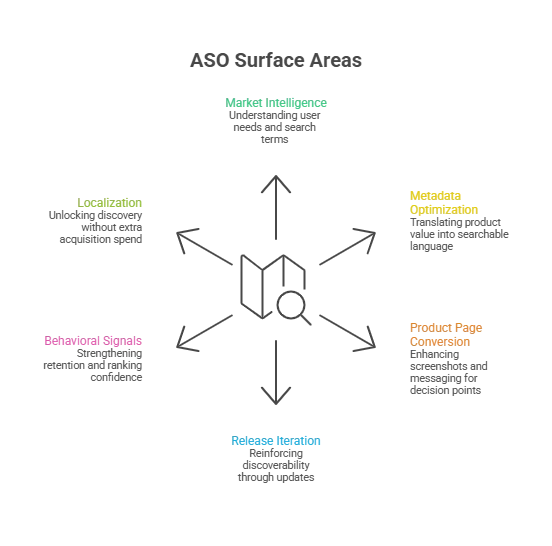
ASO improves visibility, conversion, and ranking stability through precise metadata, behavioral signals, and conversion-focused creatives. Beyond listing tweaks, ASO functions as a repeatable growth system:

  • Market & intent intelligence: Understand user language, needs, and search behavior.
  • Metadata & positioning: Translate your product’s value into searchable, intent-aligned language.
  • Product page conversion: Optimize screenshots, icons, videos, and messaging for decision points.
  • Release-aligned iteration: Reinforce discoverability with updates and launches.
  • Behavioral signals: Retention, engagement, reviews, and crash stability sustain ranking.
  • Localization: Expand discovery internationally without extra paid acquisition.

Case Insight: We helped a 5-person iOS team recover 25% of lost visibility in 30 days without delaying releases, showing how ASO compounds growth quickly.

app store optimization for ios

How ASO Differs from Traditional SEO

Many executives assume SEO expertise transfers directly to ASO. It doesn’t. Both optimize for search, but mechanics, constraints, and ranking physics differ:

Dimension SEO (Web) iOS ASO (App Store)
Indexable Surface Full-page content, headings, schema Title (30), Subtitle (30), Keyword Field (100)
Keyword Depth Virtually unlimited Strict character limits
Ranking Signals Backlinks, authority, content depth Install velocity, CVR, retention
Behavioral Signals CTR, dwell time, bounce rate Page-to-install CVR, engagement stability
Update Mechanics Continuous crawling Manual updates via App Store Connect
Optimization Cycle Rolling Structured 3–4 week cadence
Visual Impact Supportive Core driver: screenshots often determine installs
User Intent Informational Immediate problem-solving + install intent
Geography hreflang, subfolders Native storefront localization

Platform architecture also influences App Store performance. Native iOS experiences enable smoother onboarding, faster load times, and stronger retention signals, reinforcing ranking durability.

Understanding the differences between native and cross-platform development can clarify how technical decisions influence growth outcomes.

App Store metadata and ranking factors: what moves the needle in 2026

High-performing ASO teams treat discoverability, metadata, conversion, and behavioral signals as a single growth system. Each layer compounds the next: eligibility → visibility → conversion → velocity → ranking → impressions → retention → algorithm confidence.

Layer Purpose Optimization Focus Priority
Intent Architecture Search eligibility Keyword portfolio, intent mapping, competitive positioning Critical
Metadata Engineering Precision & coverage Title, subtitle, keyword field, category Critical
Conversion Mechanics Install momentum Screenshots, icon clarity, preview video, first-screen messaging Strategic
Behavioral Reinforcement Ranking stability Retention curves, review velocity, crash signals Strategic
Compounding Differentiation Durable advantage Custom pages, in-app events, localization, visual iteration Advanced

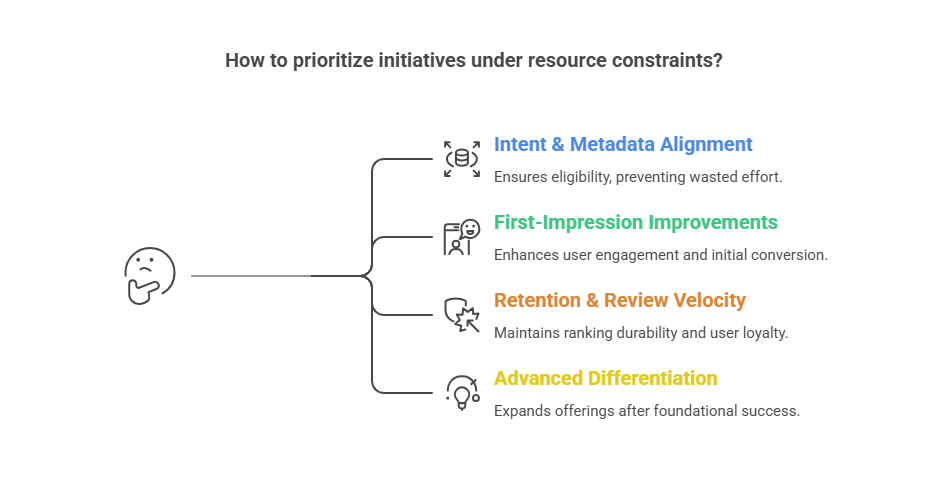
Prioritization for limited resources:

  1. Intent + metadata → eligibility & accurate positioning
  2. First-impression conversion → screenshots, icon, subtitle clarity
  3. Retention & reviews → stabilize ranking
  4. Advanced differentiation → custom pages, localization, in-app events
    app store optimization for ios

AI & Predictive Layer: The Modern ASO Advantage

AI is transforming ASO from reactive optimization to predictive decision-making:

  • Predictive Keyword Modeling: Forecast high-volume, high-conversion terms before competitors.
  • LLM-Powered Review Clustering: Identify emerging pain points and feature trends from user feedback at scale.
  • Behavioral Cohort Analysis: Determine which keywords and features drive retention in different user segments.
  • AI-Driven Screenshot Iteration Testing: Predict which visual assets maximize install conversion and iterate faster.

Strategic Impact: AI reduces experimentation risk, accelerates iteration, and allows lean teams to compete with larger organizations.

What Changed in ASO from 2023–2026

The App Store landscape has shifted significantly in the last few years, making traditional ASO tactics less effective:

  • Behavioral signals dominate rankings: Install velocity, retention, and engagement stability now outweigh keyword stuffing.
  • Visual conversion is critical: Screenshots, preview videos, and icon clarity have a larger impact on installs than ever.
  • Metadata constraints tightened: Apple continues to enforce strict character limits and indexing rules, requiring more precise keyword strategies.
  • AI & predictive insights emerging: Predictive keyword modeling, LLM-powered review clustering, and behavioral cohort modeling are enabling teams to anticipate trends and optimize proactively.
  • Localization drives incremental growth: Country-specific storefront optimization is now a major lever for discovery and installs.

Execution Insight

Strong strategy alone isn’t enough. Many teams stall due to bandwidth: iterative updates, visual experiments, and localization require consistent execution. 

Staff augmentation and hiring ASO specialists or iOS developers can maintain release cadence while running optimization cycles, reducing risk, and accelerating compounding growth.

Real-World Scenario: Sudden 30–60% Organic Install Drop

Even apps with strong ratings (4.3–4.6), low crashes, and unchanged metadata can lose 30–60% of impressions in 2–4 weeks. Causes include:

  • Ranking compression: Small keyword position shifts can cut traffic 40%+.
  • Competitor momentum: Paid campaigns, feature releases, or seasonal spikes.
  • Search demand shifts: Keyword volumes fluctuate, affecting installs.
  • Algorithm updates: Retention, review recency, or engagement changes impact visibility.
  • Browse/recommendation changes: Loss from “Similar Apps” slots or collections.

Mitigation: Audit keyword positions, refresh screenshots, optimize metadata, and align paid campaigns. Staff augmentation can accelerate these responses without pulling internal engineering off core development.

iOS keyword field optimization tips that teams get wrong

The 100-character iOS keyword field is one of the most impactful and technically demanding elements of App Store Optimization (ASO). Optimizing it correctly drives visibility, ranking, and ultimately installs.

Core Rules

  1. Total Characters: Max 100 (English; varies by language)
  2. Comma-Separated: No spaces after commas
  3. Avoid Duplication: Don’t repeat words in title, subtitle, or category
  4. Singular/Plural: Automatically indexed
  5. Case Insensitive: Lowercase works fine

Keyword Portfolio Approach

Instead of a random list, build a portfolio aligned with core value and user intent. This allows targeting different competition levels while reflecting search intent:

Bucket Focus Examples
Core category Primary ranking surface budget tracker, invoice, fitness plan
Feature Capability-driven discovery scan receipts, expense alerts, meal planner
Use-case Situational relevance freelancer invoices, student budget
Audience Conversion alignment small business, new parents

Optimization Strategy:

  • 2–4 from Core category (high-value, competitive)
  • 6–10 from Feature + Use-case (mid-competition, relevant)
  • 2–4 from Audience (improves conversion and ICP alignment)

Common Mistakes

Mistake Impact Fix
Keyword Duplication Wastes space; Apple ignores repeats Audit all fields; use unique terms
Brand Name in Keyword Field Already in title; no added value Replace with high-value keywords
Overusing Broad Terms Generic keywords have minimal ranking impact Focus on intent-driven, specific terms
Ignoring Localization Limits market relevance Prioritize country-specific keywords

App Store Metadata Execution: Title, Subtitle, and Hidden Tradeoffs

Your app’s title and subtitle are primary ranking and conversion assets. The challenge is balancing recognition with discoverability.

  • Brand clarity: Makes the app memorable and easy to recognize.
  • Intent clarity: Aligns metadata with real search queries to improve visibility.

Category Positioning That Drives Conversion

In competitive or trust-sensitive categories (fintech, health, identity), early impressions shape both installs and credibility:

  • Differentiation: Communicate your unique value immediately.
  • Conversion-focused visuals: The first screenshots often determine install decisions.
  • Credibility cues: Ratings, reviews, press mentions, and compliance signals reinforce trust and ranking stability.

Strong title, subtitle, and first-impression alignment make your listing discoverable, persuasive, and defensible, reducing acquisition friction while supporting long-term growth confidence.


Your High-Investment App Deserves Maximum Visibility

If your app’s discoverability, retention, and ranking rely on ad hoc efforts instead of specialized expertise, growth stalls and acquisition costs rise. We help teams augment engineering capacity with ASO-aware iOS experts to ensure your app gets found, converts, and scales.

Visual ASO: Screenshots & Video Previews That Drive Conversion

In the Apple App Store, visuals aren’t just design—they’re your primary acquisition interface. Icons, screenshots, and preview videos directly impact tap-to-install conversion.

Screenshot Narrative Framework:
High-performing listings reduce decision friction:

Hook → Proof → Feature → Outcome → Differentiator → Trust → CTA

Icon Strategy:
Avoid icons that are overly abstract, too similar to competitors, or unreadable at small sizes. Icons should instantly communicate category; creativity belongs inside the app.

Preview Video Tips:

  • Show the core action immediately
  • Highlight the “after” result
  • Keep understandable without sound 
  • Audio-dependent previews often reduce conversion.

CRO Focus: Funnel Decisions

  1. Impression → Tap: Optimize search visibility & first impression
  2. Tap → Install: Persuade via page clarity and visuals
  3. Install → Activation: Ensure the app fulfills its promise

Highest-Impact CRO Levers (Priority):

  • First 2 screenshots — convey value instantly
  • Subtitle clarity — remove ambiguity around core benefit
  • Trust signals — ratings, credibility, compliance
  • Preview video — only if faster/more effective than screenshots

Testing & Paid/Organic Strategy in the Apple Ecosystem

Structured testing: Use Apple Product Page Optimization to run iterative experiments on screenshots, icons, and metadata. Treat it as a repeatable process, not a one-off, to sustain conversion gains and ranking momentum.

Paid vs Organic: Many teams overspend on Apple Search Ads (ASA) assuming it substitutes for weak ASO. In reality, paid amplifies strong ASO but cannot fix poor metadata or low-converting visuals. 

Decision Guide:

  • Lean on ASA when launching, entering new regions, or validating keywords quickly.
  • Lean on organic ASO when retention/referrals are strong, building category positioning, or reducing long-term paid dependency.
  • Combine both to refine keywords from paid insights, scale installs, and support 6–12 month compounding growth.

Key takeaway: Paid is an acceleration and insight layer; ASO is the foundation for sustainable, cost-efficient acquisition.

Staff Augmentation: When to Bring in ASO Experts

For many teams, internal bandwidth or expertise isn’t enough to maintain high-performing ASO. Structured staff augmentation provides specialized skills, accelerates results, and sustains growth without premature full-time hires.

When to Augment vs Hire In-House

Augment When:

  • ASO is critical but not a full-time function.
  • Rapid audits, metadata updates, or experiments are needed.
  • Product/growth teams lack deep App Store expertise.
  • High release velocity requires optimization alongside development.

Hire In-House When:

  • ASO is a permanent growth channel with predictable workload.
  • Tight cross-team collaboration and long-term ownership are required.
  • Continuous experimentation and institutional knowledge are priorities.

Skill Profile for Success

An effective ASO specialist should combine:

  • Metadata & keyword strategy: structured targeting, portfolio management.
  • Conversion-focused marketing: persuasive messaging and visual experimentation.
  • Data & experimentation: analyze results to guide iteration.
  • App Store Connect familiarity: seamless implementation with release cycles.

Red Flags for Failed Engagement:

  • Focuses only on metadata, ignoring conversion.
  • Reports rankings without linking to installs, retention, or revenue.
  • Slow experimentation or poor collaboration with product/design teams.

Budget & Engagement Models

Model Focus Duration Cost
Project-Based Audits, repositioning, localization ~3 months $5k–$15k
Fractional Specialist Ongoing optimization, part-time (~10–20 hrs/wk) 6–12 months $3k–$7k/mo
Embedded Contributor Integrated with releases & growth sprints Ongoing $8k–$15k/mo

Budgets depend on iteration speed: faster testing → faster ranking recovery & compounding growth.

Delivery & Success Metrics

Delivery Risk Considerations:

  • Frequent, actionable reporting vs. slow updates.
  • Ability to influence design/product/release workflows.
  • Clear success metrics: visibility, conversion lift, retention, install growth, ranking recovery.
  • Knowledge transfer to reduce dependency.

KPIs for Success:

  • Install lift: % increase in organic installs.
  • Conversion rate improvement: Tap-to-install CVR, especially first 2–3 screenshots.
  • Keyword ranking recovery: Core category & feature terms.
  • Retention impact: 7–30 days post-install.
  • Revenue effect: In-app purchases/subscriptions (if applicable).

Takeaway: A structured, buyer-focused augmentation plan clarifies costs, engagement models, and expected outcomes, helping teams accelerate ASO growth while minimizing internal risk.

The 90-day ASO plan you can execute

If you want an execution blueprint for app store optimization for iOS applications, here is a plan I’ve used across multiple launches and relaunches.

Days 1-15: Audit and intent mapping

  • Pull baseline: impressions, taps, installs, CVR
  • Identify top 10 competitors and their positioning
  • Map your keyword portfolio (A/B/C/D buckets)
  • Rewrite title/subtitle/keyword field with intent clarity
  • Define your screenshot narrative (Hook → Proof → Outcome)

Deliverable: ASO strategy doc + metadata draft + visual storyboard

Days 16-45: Ship the first conversion upgrade

  • Create new screenshot set (start with the first 3)
  • Update subtitle and first screenshot headline to match top intent
  • Improve trust cues (reviews prompts inside app, support clarity)
  • Launch Product Page Optimization test if you have enough traffic

Deliverable: Conversion-focused listing v1 + active test

Days 46-90: Scale what works and stabilize

  • Apply winning assets from tests
  • Expand into localization targets if justified
  • Align ASA keyword learnings with organic metadata
  • Build a quarterly refresh rhythm tied to releases

Deliverable: ASO operating system (repeatable cadence)

Conclusion: Optimizing App Visibility and Conversion for Business Success

Across multiple launches, I’ve seen that visibility rarely improves through isolated ASO efforts. It compounds when discoverability evolves with the product and becomes part of how releases are planned, not something addressed after launch.

The apps that sustain organic growth are usually the ones where eligibility, first impressions, and post-install experience are refined continuously. That consistency improves acquisition stability and strengthens trust within the Apple App Store.

In most cases, the challenge isn’t strategy but execution bandwidth. I’ve found that extending teams with specialists like TechnBrains helps maintain optimization momentum without pulling focus away from core engineering priorities.

How Do iOS App Development Services Handle Post-Launch Maintenance?

iOS app development services handle post-launch maintenance through structured bug triage, iOS compatibility updates, security patching, performance monitoring, and controlled release management. Most teams allocate 15–20% of initial development cost annually to sustain stability and scale.

You think you’ve cracked the hard part by shipping an iOS app that’s ready to win the market. I’ve seen dozens of teams feel that relief.

But launch is where the real operational pressure begins.

And with Apple reviewing 90% of submissions in under 24 hours, the ability to ship fixes safely becomes a business capability, not just an engineering one.

In my experience, the teams that treat post-launch maintenance as a system move faster, break less, and scale cleaner.

TL;DR

  • iOS app development services handle post-launch maintenance by running a repeatable system: monitoring, triage, release gates, patch cadence, and compatibility planning.
  • Budget 15–20% of build cost annually as a baseline, then adjust by release velocity, integrations, and compliance.
  • Staff augmentation wins when you need continuity and speed without waiting on hiring cycles, but only if ownership is measurable and SLAs include resolution targets.
  • Performance is a retention lever; iOS day-1 retention averages about 23.9%, so early stability work protects CAC and LTV.
  • The highest ROI teams separate work into Run / Protect / Improve so emergencies don’t eat the roadmap.

What Happens After Your iOS App Goes Live?

Going live is not the finish line. It is the moment the app enters a harsh environment: real devices, real networks, real user behavior, and real failure points. 

The First 48 Hours After Launch

I worked with a fintech startup that skipped structured monitoring during launch week. A silent authentication token issue caused 18% login failures on iOS N-1 devices. They discovered it through 1-star reviews instead of dashboards. That 72-hour delay cost them thousands in paid acquisition waste.

You are validating that:

  • The release works across common device and iOS combinations
  • Your backend handles real traffic patterns
  • crash rate and performance metrics stay inside thresholds
  • Your support channel and feedback loops are reachable and responsive

Apple’s review throughput means you often see production behavior quickly after approval and rollout. 

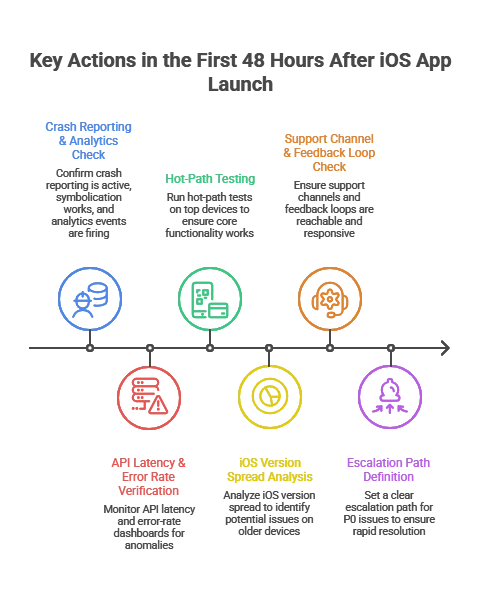
What mature teams do immediately:

  • confirm crash reporting is active and symbolication works
  • Confirmconfirm analytics events and funnels are firing correctly
  • verify API latency and error-rate dashboards
  • run hot-path tests on top devices (login, onboarding, checkout, search)
  • set a clear escalation path for P0 issues

What I’ve seen repeatedly: teams that skip this end up “discovering” critical issues through App Store reviews. That is the most expensive monitoring channel you can choose.

Immediate Monitoring: Crashes, Load, and iOS Version Spread

Device and OS-version diversity is the quiet tax on iOS maintenance. Even if adoption is strong for the latest OS, a meaningful part of your install base will lag behind.

Apple iOS usage reporting from Apple ecosystem outlets shows most devices move forward, but not all move together. 

Operational implications:

  • Most teams support current iOS plus two prior major versions unless industry requirements force a longer tail.
  • Each new iOS release introduces regression risk, including permission flows, background execution behavior, networking edge cases, UI rendering changes, and privacy requirements.

This is why serious maintenance plans include an annual iOS release motion. You plan for it. You do not react to it.

ios app development services

What Does a Typical iOS App Maintenance Plan Include?

A credible post-launch plan is not “bug fixes when needed.” It is a set of repeatable responsibilities and measurable guarantees.

Maintenance Scope: What You’re Actually Paying For

Maintenance Area What It Covers Why CTOs Care
Bug fixes and issue resolution Crash fixes, functional defects, regression fixes Protect revenue paths, reduce churn, reduce support load
iOS and device compatibility Updates for new iOS versions, device layouts, SDK changes Avoid breakage after iOS updates, avoid App Store issues
Security patches Dependency updates, vulnerability remediation, auth hardening Reduce incident risk and audit risk
Performance optimization Startup time, UI jank, memory and battery, network efficiency Directly affects retention and conversion
Monitoring and analytics Dashboards, alerts, crash triage, funnel tracking Faster diagnosis, fewer blind spots
App Store operations Release notes, phased rollout, review response More stable releases, fewer surprises
Continuous improvement UX fixes, onboarding tuning, iteration based on data Compounds product value over time


Bug Fixes and Issue Resolution 

High-performing teams actually perform way more than just fixing bugs. They run a triage pipeline:

  1. Detect: crash alerts, error logs, user support, backend incident signals
  2. Reproduce: device and iOS matrix, network simulation, test accounts
  3. Prioritize: severity plus business impact (revenue path vs edge case)
  4. Fix and verify: PR review, automated tests, QA regression pack
  5. Release: phased rollout, monitoring, rollback plan

Practical rule: Treat crashes and payment or auth bugs as stop-the-line. Everything else goes into a predictable cadence.

If a vendor cannot explain this pipeline clearly, you will feel it later as slow diagnosis, vague estimates, and avoidable regressions.

iOS Version and Device Compatibility Updates

This is the maintenance work executives underestimate until it bites. New iOS versions change behavior. Dependencies evolve. Apple deprecates APIs. Privacy policies shift.

Mature teams:

  • test on iOS developer betas every year
  • validate key flows on top devices your analytics shows
  • keep SDKs updated on a monthly or quarterly cadence, not “once a year panic”

When teams skip beta testing, I commonly see onboarding, permissions, and login flows break after iOS GA. The fix is usually simple. The business impact is rarely small.

Security Patches, Zero-Days, and Patch Cadence

The easiest way to create a security incident is to make patching a “later problem.”

In early 2026, multiple outlets reported Apple patches for an actively exploited iOS vulnerability. That is a practical reminder that patch windows matter. 

I’ve seen it myself that in one SaaS case, a third-party SDK vulnerability was disclosed publicly. Because patch cadence was quarterly instead of severity-based, legal and compliance escalated before engineering even triaged it. The issue was technical. The fallout was executive.

What CTOs should require in a maintenance plan:

  • defined patch windows for critical issues
  • an inventory of third-party SDKs and their update cadence
  • release gates for auth, encryption, and sensitive data handling changes
  • a rollback strategy if a patch breaks production behavior

SLAs and Support Models (Dedicated vs On-Demand)

An SLA is not a marketing line. It is your insurance policy during incidents.

A practical SLA structure defines:

  • response time (how fast someone starts)
  • resolution target (how fast it should be fixed or mitigated)
  • severity definitions (P0, P1, P2 tied to business impact)
  • availability (business hours vs 24/7)

When to pick which model:

  • On-demand support fits small apps with low release frequency.
  • A dedicated pod or staff augmentation fits teams shipping continuously, scaling MAU, or dealing with compliance and integrations.

Now let’s make that staff augmentation decision easy.

How to Decide If Staff Augmentation Is the Right Maintenance Model

If you’re evaluating whether to extend your internal team or build in-house, this often starts with deciding whether to hire iOS developers directly or bring in a structured augmentation pod aligned to your release cadence. 

Staff augmentation is the right model when continuity and speed matter more than long hiring cycles, but only if ownership is measurable. 

At TechnBrains, we structure staff augmentation differently for post-launch iOS apps. We don’t just assign developers. We build a maintenance-ready pod aligned to your release cadence, SLA requirements, and risk tolerance.

That typically includes a named iOS engineer, QA support for regression cycles, and optional DevOps integration when backend performance or scaling is part of the equation.

In-House vs Staff Augmentation vs Project-Based Maintenance

Model Best When Risks if Misused What to Demand
In-house maintenance You have stable hiring capacity and clear ownership Hiring delays, coverage gaps, slow ramp On-call rotation, release engineering discipline
Staff augmentation You need speed, continuity, and flexible capacity “Body shopping,” weak accountability, fragmented quality Named team, shared runbooks, measurable SLAs
Project-based support Low change volume, defined backlog Slow response in incidents, change requests inflate cost Tight scope, escalation plan, clear exclusions


Decision rule I use in practice:

If you ship at least twice a month, have meaningful integrations, or cannot tolerate multi-day incident response, staff augmentation becomes the safer operational choice. It gives you continuity without waiting for hiring cycles.

What an Effective Augmented Maintenance Pod Looks Like

For post-launch maintenance, you rarely need “more developers.” You need the right pod.

A practical pod for many products:

  • iOS engineer (primary owner of app fixes and releases)
  • QA engineer (regression packs, device matrix, release verification)
  • DevOps or backend support (as needed for incidents and performance issues)
  • Technical PM (lightweight, focused on triage, SLA, and release coordination)

If a vendor proposes a pod with no QA and no release discipline, you are buying future chaos. 

What Changes Operationally With Staff Augmentation

Staff augmentation works when you treat the team like part of your engineering system:

  • shared dashboards
  • shared incident workflow
  • shared definition of done
  • predictable release cadence
  • clear ownership for monitoring and triage

If the team is “outside the system,” you get slow diagnosis and finger-pointing.

How to Vet a Staff Augmentation Partner for Post-Launch Maintenance

This is the part buyers wish they had before signing.

The 12-Point Maintenance Vetting Checklist

Ask for proof, not promises:

  1. Can you show a real triage workflow with severity definitions?
  2. Who owns crash monitoring and alert thresholds?
  3. What is your device and iOS version test matrix strategy?
  4. How do you handle symbolication and crash reproduction?
  5. What is your patch cadence policy for critical vulnerabilities?
  6. What release gates exist before App Store submission?
  7. Do you use phased rollouts and rollback criteria?
  8. How do you prevent dependency drift?
  9. How do you handle App Store review risk and compliance changes?
  10. What is your typical weekly operating rhythm for maintenance?
  11. How do you report work in a way leadership can audit?
  12. What happens when you miss an SLA? What is the escalation path?

If the answers are vague, you will experience that vagueness during the first incident.

Cheap Support Vendors vs Operational Maintenance Partners

Factor Cheap Vendor Model Operational Maintenance Model
Team Rotating freelancers Named continuity pod
Monitoring Reactive Instrumented + alert-based
SLA Response-only Response + mitigation targets
QA Minimal device coverage Structured regression matrix
Patch cadence Monthly batch Severity-driven
Release discipline Manual CI/CD gated

How Much Should You Budget for iOS App Maintenance?

Most leadership teams under-budget maintenance because they treat it as a variable cost. In reality, it is driven by complexity, risk tolerance, compliance, and release cadence.

The 15 to 20 Percent Rule (Used Correctly)

A common benchmark is 15 to 20% of the initial build cost per year for ongoing maintenance. 

Use it as a baseline, then adjust for:

  • release frequency
  • integrations (payments, healthcare systems, logistics, CRM)
  • security posture and compliance requirements
  • scale (MAU, concurrency, regions, API volume)

A CTO-Friendly Maintenance Budget Model

Instead of one number, split maintenance into three buckets:

  1. Run: bug fixes, compatibility, monitoring
  2. Protect: security hardening, compliance updates, audit support
  3. Improve: UX refinements, onboarding tuning, performance work, roadmap features

This model prevents a classic failure: maintenance gets consumed by emergencies, then roadmap work quietly stops.

Hidden Costs in Outsourced Maintenance Contracts

Common pitfalls:

  • unclear scope, everything becomes “out of contract”
  • vague SLA language, response does not mean mitigation
  • no observability ownership, diagnosis takes too long
  • missing release engineering, no CI/CD or automated test gates
  • dependency drift, SDK updates ignored until they break

If you outsource, insist on clear deliverables and shared dashboards.

How iOS Development Services Handle Performance Optimization

iOS development services handle performance optimization by continuously monitoring crash rates, memory usage, API latency, and user flows, then prioritizing fixes based on measurable business impact and retention risk.

Performance is a retention lever. If it slips, revenue usually follows. Mature teams define performance budgets early, instrument the app for real-time observability, and treat regressions as release blockers rather than backlog items.

Business-of-Apps retention benchmarks show iOS day-1 retention around 23.9%, with a sharp drop-off over time. Early stability issues compound quickly. 

Crash Reporting and Monitoring Tools (What CTOs Should Standardize)

At a minimum, your maintenance program should include:

  • crash reporting with symbolication
  • performance monitoring for startup time, latency, UI responsiveness
  • alerting for error spikes and release regressions

The operating model is always: detect → triage → fix → verify → release.

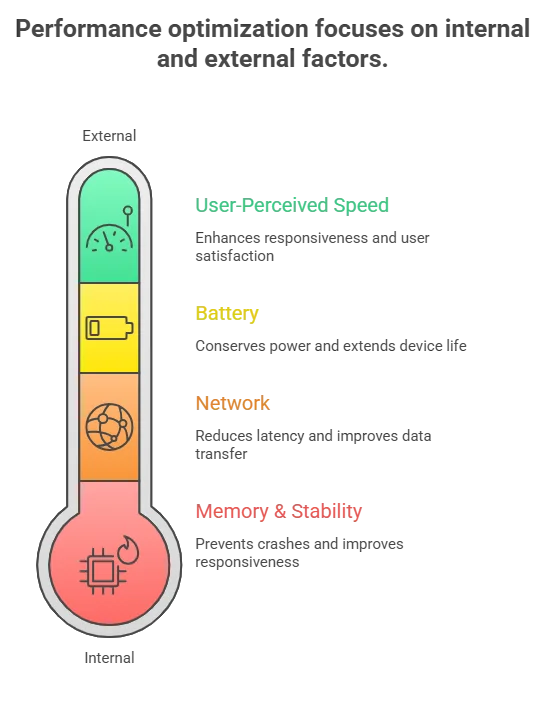
Performance Optimization Checklist (What Actually Moves the Needle)

Memory and stability:

  • remove retain cycles and leaks in long sessions
  • reduce image memory spikes with resizing and caching
  • validate background task behavior

Network:

  • define timeouts and retry policy intentionally
  • reduce chatty API patterns
  • cache safely where it reduces perceived latency

Battery:

  • audit background fetch and location usage
  • reduce unnecessary timers and polling

User-perceived speed:

  • improve launch and first meaningful screen
  • prefetch only what’s needed next
  • reduce main-thread work during scrolling

Experience note: teams that cannot measure these reliably end up debating them. Teams with instrumentation fix them quickly.

ios app development services

Analytics and Retention: Why Maintenance Impacts Revenue

Multiple sources note steep early drop-off and rapid churn in the first days after install. That makes early stability and speed improvements disproportionately valuable. 

Practical implication: if you reduce crash rate and improve startup and network performance in the first weeks, you protect marketing spend and reduce CAC waste because fewer users churn before activation.

What Maintenance Reveals About Product-Market Fit

A startup spent six months building a productivity app. Beta users liked it. Feedback was positive.

Production data told the truth.

Day-1 usage was healthy.
By Day-3, engagement dropped sharply.
By Week-1, most users had churned.

No major crashes. No infrastructure issues. The app worked. The problem simply wasn’t painful enough.

Post-launch maintenance analytics exposed that faster than any survey could.

Why Good Feedback Fails in Production

Compliments are not validation.

Product-market fit shows up in:

  • Repeat usage
  • 7-day retention
  • Workflow replacement
  • Willingness to pay

If users abandon within days, you don’t have a feature gap. You have a value gap. Maintenance instrumentation makes this visible.

Why Pain Level Determines Adoption

Users tolerate friction only when the problem is urgent.

If your product saves a few minutes, they forget it.
If it protects revenue or reduces risk, they adapt quickly.

Retention dashboards surface this distinction through behavior, not opinion.

Why Shipping Faster Beats Shipping More

The failure wasn’t building the wrong product. It was taking six months to discover it.

Slow cycles create:

  • Feature creep
  • Rising complexity
  • Delayed validation

A disciplined maintenance cadence lets you ship small, measure real usage, and pivot before technical debt compounds.

The Staff Augmentation Angle

When iteration speed matters, hiring delays become strategic drag.

A structured augmented pod enables:

  • Predictable release cycles
  • Faster validation loops
  • Capacity without permanent overhead

iOS app development and maintenance for startups is not just about stability. It is your product-learning engine.

Struggling to Ship Fast Enough to Validate?

If iteration speed is slowing down learning cycles, we help teams add dedicated iOS capacity without long hiring timelines. Structured augmentation. Defined release cadence. Measurable outcomes.


How iOS App Services Handle Security, OS Updates, and Compliance Risk

Mature teams do not react to iOS changes. They plan for them.

Responding to Apple iOS Major Releases

A reliable annual motion:

  • test on iOS beta early
  • freeze high-risk changes during OS rollout windows
  • ship a compatibility update soon after iOS GA, often with phased rollout

This avoids the “new iOS release broke login or payments” incident.

Zero-Days and Patch Management (What’s Reasonable)

When an actively exploited vulnerability is disclosed, speed matters, especially in regulated industries and enterprise contracts. 

Put this in the maintenance contract:

  • severity-based patch windows
  • monthly or quarterly dependency updates
  • audit log of changes and release notes
  • security regression tests for auth and sensitive data flows

Compliance (HIPAA, GDPR, SOC 2) as Maintenance Work

Compliance is ongoing work:

  • privacy prompts and data minimization
  • logging standards
  • encryption and key management
  • third-party SDK governance
  • incident readiness

For enterprise buyers, a maintenance partner should map controls to audit needs, even if formal audits involve your compliance team.

How iOS Teams Manage Feature Releases and Technical Debt Post-Launch

Post-launch is where technical debt either stays manageable or forces a rewrite.

Refactoring and Architecture Evolution (How Mature Teams Budget It)

Refactoring is not “extra work.” It is velocity protection.

A simple operating rule:

  • allocate a fixed percentage of each cycle for engineering health
  • schedule architectural work in quarters, not emergencies
  • expand automated tests so releases become safer over time

Safe Feature Rollouts (Flags, Phased Releases)

A maintenance-ready release model includes:

  • feature flags for controlled rollout
  • phased App Store releases
  • rollback criteria based on crash rate and funnel health
  • A/B testing where it reduces product risk

Scaling Past 100K MAU (What Changes)

At scale, you need:

  • stronger incident response
  • performance budgets and SLA thresholds
  • deeper observability
  • stricter dependency governance
  • automated regression tests

This is where staff augmentation becomes a reliability strategy. You need continuity, not rotating support.

What Happens If You Delay iOS App Maintenance?

Delaying maintenance increases the probability of high-cost events: security incidents, outages, App Store issues, and churn spikes.

Downtime Cost (Why Incident Readiness Matters)

ITIC surveys are frequently cited for downtime cost ranges. For many organizations, downtime can exceed $300,000 per hour, and for some it is $1M+ per hour

That is why mature maintenance includes alerting, on-call coverage, runbooks, and release controls.

App Store Risk and Operational Drag

Outdated apps accumulate risk: dependency vulnerabilities, compliance drift, compatibility regressions, and rising support costs. The cost stays invisible until something breaks and forces an urgent fix.

Post-launch maintenance also affects discoverability. Update frequency, stability, and ratings influence visibility. That’s why maintenance should align with your app store optimization for iOS applications strategy, not operate in isolation.

Performance Degradation and User Churn

Users do not file a ticket. They uninstall. With steep retention decay, stability work is often the highest ROI engineering investment after launch. 

Is Your Next iOS Release Operationally Controlled?

If incident response, compatibility testing, and release cadence depend on availability instead of structured ownership, risk compounds quietly. We help engineering teams design a measurable post-launch model that supports stability, velocity, and scale


Planning for Long-Term iOS App Success

The best maintenance programs make the app easier to change.

A Simple 90-Day Post-Launch Maintenance Roadmap

Days 0 to 14: Stabilize

  • fix critical crashes and hot-path issues
  • baseline performance tuning
  • validate analytics and dashboards
  • establish review and support response workflows

Days 15 to 45: Protect

  • dependency update plan
  • security posture review
  • compatibility plan for upcoming iOS changes
  • expand automated test coverage

Days 46 to 90: Improve

  • onboarding and activation optimization
  • performance budgets for startup and API latency
  • establish release cadence
  • ship roadmap features safely with flags and phased rollout

Wrapping It Up

I’ve seen apps with strong launches lose momentum not because of product quality, but because post-launch ownership was vague. Incidents slowed releases. Compatibility fixes became reactive. Technical debt quietly accumulated.

The difference between stable growth and operational drag is rarely engineering talent. It’s structured ownership.

At TechnBrains, we don’t position maintenance as “support.” We structure measurable release rhythm, defined triage workflows, and predictable operational coverage through dedicated augmentation pods. That continuity is what protects velocity.