


Hiring iOS Developers In 2026: A Complete Guide

Having spent years in the mobile development trenches, I’ve seen firsthand how costly mistakes can be when hiring iOS app development services. Some of those mistakes were mine, and I’ve learned valuable lessons along the way.

With the iOS App Store projected to generate $89.3 billion in consumer spending in 2025—more than double Android’s revenue—and hosting nearly 2 million apps, the competition is fierce. Your app is no longer just up against a handful of competitors. It’s vying for attention in an ecosystem where 1,615 new apps launch every day, and only 3.7% of users stay after 30 days.

If you’re a founder, CTO, or investor looking to hire iOS developers, this guide will walk you through everything I’ve learned from building successful iOS apps and even fixing a few that didn’t make it.

Key Takeaways

  • iOS is the Most Lucrative Platform: iOS users spend 2x more than Android users ($89.3B in 2025).
  • Prioritize Problem-Solving: Focus on candidates’ ability to think architecturally and write clean code, not just resume keywords.
  • Choose the Right Hiring Model: In-house for long-term projects, remote for flexibility, offshore for MVPs and cost efficiency.
  • Budget Realistically: Expect $100-$150/hour for senior developers in the US, $50-$90/hour internationally.
  • Build Balanced Teams: Combine senior architects, mid-level developers, and juniors for routine tasks.
  • Avoid Common Mistakes: Don’t prioritize cost over quality, always check portfolios, require code reviews, and plan for maintenance.
  • Establish Clear Workflows: Use Git branching, mandatory code reviews, 2-week sprints, and daily standups.

Key Benefits of Hiring iOS Developers for Your Project

Let me start with a question I often get: “Why not build for Android first? It has more users.”

Here’s my response: iOS users spend money.

Revenue That Matters

The numbers speak for themselves. In 2025, iOS users generated $89.3 billion in App Store spending, while Google Play brought in about $40 billion. That’s not just a small difference, it’s more than double the monetization potential.

In my experience working with startups that launched on both platforms, iOS consistently drove 70% of their revenue. Every. Single. Time.

Premium User Base with High Engagement

IOS users aren’t just spending more, they’re more engaged. On average, an iOS user spends 4.2 hours per day in apps, a 5% increase from last year. Plus, 85% of iOS users are on the latest OS version, which means:

  • No need to support outdated systems
  • Users have access to the latest features
  • Your QA process is simpler
  • You can leverage the newest APIs without worrying about backward compatibility

In contrast to Android’s fragmentation, where you’re dealing with countless OS versions and device configurations, the iOS ecosystem is a dream for developers.

Faster Time-to-Market and Lower Maintenance Costs

Here’s a crucial insight that many founders miss: well-written iOS code can cut long-term maintenance costs by 40-50%. 

Swift’s strong type system, Xcode’s debugging tools, and Apple’s tightly integrated hardware-software ecosystem help ensure fewer bugs. I’ve seen teams spend three times longer debugging Android issues than iOS for the same feature set.

Superior Security and Enterprise Adoption

If you’re developing for enterprise clients or handling sensitive data, like in fintech, healthcare, or legal industries, IOS is a must. Apple’s sandboxing, hardware-level encryption, and strict App Store review process make it the gold standard for security.

Brand Perception and User Trust

Finally, let’s talk about brand perception. Launching a polished iOS app speaks volumes about quality. It shows investors, enterprise clients, and users that you’re serious. I’ve seen startups secure funding in part because their iOS app demonstrated technical sophistication that impressed VCs.

How to Vet Senior iOS Engineers Effectively

Here’s where many founders go wrong: they hire based on years of experience and resume buzzwords, not actual problem-solving ability.

Step 1: Define What “Senior” Actually Means for Your Project

Before posting that job listing, clarify exactly what you need:

  • Architectural skills: Can they design scalable systems using MVVM, VIPER, or Clean Architecture?
  • Performance optimization: Do they understand memory management, concurrency with async/await, and how to use Instruments for profiling?
  • Mastery of modern Swift: Are they fluent in SwiftUI, Combine, and the latest iOS 18 APIs?
  • Cross-functional collaboration: Can they work seamlessly with designers, backend teams, and product managers without needing constant guidance?

Step 2: Technical Assessment That Actually Tests Real Skills

Skip the LeetCode-style algorithm puzzles. When your app crashes at 3 AM, you need someone who can solve real-world problems, not reverse a binary tree.

Here’s what I test instead:

Live Coding Session (60 minutes)

  • Networking task: Consume a REST API using URLSession or Alamofire, handle errors, and parse JSON with Codable.
  • UI implementation: Build a screen with SwiftUI or UIKit, demonstrating proper layout, Auto Layout constraints, and responsive design.
  • Debugging challenge: Provide a buggy piece of code and watch how they troubleshoot it.

Architecture Discussion (30 minutes)

  • Show them a feature spec and ask: “How would you architect this?”
  • Listen for: separation of concerns, testability, scalability, and trade-offs.

Code Review Exercise

Present poorly written code (e.g., memory leaks, hardcoded values, no error handling) and ask for a review.

Great developers will identify issues immediately and suggest clear refactoring strategies.

Step 3: Cultural Fit and Communication

Technical skills are essential, but what separates a good hire from a great one is communication and alignment with your team’s workflow.

Ask questions like:

  • “Walk me through how you approached a complex feature from start to finish.”
  • “Tell me about a time you disagreed with a product decision. How did you handle it?”
  • “How do you stay updated with changes in Apple’s ecosystem?”

The best iOS developers I’ve worked with actively contribute to open-source projects, keep up with WWDC sessions, and can articulate technical trade-offs to non-technical stakeholders.

Step 4: Portfolio Review (Don’t Skip This)

Always check their actual shipped apps. Download them. Use them. Pay attention to:

  • UI polish and attention to detail
  • Performance (does it lag? Does it drain battery?)
  • App Store ratings and user reviews
  • Code samples on GitHub (if available)

Red Flags to Watch For

After hundreds of interviews, these patterns are always red flags:

  • Can’t explain past technical decisions (“My manager told me to do it this way”)
  • Blames tools or frameworks for project failures
  • No familiarity with iOS 18, SwiftUI, or async/await in 2026
  • Can’t discuss memory management or concurrency
  • Hasn’t built or shipped an app in the last 12 months


Different Models for Hiring iOS Developers (Remote, Offshore, In-House)

Having worked with all three models, each has its place, but choosing the wrong one can derail your product roadmap.

In-House iOS Developers: The Gold Standard (With a Price Tag)

Best For: Long-term product companies, startups with funding, enterprises building core IP.

Pros Cons
Full control over development and culture High cost: $90,000 – $165,000 annually (plus benefits, office space)
Seamless collaboration with designers, PMs, and backend teams Long hiring cycles: 2-4 months to onboard the right candidate
Easier to protect IP and maintain code quality Limited scalability based on project needs


When It Doesn’t Work: Early-stage startups burning through runway, pre-product-market fit. Full-time salaries are tough to afford.

Remote iOS Developers: Flexibility Meets Quality

Best For: Startups, distributed teams, companies prioritizing talent over location.

Pros Cons
Access to global talent (Austin, Bangalore, Kyiv, etc.) Communication challenges: Requires strong async workflows
20-40% cheaper than in-house without sacrificing quality Harder to monitor progress without micromanaging
Flexibility to scale team size as needed Time zone misalignment can slow decision-making
Time zone diversity allows 24/7 development cycles


Pro Tip: Use platforms like Arc.dev, Turing, or Upwork but always run your own technical assessments.

Offshore iOS Development Teams: Speed and Cost Efficiency

Best For: MVP development, feature backlogs, short-term projects, cost-conscious startups.

Pros Cons
Lowest cost: $25-$75/hour Quality inconsistency between agencies
Rapid scaling: Add 3-5 developers quickly Language and cultural differences can cause misunderstandings
Agencies bring process maturity and project management Time zone challenges make real-time collaboration hard
Less product ownership from offshore teams


Offshore vs In-House vs Remote: A Quick Comparison 

Factor In-House Remote (Individual) Offshore Agency
Cost High ($100K–$165K/yr) Medium ($60K–$120K/yr) Low ($30K–$80K/yr)
Control ⭐⭐⭐⭐⭐ ⭐⭐⭐⭐ ⭐⭐⭐
Speed to Hire 2-4 months 2-6 weeks 1-2 weeks
Scalability Low Medium High
Communication ⭐⭐⭐⭐⭐ ⭐⭐⭐⭐ ⭐⭐⭐
Code Quality ⭐⭐⭐⭐⭐ ⭐⭐⭐⭐ ⭐⭐⭐ (varies)
Long-Term Value ⭐⭐⭐⭐⭐ ⭐⭐⭐⭐ ⭐⭐⭐


Recommendation: If going offshore, partner with an agency that has:

  • Verifiable portfolios with App Store links
  • English-fluent communication leads
  • Overlap hours with your time zone (at least 3-4 hours)
  • Transparent development processes (daily standups, sprint demos, version control)

What Are the Current iOS Developer Hourly Rates and How to Budget for Them?

Let’s talk money. I’ve seen founders underestimate iOS development costs by 50-70%, only to panic when the runway starts shrinking mid-project.

iOS Developer Hourly Rates (2026 Benchmarks)

Based on industry data and my own experience, here’s what you should expect to pay:

By Experience Level:

Experience Level Years of Experience Hourly Rate (US) Annual Salary (Full-Time)
Junior iOS Developer 1-3 years $35 – $75 $70,000 – $95,000
Mid-Level iOS Developer 3-5 years $55 – $90 $95,000 – $130,000
Senior iOS Developer 5-8 years $70 – $120 $130,000 – $165,000
Lead/Principal iOS Engineer 8+ years $80 – $150 $150,000 – $200,000+


By Hiring Model:

Model Hourly Rate Range Best For
Freelancer (Upwork, Fiverr) $25 – $150 Short-term tasks, MVP development
Remote Dedicated Developer $40 – $120 Long-term projects, product development
Development Agency $80 – $200 Full-service projects (design + backend)
In-House Employee N/A (salary) Core product development, long-term


By Geography:

Location Junior Mid-Level Senior
San Francisco/NYC $60-$90 $90-$130 $120-$180
Austin/Seattle $50-$75 $75-$110 $100-$150
Eastern Europe $30-$50 $50-$80 $70-$120
India $20-$35 $35-$60 $55-$90


Source: Data compiled from Arc.dev, Upwork, and FATbit

How to Budget Realistically

Here’s a mistake I made early in my career: calculating project cost by multiplying hourly rates by estimated hours. Sounds logical, right? Wrong.

iOS app development isn’t just about coding. Here’s what your budget actually needs to cover:

Discovery & Planning (10-15% of budget)

  • Requirements gathering
  • Technical feasibility analysis
  • Architecture design
  • Sprint planning

Design (15-20% of budget)

  • Wireframing
  • UI/UX design
  • Prototyping
  • Design system creation

Development (40-50% of budget)

  • Frontend iOS development
  • Backend integration
  • Third-party API integrations
  • Database setup

QA & Testing (15-20% of budget)

  • Manual testing
  • Automated testing setup
  • Performance testing
  • Security audits

Deployment & Maintenance (10-15% of budget)

  • App Store submission
  • First 3 months of bug fixes
  • Performance monitoring setup

Real Budget Example (Mid-Complexity App)

Let’s say you’re building a social app with user profiles, messaging, and a feed:

Team: 2 Senior iOS Developers ($100/hr each), 1 Backend Developer ($90/hr), 1 Designer ($80/hr)

Timeline: 4 months

Total hours: ~1,200 hours

Cost Breakdown:

Category Hours Hourly Rate Total Cost
iOS Development 600 hrs $100 $60,000
Backend Development 300 hrs $90 $27,000
Design 200 hrs $80 $16,000
QA & Testing 100 hrs $70 $7,000
Total $110,000


Pro Tip: Always budget 20-30% extra for scope creep, unexpected technical challenges, and post-launch fixes. I’ve never seen a project come in under budget, only on budget or over.

How to Build the Ideal iOS Development Team for Your App

Here’s a hard truth: one great developer is better than three mediocre ones. I’ve seen startups throw bodies at projects, hoping it’ll speed things up. It doesn’t. It leads to coordination overhead, code conflicts, and architectural chaos.

Whether you’re hiring a team onsite, outsourcing or considering staff augmentation, here’s how you can build an ideal ios team for your app: 

Step 1: Determine Team Size Based on Project Scope

Small Team (1-2 Developers)

  • Best For: MVPs, simple apps, limited budgets
  • Roles: 1 Senior iOS Developer, 1 Junior iOS Developer (optional)
  • Timeline: 2-4 months
  • Budget: $30K – $60K
  • Example: Fitness app with basic features like workout logging and local data storage.

Medium Team (3-5 Developers)

  • Best For: Feature-rich apps, social platforms, marketplaces
  • Roles: 1 Senior iOS Developer, 2 Mid-Level iOS Developers, 1 Backend Developer, 1 QA Engineer
  • Timeline: 4-8 months
  • Budget: $120K – $250K
  • Example: Dating app with profiles, real-time messaging, and in-app purchases.

Large Team (6+ Developers)

  • Best For: Enterprise apps, complex fintech/healthtech, AI/ML features
  • Roles: 1 Technical Lead, 2-3 Senior iOS Developers, 2-3 Mid-Level iOS Developers, 2 Backend Engineers, 1 DevOps, 1-2 QA Engineers, 1 UI/UX Designer
  • Timeline: 8-14 months
  • Budget: $300K – $700K+
  • Example: Telemedicine platform with video consultations, EHR integration, and HIPAA compliance.

Step 2: Define Clear Roles and Responsibilities

  • iOS Architect / Technical Lead: Defines the architecture, reviews code, mentors developers, makes technology stack decisions.
  • Senior iOS Developer: Implements complex features, conducts code reviews, debugs production issues.
  • Mid-Level iOS Developer: Builds UI screens, integrates with backend APIs, and handles feature development and bug fixes.
  • Junior iOS Developer: Implements small tasks, writes UI tests, and fixes low-priority bugs.
  • UI/UX Designer: Creates wireframes, ensures visual consistency, and collaborates on feasibility.
  • QA Engineer: Performs manual and automated testing, tracks bugs, and prevents issues from reaching users.

Step 3: Establish Development Workflow and Processes

Here’s what works to avoid chaotic workflows:

  • Version Control: Use Git with a branching strategy (Git Flow or Trunk-Based Development). Require code reviews before merging.
  • Sprint Planning: 2-week sprints, daily standups, use tools like Jira or GitHub Projects for task tracking.
  • Code Quality Standards: Set coding standards (e.g., SwiftLint), aim for 70%+ test coverage on business logic.
  • Communication: Use Slack/Discord for real-time chat, document architecture in Confluence/Notion, hold weekly demo sessions.

Step 4: Onboarding New Developers Efficiently

Don’t let new hires waste time figuring out how to run the app locally. Here’s how to onboard effectively:

  • Day 1 Checklist: Grant access to tools (GitHub, project management, design files), assign a mentor, review codebase architecture.
  • Week 1 Goals: Run the app locally, complete one small task, understand CI/CD pipeline.
  • First Month: Ship at least one feature to production, participate in code reviews, and understand core app architecture.

Pro Tip: Create a “Developer Onboarding Guide” that includes architecture diagrams, API docs, troubleshooting steps, and a code review checklist. This saves 10-15 hours of senior developer time per new hire.

What Mistakes Should You Avoid When Hiring iOS Developers?

I’ve made most of these mistakes myself, and I’ve watched countless founders repeat them. Learn from my pain.

Mistake #1: Hiring Based on Resume Keywords

  • The Trap: Seeing “Swift, SwiftUI, Combine” and assuming they know everything.
  • The Reality: Keyword stuffing doesn’t guarantee competence.
  • How to Avoid It: Prioritize live coding and problem-solving over resumes. Ask developers to explain technical challenges and their approach.

Mistake #2: Focusing Only on Cost

  • The Trap: Hiring a cheap offshore developer at $20/hour to save money.
  • The Reality: You’ll end up spending 3x more fixing poorly written code.
  • How to Avoid It: Invest in senior developers for core architecture decisions and budget for code reviews and QA. 

Mistake #3: Unclear Project Requirements

  • The Trap: Giving vague instructions like “Build me an app like Instagram.”
  • The Reality: Developers need clear specifications to deliver what you need.
  • How to Avoid It: Write detailed user stories, create wireframes/mockups, and define success criteria before starting development.

Mistake #4: Neglecting Post-Launch Maintenance

  • The Trap: Thinking the job is done once the app hits the App Store.
  • The Reality: Apps require ongoing updates and maintenance.
  • How to Avoid It: Budget 15-20% of development cost annually for maintenance and plan for quarterly updates.

Mistake #5: Ignoring Communication Skills

  • The Trap: Hiring a brilliant developer who can’t collaborate or explain their work.
  • The Reality: Poor communication causes bottlenecks.
  • How to Avoid It: Test communication skills during interviews, require documentation, and prioritize developers who ask clarifying questions.

Mistake #6: Not Checking Portfolios Thoroughly

  • The Trap: Assuming apps on the App Store are high quality.
  • The Reality: Not all apps are well-built.
  • How to Avoid It: Spend time using each portfolio app, check ratings, and ask about the hardest technical challenges they faced.

Mistake #7: Skipping Code Reviews

  • The Trap: Trusting developers without oversight.
  • The Reality: This leads to technical debt, bugs, and messy code.
  • How to Avoid It: Make code reviews mandatory, enforce standards with SwiftLint, and pair junior developers with seniors for mentoring.

Mistake #8: No Trial Period or Test Project

  • The Trap: Hiring based on a short interview.
  • The Reality: Interviews don’t reveal work ethic, code quality, or fit.
  • How to Avoid It: Start with a paid 1-2 week test project to evaluate their work, communication, and problem-solving skills.

How to finalize your iOS Developer Selection and Ensure a Smooth Collaboration?

You’ve interviewed candidates, narrowed down your list, and you’re ready to hire. Now comes the critical part: setting up your team for long-term success.

Final Selection Checklist

Before extending an offer, ask yourself:

  • Technical Competence: Did they pass your coding challenges with clean, maintainable code?
  • Communication: Can they explain complex concepts clearly?
  • Problem-Solving: Do they think critically and ask good questions?
  • Cultural Fit: Will they collaborate well with your team?
  • Portfolio Quality: Are their shipped apps polished and well-maintained?
  • References: Did previous clients/employers vouch for them?
  • Pricing Alignment: Does their rate fit within your budget?

If you can confidently check 6 out of 7, proceed with the hire.

Structuring the Engagement

For Full-Time Employees:

  • Offer competitive salary + equity (if startup)
  • Provide clear growth paths and mentorship opportunities
  • Include benefits: health insurance, paid time off, conference budgets for professional development

For Contractors/Remote Developers:

  • Start with a 3-month contract with renewal milestones
  • Define clear deliverables and KPIs (features shipped, bugs fixed, code review feedback)
  • Use escrow or milestone-based payments on platforms like Upwork for protection

For Agencies:

  • Sign detailed SOW (Statement of Work) outlining scope, timelines, deliverables
  • Require weekly progress demos
  • Include clauses for IP ownership and post-launch support

Collaboration Best Practices

Set Clear Expectations:

  • Define working hours and availability (especially for remote/offshore teams)
  • Agree on communication tools (Slack for chat, Zoom for standups, Jira for tasks)
  • Establish response time expectations (e.g., respond to urgent messages within 2 hours)

Foster Transparency:

  • Use version control with visibility for all stakeholders
  • Share sprint reports weekly summarizing progress, blockers, and next steps
  • Encourage developers to flag risks early (missed deadlines, technical debt, scope creep)

Maintain Momentum:

  • Celebrate small wins (feature launches, bug-free sprints)
  • Conduct retrospectives at end of each sprint to improve workflow
  • Address blockers immediately, don’t let issues linger

Invest in Relationships: This might sound soft, but it matters. The best iOS developers I’ve worked with stayed with projects long-term because they felt valued, not just paid.

  • Involve developers in product decisions early
  • Give credit publicly for good work
  • Provide opportunities to learn new technologies (SwiftUI, AI/ML integration)

Conclusion

Hiring the right iOS developer is a pivotal decision for your business’s success. Whether you’re building an app for a startup or developing a large-scale enterprise solution, choosing the right team can make or break your project. 

From understanding the differences in hiring models to defining clear roles and ensuring strong communication, these steps ensure a smoother, more efficient development process. 

Prioritizing long-term value, clear requirements, and post-launch maintenance helps avoid costly mistakes and sets you up for success. With the right strategy, your iOS app can capture the attention of millions of users and drive significant revenue.

 

How Do iOS App Development Services Handle Post-Launch Maintenance?

iOS app development services handle post-launch maintenance through structured bug triage, iOS compatibility updates, security patching, performance monitoring, and controlled release management. Most teams allocate 15–20% of initial development cost annually to sustain stability and scale.

You think you’ve cracked the hard part by shipping an iOS app that’s ready to win the market. I’ve seen dozens of teams feel that relief.

But launch is where the real operational pressure begins.

And with Apple reviewing 90% of submissions in under 24 hours, the ability to ship fixes safely becomes a business capability, not just an engineering one.

In my experience, the teams that treat post-launch maintenance as a system move faster, break less, and scale cleaner.

TL;DR

  • iOS app development services handle post-launch maintenance by running a repeatable system: monitoring, triage, release gates, patch cadence, and compatibility planning.
  • Budget 15–20% of build cost annually as a baseline, then adjust by release velocity, integrations, and compliance.
  • Staff augmentation wins when you need continuity and speed without waiting on hiring cycles, but only if ownership is measurable and SLAs include resolution targets.
  • Performance is a retention lever; iOS day-1 retention averages about 23.9%, so early stability work protects CAC and LTV.
  • The highest ROI teams separate work into Run / Protect / Improve so emergencies don’t eat the roadmap.

What Happens After Your iOS App Goes Live?

Going live is not the finish line. It is the moment the app enters a harsh environment: real devices, real networks, real user behavior, and real failure points. 

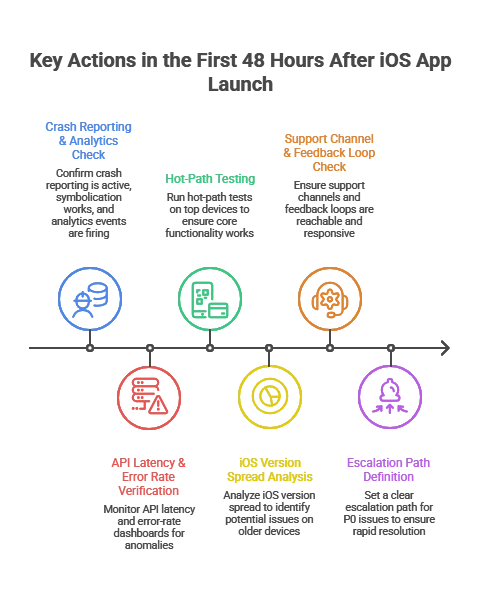
The First 48 Hours After Launch

I worked with a fintech startup that skipped structured monitoring during launch week. A silent authentication token issue caused 18% login failures on iOS N-1 devices. They discovered it through 1-star reviews instead of dashboards. That 72-hour delay cost them thousands in paid acquisition waste.

You are validating that:

  • The release works across common device and iOS combinations
  • Your backend handles real traffic patterns
  • crash rate and performance metrics stay inside thresholds
  • Your support channel and feedback loops are reachable and responsive

Apple’s review throughput means you often see production behavior quickly after approval and rollout. 

What mature teams do immediately:

  • confirm crash reporting is active and symbolication works
  • Confirmconfirm analytics events and funnels are firing correctly
  • verify API latency and error-rate dashboards
  • run hot-path tests on top devices (login, onboarding, checkout, search)
  • set a clear escalation path for P0 issues

What I’ve seen repeatedly: teams that skip this end up “discovering” critical issues through App Store reviews. That is the most expensive monitoring channel you can choose.

Immediate Monitoring: Crashes, Load, and iOS Version Spread

Device and OS-version diversity is the quiet tax on iOS maintenance. Even if adoption is strong for the latest OS, a meaningful part of your install base will lag behind.

Apple iOS usage reporting from Apple ecosystem outlets shows most devices move forward, but not all move together. 

Operational implications:

  • Most teams support current iOS plus two prior major versions unless industry requirements force a longer tail.
  • Each new iOS release introduces regression risk, including permission flows, background execution behavior, networking edge cases, UI rendering changes, and privacy requirements.

This is why serious maintenance plans include an annual iOS release motion. You plan for it. You do not react to it.

ios app development services

What Does a Typical iOS App Maintenance Plan Include?

A credible post-launch plan is not “bug fixes when needed.” It is a set of repeatable responsibilities and measurable guarantees.

Maintenance Scope: What You’re Actually Paying For

Maintenance Area What It Covers Why CTOs Care
Bug fixes and issue resolution Crash fixes, functional defects, regression fixes Protect revenue paths, reduce churn, reduce support load
iOS and device compatibility Updates for new iOS versions, device layouts, SDK changes Avoid breakage after iOS updates, avoid App Store issues
Security patches Dependency updates, vulnerability remediation, auth hardening Reduce incident risk and audit risk
Performance optimization Startup time, UI jank, memory and battery, network efficiency Directly affects retention and conversion
Monitoring and analytics Dashboards, alerts, crash triage, funnel tracking Faster diagnosis, fewer blind spots
App Store operations Release notes, phased rollout, review response More stable releases, fewer surprises
Continuous improvement UX fixes, onboarding tuning, iteration based on data Compounds product value over time


Bug Fixes and Issue Resolution 

High-performing teams actually perform way more than just fixing bugs. They run a triage pipeline:

  1. Detect: crash alerts, error logs, user support, backend incident signals
  2. Reproduce: device and iOS matrix, network simulation, test accounts
  3. Prioritize: severity plus business impact (revenue path vs edge case)
  4. Fix and verify: PR review, automated tests, QA regression pack
  5. Release: phased rollout, monitoring, rollback plan

Practical rule: Treat crashes and payment or auth bugs as stop-the-line. Everything else goes into a predictable cadence.

If a vendor cannot explain this pipeline clearly, you will feel it later as slow diagnosis, vague estimates, and avoidable regressions.

iOS Version and Device Compatibility Updates

This is the maintenance work executives underestimate until it bites. New iOS versions change behavior. Dependencies evolve. Apple deprecates APIs. Privacy policies shift.

Mature teams:

  • test on iOS developer betas every year
  • validate key flows on top devices your analytics shows
  • keep SDKs updated on a monthly or quarterly cadence, not “once a year panic”

When teams skip beta testing, I commonly see onboarding, permissions, and login flows break after iOS GA. The fix is usually simple. The business impact is rarely small.

Security Patches, Zero-Days, and Patch Cadence

The easiest way to create a security incident is to make patching a “later problem.”

In early 2026, multiple outlets reported Apple patches for an actively exploited iOS vulnerability. That is a practical reminder that patch windows matter. 

I’ve seen it myself that in one SaaS case, a third-party SDK vulnerability was disclosed publicly. Because patch cadence was quarterly instead of severity-based, legal and compliance escalated before engineering even triaged it. The issue was technical. The fallout was executive.

What CTOs should require in a maintenance plan:

  • defined patch windows for critical issues
  • an inventory of third-party SDKs and their update cadence
  • release gates for auth, encryption, and sensitive data handling changes
  • a rollback strategy if a patch breaks production behavior

SLAs and Support Models (Dedicated vs On-Demand)

An SLA is not a marketing line. It is your insurance policy during incidents.

A practical SLA structure defines:

  • response time (how fast someone starts)
  • resolution target (how fast it should be fixed or mitigated)
  • severity definitions (P0, P1, P2 tied to business impact)
  • availability (business hours vs 24/7)

When to pick which model:

  • On-demand support fits small apps with low release frequency.
  • A dedicated pod or staff augmentation fits teams shipping continuously, scaling MAU, or dealing with compliance and integrations.

Now let’s make that staff augmentation decision easy.

How to Decide If Staff Augmentation Is the Right Maintenance Model

If you’re evaluating whether to extend your internal team or build in-house, this often starts with deciding whether to hire iOS developers directly or bring in a structured augmentation pod aligned to your release cadence. 

Staff augmentation is the right model when continuity and speed matter more than long hiring cycles, but only if ownership is measurable. 

At TechnBrains, we structure staff augmentation differently for post-launch iOS apps. We don’t just assign developers. We build a maintenance-ready pod aligned to your release cadence, SLA requirements, and risk tolerance.

That typically includes a named iOS engineer, QA support for regression cycles, and optional DevOps integration when backend performance or scaling is part of the equation.

In-House vs Staff Augmentation vs Project-Based Maintenance

Model Best When Risks if Misused What to Demand
In-house maintenance You have stable hiring capacity and clear ownership Hiring delays, coverage gaps, slow ramp On-call rotation, release engineering discipline
Staff augmentation You need speed, continuity, and flexible capacity “Body shopping,” weak accountability, fragmented quality Named team, shared runbooks, measurable SLAs
Project-based support Low change volume, defined backlog Slow response in incidents, change requests inflate cost Tight scope, escalation plan, clear exclusions


Decision rule I use in practice:

If you ship at least twice a month, have meaningful integrations, or cannot tolerate multi-day incident response, staff augmentation becomes the safer operational choice. It gives you continuity without waiting for hiring cycles.

What an Effective Augmented Maintenance Pod Looks Like

For post-launch maintenance, you rarely need “more developers.” You need the right pod.

A practical pod for many products:

  • iOS engineer (primary owner of app fixes and releases)
  • QA engineer (regression packs, device matrix, release verification)
  • DevOps or backend support (as needed for incidents and performance issues)
  • Technical PM (lightweight, focused on triage, SLA, and release coordination)

If a vendor proposes a pod with no QA and no release discipline, you are buying future chaos. 

What Changes Operationally With Staff Augmentation

Staff augmentation works when you treat the team like part of your engineering system:

  • shared dashboards
  • shared incident workflow
  • shared definition of done
  • predictable release cadence
  • clear ownership for monitoring and triage

If the team is “outside the system,” you get slow diagnosis and finger-pointing.

How to Vet a Staff Augmentation Partner for Post-Launch Maintenance

This is the part buyers wish they had before signing.

The 12-Point Maintenance Vetting Checklist

Ask for proof, not promises:

  1. Can you show a real triage workflow with severity definitions?
  2. Who owns crash monitoring and alert thresholds?
  3. What is your device and iOS version test matrix strategy?
  4. How do you handle symbolication and crash reproduction?
  5. What is your patch cadence policy for critical vulnerabilities?
  6. What release gates exist before App Store submission?
  7. Do you use phased rollouts and rollback criteria?
  8. How do you prevent dependency drift?
  9. How do you handle App Store review risk and compliance changes?
  10. What is your typical weekly operating rhythm for maintenance?
  11. How do you report work in a way leadership can audit?
  12. What happens when you miss an SLA? What is the escalation path?

If the answers are vague, you will experience that vagueness during the first incident.

Cheap Support Vendors vs Operational Maintenance Partners

Factor Cheap Vendor Model Operational Maintenance Model
Team Rotating freelancers Named continuity pod
Monitoring Reactive Instrumented + alert-based
SLA Response-only Response + mitigation targets
QA Minimal device coverage Structured regression matrix
Patch cadence Monthly batch Severity-driven
Release discipline Manual CI/CD gated

How Much Should You Budget for iOS App Maintenance?

Most leadership teams under-budget maintenance because they treat it as a variable cost. In reality, it is driven by complexity, risk tolerance, compliance, and release cadence.

The 15 to 20 Percent Rule (Used Correctly)

A common benchmark is 15 to 20% of the initial build cost per year for ongoing maintenance. 

Use it as a baseline, then adjust for:

  • release frequency
  • integrations (payments, healthcare systems, logistics, CRM)
  • security posture and compliance requirements
  • scale (MAU, concurrency, regions, API volume)

A CTO-Friendly Maintenance Budget Model

Instead of one number, split maintenance into three buckets:

  1. Run: bug fixes, compatibility, monitoring
  2. Protect: security hardening, compliance updates, audit support
  3. Improve: UX refinements, onboarding tuning, performance work, roadmap features

This model prevents a classic failure: maintenance gets consumed by emergencies, then roadmap work quietly stops.

Hidden Costs in Outsourced Maintenance Contracts

Common pitfalls:

  • unclear scope, everything becomes “out of contract”
  • vague SLA language, response does not mean mitigation
  • no observability ownership, diagnosis takes too long
  • missing release engineering, no CI/CD or automated test gates
  • dependency drift, SDK updates ignored until they break

If you outsource, insist on clear deliverables and shared dashboards.

How iOS Development Services Handle Performance Optimization

iOS development services handle performance optimization by continuously monitoring crash rates, memory usage, API latency, and user flows, then prioritizing fixes based on measurable business impact and retention risk.

Performance is a retention lever. If it slips, revenue usually follows. Mature teams define performance budgets early, instrument the app for real-time observability, and treat regressions as release blockers rather than backlog items.

Business-of-Apps retention benchmarks show iOS day-1 retention around 23.9%, with a sharp drop-off over time. Early stability issues compound quickly. 

Crash Reporting and Monitoring Tools (What CTOs Should Standardize)

At a minimum, your maintenance program should include:

  • crash reporting with symbolication
  • performance monitoring for startup time, latency, UI responsiveness
  • alerting for error spikes and release regressions

The operating model is always: detect → triage → fix → verify → release.

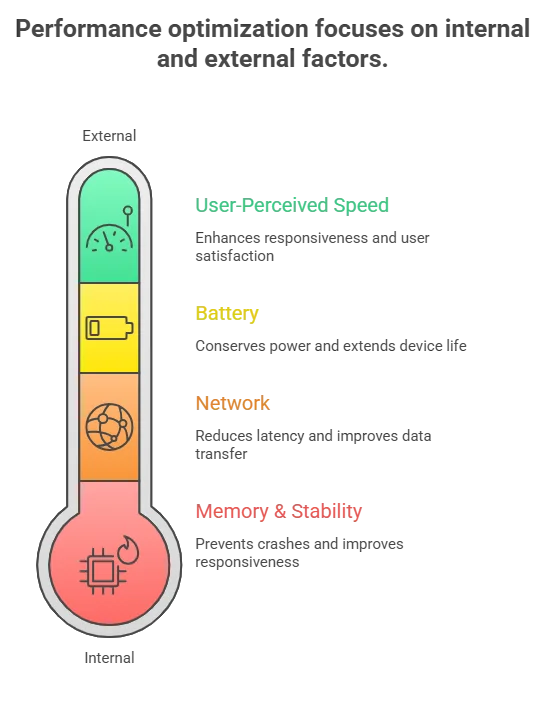
Performance Optimization Checklist (What Actually Moves the Needle)

Memory and stability:

  • remove retain cycles and leaks in long sessions
  • reduce image memory spikes with resizing and caching
  • validate background task behavior

Network:

  • define timeouts and retry policy intentionally
  • reduce chatty API patterns
  • cache safely where it reduces perceived latency

Battery:

  • audit background fetch and location usage
  • reduce unnecessary timers and polling

User-perceived speed:

  • improve launch and first meaningful screen
  • prefetch only what’s needed next
  • reduce main-thread work during scrolling

Experience note: teams that cannot measure these reliably end up debating them. Teams with instrumentation fix them quickly.

ios app development services

Analytics and Retention: Why Maintenance Impacts Revenue

Multiple sources note steep early drop-off and rapid churn in the first days after install. That makes early stability and speed improvements disproportionately valuable. 

Practical implication: if you reduce crash rate and improve startup and network performance in the first weeks, you protect marketing spend and reduce CAC waste because fewer users churn before activation.

What Maintenance Reveals About Product-Market Fit

A startup spent six months building a productivity app. Beta users liked it. Feedback was positive.

Production data told the truth.

Day-1 usage was healthy.
By Day-3, engagement dropped sharply.
By Week-1, most users had churned.

No major crashes. No infrastructure issues. The app worked. The problem simply wasn’t painful enough.

Post-launch maintenance analytics exposed that faster than any survey could.

Why Good Feedback Fails in Production

Compliments are not validation.

Product-market fit shows up in:

  • Repeat usage
  • 7-day retention
  • Workflow replacement
  • Willingness to pay

If users abandon within days, you don’t have a feature gap. You have a value gap. Maintenance instrumentation makes this visible.

Why Pain Level Determines Adoption

Users tolerate friction only when the problem is urgent.

If your product saves a few minutes, they forget it.
If it protects revenue or reduces risk, they adapt quickly.

Retention dashboards surface this distinction through behavior, not opinion.

Why Shipping Faster Beats Shipping More

The failure wasn’t building the wrong product. It was taking six months to discover it.

Slow cycles create:

  • Feature creep
  • Rising complexity
  • Delayed validation

A disciplined maintenance cadence lets you ship small, measure real usage, and pivot before technical debt compounds.

The Staff Augmentation Angle

When iteration speed matters, hiring delays become strategic drag.

A structured augmented pod enables:

  • Predictable release cycles
  • Faster validation loops
  • Capacity without permanent overhead

iOS app development and maintenance for startups is not just about stability. It is your product-learning engine.

Struggling to Ship Fast Enough to Validate?

If iteration speed is slowing down learning cycles, we help teams add dedicated iOS capacity without long hiring timelines. Structured augmentation. Defined release cadence. Measurable outcomes.


How iOS App Services Handle Security, OS Updates, and Compliance Risk

Mature teams do not react to iOS changes. They plan for them.

Responding to Apple iOS Major Releases

A reliable annual motion:

  • test on iOS beta early
  • freeze high-risk changes during OS rollout windows
  • ship a compatibility update soon after iOS GA, often with phased rollout

This avoids the “new iOS release broke login or payments” incident.

Zero-Days and Patch Management (What’s Reasonable)

When an actively exploited vulnerability is disclosed, speed matters, especially in regulated industries and enterprise contracts. 

Put this in the maintenance contract:

  • severity-based patch windows
  • monthly or quarterly dependency updates
  • audit log of changes and release notes
  • security regression tests for auth and sensitive data flows

Compliance (HIPAA, GDPR, SOC 2) as Maintenance Work

Compliance is ongoing work:

  • privacy prompts and data minimization
  • logging standards
  • encryption and key management
  • third-party SDK governance
  • incident readiness

For enterprise buyers, a maintenance partner should map controls to audit needs, even if formal audits involve your compliance team.

How iOS Teams Manage Feature Releases and Technical Debt Post-Launch

Post-launch is where technical debt either stays manageable or forces a rewrite.

Refactoring and Architecture Evolution (How Mature Teams Budget It)

Refactoring is not “extra work.” It is velocity protection.

A simple operating rule:

  • allocate a fixed percentage of each cycle for engineering health
  • schedule architectural work in quarters, not emergencies
  • expand automated tests so releases become safer over time

Safe Feature Rollouts (Flags, Phased Releases)

A maintenance-ready release model includes:

  • feature flags for controlled rollout
  • phased App Store releases
  • rollback criteria based on crash rate and funnel health
  • A/B testing where it reduces product risk

Scaling Past 100K MAU (What Changes)

At scale, you need:

  • stronger incident response
  • performance budgets and SLA thresholds
  • deeper observability
  • stricter dependency governance
  • automated regression tests

This is where staff augmentation becomes a reliability strategy. You need continuity, not rotating support.

What Happens If You Delay iOS App Maintenance?

Delaying maintenance increases the probability of high-cost events: security incidents, outages, App Store issues, and churn spikes.

Downtime Cost (Why Incident Readiness Matters)

ITIC surveys are frequently cited for downtime cost ranges. For many organizations, downtime can exceed $300,000 per hour, and for some it is $1M+ per hour

That is why mature maintenance includes alerting, on-call coverage, runbooks, and release controls.

App Store Risk and Operational Drag

Outdated apps accumulate risk: dependency vulnerabilities, compliance drift, compatibility regressions, and rising support costs. The cost stays invisible until something breaks and forces an urgent fix.

Post-launch maintenance also affects discoverability. Update frequency, stability, and ratings influence visibility. That’s why maintenance should align with your app store optimization for iOS applications strategy, not operate in isolation.

Performance Degradation and User Churn

Users do not file a ticket. They uninstall. With steep retention decay, stability work is often the highest ROI engineering investment after launch. 

Is Your Next iOS Release Operationally Controlled?

If incident response, compatibility testing, and release cadence depend on availability instead of structured ownership, risk compounds quietly. We help engineering teams design a measurable post-launch model that supports stability, velocity, and scale


Planning for Long-Term iOS App Success

The best maintenance programs make the app easier to change.

A Simple 90-Day Post-Launch Maintenance Roadmap

Days 0 to 14: Stabilize

  • fix critical crashes and hot-path issues
  • baseline performance tuning
  • validate analytics and dashboards
  • establish review and support response workflows

Days 15 to 45: Protect

  • dependency update plan
  • security posture review
  • compatibility plan for upcoming iOS changes
  • expand automated test coverage

Days 46 to 90: Improve

  • onboarding and activation optimization
  • performance budgets for startup and API latency
  • establish release cadence
  • ship roadmap features safely with flags and phased rollout

Wrapping It Up

I’ve seen apps with strong launches lose momentum not because of product quality, but because post-launch ownership was vague. Incidents slowed releases. Compatibility fixes became reactive. Technical debt quietly accumulated.

The difference between stable growth and operational drag is rarely engineering talent. It’s structured ownership.

At TechnBrains, we don’t position maintenance as “support.” We structure measurable release rhythm, defined triage workflows, and predictable operational coverage through dedicated augmentation pods. That continuity is what protects velocity.

What to Look for in an iOS Developer Before Hiring Them

iOS developers are highly regarded in mobile app development due to their polished interfaces and seamless user experiences. To achieve this level of success, iOS developers prioritize simplicity and ease of use. iOS developers prioritize the needs of their target audience by presenting the most important information first in a logical and easy-to-read format. In November 2023, around 38,000 new mobile apps were released on the Apple App Store. As a result, the demand for skilled iOS developers has surged.

This surge in demand to hire iOS developers can be attributed to several factors, including the lucrative nature of iOS app development, the platform’s consistent user interface, and the promise of high-profit potential. iOS developers are valued for their ability to create apps that not only function flawlessly but also offer a visually appealing and intuitive user experience.

As the leading iPhone app development companies strive to stay competitive in the ever-evolving digital landscape, the need for skilled iOS developers has become more pronounced. Whether it’s crafting innovative solutions for businesses or developing consumer-facing apps that captivate audiences, the expertise of iOS developers is indispensable.

In this article, we’ll explore the essential skills that define a top-tier iOS developer. From proficiency in programming languages like Swift to a deep understanding of app design principles, we’ll explore the qualities that make iOS developers invaluable assets to any development team. So, let’s dive in and explore the key attributes that distinguish iOS developers in today’s competitive market.

Why hire iOS developers for your company?

Suppose you’re looking to create applications for mobile devices running on Apple’s iOS operating system. In that case, it’s important to hire an iOS developer who can help you achieve your company’s or client’s goals and requirements.

An iOS developer is responsible for developing, testing, and improving applications that are tailored to the specific needs of their company or customer. They have a strong understanding of iOS and how it interacts with different Apple devices, including the iPhone, iPad, Apple Watch, and Apple TV. By hiring an experienced iOS developer, you can ensure that your applications are optimized for the iOS platform and provide a seamless experience for your users.

Technical Skills To Look In An iOS Developer Before Hiring Them

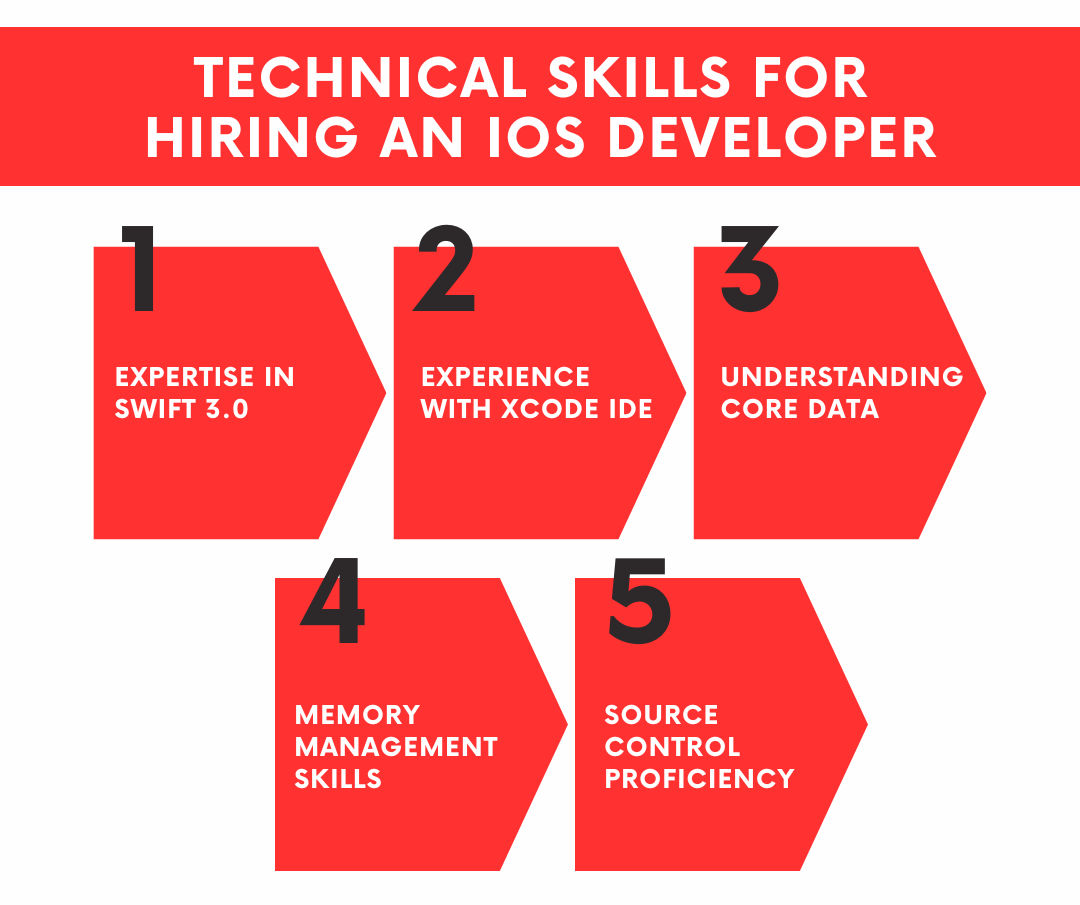
Technical skills that an iOS developer for hire must have are

  1. Expertise in Swift 3.0
  2. Experience with Xcode IDE
  3. Understanding Core Data
  4. Memory Management Skills
  5. Source Control Proficiency
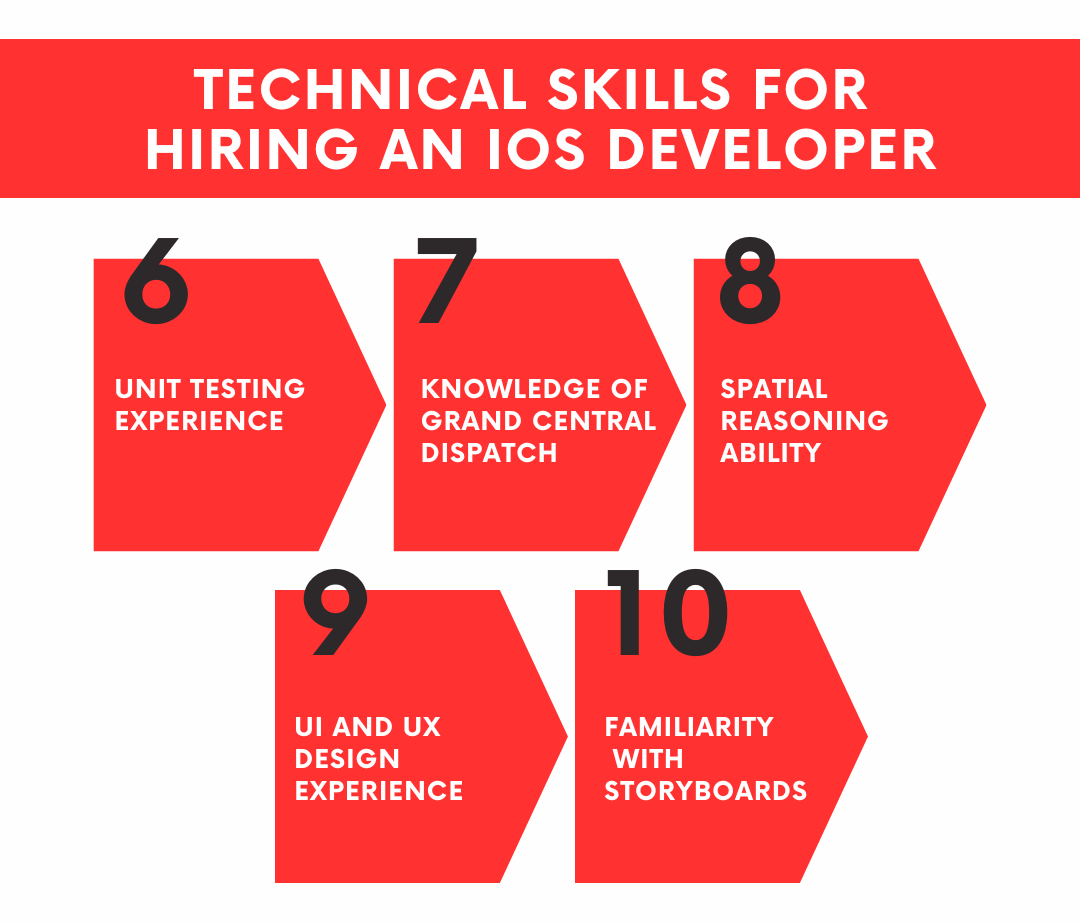
  6. Unit Testing Experience
  7. Knowledge of Grand Central Dispatch
  8. Spatial Reasoning Ability
  9. UI and UX Design Experience
  10. Familiarity with Storyboards

In iOS development, technical skills are important to guage the expertise and proficiency of an iOS Developer in using tools, programming languages, frameworks, and methodologies necessary to create iOS applications. Here’s a detailed explanation of each technical skill you need to look for when hiring iOS developers:

Technical Skills To Look In An iOS Developer Before Hiring Them

1. Expertise in Swift 3.0

Swift is one of the best languages for iOS App development as the main coding language utilized in developing iOS applications. Proficiency in Swift 3.0 involves understanding its syntax, features, and best practices for writing clean, efficient, and maintainable code. Developers should be familiar with Swift’s object-oriented programming concepts, data types, control flow structures, functions, classes, inheritance, protocols, and error-handling mechanisms.

Why Expertise in Swift 3.0 Matters?

This will help evaluate an iOS developer’s proficiency in Swift 3.0 for efficient iOS app development, given Swift’s widespread usage and effectiveness in creating high-quality applications.

2. Experience with Xcode IDE

Xcode is the official Integrated Development Environment (IDE) provided by Apple for iOS and macOS app development. Experience with Xcode involves familiarity with its various features, including code editor, interface builder, debugging tools, simulator, asset management, version control integration, and app deployment capabilities. Developers should know how to navigate and utilize Xcode effectively to develop, debug, and deploy iOS applications.

Why Look for an Experience with Xcode IDE?

Evaluating familiarity with Xcode IDE will enable you to understand the capability of an iOS developer to work with essential tools and resources for iOS app development, contributing to streamlined and effective development processes.

3. Understanding Core Data

Core Data is an Apple-provided framework used to handle model layer objects in iOS and macOS apps. It provides a high-level API for data storage, retrieval, and manipulation, along with support for object graph management, data persistence, and data modeling. Knowledge of Core Data includes understanding its concepts, such as managed object contexts, persistent stores, entities, attributes, relationships, fetch requests, and faulting behavior.

Worth of Understanding Core Data

Core Data comprehension is crucial when hiring an iOS developer to competently manage model layer objects in iOS and macOS apps, enabling efficient data handling and storage mechanisms.

4. Memory Management Skills

Memory management is crucial in iOS app development to ensure efficient utilization of device resources and prevent memory-related issues like crashes and performance degradation. Memory management skills involve understanding concepts such as Automatic Reference Counting (ARC), strong and weak references, retaining cycles, memory leaks, and optimizing memory usage to minimize the app’s memory footprint and improve performance.

Why Memory Management Skills are Important?

Proficiency in managing model layer objects in iOS and macOS applications through Core Data will help assess the skill set of iOS developers with efficient data handling and storage mechanisms.

5. Source Control Proficiency

Source control systems, such as Git, Subversion (SVN), or Mercurial, are essential for managing and tracking changes to source code files in collaborative software development projects. Source control proficiency includes knowledge of version control concepts, branching strategies, committing changes, resolving conflicts, merging code, creating pull requests, and collaborating with other developers using source control platforms like GitHub, Bitbucket, or GitLab.

The Importance of Source Control Proficiency

Evaluating proficiency in source control aids in understanding the ability of an iOS developer to manage collaborative development effectively. It also helps in tracking changes in the source code, ensuring version control and efficient collaboration within development teams.

Technical Skills To Look In An iOS Developer Before Hiring Them (continued)

6. Unit Testing Experience

Unit testing is a software testing technique used to validate the individual components or units of an application in isolation. Unit testing experience involves writing, executing, and maintaining automated test cases to verify the correctness and functionality of specific modules, classes, methods, or functions within an iOS app. Developers should be familiar with testing frameworks like XCTest or Quick/Nimble and techniques like test-driven development (TDD) to ensure code quality and reliability.

Unit testing experience evaluation

Assessing experience in unit testing assists in gauging the ioS developer’s capability to verify the functionality and stability of iOS applications, ensuring the reliability and robustness of the developed software.

7. Knowledge of Grand Central Dispatch

Grand Central Dispatch (GCD) is a technology provided by Apple for implementing concurrent and asynchronous programming in iOS and macOS applications. Knowledge of GCD includes understanding its concepts, such as dispatch queues, concurrent and serial execution, dispatch groups, barriers, semaphores, and asynchronous task scheduling. Developers should know how to use GCD effectively to improve app responsiveness, performance, and scalability by leveraging multicore processors and parallel execution.

Knowledge assessment of Grand Central Dispatch

Analyzing a developer’s knowledge of Grand Central Dispatch is crucial in determining their ability to implement concurrency and enhance app performance. This contributes to the efficient execution of tasks in iOS applications.

8. Spatial Reasoning Ability

Spatial reasoning ability refers to the capacity to understand and manipulate objects in three-dimensional space. In the context of iOS app development, spatial reasoning is essential for designing and laying out user interfaces (UIs), creating animations, and optimizing user interactions. Developers with strong spatial reasoning skills can design intuitive, visually appealing, and user-friendly interfaces that enhance the overall user experience of iOS applications.

Spatial reasoning ability assessment

Evaluating a developer’s spatial reasoning ability is essential in understanding their capacity to design user-friendly and intuitive interfaces for iOS applications. This ensures that the iOS developer for hire has enhanced usability and user experience.

9. UI and UX Design Experience

User Interface (UI) and User Experience (UX) design experience involves designing the visual appearance, layout, and interactive elements of iOS applications to optimize usability, accessibility, and user satisfaction. UI design focuses on aesthetics, typography, color schemes, icons, and graphics, while UX design focuses on user research, wireframing, prototyping, user flows, information architecture, and usability testing. Developers with UI and UX design experience can create engaging, intuitive, and immersive app interfaces that resonate with users and align with design principles and guidelines.

UI and UX design experience evaluation

UI and UX design skills helps in gauging their capability to create visually appealing and user-centric iOS app designs. This contributes to improved user engagement and satisfaction.

10. Familiarity with Storyboards

Storyboards are visual representations of an iOS app’s user interface, allowing developers to design and prototype UI screens, define navigation flows, and configure view controllers using a drag-and-drop interface. Familiarity with storyboards involves knowing how to create, customize, connect, and manage UI scenes, segues, and transitions within Xcode’s Interface Builder. When hiring iOS Developers you should understand the benefits and limitations of using storyboards for UI design and be able to integrate them seamlessly into the app development workflow.

Non-Technical Skills

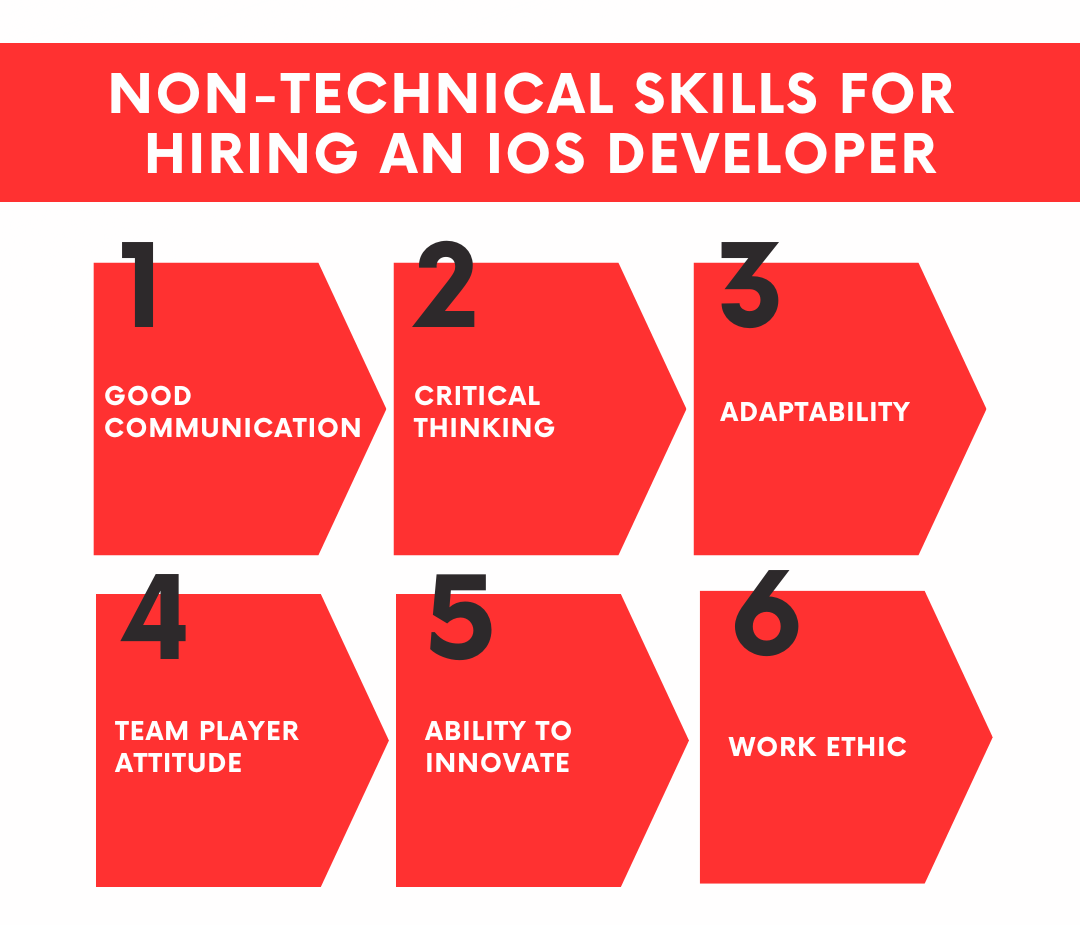
Non-technical skills are as important as technical expertise for iOS developers. These skills enhance collaboration and improve the overall quality and efficiency of iOS app development.

Non-Technical Skills fro hiring an ios developer

Good Communication

Effective communication is essential for collaborating with clients and team members and understanding project requirements.

Why look for it when hiring an iOS app developer: Clear and concise communication ensures that developers understand client expectations and project specifications accurately. It also facilitates effective collaboration within the development team, leading to smoother project execution and timely delivery.

Critical Thinking

The ability to think critically and solve problems efficiently is crucial for overcoming challenges in iOS development.

Why look for it when hiring an iOS app developer: Critical thinking enables developers to analyze complex problems, identify potential solutions, and make informed decisions during the development process. It allows them to troubleshoot issues, optimize code, and implement innovative solutions, ultimately enhancing the quality and functionality of the app.

Adaptability

iOS developers should be adaptable to changing technologies and trends, allowing them to stay relevant in a fast-paced industry.

Why look for it when hiring an iOS app developer: The technology landscape is constantly evolving, and iOS developers need to adapt to new tools, frameworks, and methodologies to remain competitive. Adaptable developers can quickly learn and master new skills, embrace emerging technologies, and pivot strategies when necessary, ensuring that their apps remain cutting-edge and market-ready.

Team Player Attitude

Collaboration and teamwork are essential for successful iOS development projects, making a team player attitude indispensable.

Why look for it when hiring an iOS app developer: iOS development projects typically involve multidisciplinary teams comprising developers, designers, testers, and project managers. A team player attitude fosters positive working relationships, promotes open communication, and encourages knowledge sharing among team members. It also enables developers to contribute effectively to group discussions, brainstorming sessions, and collective problem-solving efforts, resulting in cohesive and harmonious project outcomes.

Ability to Innovate

Innovation is key for creating unique and successful iOS apps that meet client needs and stand out in the market.

Why look for it when hiring an iOS app developer: In a crowded app market, innovation sets apps apart from the competition and drives user engagement and retention. Innovative iOS developers can conceptualize fresh ideas, explore creative solutions to user pain points, and integrate cutting-edge features and functionalities into their apps. They are proactive in exploring new technologies, experimenting with novel design approaches, and pushing the boundaries of app development, ultimately delivering compelling and differentiated user experiences.

Work Ethic

A strong work ethic, including punctuality, organization, and focus, is essential for producing high-quality work and meeting project deadlines.

Why look for it when hiring an iOS app developer: iOS development projects often have strict timelines and deliverables, requiring developers to demonstrate diligence, discipline, and commitment to their work. A strong work ethic ensures that developers manage their time effectively, prioritize tasks efficiently, and adhere to project schedules. It also reflects their professionalism, reliability, and dedication to delivering exceptional results, instilling confidence in clients and stakeholders, and fostering long-term partnerships.

Hourly rates for iOS developers for hire are based on experience.

When considering the cost of iOS app development in 2024, it’s essential to factor in various elements that contribute to the overall expense. One significant aspect is the iOS developer hourly rate, which typically ranges between $40 to $60. However, this rate can vary depending on the complexity and specific requirements of your project. Additionally, other factors such as design, features, testing, and post-launch maintenance also contribute to the total cost of developing an iOS app. Therefore, it’s crucial to conduct thorough research and collaborate closely with developers to get an accurate estimation tailored to your project’s needs.

Experience Level iOS Developers
Entry-level $40 – $60
Mid-level $50 – $100
Senior-Level $90 – $160

End Note

To create exceptional iOS apps for iPhone, it’s important to hire an iOS developer who can help you achieve your company’s or client’s goals and requirements. An iOS developer is responsible for developing, testing, and improving applications that are tailored to the specific needs of their company or customer.

They have a strong understanding of iOS and how it interacts with different Apple devices, including the iPhone, iPad, Apple Watch, and Apple TV. By hiring an experienced iOS developer, you can ensure that your applications are optimized for the iOS platform and provide a seamless experience for your users.

Best iOS Developers for Hire

At TechnBrains, we offer the best iOS developers for hire. Our team excels in Swift programming, Xcode IDE, Core Data, and memory management. We prioritize communication, critical thinking, adaptability, teamwork, innovation, and a strong work ethic in our developers. With us, you get skilled professionals dedicated to delivering top-notch results.